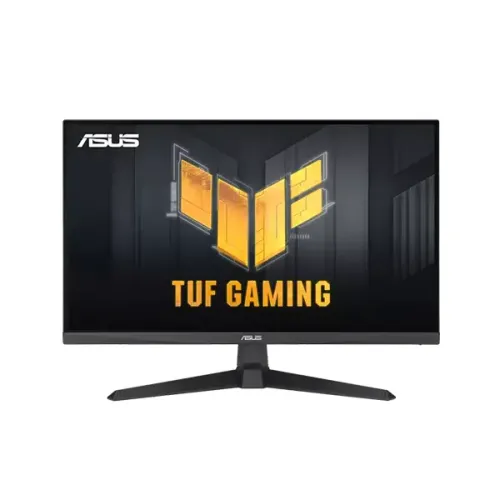
ASUS TUF Gaming VG279QE5A overview
The ASUS TUF Gaming VG279QE5A is a flat 27-inch Full HD IPS gaming monitor. It combines a native 1920 × 1080 image with a maximum 146Hz refresh mode, adaptive refresh support, motion clarity features, wide-gamut color figures, integrated speakers and a stand that tilts. The official specifications identify a 27-inch panel, 300 cd/m² typical brightness, 1500:1 typical contrast and 178-degree horizontal and vertical viewing angles. The model is intended for PC and console play as well as everyday desktop use. The 146Hz figure is an overclocked maximum, while the normal refresh mode is up to 144Hz. This guide distinguishes measured methods, published specifications and retailer claims so that the headline numbers are not mistaken for guarantees of every setup or panel condition.
Full HD resolution and 27-inch screen size
At 27 inches diagonally, the screen offers more physical area than a compact 24-inch gaming display. Its native resolution is 1920 × 1080 in a 16:9 format. The pixel pitch is approximately 0.311mm, equivalent to about 81.6 pixels per inch. This density is common for Full HD displays at this size. Text and interface elements are visible at standard scaling, though fine edges will not look as dense as on a 27-inch QHD display. The Full HD pixel count can be less demanding for a graphics card than QHD, which can help the computer reach higher frame rates in games. The best choice depends on how close you sit, the size of your desk and whether refresh rate or fine desktop detail matters more in your daily use.
IPS image, brightness and color measurements
ASUS specifies an IPS panel with a matte anti-glare surface, 300 cd/m² typical brightness and 1500:1 typical contrast. The listed viewing angle is 178 degrees horizontally and vertically. ASUS gives color space values of 125% sRGB and 90% DCI-P3, and support for 16.7 million colors. These are gamut-area/space figures in ASUS specifications; they do not promise factory calibration, uniformity or color accuracy. The wide color presentation can look vivid in games and video, while color-critical photo or print work calls for a calibrated workflow and suitable color management. An anti-glare finish helps diffuse reflections from indoor lighting but cannot eliminate glare from a bright window or direct light. Adjust brightness to the room and task rather than assuming the typical maximum is always comfortable.
146Hz refresh and overclock setup
ASUS lists 146Hz as the maximum refresh rate and the user manual describes 1920 × 1080 at 146Hz as an overclock timing. The ordinary maximum is 144Hz; 146Hz is therefore an overclocked setting, not a native fixed 146Hz promise. ASUS lists a 48–146Hz vertical-frequency range on HDMI and DisplayPort. After connecting a compatible computer, select the monitor’s overclock option in its on-screen display if required, then choose the available refresh rate in the operating system or graphics driver. Use a cable and graphics output appropriate to the desired mode. The 146Hz setting will only help when the source device renders sufficiently high frame rates. Console capabilities vary by console and game, so check the console’s resolution and refresh options instead of assuming it will use every PC mode.
MPRT response time, Adaptive-Sync and ELMB Sync
The ASUS technical page lists 1ms MPRT, while the manual also lists 4ms gray-to-gray. These figures describe different response-time methods and are not interchangeable. MPRT is a motion-picture response measure; gray-to-gray concerns pixel transitions. ASUS lists Adaptive-Sync variable refresh technology and Extreme Low Motion Blur Sync (ELMB Sync), which is designed to combine motion-blur reduction with variable refresh. The best result depends on frame rate, settings, game and visual sensitivity. Some motion clarity options can affect brightness or introduce visible artifacts for some users. Start with adaptive refresh enabled, compare the available OSD options in a familiar game, and keep the mode that looks comfortable. The listing does not claim dedicated native NVIDIA G-Sync hardware; compatibility wording should describe Adaptive-Sync and compatible GPU modes carefully.
Ports, built-in audio and devices
The monitor has one HDMI 2.0 input, one DisplayPort 1.2 input and a 3.5mm earphone output. The two video inputs allow a PC and another source to remain connected, with the active input chosen from the display controls. ASUS lists HDMI and DisplayPort signal frequency up to 146Hz vertically. The monitor also includes two 2W speakers for basic system audio, video calls or casual viewing. Their compact built-in format is convenient but is not a replacement for dedicated speakers or a gaming headset when stronger bass, higher volume or positional audio is important. Digital audio can arrive through HDMI or DisplayPort; the earphone jack provides a wired audio connection. Confirm what cables are included for the regional product package, since ASUS notes that accessories can vary by region.
Gaming controls and software features
ASUS lists GameVisual picture modes, GamePlus overlays, Shadow Boost, Dynamic Crosshair, AI Visual, DisplayWidget Center, color-temperature selection and HDCP. ELMB Sync and Adaptive-Sync address motion presentation. These features are adjusted through the on-screen display or compatible ASUS software. GamePlus can offer overlays such as an FPS counter or timer; overlays are optional tools and may not suit every game or competitive rule set. Shadow Boost alters dark-scene visibility and can change the intended contrast of a game. GameVisual presets change the image for different content types, while color-temperature settings adjust the overall tone. Try one adjustment at a time so you can tell what changed. ASUS DisplayWidget Center availability depends on supported operating systems and software versions; check ASUS support before relying on it in a managed or older computer environment.
Stand adjustment, VESA mounting and fit
The supplied stand supports tilt from −5 to +23 degrees. ASUS does not list height adjustment for this model, and the stand does not swivel or pivot. A VESA 100 × 100mm mount pattern provides an option for a compatible monitor arm or wall mount. Verify the mount’s supported screen size, load rating, screw fit and installation requirements before use. ASUS lists dimensions of 61.5 × 45.3 × 19.3cm with the stand and 61.5 × 36.9 × 6.0cm without it, in width, height and depth order. Estimated weight is 4.4kg with stand and 3.6kg without; gross package weight is listed at 6.3kg. The ASUS page notes these values can vary by region. Measure desk width, depth and viewing distance before purchase.
Power, eye-care and daily setup
ASUS specifies 100–240V AC, 50/60Hz input, operating consumption up to 16.7W under its stated test condition, below 0.5W in power-saving mode and below 0.3W when off. The manual says the operating figure was measured at 200 nits without audio, USB or card-reader connection; actual use varies with brightness and configuration. ASUS lists flicker-free and Low Blue Light features and TÜV-related certifications. Blue-light reduction changes the image tone, so use the setting that suits the task and your comfort. Position the screen to avoid direct reflections, set a comfortable viewing distance and take breaks during long sessions. Keep the vents clear and clean the panel gently with a soft cloth.
Use with gaming PCs and consoles
For a PC, DisplayPort 1.2 is one supported route to the full high-refresh modes, and HDMI 2.0 is available for a second device. Check the PC graphics output, driver, cable and monitor overclock setting when the expected refresh option does not appear. A gaming PC will benefit most when its game frame rate is near the selected refresh rate; a faster display cannot make the GPU render more frames by itself. Consoles may use a narrower set of supported resolutions and refresh rates than a PC. The built-in speakers can provide convenient audio for casual play, while a headset is more suitable for private listening or positional cues. The earphone output gives another wired option. Confirm compatibility for the exact console generation and game before relying on a particular high-frame-rate mode.
Who may prefer another monitor
This model may suit a player who wants a 27-inch IPS display, a high refresh rate at Full HD, adaptive refresh tools and integrated speakers. The resolution is a trade-off: 1920 × 1080 can make it easier to reach high frame rates, but QHD at 27 inches provides finer detail for small text and dense creative layouts. Users needing a stand with built-in height adjustment, swivel or portrait pivot should consider an ergonomic model or budget for a VESA arm. Users seeking USB-C docking, laptop charging, a USB hub, OLED contrast, certified HDR or higher resolution should compare other categories. HDR10 appears on some retailer pages but is not part of the official ASUS tech specification consulted for this audit, so this catalog does not assert HDR support.
Bangladesh price and warranty notes
The existing BiponiBD variant MSRP of ৳21,499 is retained. The ASUS catalog page has a previous approximate range up to ৳29,000 without source URLs. Antigravity’s retailer cross-check and current listing pages observed prices around ৳21,499–৳21,500 at several Bangladesh sellers; some pages show higher regular prices, promotions or out-of-stock status. A qualified ৳21,499–৳22,500 market reference is more representative of the observed listings than the unsupported ৳29,000 ceiling. It remains an informational snapshot, not a current merchant offer or stock guarantee. Retailer pages advertise three-year warranties, and at least one notes that the original box is required for a claim. Confirm the exact service provider, warranty card, stock, checkout price, included accessories and box-retention rules with the seller before ordering.
Model number, regional SKU and box contents
The product model is ASUS TUF Gaming VG279QE5A. The exact ASUS regional ordering code is not visible on the supplied catalog images. ASUS uses longer regional part numbers, and a third-party identifier such as 90LM0BJ0-B01171 or an associated EAN must not be copied to this unit without checking its carton label. The product MPN is normalized to the exact public model string VG279QE5A, while barcode and GTIN remain null. This keeps the product identifiable without asserting a regional barcode that may not match imported stock. ASUS lists power cord, HDMI cable, quick-start guide, warranty card and an L-shaped screwdriver among accessories, but explicitly says accessories vary by region. Check the sealed box and seller listing for the Bangladesh unit’s included cable and documentation.