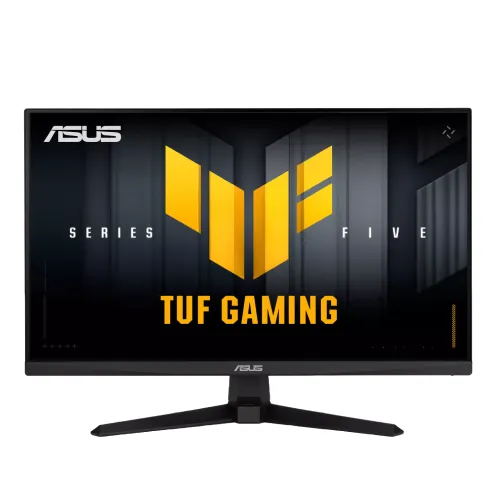
ASUS TUF Gaming VG279QM5A 27" FHD 240Hz Fast IPS Gaming Monitor. This model-specific guide covers refresh rate, response, VRR, gaming features, setup, connections, warranty and buying checks.
ASUS TUF Gaming VG279QM5A overview
The ASUS TUF Gaming VG279QM5A is a 27-inch Full HD Fast IPS monitor designed for fast-paced PC and console gaming. Its headline specification is a 240Hz maximum refresh rate, supported by Adaptive-Sync technologies, ASUS gaming display features and built-in stereo speakers. The model is part of ASUS TUF Gaming Series 5, and the complete suffix matters: similarly named VG279Q, VG279QM and Q5A/QM5A monitors can have different refresh rates, panel types or ergonomics. This guide refers to the exact VG279QM5A code listed on this page and the official ASUS technical specification. It is intended to help buyers match a monitor to a graphics card, desk and game library. In brief, the monitor emphasizes fluid 1080p play and flexible digital inputs, while a 27-inch FHD panel gives less fine detail than a same-size QHD screen.
Resolution, size and viewing distance
The 27-inch diagonal panel has a native 1920 × 1080 resolution and a 16:9 aspect ratio. ASUS lists a 0.311mm pixel pitch, approximately 81.6 pixels per inch. That density is comfortable for games and video viewed at a typical desk distance, and Full HD is less demanding for a graphics card than 2560 × 1440 or 4K. It can therefore help a system reach high frame rates that make a 240Hz display worthwhile. The trade-off is that small fonts, fine lines and detailed images are not as sharp as on a 27-inch QHD display, which has substantially more pixels across the same area. If you work with spreadsheets, design canvases or dense text close to the screen, compare the pixel density in person or consider QHD. Fast IPS provides wide 178-degree horizontal and vertical viewing angles, and the anti-glare surface helps diffuse reflections from ordinary room lighting.
240Hz refresh rate and motion response
ASUS specifies a maximum refresh rate of 240Hz and lists a vertical digital signal range of 48–240Hz for both HDMI and DisplayPort. A 240Hz screen can update four times as often as a 60Hz display, which makes motion appear smoother and can reduce display scanout delay. It does not create extra frames by itself: a PC must render enough frames per second, and a game must allow a sufficiently high frame-rate cap. Competitive shooters and esports titles are the clearest use cases; cinematic games can still benefit from responsive motion, though their frame rates may be lower. ASUS lists 1ms GTG and a 0.3ms minimum response figure. Treat the minimum as a best-case specification that can depend on the selected overdrive or motion setting. Refresh rate, pixel response and system input latency are different measurements. If an extreme overdrive setting produces bright trails or inverse ghosting, select a slower response mode that looks cleaner. After connecting, choose 1920 × 1080 and 240Hz in your operating system or GPU control panel and confirm the monitor is using the intended input.
Adaptive-Sync, FreeSync and G-SYNC compatibility
ASUS lists AMD FreeSync Premium, NVIDIA G-SYNC Compatible and VESA Adaptive-Sync Display 240Hz support. Variable refresh rate synchronizes the display refresh with changing GPU frame output, helping reduce tearing and judder when a game does not hold a fixed frame rate. Use a compatible graphics card, current driver and supported connection, then enable adaptive sync in both the monitor and GPU settings when needed. The monitor can have more than one gaming mode, but a feature label alone does not guarantee every blur-reduction and variable-refresh setting works together at every frame rate. ASUS highlights ELMB Sync, its combination of Extreme Low Motion Blur and Adaptive-Sync. Compare it with standard Adaptive-Sync using the games you play, because strobing or blur reduction may change brightness and can create artifacts for some viewers. A stable frame rate within the supported range is more important than enabling every option at once.
Colour, brightness and HDR10
The official specification lists 300 cd/m² typical brightness, a 1,000:1 typical contrast ratio, 16.7 million colours and 99% sRGB. These figures are suitable for everyday gaming, streaming and web content in a normal room. They are not a factory calibration report: a gamut percentage does not by itself prove colour accuracy, uniformity or print matching. Colour-critical work should use a calibrated display and an appropriate profile. The VG279QM5A accepts HDR10 input. ASUS does not list local-dimming zones or a VESA DisplayHDR certification for this model, so buyers should regard HDR10 as signal compatibility and avoid assuming high-end HDR contrast or peak highlights. With a typical 300-nit brightness and IPS contrast, HDR effects can be less dramatic than on a substantially brighter display with local dimming. For many games, a well-adjusted SDR mode may look more consistent. Use the GameVisual presets as starting points and adjust brightness, colour temperature and shadow settings for the room.
Gaming controls and eye-comfort features
ASUS includes TUF Gaming AI tools (Dynamic Crosshair, Dynamic Shadow Boost and AI Visual), plus several other features in addition to refresh and sync. GameVisual provides picture presets for different content, and GamePlus offers gaming overlays and counters. Shadow Boost can lift detail in dark scenes, but increasing shadows may also flatten contrast. GameFast Input technology is designed to reduce display-side processing delay. TUF Gaming AI can provide Dynamic Crosshair, Dynamic Shadow Boost and AI Visual functions in supported scenarios. DisplayWidget Center provides software controls for compatible Windows systems, while GameVisual and color-temperature selection are also available through the monitor settings. Flicker-free operation and Low Blue Light options can make long sessions more comfortable for some users. A low-blue-light setting changes the picture colour, so a neutral colour mode may be preferable when judging photos or product images. The display also supports HDCP 2.3 for protected digital content. These conveniences help tailor the screen to a game, but they do not replace taking breaks, keeping a comfortable viewing distance and setting room lighting to avoid glare.
Connections, speakers and console use
The monitor has two HDMI 2.0 inputs and one DisplayPort 1.4 input using HBR2, plus a 3.5mm headphone jack. Multiple video inputs make it easy to keep a PC and another source connected. ASUS lists 48–240Hz vertical timing for HDMI and DisplayPort; actual refresh availability still depends on the source output, cable and selected mode. Check a laptop’s port and adapter specifications if using USB-C-to-HDMI or a dock, because some adapters cannot pass the maximum refresh rate. The monitor includes built-in speakers rated at 2W × 2. They are useful for basic desktop audio, system alerts and casual video, but a headset or dedicated speakers will provide more volume and fuller sound for games and films. The earphone jack provides a convenient wired audio connection. There is no USB-C video input or USB hub listed, so this is not a one-cable laptop dock. Console buyers should check the specific console output modes and game support; the panel’s maximum is 240Hz, while many console games use lower frame rates.
Stand, mounting, dimensions and power
The stock stand supports tilt from approximately -5 degrees to +23 degrees. It does not offer height adjustment, swivel or portrait pivot. ASUS lists 100 × 100mm VESA wall mounting, which enables use of a compatible third-party monitor arm. Check the arm’s load capacity and mounting screws before installation. The official US specification gives approximate dimensions of 61.50 × 45.30 × 19.30cm with the stand and 61.50 × 36.90 × 5.90cm without it; the box is listed at 68.00 × 45.00 × 17.10cm. Listed weight is about 4.5kg with the stand, 3.7kg without and 6.1kg gross packaged. ASUS notes that dimensions and weight can vary by region, so treat those as reference values and verify the delivered carton when shipping or desk fit matters. The power specification is 100–240V, 50/60Hz, under 18W, with power-saving below 0.5W and power-off below 0.3W. Kensington lock support is also listed.
Bangladesh price, warranty and buying checklist
At the time of this review, Star Tech listed a cash price around ৳30,500 with regular pricing of ৳32,880; Tech Land BD showed approximately ৳30,500 against a ৳32,500 regular price. Both retailer pages advertise three-year warranty coverage. These are seller listings, not a guarantee that the same price, stock or service terms apply everywhere. ASUS states that regional availability and specifications can vary, so confirm the exact VG279QM5A model code on the box, the warranty provider, serial eligibility, dead-pixel policy and required invoice details before purchase. The existing catalog price of ৳30,500 remains separate from observed regular prices. Check the sealed package and accessories with the seller; the manufacturer specification lists a power cord, quick-start guide and other region-dependent items, and the US version may include a DisplayPort cable. If you depend on a specific cable, ask the local seller to confirm it is in the carton. Keep the invoice and serial number for service.
Who should choose this monitor
The VG279QM5A is a strong fit for players who value high-refresh 1080p gaming, use a GPU capable of producing high frame rates, and want several digital inputs plus basic integrated audio. Fast IPS viewing angles, game-specific controls, FreeSync Premium and G-SYNC Compatible support make it versatile for competitive games and everyday desktop use. It is less compelling if your priority is very crisp text at a close viewing distance, a height-adjustable stand, USB-C docking or premium HDR. A 27-inch QHD monitor may be the better choice for detail-heavy creative work or a larger productivity workspace; a smaller 24-inch FHD screen will look sharper at a similar viewing distance. Compare the full model number and refresh rate rather than relying on a similar ASUS TUF product title. With the right PC, cable and settings, the monitor can deliver its intended 240Hz experience while retaining the practical advantages of its HDMI, DisplayPort and speaker features.