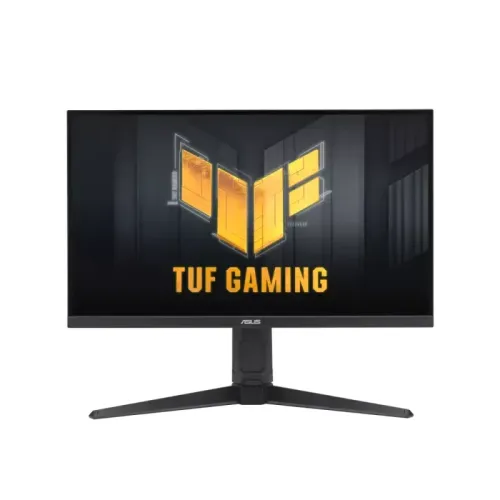
The ASUS TUF Gaming VG27AQL5A is a 27-inch QHD Fast IPS monitor with up to 210Hz over DisplayPort, Adaptive-Sync, DisplayHDR 400, an adjustable stand and built-in stereo speakers.
Product identity and intended use
The ASUS TUF Gaming VG27AQL5A is a 27-inch QHD Fast IPS monitor designed for gaming and everyday display use. ASUS’s official specification page identifies the exact VG27AQL5A model and lists its panel, resolution, refresh rate, inputs, audio, stand, power and certifications. Matching Star Tech and Global Brand listings confirm the local model code and the core QHD/210Hz product identity. This is a different model from nearby VG27AQ5A and VG27AQME5F products, which have their own specifications. Keep the full VG27AQL5A model code on the invoice and product label.
The display has a 2560 × 1440 QHD resolution in a 16:9 format. QHD provides more image detail and workspace than Full HD at the same 27-inch size, while being less demanding to render than 4K at the same frame rate. The visible sharpness also depends on operating-system scaling, viewing distance and the content source. Users can adjust interface scaling to balance detail and text size.
The panel is Fast IPS with a maximum refresh rate of 210Hz. A high refresh rate can make motion look smoother when the source produces enough frames and the connection carries the selected mode. It does not make a game render at 210 frames per second by itself. Graphics hardware, game settings, selected resolution, port and cable all affect the actual frame rate and refresh mode.
ASUS lists AMD FreeSync Premium and VESA AdaptiveSync Display 210Hz certification. Adaptive refresh can coordinate the monitor’s updates with compatible graphics output to reduce tearing in supported conditions. ASUS also lists ELMB Sync, which combines motion-blur-reduction and variable-refresh features; actual use and trade-offs depend on the selected mode and source. For competitive games, confirm the GPU output and test the intended QHD/210Hz configuration.
The official product specification gives more detail than many brief seller listings. It distinguishes typical and peak brightness, describes port-specific signal frequencies, lists speaker output and explicitly labels the Type-C interface as a service port. These distinctions are included in this product copy so a buyer can check compatibility before ordering.
Resolution, refresh and motion
ASUS lists native resolution at 2560 × 1440 and aspect ratio at 16:9. At 27 inches, that QHD workspace supports detailed game imagery, multiple windows, timelines and general computing. The graphics system needs to render the content at the desired frame rate to take advantage of the monitor’s maximum refresh. A GPU may produce very different frame rates across games and quality settings, even when the display itself supports 210Hz.
ASUS states a maximum refresh rate of 210Hz. Its signal-frequency table lists DisplayPort vertical frequency from 48 to 210Hz and HDMI vertical frequency from 48 to 144Hz. The full maximum is therefore tied to DisplayPort in the published specification. Check the selected input and cable, use the monitor’s native resolution and select a supported refresh rate in the operating system or graphics control panel. If 210Hz is not available, verify the GPU output, cable, driver, color settings and monitor mode.
ASUS lists a 1ms GTG response time and 0.3ms minimum response. Gray-to-gray response measures pixel transitions between shades under a test condition. The 0.3ms minimum is not input lag and is not a guarantee that every transition always completes in that time. Response behavior can change with overdrive and ELMB settings. Motion clarity also depends on source frame rate, refresh synchronization and the displayed scene.
Adaptive-Sync and AMD FreeSync Premium can help synchronize refresh timing with compatible graphics output. The monitor is also certified as VESA AdaptiveSync Display 210Hz. Compatibility, variable-refresh range and input limits depend on hardware, drivers and the selected port. Verify the current graphics configuration if variable refresh is an important purchase requirement.
ASUS’s ELMB Sync combines Extreme Low Motion Blur with Adaptive-Sync. Motion-blur-reduction modes may have separate operating conditions and can affect brightness or supported refresh. Use the manual and on-screen menu to choose a mode that fits the game and viewing preference. GameFast Input technology, Shadow Boost and GamePlus are additional listed tools; they provide control or picture adjustments rather than changing the monitor’s native pixel count.
Brightness, colors and HDR
The official specification lists typical brightness at 350 cd/m² and peak HDR brightness at 400 cd/m². These values describe different conditions: 350 cd/m² is the typical SDR brightness listing, while 400 cd/m² is a peak HDR figure. They should not be described as one constant brightness value. Actual appearance also depends on picture mode, HDR content, room lighting and individual panel variation.
ASUS specifies a typical contrast ratio of 1300:1, 1073.7 million display colors, 130% sRGB and 95% DCI-P3 color-space coverage. These numbers describe the manufacturer’s listed panel characteristics. Gamut coverage alone does not prove calibration accuracy or uniformity for a particular unit. For color-critical design or photo work, check whether the selected color mode is appropriate and calibrate the display if accurate matching is required.
The monitor supports VESA DisplayHDR 400 and multiple HDR modes. HDR playback depends on supported content, operating system, graphics hardware and connection. A peak HDR brightness figure does not establish local-dimming hardware or guarantee a specific measured contrast in every scene. Keep HDR enabled only when it produces the desired appearance for the source and content.
ASUS lists Flicker-Free and Low Blue Light, plus four color-temperature modes. These settings can help users tune the image to their room and preference; they are not medical treatments or a guarantee against eye fatigue. Set comfortable brightness, reduce reflections, position the panel at an appropriate height and take breaks during long sessions.
GameVisual offers picture presets, while GamePlus includes gaming overlays and tools. ASUS DisplayWidget Center allows settings adjustment through software on compatible systems. The manufacturer also lists GameFast Input, Shadow Boost, Trace Free and ASUS Power Sync. Software behavior and feature availability can depend on a supported computer and current ASUS utilities.
Ports, audio and compatibility
The official I/O list includes one DisplayPort 1.4 (HBR2), two HDMI 2.0 inputs, one USB 3.2 Gen 1 Type-C service port and an earphone jack. The USB-C interface is identified as a service port; it is not listed as a DisplayPort Alt Mode video input or laptop charging connection. For video, plan to use DisplayPort or HDMI and check the port-specific maximum refresh: ASUS lists DisplayPort up to 210Hz and HDMI up to 144Hz vertically.
The monitor includes stereo speakers rated 2W × 2 and a 3.5mm earphone jack. These speakers provide basic audio without separate desk speakers, while headphones or external speakers can provide another listening option. Audio behavior depends on the source and selected input. Check the computer or console’s audio output settings if sound does not reach the monitor.
HDCP 2.2 is listed by ASUS. This can matter for protected video playback, though the application, source and content service also need to support the required path. Keep the supplied or suitable video cable connected directly when troubleshooting display or protected-content issues.
The power specification lists 100–240V AC, 50/60Hz. ASUS gives power consumption below 20.8W, power-saving mode below 0.5W and power-off mode below 0.3W. Actual use can vary with brightness, HDR settings, refresh and connected devices. Use the included power cord and maintain clear ventilation.
Stand, mounting, package and warranty
The ergonomic stand supports 0–130mm height adjustment, tilt from -5° to +20°, swivel from -20° to +20° and pivot from -90° to +90°. Those adjustments can help align the screen with a seated or standing position and rotate it for portrait use. ASUS also lists a 100 × 100mm VESA pattern, Kensington lock and one-quarter-inch tripod socket. Use a mount rated for the monitor and install it securely.
The estimated dimensions with stand are 61.50 × 53.40 × 21.50cm; without stand they are 61.50 × 36.70 × 5.10cm. ASUS lists estimated net weight at 6.4kg with stand and 4.1kg without stand; gross boxed weight is 8.7kg. Dimensions and weights can vary by region. Measure desk width and depth, allow cable space and check an arm’s weight rating before mounting.
ASUS lists a DisplayPort cable, power cord, L-shaped screwdriver, quick-start guide and warranty card. Accessories vary by region, so compare the local retail package with the official list and confirm what is included before purchase. Keep the invoice, serial number, packaging and warranty documentation, and inspect the panel and ports after delivery.
ASUS lists a three-year product security update support period ending 31 December 2026; this is not the same as the seller’s hardware warranty. Bangladesh retailer pages list a three-year warranty. Confirm the written local warranty, service provider and coverage conditions with the seller. Do not assume that a security-support note describes repair coverage.
Bangladesh stock and purchase checklist
Star Tech’s exact-model page showed “Up Coming” and “To be announced.” Tech Land’s exact-model result and product page showed Out of Stock. Global Brand PLC, which describes itself as an authorized ASUS distributor in Bangladesh, displayed the model specification page but no product price or purchase stock on the page reviewed. Search snippets showed a Star Tech price, but the direct listing did not confirm an active offer, so this catalog record does not publish a current market-price estimate.
Before buying, confirm the exact VG27AQL5A model, current stock, price and written three-year seller warranty. Check that the gaming PC can output QHD at the desired frame rate through DisplayPort 1.4. ASUS lists HDMI up to 144Hz, so a console or HDMI-only source may not reach the 210Hz maximum. The USB-C service port does not replace the DisplayPort or HDMI input.
Check whether the local box includes the DisplayPort cable and power cord, verify the stand movement and mounting pattern, and make sure the desk or arm supports the estimated weight. If built-in sound is sufficient, the 2W × 2 speakers are available; for stronger sound, plan external speakers or headphones.
This model’s main strengths are QHD resolution, Fast IPS, 210Hz DisplayPort support, variable-refresh certifications, ergonomic adjustment, stereo speakers and a detailed official specification. Its practical limits are HDMI refresh up to 144Hz, no USB-C video input, the distinction between typical and peak HDR brightness, and unavailable local stock in the pages checked. Confirm current availability before choosing it for a specific build.
Key features
- 27-inch Fast IPS panel with QHD 2560 × 1440 native resolution and 16:9 aspect ratio.
- Up to 210Hz maximum refresh rate through DisplayPort 1.4; HDMI signal frequency is listed to 144Hz.
- 1ms GTG response and 0.3ms minimum response-time figures listed by ASUS.
- Typical brightness 350 cd/m²; peak HDR brightness 400 cd/m²; typical contrast 1300:1.
- 10-bit color signal with 1.0737 billion colors, 130% sRGB and 95% DCI-P3 coverage listed by ASUS.
- VESA DisplayHDR 400, AMD FreeSync Premium and VESA AdaptiveSync Display 210Hz certifications.
- ASUS ELMB Sync, Adaptive-Sync, GameFast Input, Shadow Boost, GamePlus and GameVisual features.
- One DisplayPort 1.4 HBR2 input and two HDMI 2.0 inputs; one USB-C 3.2 Gen 1 service port is not a video input.
- Built-in stereo speakers rated 2W × 2 and an earphone jack.
- Flicker-free and Low Blue Light technologies with four color-temperature modes.
- Ergonomic stand with tilt, swivel, pivot and 0–130mm height adjustment.
- 100 × 100mm VESA mounting plus Kensington lock and one-quarter-inch tripod socket.
- With-stand dimensions about 61.50 × 53.40 × 21.50cm; estimated net weight 6.4kg.
- Power consumption below 20.8W, with power-saving below 0.5W and power-off below 0.3W.
- ASUS lists a DisplayPort cable, power cord, L-shaped screwdriver, quick-start guide and warranty card; regional package contents vary.
Advantages
- QHD resolution, Fast IPS and up to 210Hz combine detail and fast motion on a 27-inch display.
- ASUS lists both AMD FreeSync Premium and VESA AdaptiveSync Display 210Hz certification.
- A fully adjustable stand supports height adjustment, tilt, swivel and pivot, with VESA mounting as another option.
- Built-in 2W × 2 speakers and an earphone output provide basic audio without separate desk speakers.
- ASUS official specifications provide detailed source-backed display, power, dimensions, audio and connection data.
Limitations to consider
- The 210Hz maximum is specified for DisplayPort; ASUS lists HDMI vertical frequency only up to 144Hz.
- The USB-C port is a service port, not a USB-C video input; video uses DisplayPort or HDMI.
- The listed 350 cd/m² typical brightness is distinct from the 400 cd/m² HDR peak figure.
- Estimated 6.4kg net weight with stand requires a stable desk or suitably rated mount.
- Bangladesh retailer pages checked were Upcoming or Out of Stock, so no current local price estimate is shown.
Frequently asked questions
What is the ASUS TUF Gaming VG27AQL5A?
It is a 27-inch QHD Fast IPS gaming monitor with a maximum 210Hz refresh rate, Adaptive-Sync, DisplayHDR 400, an adjustable stand and 2W × 2 built-in speakers.
What is its resolution and screen format?
ASUS lists 2560 × 1440 QHD resolution and a 16:9 aspect ratio on a 27-inch panel.
How can I use the full 210Hz refresh rate?
ASUS lists DisplayPort vertical frequency up to 210Hz. The graphics source, DisplayPort output, cable and selected QHD mode must also support the signal. ASUS lists HDMI vertical frequency up to 144Hz.
Is USB-C a video input?
No. ASUS lists one USB 3.2 Gen 1 Type-C service port. Video inputs are one DisplayPort 1.4 (HBR2) and two HDMI 2.0 ports.
What are the brightness and contrast figures?
ASUS specifies 350 cd/m² typical brightness, 400 cd/m² peak HDR brightness and 1300:1 typical contrast. These refer to different measurement conditions and should not be combined into one brightness value.
Does it support HDR and variable refresh?
ASUS lists VESA DisplayHDR 400, AMD FreeSync Premium and VESA AdaptiveSync Display 210Hz. HDR and variable refresh also depend on source hardware, content, connection and settings.
What are the response-time ratings?
ASUS lists 1ms GTG and 0.3ms minimum. These are pixel response measures, not input lag; results depend on the selected mode and measurement conditions.
Does it have speakers?
Yes. ASUS lists stereo speakers rated 2W × 2. A 3.5mm earphone jack is also included; external speakers may offer stronger audio.
Can the stand be adjusted?
ASUS lists 0–130mm height adjustment, tilt from -5° to +20°, swivel from -20° to +20° and pivot from -90° to +90°. A 100 × 100mm VESA mount is also listed.
What comes in the box?
ASUS lists a warranty card, quick-start guide, power cord, L-shaped screwdriver and DisplayPort cable. Accessories can vary by region, so confirm the Bangladesh package with the seller.
What is the current Bangladesh price and stock?
Star Tech lists the exact model as Upcoming / To be announced. Tech Land shows Out of Stock, and the Global Brand distributor page reviewed did not show a purchase price. Search snippets are not treated as a current offer, so this product record has no market-price estimate.
What warranty is listed?
ASUS and Bangladesh seller pages list three years in the reviewed sources. Confirm the written local warranty, service provider and exclusions with the seller before purchase.
Confirm local stock, price, package contents and written warranty with the seller before ordering.