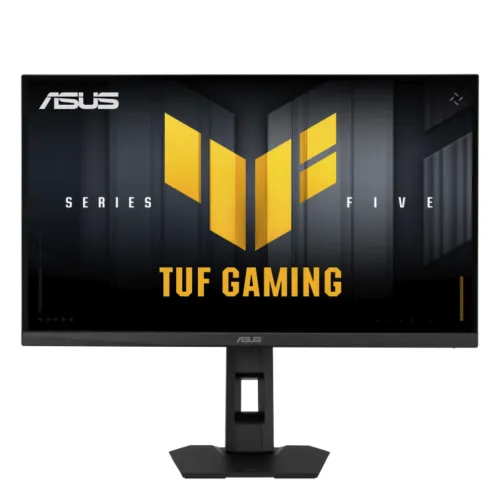
ASUS TUF Gaming VG27AQL5F 27-inch 220Hz QHD Fast IPS Monitor: Complete Buying Guide
Model identity and Series 5 positioning
The ASUS TUF Gaming VG27AQL5F is a 27-inch QHD gaming monitor from ASUS TUF Gaming Series 5. The model’s exact retail code is VG27AQL5F and the ASUS product part number is 90LM0D50-B02171. That part number is included in technical product information, not added to the customer-facing title. The final letter matters: VG27AQL5A is a sibling product with different maximum refresh behavior, so buyers should compare the full model suffix on the box and invoice. The VG27AQL5F combines 220Hz, Fast IPS, 0.3ms minimum response mode, adaptive sync, an ergonomic stand and two speakers. Its title, slug, active status, category, ASUS brand, SKU and current ৳33,000 price are retained.
QHD resolution and refresh-rate connection
The 27-inch panel displays 2560 × 1440 pixels in a 16:9 layout, with 0.233mm pixel pitch and a 596.74 × 335.67mm viewing area. QHD has about 77% more pixels than Full HD, yielding a useful balance of game detail and workspace on a 27-inch screen. ASUS specifies up to 220Hz through DisplayPort 1.4. At QHD, the HDMI 2.1 TMDS input is specified to 150Hz, so users who want the full 220Hz should connect the computer over DisplayPort and choose the correct mode in operating-system settings. Cable, graphics-card output and game frame rate also matter. The screen can refresh at 220Hz, but it does not make a system render 220 frames per second.
Fast IPS response and adaptive sync
ASUS Fast IPS technology is specified with a 1ms grey-to-grey response time and a 0.3ms minimum response figure. GTG and minimum response are distinct measurement methods, so they should not be presented as interchangeable. ASUS also includes variable refresh support with AMD FreeSync Premium and NVIDIA G-SYNC Compatible. These features can reduce tearing and stutter when the monitor and graphics card operate in compatible modes. ELMB Sync combines ASUS Extreme Low Motion Blur with adaptive sync under supported settings. Response-time and strobing modes can alter brightness or introduce artifacts, so test the available settings with your preferred games. The goal is a useful balance of motion clarity, frame pacing and visual quality rather than selecting the most aggressive setting automatically.
Color, contrast and HDR
ASUS lists 95% DCI-P3 and 130% sRGB coverage, 10-bit display color support, 1300:1 typical contrast, 350 cd/m² typical brightness and 400 cd/m² peak brightness in HDR mode. These specifications provide more color range and contrast than basic entry gaming panels and make the screen suitable for vivid games and general creative viewing. VESA DisplayHDR 400 compliance and HDR10 signal support provide HDR compatibility, but the monitor does not list local dimming. It should therefore be understood as entry-level HDR rather than a display with deep local contrast or OLED-like blacks. For professional color work, coverage percentages are not a substitute for calibration, color uniformity data and an appropriate color-managed workflow.
Ports and sound
The connection panel includes two HDMI 2.1 TMDS inputs, one DisplayPort 1.4 HBR2 input and one 3.5mm earphone jack. At QHD, HDMI supports up to 150Hz according to ASUS signal specifications; DisplayPort is the connection for the 220Hz maximum. The monitor also contains two 2W speakers for basic audio. Use the earphone output or external audio equipment when more volume, bass or positional detail is needed. ASUS lists HDCP 2.2 support. Before connecting a console or computer, check its supported resolution and refresh-rate modes and choose the correct input in the on-screen display. A USB hub or USB-C connection is not listed for this model, so do not assume it offers laptop docking.
Gaming controls and software
The VG27AQL5F includes ASUS GameVisual and GamePlus functions, ELMB Sync, GameFast Input technology, Shadow Boost, Gaming AI features such as Dynamic Crosshair and Dynamic Shadow Boost, and DisplayWidget Center for mouse-based setting control in Windows. These tools can adjust the image or make common monitor controls easier to reach; they do not guarantee a higher game frame rate or better results in every title. Gaming AI options may affect how the image appears, so use them selectively. A four-mode color-temperature selection and on-screen controls provide further tuning. The 1/4-inch threaded socket on the stand can hold compatible lightweight accessories, which may be useful for a webcam or key light in a streaming setup.
Ergonomics and mounting
The included stand supports height adjustment through 120mm, swivel from -20° to +20°, tilt from -5° to +20°, and pivot from -90° to +90°. These adjustments make it easier to set eye level and rotate the screen for portrait use. The display also supports a 100 × 100mm VESA mount. ASUS lists dimensions of 615.3 × 535.1 × 193.9mm with stand and 615.3 × 368.9 × 59.4mm without stand. Weight is 6.0kg with the stand and 4.0kg without it. Ensure the desk has room for the broad stand footprint and that a third-party arm is rated for the panel. A Kensington lock helps secure the display in shared environments.
Eye care, power and daily use
The monitor lists TÜV Rheinland-certified Flicker-Free and Low Blue Light features. These display options can help users adjust the image for long sessions, but comfort also depends on room lighting, brightness, viewing distance and regular breaks. The internal power supply accepts 100–240V at 50/60Hz; no external power brick is needed. ASUS lists typical consumption below 21W, below 0.5W in power-saving mode and below 0.3W when off. The built-in speakers, adjustable stand and DisplayWidget Center make the screen adaptable to mixed gaming and work. Set brightness for the room and use the native QHD mode for sharp text.
Package contents and Bangladesh purchase checks
ASUS technical information lists package dimensions of 680 × 515 × 148mm and gross weight of 7.8kg. The retailer box is expected to include the monitor, stand and base, a DisplayPort cable, AC power cord, quick-start guide and warranty card, although regional packages can differ. Current Bangladesh listings place the model around ৳32,500–৳34,000; the catalog variant remains ৳33,000. ASUS Bangladesh lists a 36-month LCD monitor warranty, and local sellers advertise three years. Confirm authorized seller status, final price, serial eligibility, warranty provider, claim procedure and in-box cable before ordering. Barcode, GTIN and country of origin are not available from the product label and are left unset rather than guessed.
Who should choose the VG27AQL5F
This monitor fits a buyer who wants QHD detail, a high 220Hz PC gaming ceiling, adaptive synchronization, wide color coverage and a flexible stand in one 27-inch display. It can also serve for everyday productivity, content viewing and streaming, helped by the speakers and tripod socket. Use DisplayPort to access the 220Hz maximum; HDMI at QHD is specified to 150Hz. Buyers who prioritize deep HDR contrast, a USB-C dock, premium speakers or the lowest possible price may prefer another display. Choose based on the games and PC hardware you actually use, confirm the precise VG27AQL5F suffix and warranty, and compare display modes before selecting the fastest refresh setting.
Recommended setup checklist
Before the first gaming session, assemble the stand on a stable, level desk and remove any protective film from the panel. Connect the AC cable and DisplayPort cable, then update the graphics driver and select 2560 × 1440 at up to 220Hz in the computer’s display settings. Verify the on-screen refresh counter or operating-system mode rather than assuming the cable selected the maximum automatically. If connecting through HDMI, expect a QHD ceiling of 150Hz according to the ASUS signal specification. Configure Adaptive-Sync and ELMB Sync using supported combinations, and compare the resulting motion and brightness in games you actually play. Set brightness to match the room, test the speakers or headphone output, and adjust the stand height and tilt for a comfortable viewing line. Save the purchase invoice, serial number and warranty card, and confirm the local service contact before the return period ends.