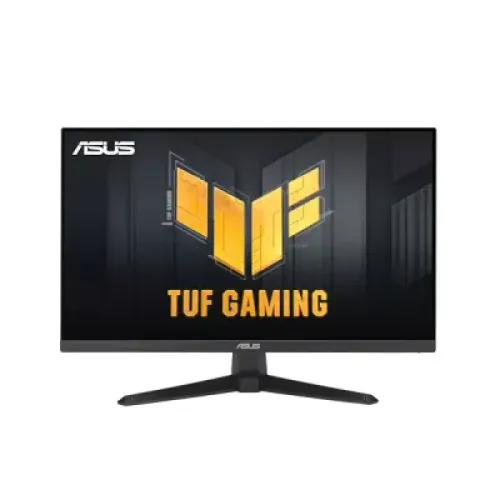
ASUS TUF Gaming VG27AQM5A overview
The ASUS TUF Gaming VG27AQM5A is a 27-inch QHD gaming monitor built around a Fast IPS panel and a maximum 300Hz refresh rate. ASUS identifies the exact model as VG27AQM5A. It combines 2560 × 1440 resolution, 1ms gray-to-gray response time, HDR10, Adaptive-Sync, ELMB Sync, GamePlus and GameVisual controls. The stand includes tilt and swivel movement, and the display has built-in stereo speakers. This monitor is intended for players who want a high refresh rate and QHD detail on a 16:9 screen. Its 300Hz mode depends on a compatible source, connection, cable, driver, and selected settings. The local catalog name, SKU and images identify this exact ASUS TUF series model; this description avoids conflating it with other VG27AQ or VG27AQML5A variants.
QHD resolution on a 27-inch screen
The panel's native resolution is 2560 × 1440, commonly called QHD, across a 16:9 aspect ratio. This gives 3,686,400 pixels for game scenes, documents, browsers and creative applications. Compared with Full HD, QHD can show finer detail and more desktop content, while requiring more graphics rendering power. Set the computer to 2560 × 1440 for native output and use display scaling that fits your viewing distance. The 27-inch size offers a moderate desk footprint and clear pixel density for a desktop setup. The monitor scales video and images from other resolutions, but scaling cannot add detail absent from the source. A graphics card must render the desired game's frame rate; the monitor's 300Hz capability does not force a game to reach that rate.
300Hz refresh and 1ms response
ASUS specifies a maximum 300Hz refresh rate and 1ms gray-to-gray response time, with a 0.3ms minimum figure also listed. A 300Hz panel can refresh up to 300 times each second when the source and selected mode support it. This can make motion, tracking and fast camera movement appear smoother in games that render high frame rates. Benefits depend on the PC, game engine, graphics quality and ability to sustain the frame rate. The 1ms GTG value and the 0.3ms minimum are different manufacturer response-time specifications; neither guarantees every pixel transition has identical behavior in every mode. Choose the response or overdrive setting that looks clear without visible overshoot. After setup, verify QHD resolution and 300Hz in the operating system or GPU settings.
Fast IPS panel, color and brightness
ASUS lists a Fast IPS panel with 178-degree horizontal and vertical viewing angles, 300 cd/m² typical brightness, 1300:1 typical contrast, 16.7 million display colors, and 95% DCI-P3 color space. The wide nominal viewing angle helps when the viewer is not perfectly centered, although color and brightness may shift off-axis. A 95% DCI-P3 gamut describes color-space coverage, not a guarantee that every monitor ships calibrated to a production standard. For accurate creative work, use a suitable color mode and calibrate the individual display. The 300 cd/m² brightness is a typical specification, not a promise of identical brightness across all content and settings. Some Bangladesh seller tables list 1500:1 contrast; ASUS specifies 1300:1 typical, so this product copy follows the manufacturer.
ELMB Sync and variable refresh
ASUS includes Extreme Low Motion Blur and ELMB Sync, which can combine motion-blur reduction with adaptive refresh features in supported configurations. ASUS also lists Adaptive-Sync, AMD FreeSync Premium, and G-SYNC Compatible status. These technologies can help reduce tearing and improve perceived motion when paired with compatible graphics hardware and suitable driver settings. The results depend on frame rate, input, image mode and the selected monitor controls. ELMB or overdrive behavior may introduce visual artifacts at some settings, so test the available modes with your own games. Variable refresh does not guarantee a fixed frame rate and does not replace a capable graphics card. Use the graphics card control panel and monitor menu to enable the feature, then confirm that the chosen 2560 × 1440 refresh mode is active.
HDR10 and gaming image modes
HDR10 support allows the monitor to receive compatible HDR signals. HDR10 is a format label, not a separate peak-brightness certification. ASUS specifies 300 cd/m² typical brightness and 1300:1 typical contrast, so HDR expectations should be based on those characteristics and the monitor's tone mapping. HDR content, a compatible game or video source, and correct operating-system or console settings are needed. GameVisual modes, Shadow Boost and AI-assisted visual options can adjust the image for different game types. These controls are preference tools rather than guarantees of competitive advantage. Some modes may change brightness, contrast or color, so compare them with the same scene and retain the mode that best fits the content. For regular desktop use, an SDR picture mode may be more comfortable.
ASUS GamePlus, GameFast and controls
ASUS lists GamePlus overlays, GameVisual presets, GameFast Input technology, Shadow Boost, DisplayWidget Center and AI Assistant features including Dynamic Shadow Boost, Dynamic Crosshair and AI Visual. These options provide on-screen controls and image adjustments for compatible use cases. GamePlus can display tools such as a crosshair, timer, FPS counter or alignment guide; exact menu features can depend on firmware and settings. DisplayWidget Center offers software controls from a supported computer. These features do not improve the source game's code or guarantee better results. Update the monitor driver or software only from ASUS support pages when needed, and check compatibility with the computer's operating system. The on-screen display remains available for selecting input, refresh mode and picture settings.
Inputs, USB-C service port and audio
ASUS specifies two HDMI 2.1 FRL inputs, one DisplayPort 1.4 HBR3 input, a headphone jack, and a USB 3.2 Gen 1 Type-C service port. The USB-C port is identified as a service port; do not assume that it carries USB-C video, laptop charging or ordinary hub data unless ASUS confirms a supported use. HDMI and DisplayPort can connect a gaming PC or console, and the active source is selected in the monitor menu. The built-in audio consists of two 2W speakers, while the headphone jack supports private listening. For a PC with a dedicated GPU, connect the monitor to the graphics card output. Check the cable, source capability, color depth and resolution when targeting 300Hz; the highest display rate is not available in every source configuration.
Ergonomics, stand and VESA mounting
The stand supports tilt from approximately −5 degrees to +20 degrees and swivel from approximately −20 to +20 degrees. ASUS lists no height adjustment, so users who need a higher screen position can consider a compatible riser or monitor arm. VESA mounting uses a 100 × 100mm pattern, and a Kensington lock slot supports compatible physical security hardware. ASUS lists the monitor dimensions as 615 × 455 × 214mm with the stand and 615 × 367 × 54mm without it. Net weight is about 4.6kg including the stand and 3.6kg without; package gross weight is 6.4kg. Measure desk depth and arm clearance, verify screw length and mount capacity, and leave space for the cables and ventilation.
Power and package contents
ASUS lists power consumption under 33W, less than 0.5W in power-saving mode, less than 0.3W when off, and 100–240V at 50/60Hz. The accessory list includes a warranty card, quick-start guide, power cord, L-shaped screwdriver and DisplayPort cable, though ASUS notes that accessories vary by region. Confirm the local sealed package contents with the Bangladesh seller, especially if a particular cable or adapter matters to your setup. Use a suitable mains connection and avoid sharply bending or straining cables. The existing catalog warranty states three years; verify the written local coverage, service location, exclusions, dead-pixel terms and invoice with the seller before purchase.
Bangladesh price and buyer checklist
Listings checked on 5 November 2026 showed roughly ৳45,500 to ৳47,000 across Bangladesh sellers, including ৳46,499 at Star Tech and PQS. Offers and stock change, and payment method, VAT, delivery or bundle may affect the final checkout amount. The existing catalog variant MSRP of ৳46,499 is preserved. Before ordering, verify the exact model label VG27AQM5A, the seller's written warranty, panel condition and return terms. Confirm that your graphics card can output QHD at the refresh rate you want through the selected HDMI or DisplayPort input. Consider the desk position, stand's lack of height adjustment, speakers, and whether the USB-C service port meets your expectations. These checks help distinguish model features from regional box contents and short-lived discounts.
Who should consider this monitor
This model can suit competitive PC players seeking a high refresh rate while retaining QHD resolution, Fast IPS viewing characteristics, ELMB Sync, variable refresh and gaming image controls. It can also work for general desktop use, streaming and casual games, although the 300Hz capability is most relevant to high-frame-rate play. A buyer who prefers 4K resolution, a height-adjustable stand, a USB-C dock with video and charging, or HDR performance with a higher peak brightness may prefer a different category. The screen's Fast IPS panel and 95% DCI-P3 listing are useful for broad color, but color-critical work still benefits from calibration. A monitor specification describes capabilities, not the performance of the connected PC or an individual panel under every setting.
Summary
ASUS TUF Gaming VG27AQM5A brings together a 27-inch QHD Fast IPS panel, 300Hz maximum refresh, 1ms GTG, 0.3ms minimum response claim, HDR10, ELMB Sync, Adaptive-Sync, FreeSync Premium, G-SYNC Compatible support, stereo speakers and two HDMI 2.1 inputs. It has one DisplayPort 1.4 input, a headphone jack and a USB-C service port. ASUS specifies 1300:1 typical contrast and 95% DCI-P3; local seller listings sometimes vary on contrast. The monitor's stand tilts and swivels but has no height adjustment. Confirm the exact cable, GPU output, local warranty, and seller checkout price. Its model code, feature claims and structured attributes in this catalog now follow ASUS's exact-model specification.