ASUS TUF Gaming VG27AQME5F 27-inch 255Hz QHD Fast IPS Monitor: Complete Guide
Model identification and Series 5 context
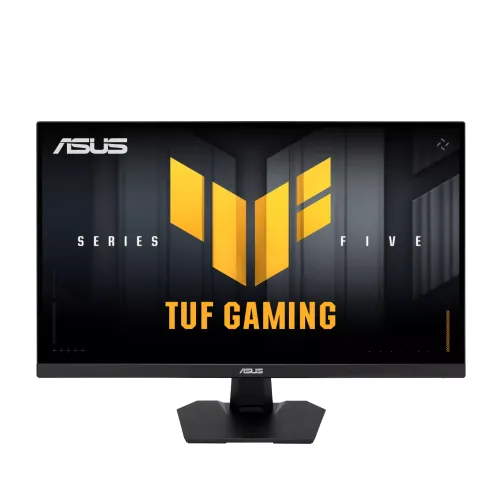
The ASUS TUF Gaming VG27AQME5F is a 27-inch QHD Fast IPS gaming monitor in ASUS TUF Gaming Series 5. Its exact model code is VG27AQME5F, and ASUS technical information associates the chassis with regional part-number families 90LM0D40-B01171 and 90LM0D40-B011B1. Because regional suffixes can vary and the received carton label was not available, the catalog MPN uses the model code rather than guessing a regional package code. Do not confuse this model with VG27AQML5A, VG27AQ5A or VG27AQE5A: those are separate Series 5 variants with different refresh ceilings and sometimes different ergonomics. The existing product name, slug, ASUS brand, category, status, variant SKU and ৳33,000 price are preserved.
QHD detail and 255Hz refresh
The 27-inch panel displays 2560 × 1440 pixels in a 16:9 format, with a 0.233mm pixel pitch and 596.74 × 335.67mm active viewing area. QHD provides substantially more desktop detail than Full HD and is a common resolution for modern PC gaming. ASUS lists up to 255Hz in overclock mode through DisplayPort 1.4 HBR3. HDMI 2.1 TMDS is specified only up to 150Hz at QHD. To reach the headline refresh rate, connect a capable PC through DisplayPort, enable the monitor’s overclock setting if required, and select the desired refresh in the operating system. The GPU and game must also produce sufficient frames; the panel’s refresh capability does not guarantee a 255-FPS game.
Fast IPS and response-time modes
ASUS specifies a Fast IPS panel with 1ms GTG response and a 0.3ms minimum response value. These numbers are different measurements and should not be compared as if they represented the same test. A faster response setting may introduce overshoot or alter the image, so test the monitor’s overdrive modes with your preferred games. Adaptive-Sync support includes AMD FreeSync Premium and NVIDIA G-SYNC Compatible. Variable refresh can synchronize screen updates with a compatible GPU and reduce tearing within supported ranges. ELMB Sync is designed to combine ASUS motion blur reduction with variable refresh. Available combinations depend on the input, overclock setting and OSD configuration. For consistent results, tune the refresh mode, response option and VRR together instead of relying on a single marketing number.
Connection-specific input limits
The port panel includes two HDMI 2.1 TMDS inputs, one DisplayPort 1.4 HBR3 input and an earphone jack. The HDMI ports are not specified for the full 255Hz ceiling: at QHD, ASUS lists a maximum vertical frequency of 150Hz over HDMI and 255Hz over DisplayPort. This is a meaningful practical distinction for PC buyers. HDMI 2.1 naming alone does not mean every port uses the 48Gbps FRL mode; ASUS identifies these inputs as TMDS. Use DisplayPort for maximum PC refresh. HDMI is still useful for a console or another device, but the exact resolution and refresh depend on the source’s output modes. Check the on-screen input setting after connecting.
Color, contrast and HDR10
ASUS lists 95% DCI-P3 color coverage, 1073.7 million colors in 10-bit mode, 1300:1 typical contrast and 300 cd/m² typical brightness. These properties support vivid games, video and general creative content. A coverage percentage describes the range of colors the panel can reproduce; it is not a factory calibration report or a guarantee of color accuracy. The display accepts HDR10 signals, but no local dimming is listed and typical brightness is 300 cd/m². Treat HDR10 as compatibility rather than premium high-dynamic-range performance. For color-critical production, calibrate the display and verify measured accuracy, uniformity and the exact workflow profile. For ordinary indoor gaming and desktop use, the anti-glare Fast IPS panel provides a flexible SDR image.
Gaming features and ASUS software
The VG27AQME5F includes GameVisual, GamePlus, GameFast Input, Shadow Boost, ELMB Sync and DisplayWidget Center. ASUS Gaming AI features include Dynamic Crosshair, Dynamic Shadow Boost and AI Visual. These options provide OSD presets, overlays and image adjustments; they do not increase the computer’s rendered frame rate. DisplayWidget Center offers a desktop route to monitor settings where supported. Use these functions selectively because an image preset or AI adjustment may change brightness, color or visibility. Four color-temperature modes and Low Blue Light control provide additional tuning. The best combination depends on the game and the room. Keep a neutral picture profile for tasks where accurate colors matter, and use game-specific controls where faster target visibility is the priority.
Speakers, sound and accessories
Two built-in 2W speakers provide convenient stereo output for system sounds, video calls and casual media. They are small monitor speakers rather than a replacement for dedicated desktop speakers or a gaming headset. The earphone jack allows external wired audio. The internal power supply means there is no separate power brick on the desk. ASUS technical information lists a DisplayPort cable, power cord, quick-start guide, warranty card and an L-shaped screwdriver among regional package accessories; exact items can vary by market. Confirm included cable types at purchase, especially if you plan to connect by HDMI. For full refresh, a DisplayPort cable is required.
Stand, mount and physical fit
The included stand supports tilt from -5° to +20° but has no height, swivel or pivot adjustment. The monitor supports a standard 100 × 100mm VESA mount, so a separate arm can provide a wider ergonomic range. Dimensions are 615.3 × 450.9 × 169.8mm with stand and 615.3 × 368.9 × 59.4mm without stand. Net weight is 4.9kg with stand and 4.0kg without it. Confirm that a third-party arm is rated for the panel and that the desk clamp fits your tabletop. The display uses a Kensington lock slot. Check cable clearance at the rear and leave space for airflow when positioning the monitor near a wall.
Power, package logistics and daily setup
The monitor uses an internal 100–240V, 50/60Hz power supply. ASUS lists consumption below 21W typical, below 0.5W in power-saving mode and below 0.3W when off. The official package is 680 × 475 × 148mm and 6.6kg gross. Before gaming, select QHD resolution, connect via DisplayPort, enable overclock mode if needed, and confirm the operating system shows 255Hz. If the signal is unstable, check the cable, GPU output and driver settings. A computer’s frame rate may remain lower than the panel refresh in demanding games. Save the invoice and serial information for warranty claims, and confirm the local seller’s box and dead-pixel terms.
Bangladesh price, warranty and buying decision
The catalog price is ৳33,000 and the observed local range was roughly ৳32,500–৳33,500 offer price, with regular prices around ৳34,000–৳35,000. Bangladesh retailers reviewed advertised a three-year official warranty. Check current stock, cash or online payment pricing, seller authorization, serial eligibility, warranty provider and claim procedure before ordering. Confirm the complete VG27AQME5F model suffix rather than comparing only “27-inch 255Hz ASUS.” This monitor suits buyers seeking QHD detail and very fast DisplayPort PC gaming with a wide-gamut Fast IPS panel. Buyers needing a height-adjustable stand, stronger HDR contrast, USB hub or USB-C docking should compare other models. Leave barcode, GTIN and country of origin blank until a unit label confirms them.
Practical setup checklist
For a first setup, assemble the stand on a firm surface, connect power and DisplayPort, and select 2560 × 1440 in the computer settings. Enable the monitor’s overclock option where required and choose 255Hz from the display menu. Confirm that the GPU and cable support the mode. Use HDMI for consoles or secondary sources, with the understanding that the ASUS signal table caps HDMI at 150Hz vertical frequency at QHD. Adjust tilt, set brightness for the room, and try the OSD response and ELMB Sync modes in actual gameplay. Test the 2W speakers and earphone jack. Keep protective packaging until the display is checked for image defects and the local warranty process is understood.