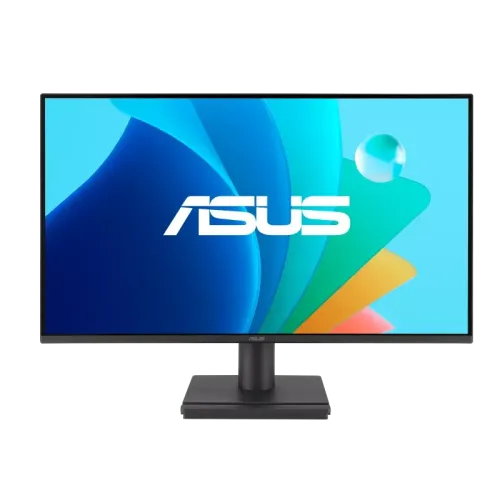
An IPS screen for everyday Full HD use
The ASUS VA249HG is a 23.8-inch Full HD monitor with an IPS panel and maximum refresh rate of 120Hz. ASUS describes it as an Eye Care monitor with Adaptive-Sync, HDMI and VGA connectivity, a headphone jack and VESA mounting. The official user guide and ASUS technical specifications provide the primary data used here. This model can be considered for office documents, online classes, browsing, video and casual gaming when a standard 1920 × 1080 display suits the desk. Its Full HD resolution and fixed stand capabilities are important purchase considerations, especially for users who need more desktop space or ergonomic adjustment.
Screen area and Full HD resolution
The panel measures 23.8 inches diagonally with a 16:9 aspect ratio and 1920 × 1080 pixels. This resolution is supported by most computers and is suitable for common productivity and entertainment tasks. A 23.8-inch Full HD panel keeps text and interface elements at a practical size for many desks, while not demanding high graphics bandwidth. Full HD offers less pixel detail and fewer simultaneous work areas than QHD or 4K. Users who keep several dense windows open or work on high-resolution imagery may prefer a higher-resolution display. ASUS lists a 0.2745 mm pixel pitch and 527.04 × 296.46 mm viewable area.
IPS, viewing angles and color range
ASUS identifies the VA249HG as an IPS monitor with 178-degree horizontal and vertical viewing angles. Its official technical data lists 16.7 million colors and 99% sRGB color space. This is useful context for general image and web use, but it does not certify factory calibration or professional color accuracy. The anti-glare surface can reduce mirror-like reflections, although lighting and window placement still matter. ASUS lists typical brightness of 300 cd/m² and typical contrast of 1500:1. A separate maximum contrast figure is not the same as typical static contrast and should not replace it in comparisons.
120Hz operation and Adaptive-Sync
The maximum refresh rate is 120Hz. ASUS’s user guide lists 1920 × 1080 at 120Hz on HDMI; ASUS technical information specifies an HDMI vertical signal range up to 120Hz and VGA up to 75Hz. For 120Hz, use a computer output and HDMI cable capable of the required mode, then select 1920 × 1080 and 120Hz in display settings. If the option is missing, inspect the port, cable, adapter, driver, input selection and active resolution. Adaptive-Sync/VRR can coordinate monitor refresh with supported graphics hardware, helping reduce tearing in compatible setups. Compatibility varies by graphics card, driver and settings.
Understanding the 1ms MPRT figure
ASUS lists 1ms MPRT on the VA249HG. MPRT describes motion-picture response and is distinct from a Gray-to-Gray pixel transition time. The cited VA249HG technical specification does not state a GTG response figure. The product copy therefore preserves the measurement label and does not claim 1ms GTG. Motion clarity also depends on refresh rate, source frame rate, pixel behavior and selected monitor mode. Choose settings based on the intended content and visual comfort rather than relying on a single response-time number.
Image, color and gaming features
ASUS lists SmoothMotion, Trace Free, GamePlus, QuickFit Plus, Motion Sync and Adaptive-Sync features. The on-screen display offers picture modes and four color-temperature selections. These functions provide options for different content but do not guarantee that every game or application will use them. The monitor supports HDCP 1.4. Low Blue Light and Flicker-Free settings can be selected for viewing preferences. Check the manual for feature interactions and make sure the computer’s output mode remains compatible after changing refresh, sync or image settings.
Eye-care functions
ASUS states that its Eye Care monitors include TÜV Rheinland-certified Flicker-Free and Low Blue Light technologies. VA249HG specifications also list Eye Care+ functions. These screen settings can change display behavior and provide features such as reminders or color assistance; they are not medical guarantees. Good ambient light, sensible brightness, viewing distance and regular breaks remain practical considerations for extended computer use. The anti-glare surface can help in typical indoor lighting but does not eliminate reflections from bright light sources.
Ports and audio setup
The rear I/O includes one HDMI 1.4 port and one VGA input, along with PC audio input and a headphone output. HDMI is the connection to use for the listed 1920 × 1080 at 120Hz mode. The analog VGA input has a maximum 75Hz vertical frequency in the manufacturer specification. The monitor has no built-in speakers. ASUS indicates that sound can come from HDMI or VGA and be sent to the headphone output, allowing connection to headphones or external speakers. Confirm the computer’s audio output and selected input if there is no sound.
Stand, mounting and physical dimensions
The included stand supports tilt from −5 degrees to +23 degrees. ASUS does not list height adjustment; swivel and pivot are also not stated. The VESA pattern is 100 × 100 mm, and the monitor includes a Kensington lock point. Manufacturer dimensions are approximately 540 × 408 × 191 mm with the stand and 540 × 316 × 46 mm without the stand. Estimated net weight is 3.2 kg and package gross weight 4.95 kg. Check an arm’s weight rating and mounting screws, and allow clearance for the rear cable connections.
Power and included accessories
The electrical rating is AC 100–240V, 50/60Hz, 1.5A. ASUS lists power-on consumption up to 15W, less than 0.5W in power-saving mode and less than 0.3W when powered off. Regional box accessories may vary; ASUS lists a power cord, HDMI cable, quick-start guide and warranty card. Verify the delivered carton and serial label. Use the supplied or an approved compatible power cable. Do not assume the exact included cable arrangement from a retailer gallery image alone.
Bangladesh warranty and seller terms
ASUS Bangladesh warranty information lists LCD monitors at 36 months. Warranty service depends on the authorized-dealer invoice, serial number and applicable ASUS terms. Local retailers also advertise a three-year warranty, but verify which provider handles claims, what is covered and whether the box or purchase documents must be retained. Retail prices and stock change and are not a statement of BiponiBD price or availability. This listing copy does not make an unverified country-of-origin claim, review or rating.
Who should consider this display
The VA249HG can suit a user who wants an IPS Full HD monitor with 120Hz over HDMI, adaptive refresh, standard audio output and VESA support. Office and study users can use the same screen for everyday computing, while compatible systems can use the faster refresh mode for gaming and motion. Buyers who need built-in speakers, USB-C docking, DisplayPort, a height-adjustable stand or QHD resolution should compare alternatives. Check the exact VA249HG model, warranty paperwork and connection requirements before ordering.
Basic setup steps
Attach the stand to a stable surface or fit a compatible 100 × 100 mm VESA mount. Connect the power cord and choose HDMI for the 120Hz Full HD mode. In the computer display settings select 1920 × 1080 and 120Hz when offered. If 120Hz does not appear, check the graphics output, cable, driver, adapter and input selection. Connect external headphones or speakers through the audio setup because there are no integrated speakers. Set tilt, brightness and eye-care options to comfortable levels, then confirm the model and warranty details on the delivered box.
Technical specifications
Key features
- 23.8-inch IPS panel, Full HD 1920 × 1080 resolution and 16:9 aspect ratio.
- 120Hz maximum refresh; ASUS documents a 1920 × 1080 at 120Hz HDMI timing.
- 1ms MPRT response specification; no GTG value appears on the cited exact-model data sheet.
- 300 cd/m² typical brightness and 1500:1 typical contrast ratio.
- 99% sRGB color space, 16.7 million colors and 178° viewing angles.
- Adaptive-Sync variable refresh, SmoothMotion, Trace Free, GamePlus and Motion Sync.
- TÜV Rheinland-certified Flicker-Free and Low Blue Light technologies.
- One HDMI 1.4 and one VGA input, plus PC audio input and headphone output.
- No built-in speakers; HDMI/VGA audio can be routed to the headphone output.
- Tilt −5°/+23°, VESA 100 × 100 mm, Kensington lock and black finish.
Advantages
- 120Hz Full HD mode and Adaptive-Sync can produce smoother visuals with compatible computers.
- IPS panel, wide viewing angles and 99% sRGB specification suit general desk and media use.
- 300 cd/m² typical brightness is higher than some entry-level Full HD monitors.
- HDMI and VGA plus audio input/output allow a range of desktop and older-device connections.
- VESA support, Eye Care modes and official ASUS Bangladesh 36-month LCD monitor warranty information.
Points to consider
- Full HD provides less pixel density and workspace than QHD or 4K at 23.8 inches.
- 120Hz requires compatible HDMI source/cable/settings; VGA maximum is 75Hz.
- No built-in speakers, USB hub or DisplayPort input is specified.
- The included stand tilts but does not offer height adjustment, swivel or pivot.
- Local warranty still requires an authorized dealer, invoice and serial-number validation.
Frequently asked questions
What is the exact monitor model?
This is ASUS VA249HG. ASUS’s official product page and user guide identify the model as VA249HG. Do not confuse this entry with other ASUS VA or VY series displays.
What is the screen size and resolution?
It uses a 23.8-inch IPS panel with 1920 × 1080 Full HD resolution, 16:9 aspect ratio and 0.2745 mm pixel pitch.
Does the VA249HG support 120Hz?
Yes. ASUS lists 120Hz maximum refresh, and the official user guide includes a Full HD 1920 × 1080 at 120Hz timing on HDMI. The source, cable and settings must support that mode.
What is the response time?
The exact-model ASUS data lists 1ms MPRT. It does not provide a GTG figure on the cited technical page, so this listing does not invent one. MPRT and GTG are different measurement methods.
What are the brightness and contrast figures?
ASUS lists 300 cd/m² typical brightness, 1500:1 typical contrast and up to 3000:1 maximum contrast. Typical and maximum/dynamic figures are measured differently; 1500:1 is the typical reference.
Which ports does it have?
The monitor has one HDMI 1.4 input, one VGA input, PC audio input and a headphone output. There is no DisplayPort or USB hub listed.
Does it have built-in speakers?
No. ASUS’s official specification says there are no speakers. HDMI or VGA audio may be received and routed through the headphone output for connected headphones or external speakers.
Does Adaptive-Sync work with every graphics card?
ASUS lists Adaptive-Sync/VRR. Actual compatibility and usable refresh range depend on the graphics card, driver, operating system, connection and display settings. Confirm support on the specific source device.
What eye-care functions are available?
ASUS lists TÜV Rheinland-certified Flicker-Free and Low Blue Light technologies and Eye Care+ features. These are display functions, not medical treatment; use comfortable lighting, distance and breaks.
Can it be mounted on a monitor arm?
Yes. ASUS lists a 100 × 100 mm VESA pattern and Kensington lock. Confirm the arm’s pattern, load limit and screw compatibility before mounting.
How much can the stand tilt?
ASUS lists a tilt range from −5° to +23°. Its technical sheet states no height adjustment; swivel and pivot are not listed.
What warranty applies in Bangladesh?
ASUS Bangladesh lists 36 months for LCD monitors. The invoice, authorized-dealer and serial-number rules apply; check the delivered unit’s serial and purchase paperwork with ASUS or the authorized seller.
Specifications are based on ASUS VA249HG official technical information and user guide. Confirm local warranty paperwork and package accessories for the delivered unit.