ASUS VA249QGS 23.8-inch Full HD IPS Business Monitor — Buyer Guide
Exact model identity
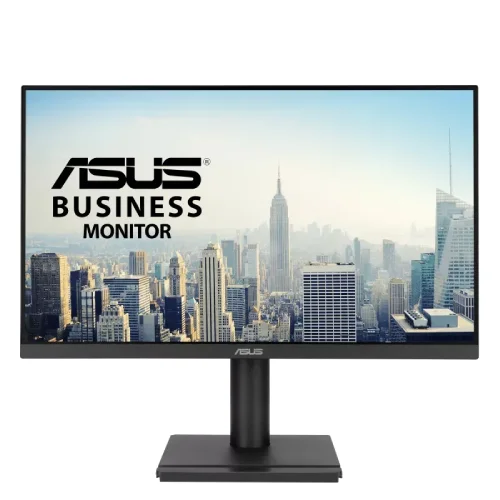
The ASUS VA249QGS is a 23.8-inch business monitor with a Full HD IPS panel and a maximum refresh rate of 120Hz. ASUS’s exact-model technical specification and VA249QGS series user manual identify the model directly. Keep it distinct from ASUS VA249QGSE and VA249QG: the QGS manual specifies a 120Hz panel, ergonomic stand, four-port USB hub, HDMI 1.4, DisplayPort 1.2 and VGA. The model code matters when checking driver information, accessory compatibility and warranty. The photographed product is the black VA249QGS configuration; ASUS documents regional dimension and accessory variations, so verify the code on the carton and invoice.
23.8-inch Full HD IPS picture
The display measures 23.8 inches diagonally, uses a 16:9 IPS panel with LED backlighting, and renders 1920 × 1080 pixels. ASUS lists an anti-glare surface, 178° horizontal and vertical viewing angles and 0.2745mm pixel pitch. The active viewing area is 527.04 × 296.46mm. Full HD on this size suits office documents, web applications, video meetings, spreadsheets and everyday desktop work without demanding a high-end graphics card. IPS and wide viewing angles help keep the picture consistent when colleagues look at the screen from the side. The panel is flat; no curved-screen claim applies to this model.
120Hz refresh and 1ms MPRT
The maximum refresh rate is 120Hz. ASUS’s official signal-frequency table states 48–120Hz vertical for HDMI and DisplayPort, while VGA is listed at 48–75Hz. The manual’s timing list confirms 1920 × 1080 at 120Hz on HDMI and DisplayPort, not VGA. A compatible computer and cable are needed to select 120Hz in its display settings. ASUS specifies 1ms MPRT response time; this is a motion-picture-response-time figure, not the same measurement as gray-to-gray pixel transition. The faster refresh makes cursor movement, scrolling and compatible games appear smoother than 60Hz, but the source must deliver higher-frame-rate content to show the full benefit.
Brightness, contrast and color
ASUS specifies typical brightness of 350cd/m², maximum contrast of 3000:1 and typical contrast of 1500:1. These are distinct values: use the typical contrast figure for ordinary comparisons and retain “maximum” as ASUS labels it. ASUS lists 16.7 million display colors and 99% sRGB coverage. This makes the monitor suitable for general office color and everyday media. The gamut percentage does not guarantee a factory calibration grade or professional proofing accuracy; ASUS does not provide a per-unit Delta E calibration report in the reviewed specification. One Bangladesh seller table showed 300cd/m², which conflicts with ASUS’s 350cd/m² official figure; this catalog uses the manufacturer specification and notes the seller discrepancy.
Adaptive Sync and ASUS Eye Care
The VA249QGS includes ASUS Adaptive-Sync/variable refresh rate, Motion Sync, Trace Free and Eye Care+ functions. ASUS lists TÜV Rheinland Low Blue Light and Flicker-Free certifications, plus several color and display modes through Splendid technology. These are screen comfort and motion options, not medical claims. The OSD also includes GamePlus, QuickFit overlays, color-temperature selection, rest reminders, color augmentation and energy-saving options. HDCP 1.4 is listed. Adaptive-Sync’s available range can depend on the connection and graphics source, so use a supported HDMI or DisplayPort connection and check the graphics driver. Do not describe it as a gaming monitor with a higher refresh than its documented 120Hz maximum.
Ports, USB hub and audio
The available inputs are one HDMI 1.4, one DisplayPort 1.2 and one VGA port. ASUS also lists a four-port USB 3.2 Gen 1 Type-A hub, one USB Type-B upstream connection, an earphone output and a PC audio input. To use the USB hub, connect the USB Type-B upstream cable to the computer; the USB-A ports then serve peripherals. The manual lists two built-in 2W speakers, for 2×2W total, and audio output from HDMI or DisplayPort. The side and rear product images show the hub and video connectors. The hub does not make this a USB-C monitor: a USB-C display input is not listed.
Ergonomic stand and mounting
The supplied stand supports a broad range of desk positions. ASUS specifies tilt from −5° to +35°, swivel from −180° to +180°, pivot from −90° to +90°, and 0–130mm height adjustment. This permits portrait rotation for long documents when the operating system is set to portrait orientation. A 100×100mm VESA wall-mount pattern is supported if the stand is removed. ASUS also lists a Kensington lock slot. These details distinguish the VA249QGS’s adjustable stand from simpler fixed-tilt office displays. Ensure the desk and arm can support the monitor’s weight and use the correct VESA screws; follow the manual during stand removal or installation.
Power, dimensions and weight
The display uses an internal AC-to-DC supply and a detachable power cord. ASUS lists 100–240V, 50/60Hz and under 14W power consumption; power-saving mode is under 0.5W and off mode under 0.3W. ASUS estimates dimensions with stand at 540 × 457 × 211mm and without stand at 540 × 323 × 48mm; carton dimensions are 600 × 412 × 141mm. Approximate net weight with stand is 4.8kg, without stand 3.05kg, and gross package weight 6.3kg. ASUS cautions that dimensions and included accessories can vary by region, so verify regional package details with the seller.
Box contents and setup
ASUS’s official specification lists a warranty card, USB Type-B-to-A cable, quick-start guide, power cord and HDMI cable as accessories, subject to regional variation. The DisplayPort cable is not listed in that official accessory list, even though some local bundles may include additional items; do not promise one unless the seller confirms it. For a first-time setup, connect the computer to HDMI, DisplayPort or VGA, connect the power cord, and use the OSD to select the matching input and desired refresh rate. Connect the USB Type-B upstream lead if you want to use the four USB-A downstream ports.
Office and home uses
This monitor fits a workstation that benefits from an adjustable stand, portrait orientation, USB peripherals, integrated speakers and legacy VGA support alongside HDMI and DisplayPort. It can serve office staff, students, home users and shared desks that need a comfortable 23.8-inch Full HD screen. The 120Hz mode adds smoothness to compatible content, while the 99% sRGB claim and IPS panel suit everyday visual work. It is not a 1440p display and has no USB-C video input. Buyers requiring a wider color space, higher pixel density or USB-C single-cable docking should compare a model whose official specifications explicitly include those functions.
Bangladesh price and warranty
Bangladesh exact-model seller pages observed during this review showed offers around ৳23,000–৳23,500, with crossed or regular prices varying. Stock, promotions and shipping can change. The existing BiponiBD variant price is ৳23,000 and is retained. Several local listings advertise a three-year warranty; ASUS’s international specification does not establish the Bangladesh distributor or local claim process. Confirm the service provider, invoice requirement, dead-pixel policy and whether the full three years are covered by the authorized local distributor. A seller page may provide its own terms, so compare the warranty card with the seller’s written policy at purchase.
Checklist before ordering
Before ordering, verify the exact VA249QGS code, current stock and price, and local warranty documents. Check that your PC has the desired connector: HDMI and DisplayPort support up to 120Hz at 1920 × 1080 in ASUS’s listed timing information, while VGA is limited to 75Hz vertical. If you need the USB hub, include the USB Type-B upstream connection. Decide whether the height, pivot and swivel adjustments or 100×100mm VESA mount suit your desk. Confirm regional box contents, since ASUS states accessories may vary. These checks keep the listing useful while separating manufacturer specifications from seller pricing and warranty claims.