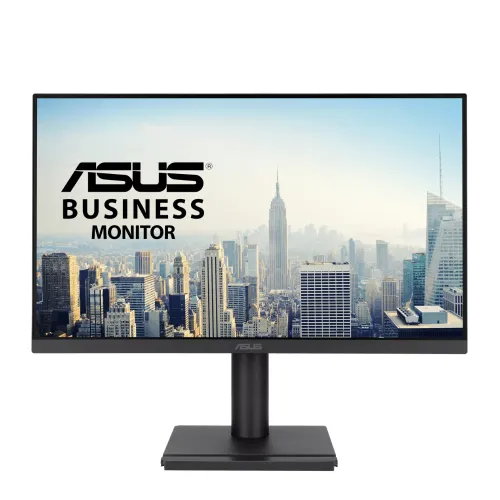
ASUS VA249QGSE 23.8-inch Full HD 120Hz IPS Business Monitor
Panel size, resolution and image density
The ASUS VA249QGSE is a business-class Full HD monitor with a 23.8-inch viewable IPS panel. ASUS lists 1920 × 1080 resolution, a 16:9 aspect ratio, LED backlighting, an anti-glare surface and 178-degree horizontal and vertical viewing angles. Bangladesh retailers and the product name round it to 24 inches; 23.8 inches is the manufacturer's panel size. The viewable area is 527.04 × 296.46 mm, pixel pitch is 0.2745 mm and density is about 92.6 pixels per inch. Its frameless-style appearance supports a multi-screen desk, though the image itself is still bounded by a thin physical bezel. The model identifier is VA249QGSE. Check the suffix carefully: VA249QG, VA249QGS and VA249HG are separate models and their features or specifications must not be substituted.
120Hz and Adaptive-Sync
The maximum refresh rate is 120Hz. ASUS specifies digital signal ranges of 50–120Hz vertically over HDMI and DisplayPort at supported modes; the analog VGA range is 59–75Hz. Thus a 120Hz setup needs a compatible digital source connected through HDMI or DisplayPort, a suitable cable, the Full HD output mode and a selected 120Hz setting in the computer's advanced display options. VGA should not be advertised as supporting 120Hz on this model. A higher refresh rate can make cursor movement, scrolling, animation and compatible games look smoother than 60Hz, but it does not increase the number of frames rendered by a game or video source. ASUS also lists Adaptive-Sync (VRR), which can coordinate supported digital refresh timing with a compatible graphics source; source support, drivers, connection and operating mode matter.
1ms MPRT and motion settings
The response-time figure is 1ms MPRT, as stated in ASUS's exact-model specification. MPRT describes motion-picture response and is not the same measurement as gray-to-gray response time. ASUS separately lists Trace Free and Motion Sync display technologies. The 1ms MPRT headline should not be rewritten as 1ms GtG, and it does not mean every pixel changes in one millisecond under every setting. This productivity monitor can handle everyday tasks and casual gaming, but a competitive player should compare refresh rate, motion handling, input lag and game performance across the whole setup rather than relying on one response-time label.
Brightness, contrast and color
ASUS lists 300 cd/m² typical brightness, 1500:1 typical contrast and 3000:1 maximum contrast. The distinction between typical and maximum matters: use 1500:1 as the typical contrast figure and keep the 3000:1 value labeled maximum. The IPS panel supports 16.7 million colors and 99% sRGB coverage. Gamut coverage is not a per-unit calibration certificate, so professional color-critical work should use a suitable calibration workflow and an appropriate display. The matte anti-glare coating and wide viewing angles are useful in shared desks and office environments, although reflections and readability still depend on room lighting and screen placement. ASUS does not list HDR support for this model, so it should not be presented as an HDR display.
Eye-care features and software
Eye-care options include ASUS Eye Care+ technology, TÜV Rheinland-certified flicker-free operation and Low Blue Light. Four color-temperature modes allow adjustments to the screen's warmth. ASUS also lists Splendid picture modes and ASUS Power Sync. Low Blue Light changes the emitted color balance and may make whites look warmer; choose the setting that suits the task. These are display comfort features, not treatment or a guarantee against eye fatigue. ASUS DisplayWidget Center is a supported utility for changing display settings with a mouse on Windows or macOS; availability and features depend on software version and device compatibility. The product page also describes Smart Voice Control in DisplayWidget Center and notes that it needs internet access and user sign-in.
Video connections and audio
The rear I/O provides one HDMI 1.4 input, one DisplayPort 1.2 input, one VGA analog input and an earphone jack. A headphone connection is available for private listening. The monitor also has built-in stereo speakers rated at 2W per channel, giving basic audio for calls, lessons and short videos without a separate soundbar. Speaker output is suitable for everyday low-volume playback, not a room-filling sound system. HDCP 1.4 is listed. Connect a modern PC by HDMI or DisplayPort to use digital 120Hz modes; a VGA legacy connection has a lower listed maximum vertical frequency. The exact-model specification lists one HDMI port, so do not claim dual HDMI.
Ergonomic stand, VESA and security
The included ergonomic stand supports tilt from -5° to +35°, swivel from -180° to +180°, portrait pivot from -90° to +90° and height adjustment through 0–130 mm. These movements let a user set the viewing height, rotate the panel to portrait for long documents and adjust the angle for seating. ASUS also describes a hands-free holder on the stand for a phone, name card or similarly small item. The back has a Kensington lock slot and a standard 100 × 100 mm VESA mount for a compatible arm or wall bracket. Check the arm's load range, mounting screws and cable slack before mounting; after removing the stand, support the panel safely while attaching the bracket.
Dimensions, weight and setup space
ASUS estimates dimensions, with stand, at 54.11 × 46.33 × 21.12 cm (width × height × depth), and without the stand at 54.11 × 32.15 × 4.98 cm. The box is listed as 62.0 × 41.20 × 14.50 cm. Estimated net weight is 4.50 kg with the stand, 3.10 kg without the stand, and gross weight is 6.70 kg. ASUS explicitly says dimensions and weights may vary by region, so use these as manufacturer estimates and confirm the local package if shipping clearance or arm capacity is critical. The black finish shown in the catalog images fits a typical office setup.
Power and regional accessories
The display uses a 100–240V, 50/60Hz power input. ASUS lists power consumption below 13W, power-saving mode below 0.5W and power-off mode below 0.3W. It is a low-power display compared with many larger monitors, but actual use depends on brightness and operating conditions. ASUS lists a power cord, HDMI cable, warranty card, quick-start guide, rubber sticker and certificate among accessories, with package contents varying by region. The exact Bangladesh seller bundle should be confirmed at purchase; regional box contents are not guaranteed by the global specification.
Bangladesh price and warranty
During this review, exact-model Bangladesh seller pages listed prices around ৳22,800. Star Tech showed ৳22,800 against a regular listing of ৳24,200 and advertised three years of warranty; TechLand also listed ৳22,800 and three years. These offers and availability can change. The existing BiponiBD variant price is ৳22,800 and is retained. Seller warranty headlines are not a substitute for checking which distributor or service center will handle a claim, what proof of purchase is required, the dead-pixel policy and any packaging conditions. Ask the seller to put the warranty duration and provider on the invoice.
Who it suits and how to configure it
The VA249QGSE suits a desk where users want Full HD, a compact 23.8-inch panel, 120Hz digital refresh, an adjustable stand and several input types. HDMI, DisplayPort and VGA help connect both current and older devices; the stand's height and swivel adjustments make it practical for shared offices or portrait reading. The 99% sRGB specification is suitable for general content work but should not be mistaken for measured factory calibration. Users who need higher resolution, USB-C docking, multiple HDMI sockets or certified HDR should compare models that explicitly list those features. Before buying, verify the VA249QGSE label, ensure the included stand and cables match the local offer, connect by HDMI or DisplayPort for 120Hz, then select the 120Hz mode in display settings. If only 60Hz appears, review the cable, adapter, graphics output, resolution and selected input.