Product overview
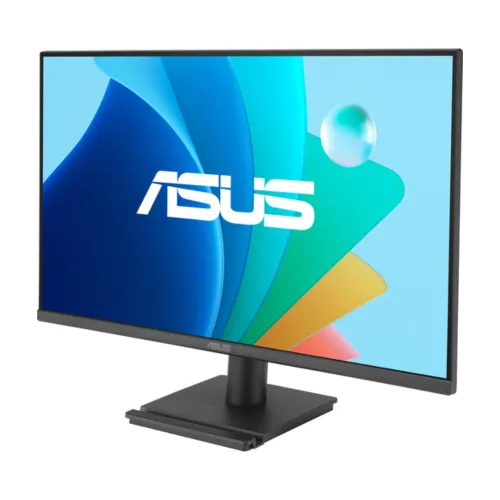
The ASUS VA279HG is a 27-inch Full HD IPS monitor designed for everyday desktop work, video and entry-level gaming. ASUS lists a maximum refresh rate of 120Hz, a 1ms MPRT response figure, Adaptive-Sync and Eye Care features. Its connector set is deliberately simple: one HDMI 1.4 input, one VGA input and an earphone output. The exact model code is VA279HG. The 27-inch size and 120Hz description can help shoppers recognize the product, but should not be mistaken for its model number. This guide uses ASUS technical data and the exact-model manual for hardware details. The listing photographs show a thin-bezel screen, a rectangular base with an integrated phone cradle, rear housing and Eye Care promotional graphics. Pictures can help identify the product design; they do not confirm the condition, regional package contents, warranty provider or current offer terms.
This product may suit a home office, study area or general-use desk where a large Full HD canvas and familiar video connections are priorities. It can also serve casual gaming when the computer supports the selected refresh mode. Buyers should compare the resolution against their viewing distance and work needs: Full HD on a 27-inch screen gives a more spacious physical image than a 24-inch monitor, but it does not provide the same pixel density as QHD at this size. The following sections explain the main specifications, connection limits, stand movement, energy figures and purchase checks so those trade-offs are clear before ordering.
Panel size, shape and resolution
The screen measures 27 inches diagonally and uses a 16:9 widescreen shape. Its native resolution is 1920 × 1080 pixels, commonly called Full HD. ASUS lists a 597.88 × 336.312 mm viewing area and 0.311 mm pixel pitch. This size can make documents, browser pages and video feel physically larger, but the fixed pixel count is still Full HD. On a 27-inch display, users who work with fine text, detailed design files or several dense windows may prefer to compare a QHD model before choosing. The monitor cannot add detail that is absent from the source image, and scaling settings can change how text and interface elements appear.
The panel is IPS with LED backlighting and an anti-glare surface. ASUS specifies viewing angles of 178° horizontally and vertically at a contrast-ratio criterion of CR≥10. Broad viewing angles can help when the screen is viewed slightly off-center or shared with another person. They do not mean brightness, contrast or color remain perfectly unchanged at every position. The panel is flat, not curved. Set the screen at a comfortable distance and angle, then adjust brightness and color settings for the room. A matte surface can reduce some reflections, though it cannot eliminate every reflection from a bright window or lamp.
Refresh rate and 120Hz setup
ASUS lists 120Hz as the VA279HG maximum refresh rate. Its technical page gives HDMI vertical signal timing from 48Hz to 120Hz, so HDMI is the relevant connection for the listed top refresh mode. A monitor setting alone cannot make every computer output 120 frames per second. The graphics device, game or application, cable, driver and operating-system display configuration all contribute to whether the mode is available and how smoothly content plays. If 120Hz does not appear in system settings, check the HDMI connection, graphics output capability, selected input, driver and resolution timing before drawing conclusions.
The VGA analog input has a different limit: ASUS lists vertical analog timings from 50Hz to 75Hz. A computer connected by VGA should not be expected to reach the HDMI 120Hz maximum. The source may also be limited by its own output capability. In practical terms, a compatible PC and HDMI connection can use the monitor’s higher refresh range, while a legacy VGA source can remain useful for lower refresh office workloads. The maximum refresh figure is a capability ceiling, not a guarantee that every game will render at 120 frames per second. Frame rate depends on the computer hardware, software and chosen quality settings.
Motion response and Adaptive-Sync
ASUS lists 1ms MPRT response time for this model. MPRT means motion-picture response time, a measure that differs from gray-to-gray pixel transition time and from input lag. MPRT measures motion-picture response and differs from gray-to-gray pixel response and input lag, so compare response figures only when the measurement method is stated. The specification page also lists Adaptive-Sync variable refresh technology. Adaptive-Sync can coordinate the refresh behavior of a compatible display and source within supported modes, but actual operation depends on the graphics output, driver, cable and selected settings. ASUS lists Adaptive-Sync but does not identify G-SYNC or FreeSync certification in the exact-model specification. Check compatibility with your graphics card and selected display mode.
Motion appearance depends on more than the response figure. Refresh rate, frame delivery, picture settings and the content itself all matter. ASUS lists Trace Free and Motion Sync features in its product information, along with GamePlus controls. These are display tools and do not increase the source computer’s performance or remove every motion artifact. Users can compare the monitor with their intended games and graphics hardware, and can adjust available on-screen settings after setup. For buyers who need verified certification for a particular GPU ecosystem, check current compatibility documentation for the graphics card and monitor rather than relying on a retailer shorthand.
Brightness, contrast and color
The ASUS technical specification lists typical brightness of 300 cd/m² and typical contrast ratio of 1500:1. These are manufacturer reference values; individual viewing results vary with image mode, brightness setting, room lighting and content. ASUS also lists a 99% sRGB color space and support for 16.7 million display colors. The gamut figure describes color-space coverage as ASUS reports it. It is not an individual calibration certificate, a guarantee of color accuracy or evidence that every unit has been measured and profiled. For photo, print or video work that requires a known color workflow, buyers should plan for suitable calibration and color management.
The monitor includes four color-temperature selections and ASUS SPLENDID picture modes. These controls can make the picture warmer, cooler or otherwise tuned to a preference, though they do not alter the underlying panel resolution. Changing picture modes may affect brightness and color appearance. The display’s viewing angles can make it easier to see the picture from different seated positions, but matching color across multiple displays still requires appropriate calibration. Use the on-screen controls and the manual to understand the available choices. If the primary task is ordinary browsing, documents, streaming or general PC use, these options can provide flexibility without implying professional-grade calibration.
Eye Care and image tools
ASUS lists Flicker-free, Low Blue Light and Eye Care+ technologies for the VA279HG. The manufacturer also specifies Trace Free, SPLENDID, GamePlus, QuickFit and DisplayWidget Center support. These features provide display adjustments, overlays or layout aids. Their usefulness depends on the user’s task and preference. Eye-care features are display settings; they are not medical treatment and cannot guarantee comfort for every person. Room lighting, viewing distance, brightness, posture and breaks remain relevant to a comfortable workspace. If a display setting changes the image in an unwanted way, return to another picture mode and consult the model manual for the menu descriptions.
The gallery includes promotional graphics about viewing angles and Eye Care alongside product photographs. Use the ASUS technical specification for the measured display values and feature details. QuickFit and GamePlus are included as software or on-screen tools, and do not add hardware ports or change the native resolution. DisplayWidget Center support likewise does not mean the monitor has a USB connection; the listed I/O remains HDMI, VGA and an earphone jack.
Inputs, sound and compatibility
The VA279HG provides one HDMI 1.4 input and one VGA input. HDMI is the digital connection and supports the listed 120Hz maximum timing; VGA is an analog connection with vertical timing up to 75Hz. Select the matching input in the display controls after connecting the computer. The required cable may depend on the source device and regional box contents. ASUS documentation notes that some accessories, including HDMI or VGA cables, can be optional depending on package configuration, so buyers should confirm what is included in the local offer rather than assume every shown cable is supplied.
The official ASUS specification says the monitor has no built-in speakers. It lists an earphone jack, which can be used with compatible external headphones or audio equipment. The sound signal source and routing depend on the connected device and setup. There is no listed DisplayPort, USB hub, USB-C video input or laptop-charging capability. A laptop that only offers USB-C may require a compatible active adapter or dock; confirm that adapter supports the desired resolution and refresh before purchase. If a legacy desktop uses VGA, remember that the analog path has a lower refresh ceiling than HDMI.
Stand, VESA mounting and desk fit
The supplied stand supports tilt from −5° to +23°. ASUS does not list height adjustment, swivel or pivot movement for the stand. Users who need the screen to move vertically or rotate into portrait orientation may want an adjustable monitor arm. ASUS specifies a 100 × 100 mm VESA mounting pattern. Verify the mounting arm’s supported load, screw size and installation instructions before attaching it. A Kensington lock slot is also listed for compatible security cables, which can be useful in shared spaces.
With the stand attached, ASUS lists dimensions of 613.4 × 447.1 × 194.2 mm. Without the stand, dimensions are 613.4 × 362.1 × 49.8 mm. Measure the available desk or mounting area and allow space for the stand feet, tilt movement, connectors and cable bends. The images show a rectangular base with an integrated phone cradle and a thin-bezel front design, but a photograph cannot substitute for measuring the target desk. The monitor’s approximate net weight is 3.74 kg with stand and 3.38 kg without stand. Check the arm manufacturer’s load range if using a third-party mount.
Power and energy figures
The ASUS manual lists a power input range of 100–240V AC at 50/60Hz. ASUS technical information gives power-on consumption below 15W, power-saving mode below 0.5W and power-off mode below 0.3W. These are manufacturer figures under stated test conditions. Actual energy use may vary with brightness, picture mode, signal state and operating environment. The rating describes electrical compatibility; it does not confirm which plug or cable is included in a particular Bangladesh shipment. Use the supplied power cable and follow the manual’s electrical-safety guidance.
For placement, leave room for ventilation and cable routing, and avoid pulling on the HDMI, VGA or power connections. When changing the display or connecting a computer, follow the manual’s instructions and use a stable surface. If a compatible surge protector or power strip is used, confirm it is properly rated for the local electrical supply. The stated consumption is low compared with many larger desktop displays, but it should not be turned into an exact monthly bill estimate without knowing usage hours and local tariff.
Dimensions, shipping box and included items
The ASUS manual lists approximate carton dimensions of 690 × 452 × 146 mm and gross weight of about 6.18 kg. The assembled monitor is listed at approximately 3.74 kg net with stand. Carton measurements help estimate storage and handling, but courier billable weight can depend on the carrier’s dimensional-weight formula and packaging used by the seller. ASUS documentation lists a quick-start guide, warranty card and power cable; HDMI and VGA cables and a phone-holder sticker may be optional depending on regional package. Confirm the exact inclusions for this offer before ordering if a particular cable or accessory is needed.
Product photographs may include overlays, promotional text or diagrams that do not ship as physical accessories. The gallery’s warranty banner should be read as an image claim, not confirmation of which organization provides service or how a claim is handled. The retailer or distributor should confirm package contents and warranty details for the serial number being sold. This distinction helps keep product specifications grounded in ASUS documentation while treating local commercial commitments as offer-specific information.
Who this monitor may suit
The VA279HG may suit users who want a large 27-inch screen for study, office work, browsing, video and general PC tasks. Its IPS panel, anti-glare finish and broad listed viewing angles support common desk use. The HDMI input and 120Hz maximum can also suit casual gaming when the source computer supports the desired mode. VGA preserves compatibility with some older desktop systems, though its listed vertical limit is 75Hz. Buyers should decide whether Full HD is sufficiently detailed at 27 inches and whether the stand’s tilt-only movement fits their desk.
It may be less suitable for users who need QHD or 4K resolution, built-in audio, USB-C docking, DisplayPort, a USB hub or a height-adjustable stand. Color-critical work should be evaluated against calibration requirements rather than relying on a 99% sRGB coverage figure alone. Competitive gaming buyers should verify the graphics card, game frame rate and refresh mode they actually intend to use. The best fit depends on the computer and workspace, so compare the stated limitations with the tasks the display will be asked to handle.
Setup checklist for a PC
Place the monitor on a stable surface, connect power and attach the computer using HDMI or VGA. For the 120Hz mode, use HDMI and a source that supports 1920 × 1080 at the selected refresh rate. Select the correct input through the monitor’s controls, then choose a supported refresh rate in the computer’s display settings. If the 120Hz option is missing, check the graphics output, cable, driver, input selection and resolution mode. VGA is limited to the manufacturer-listed vertical timing of up to 75Hz.
Use the on-screen display to select picture settings and color temperature. Connect headphones or external audio hardware to the earphone jack if sound is required, because there are no built-in speakers. Confirm that the display is level and that the stand tilt suits the seated position. If using a VESA arm, follow the monitor and arm instructions, verify the 100 × 100 mm mounting pattern and ensure the arm supports the monitor. Consult the exact model manual for button operation, supported timings and safe handling.
Care, comfort and troubleshooting
Keep the display on a stable desk and follow ASUS cleaning guidance. Avoid applying liquid directly to the panel, and route cables so they do not pull on the connectors. Adjust brightness to the room and choose the image or Low Blue Light settings that look comfortable. The Eye Care labels describe display technologies, not health outcomes. If the picture appears stretched or soft, verify that the computer is using the native 1920 × 1080 resolution and a compatible refresh mode. If there is no picture, check power, the selected HDMI/VGA input and the source device output.
For a missing 120Hz option, verify the HDMI connection and graphics configuration; changing to VGA will not provide the same maximum refresh. For no audio, remember the display has no speakers and route sound to the connected headphones or external audio device. If a VESA arm is used, check that it remains secure and that cables have enough slack for the monitor’s movement. The manual is the authority for exact menu instructions, timings and safe mounting practices.
Warranty, price and local offer details
The stored variant MSRP is BDT 18,000. This catalog value is a reference price field; it is not by itself proof of live stock, checkout price, discount or a manufacturer-published Bangladesh MSRP. The ASUS sources establish the hardware specifications, not the terms of this specific sale. The product imagery contains a three-year warranty claim, but it does not identify the warranty provider, serial eligibility, coverage exclusions or claim process. Confirm those details with the seller or distributor for the actual unit before relying on the claim.
Before ordering, review the current offer for availability, selling price, delivery charges, payment terms, box contents and warranty service. Retailer terms can vary by region and seller even for the same exact model. The listing should not promise a local warranty solely because the manufacturer’s image or an unrelated retailer page shows a duration. Keep the exact model code VA279HG on the invoice or order record so product identity can be checked if service is later needed.
Buying checklist and model identification
Check that the product label and order details identify ASUS VA279HG. Decide whether 27-inch Full HD provides enough detail for your normal viewing distance, and confirm that the computer can output the desired resolution and refresh rate. Use HDMI for the listed 120Hz maximum; use VGA only with the understanding that its maximum listed vertical timing is 75Hz. Confirm that you do not need built-in speakers, USB-C, DisplayPort or a height-adjustable stand.
Measure the desk and check the tilt-only stand, or confirm VESA arm compatibility. If color accuracy is important, plan for a color-managed workflow. Ask the seller to confirm current price, stock, included cable, warranty provider and claim terms. These checks connect the model’s manufacturer specifications with the actual Bangladesh offer and reduce confusion between a product capability and a seller-specific promise.
Specification and source notes
This guide was checked against the ASUS VA279HG technical specification and the official VA279HG/VA279QG series manual. The exact model source lists a 27-inch IPS Full HD panel, 120Hz maximum, 1ms MPRT, typical 300 cd/m² brightness, 1500:1 typical contrast, 99% sRGB, HDMI 1.4, VGA, earphone jack, Adaptive-Sync, tilt and power data. The manual supports dimensions, weights, package measurements and regional accessory qualifications. ASUS notes that specifications and bundled items may vary by region.
The ASUS VA279HG specification describes a 27-inch Full HD IPS monitor with a 120Hz maximum refresh rate over HDMI, one VGA input and an earphone jack. ASUS lists no built-in speakers. The series manual gives the physical dimensions, packaging measurements and regional accessory notes. Confirm local warranty and offer terms with the seller. Local seller information remains qualified until the exact offer terms are confirmed.