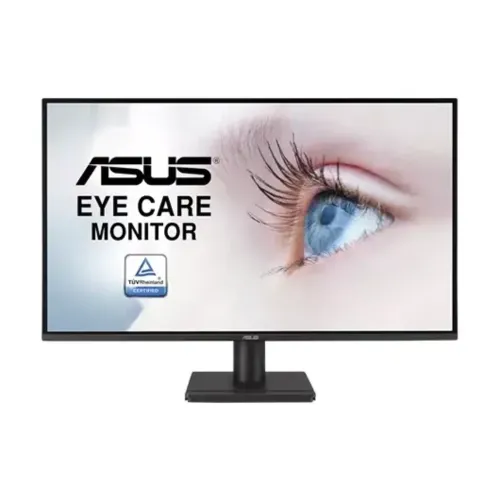
ASUS VA27AQ: 27-inch QHD IPS Eye Care monitor
The ASUS VA27AQ is a 27-inch WQHD monitor with a 2560 × 1440 IPS panel, anti-glare surface and maximum 75Hz refresh rate. ASUS positions it as an Eye Care display for work, study, browsing and video, with Adaptive-Sync and a set of display tools including SPLENDID, Trace Free, GamePlus and QuickFit. It also has integrated 2W × 2 speakers, a 3.5mm audio path, HDMI, DisplayPort and VGA inputs. The 75Hz rating is the published maximum; this model is not a high-refresh esports monitor. This guide explains its resolution and density, the source limitations of its 1ms MPRT rating, port versions, HDR10 support, viewing and comfort features, stand, package and Bangladesh warranty. Specifications below use ASUS's official VA27AQ sheet as the source of truth and flag seller-page differences where they matter.
QHD resolution, viewing area and text clarity
The 27-inch panel has a 16:9 aspect ratio and an active viewing area of 597.74 × 335.67mm. Its 2560 × 1440 resolution is commonly called QHD or WQHD and provides more desktop workspace and fine detail than Full HD. The listed 0.233mm pixel pitch works out to approximately 108.8 pixels per inch. This can help when viewing spreadsheets, documents, timelines and high-resolution images, while operating-system scaling lets you enlarge text and controls to suit your eyes. ASUS specifies an IPS panel with 178° horizontal and vertical viewing angles, LED backlight and anti-glare surface. The non-glare coating reduces mirror-like reflections but does not remove all glare from strong windows or lights. The chassis measurements are larger than the active panel area; check desk placement against the physical dimensions in the specifications below.
75Hz refresh and 1ms MPRT
ASUS lists a maximum refresh rate of 75Hz. The signal-frequency table shows vertical frequency up to 75Hz over HDMI and DisplayPort; VGA also reaches the listed 75Hz range. That is smoother than a basic 60Hz output in supported desktop use, but it is far below 144Hz, 165Hz or 180Hz gaming screens. Select 2560 × 1440 and the highest supported refresh in your operating-system display settings. A graphics source, cable and selected resolution must support the mode. ASUS lists 1ms MPRT response time. MPRT (Moving Picture Response Time) is a motion-clarity measure and is not interchangeable with gray-to-gray (GtG) pixel response; the public ASUS specification reviewed does not state a GtG number. Compare motion modes in your own applications rather than treating the advertised response label as a promise for every transition.
Brightness, contrast and color
ASUS specifies typical brightness of 350cd/m², a typical static contrast ratio of 1000:1 and a maximum dynamic contrast ratio of 3000:1. Retailer pages sometimes label the maximum figure as the monitor's general contrast ratio, so the distinction matters: 1000:1 is the typical static value, while 3000:1 is the stated maximum. The official UK specification lists 99% sRGB color space and 16.7 million display colors. Some Bangladesh reseller text omits or describes the gamut differently; this listing uses the exact official ASUS 99% sRGB specification. ASUS does not publish a factory Delta E accuracy result in that sheet. For print, grading or other color-critical work, seek measured calibration data instead of assuming a gamut percentage guarantees accuracy. The 350cd/m² brightness is a typical rating; room conditions and selected picture mode affect perceived luminance.
HDR10 and Adaptive-Sync expectations
ASUS lists HDR10 support and VRR (Adaptive-Sync) technology. These features let the monitor accept supported HDR content and variable-refresh signals from compatible sources. The VA27AQ specification does not list a VESA DisplayHDR certification tier or local-dimming system. Its HDR10 input support should therefore not be confused with a certified high-brightness HDR display. Adaptive-Sync can help match refresh to frame delivery and reduce tearing in supported configurations, but the published signal frequency is capped at 75Hz. The usable behavior depends on the GPU, connection, driver and display mode. If HDR content appears washed out in routine desktop work, compare SDR and HDR with the actual apps and return to the setting that looks clear and comfortable.
Eye Care+ and everyday display tools
ASUS lists Eye Care+ Technology, Low Blue Light, TÜV Flicker-free and TÜV Low Blue Light features. These settings can adjust the display for different tasks and viewing comfort, but comfort is personal and also depends on breaks, room lighting, brightness and viewing distance. The color-temperature selector has four modes. SPLENDID provides preset picture modes, Trace Free controls response tuning, GamePlus provides gaming overlays, and QuickFit offers alignment/grid tools. HDCP 1.4 is listed. ASUS also lists Motion Sync, ASUS Power Sync and DisplayWidget Center; supported operation can depend on the connected equipment and software version. These are convenience features rather than a substitute for calibrated color or a guarantee against eye strain.
Connections, signal versions and speakers
The official connection list contains one DisplayPort 1.2 input, one HDMI 1.4 input, one VGA input and an audio output. HDCP 1.4 is supported. The digital signal-frequency range for HDMI and DisplayPort reaches 75Hz vertical refresh; VGA's listed frequency also reaches 75Hz. Confirm the graphics source has a compatible output and cable for 2560 × 1440. The integrated speakers are rated at 2W × 2. A 3.5mm audio output can connect wired headphones or powered speakers. The ports make it possible to leave a desktop, older VGA source and another HDMI device connected, then choose the active input. The official I/O specification lists one of each video input, not multiple HDMI ports. Use the manual for connector location and on-screen source selection.
Stand tilt, VESA and security
The included stand supports tilt from -5° to +23°. ASUS does not list height adjustment, swivel or pivot for this stand. If you need the screen higher or in portrait orientation, a compatible riser or VESA arm is required. The rear uses a 100 × 100mm VESA mounting pattern. ASUS also lists a Kensington lock provision. Use the monitor's weight without stand when matching a mount, and verify the mounting hardware and arm capacity before installation. With a fixed-height stand, screen position depends on desk height and chair posture; check ergonomics before choosing this model for long daily sessions.
Dimensions, weight and packaging
ASUS lists the VA27AQ at 61.35 × 44.42 × 19.42cm with stand (width × height × depth) and 61.35 × 35.85 × 4.6cm without stand. Estimated net weight is 3.89kg with stand and 3.5kg without stand. The estimated retail carton measures 69.4 × 45.0 × 14.3cm and weighs 6.2kg gross. ASUS notes that dimensions and weight may vary by region. These are manufacturer estimates, useful for desk planning and delivery, not a guarantee that every regional box is identical. The variant shipping metadata uses the carton dimensions and gross weight rather than the lighter bare monitor weight.
Power, contents and regional variation
The power specification lists 100–240V AC at 50/60Hz, consumption below 17.7W, power-saving mode below 0.5W and power-off mode below 0.3W. Accessories vary by region; ASUS lists a warranty card, rubber sticker, quick-start guide, power cord and HDMI cable. Confirm the exact box contents with the Bangladesh seller before purchase, including whether the local bundle contains an HDMI cable and power cord for your outlet. Use the included power cable and follow the manual's setup instructions. Regional variation also applies to dimensions, weight, accessories and commercial part-code suffixes; the canonical model for this listing remains VA27AQ.
Bangladesh price and warranty snapshot
The saved BiponiBD variant price is ৳25,000. During this review, Star Tech, Ryans and TechLand listings showed a street price around ৳25,000, with regular/old prices varying by seller. The reviewed Bangladesh pages advertise three-year warranty coverage; confirm the official distributor, serial verification, warranty-card requirements, service center, dead-pixel policy and exclusions on the invoice. ASUS's international specification sheet does not itself establish the local warranty for a Bangladesh unit. Prices and stock are snapshots, not guarantees, and EMI or payment-method offers can change the amount due. Keep the original packaging and proof of purchase if the local seller requires them for warranty service.
Who this monitor suits
The VA27AQ fits buyers who want QHD resolution and IPS viewing angles for office work, study, general productivity and media, with basic casual gaming features and built-in speakers. It offers a sharper 27-inch desktop than Full HD and an ergonomic eye-care feature set. Its 75Hz ceiling is a constraint for players seeking very high refresh, and its stand is tilt-only. HDR10 input support is not the same as a certified HDR tier. If your work needs a USB-C dock, USB hub, height-adjustable stand or high-refresh gaming, verify those requirements separately because they are not listed for this model. For a balanced setup, connect through DP 1.2 or HDMI 1.4 at QHD, set scaling to comfortable text size, and position the screen so the top edge and viewing distance suit your posture.
Quick setup checklist
Assemble the stand on a level desk, connect the AC power cable and attach the source through DisplayPort 1.2, HDMI 1.4 or VGA as appropriate. Select 2560 × 1440 in the computer display settings and choose a refresh rate up to the supported 75Hz. Adjust tilt between -5° and +23°. Use the on-screen menu to compare picture presets, four color-temperature modes, Low Blue Light and Eye Care+ options. Test the integrated 2W × 2 speakers and use the audio output for headphones or external speakers. Install DisplayWidget Center from ASUS support if you want its software controls, confirming compatibility with your operating system. Save the invoice and warranty card and check the local registration process with the seller.
Specification transparency
The product details in this guide come from the ASUS VA27AQ official specification and support pages, cross-checked against Star Tech, Ryans and TechLand Bangladesh listings. ASUS's sheet confirms 27-inch IPS, QHD, 75Hz, 1ms MPRT, 350cd/m², 99% sRGB, 1000:1 typical / 3000:1 maximum contrast, HDR10, Adaptive-Sync, 2W × 2 speakers, ports, tilt, VESA, dimensions, weight, power and region-varying accessories. Seller prose can mix typographical and generic marketing claims; this description follows the model-specific official table where values differ. Exact barcode and country of origin are not verified for the local unit and remain unset. Four product images were reviewed individually: front eye-care graphic, angled front view, side profile and rear housing. Alt text below describes these visible views.