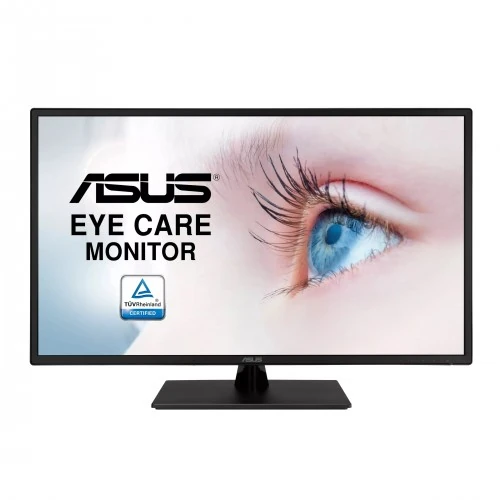
ASUS VA329HE 31.5-inch 75Hz FHD FreeSync IPS Eye Care Monitor: Bangladesh Buying Guide
Exact model and regional identity
This listing is for the ASUS VA329HE, a black 31.5-inch Full HD IPS monitor. Its exact marketing model is VA329HE; “31.5 inch”, “75Hz” and “FHD” are descriptive specifications, not part of the model number. ASUS regional ordering numbers include 90LM07F1-B01BB0 and 90LM07FB-B01BC1, but the Bangladesh shipment label is not visible in the supplied images. Keep the product and variant manufacturer part number as VA329HE unless the actual carton proves a local ordering code. The white VA329HE-W is a color variant. VA329QG3, VA32AQ and VA32UQ are different displays with different resolutions, refresh rates or ports. Confirm the full code on the invoice and carton.
31.5-inch Full HD IPS picture
ASUS specifies a 31.5-inch, 16:9 IPS panel with native 1920 by 1080 Full HD resolution. The 178-degree horizontal and vertical viewing angles are useful when more than one person watches or when the screen sits off-centre. Brightness is rated at 300 cd per square metre and static contrast at 1200 to 1; ASUS Smart Contrast Ratio is a separate dynamic processing figure and should not be confused with native contrast. The panel displays 16.7 million colours. These specifications suit office documents, learning, video playback and general desktop use. They do not make this a high-resolution editing display: the large panel spreads Full HD pixels over a wide area.
Pixel pitch and viewing distance
The official pixel pitch is 0.363 millimetres, corresponding to roughly 70 pixels per inch. Compared with a 24-inch Full HD screen, the VA329HE presents larger physical text and interface elements at the same operating-system scaling. That can be comfortable for viewing from farther away, such as a shared desk, counter or bedroom. At close distance, fine text and diagonal edges look less dense than on a smaller Full HD or similarly sized QHD display. Consider your seating distance, desk depth and typical content before buying. If you inspect tiny text from under about half a metre, a higher pixel-density model may be preferable; if you value a large image and readable controls, the bigger pixels can be an advantage.
75Hz and Adaptive-Sync / FreeSync
The VA329HE supports up to 75Hz and ASUS lists Adaptive-Sync / AMD FreeSync support. ASUS product specifications identify the technology for this exact model, so the FreeSync wording is supported. A 75Hz refresh can make pointer movement and scrolling feel smoother than 60Hz when the connected computer outputs a compatible signal. Variable refresh can reduce tearing within the supported operating range when the graphics hardware, driver, connection and settings are compatible. The monitor is not a 144Hz competitive gaming screen; the specified response time is 5ms GTG. Treat this as a large general-purpose display with modest gaming features, and check the game’s resolution and frame rate expectations against the PC or console.
Glare finish, brightness and colour
The ASUS specification calls the surface Glare, meaning the screen is glossy rather than a conventional matte anti-glare finish. The finish can make colours appear vivid, but it also reflects windows and lamps more readily. Place it so bright light sources are not directly behind the viewer and adjust room lighting if reflections distract. Typical brightness is 300 cd per square metre; this is intended for indoor use and does not establish HDR support. The listed 1200:1 native contrast and 16.7 million colours describe the panel, not calibrated colour accuracy. For colour-critical design, use a suitable calibration workflow and verify the gamut requirements. The four colour-temperature modes offer convenient adjustments but do not substitute for measured calibration.
Eye-care and on-screen tools
ASUS lists TÜV Rheinland-certified Flicker-Free and Low Blue Light technologies for the VA329HE. The on-screen menu offers four colour-temperature or blue-light filter modes so the image can be adjusted for reading or evening use. These options can change the screen’s colour appearance; choose a neutral setting when colour matters. ASUS also specifies GamePlus overlays, SPLENDID picture modes and QuickFit virtual scale tools. These are on-screen display features for gaming aids, picture presets and document or photo layout checks. They do not change the panel’s physical resolution or add software functions to the connected computer. Comfort remains personal: set a suitable brightness, avoid reflections and take breaks during long sessions.
Inputs, audio and device switching
The rear panel provides two HDMI 1.4 inputs, one D-Sub VGA input and a 3.5mm earphone jack. This mix lets a user keep modern HDMI devices and an older VGA computer attached at once, then switch the active input through the monitor’s menu. There is no DisplayPort and no USB-C input. ASUS specifies no built-in speakers. The 3.5mm jack is an audio output for headphones or powered speakers when audio arrives over HDMI; it is not a speaker system or a general-purpose line input. Check that the computer or console sends compatible video over the chosen connector and that audio is routed to the display if using the headphone output.
Stand, mounting and desk fit
The supplied stand supports tilt from approximately -5 degrees to +8 degrees and has no height adjustment, swivel or pivot. ASUS lists a 100 by 100 millimetre VESA mounting pattern for a monitor arm or wall bracket; check the mount’s weight rating and clearance before installation. With the stand, the monitor measures 72.7 by 47.97 by 20.2 centimetres and weighs 7.1 kilograms net. Without the stand, the listed weight is 6.0 kilograms. The five catalog images show the front, angled views, rear housing and side profile; they do not show a readable regulatory label. Leave enough desk depth for the large screen and its rectangular base, and verify the stand is level before use.
Power use and shipping package
The monitor accepts AC 100 to 240 volts at 50/60Hz and ASUS lists typical power consumption below 19.88 watts. It uses an internal supply rather than a large external adapter. Official package information lists a gross weight of about 9.6 kilograms and carton dimensions of 86.0 by 53.7 by 14.5 centimetres. Those package measurements are separate from the assembled display dimensions and are useful for courier estimates. The variant shipping fields use the carton’s longest side as length (86cm), depth as width (14.5cm) and carton height as height (53.7cm); confirm the courier’s preferred orientation if entering a manual quote. Keep the retail box and serial label with the purchase invoice for warranty service.
Choose the VA329HE within ASUS range
The VA329HE is a flat IPS Full HD display with 75Hz refresh, FreeSync, two HDMI inputs and VGA, but no built-in speakers. Do not confuse it with the VA329HE-W white chassis, the VA329QG3 high-refresh gaming model, the 31.5-inch WQHD VA32AQ or the 4K VA32UQ family. Curved VA326H or VA327H models also differ in panel shape and technology. A seller title that shares “32-inch ASUS” is not enough to establish equivalent specifications. Match the complete model code and confirm the ports, stand, resolution and colour of the actual unit. This helps avoid applying an adjacent model’s DisplayPort, speaker or panel claims to the VA329HE.
Bangladesh price and warranty
Bangladesh retailer listings reviewed show the model around ৳31,400 to ৳32,000, with promotional and regular prices varying by seller and date. The catalog price of ৳32,000 remains unchanged. Star Tech, TechLand BD, Skyland, Ultra Tech and Ryans describe a three-year warranty for this model. The catalog’s existing warranty field says “3 years”; retaining that exact value keeps the schema consistent while the product copy can explain it as a three-year official warranty. Check stock, invoice terms, authorized-service coverage and current final price with the seller. Keep the original box, serial label and purchase document because warranty claims may require identifying the exact regional unit.
Who may find this display useful
The large viewing area can suit office dashboards, spreadsheets, education, customer counters and casual media viewing when a user wants large text and does not sit very close. Dual HDMI plus VGA can help in a multi-device room with both newer and legacy equipment. IPS viewing angles and 75Hz FreeSync support add flexibility for everyday use and casual games. The model may not suit a buyer who wants crisp high-density text at close range, a matte surface, DisplayPort, USB-C, built-in audio or a fully adjustable stand. Compare the total desk footprint and resolution against the price of a smaller QHD or similarly sized higher-resolution panel. Needs and viewing distance matter as much as the headline diagonal.
Setup and inspection checklist
Before ordering, ask the retailer to confirm the VA329HE model code, black finish, included stand, 3-year warranty and current price in writing. On delivery, compare the serial and regional product label on the carton with the invoice, inspect the panel for damage and retain the packaging. Connect HDMI or VGA, select 1920 by 1080 at up to 75Hz in the computer’s display settings, and enable Adaptive-Sync only if the source device supports it. Choose an input and audio output path that matches the connected device. Set tilt, brightness and Low Blue Light mode for the room. If using an arm, verify VESA 100 by 100mm compatibility and support for the monitor’s mass before removing the stand.