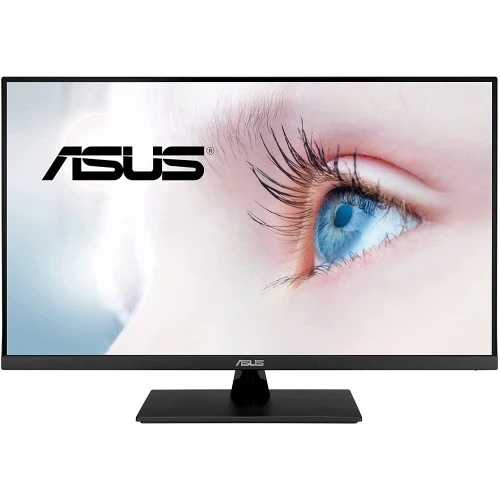
ASUS VP32AQ overview
The ASUS VP32AQ is a 31.5-inch class WQHD monitor designed for home office, study, entertainment, and everyday PC use. ASUS specifies a 2560 × 1440 IPS panel, 75Hz maximum refresh rate, 100% sRGB color space, HDR10 support, Adaptive-Sync, and two built-in 2W speakers. The local product name says 32 inches, while ASUS lists a 31.5-inch panel; this page uses both labels carefully so buyers can distinguish the marketed size class from the panel's stated diagonal. The exact model is VP32AQ. Its connectivity includes one DisplayPort 1.2 and one HDMI 1.4 input, plus a headphone connection. This is a detailed general-purpose QHD monitor rather than a high-refresh competitive gaming display.
QHD resolution for a larger workspace
The native 2560 × 1440 resolution places 3,686,400 pixels on a 16:9 screen. It offers more desktop detail and workspace than Full HD, which can make spreadsheets, browser tabs, documents, timelines, and side-by-side windows easier to arrange. A 31.5-inch class screen lets those QHD pixels appear at a larger physical size than on a smaller monitor, so operating-system scaling and viewing distance can be adjusted to keep text comfortable. The display shows the signal supplied by the connected computer; it does not add genuine detail to a lower-resolution video or game. Set the computer to 2560 × 1440 for native output, then choose a scaling level that suits your eyesight and desk distance. The graphics source must support QHD at the selected refresh rate.
IPS panel, viewing angles and color
ASUS lists an IPS panel with 178-degree horizontal and vertical viewing angles, 100% sRGB color space, 350 cd/m² typical brightness, and a typical 1000:1 contrast ratio. The broad nominal viewing-angle rating helps when the viewer is not exactly centered, although perceived brightness and color can still shift at oblique positions. The 100% sRGB specification is useful context for web images, office documents, and everyday media. It does not guarantee factory calibration accuracy for every unit or application. Creators should select an appropriate display mode and use a calibrated workflow when colors must match a controlled production target. The 350 cd/m² figure is a typical brightness specification, while room reflections and chosen picture settings affect the brightness that feels comfortable. ASUS also states 10-bit display color support as 1.0737 billion colors.
75Hz refresh and 5ms response time
The maximum refresh rate is 75Hz and ASUS specifies a 5ms gray-to-gray response time. At 75Hz, a compatible source can refresh the image up to 75 times each second. This is a modest step above 60Hz and can make supported desktop motion feel a little smoother, while the VP32AQ remains positioned for general use rather than 144Hz or higher esports play. The response-time figure is a manufacturer rating under stated measurement conditions, not a guarantee that every pixel transition completes in five milliseconds in every picture mode. Actual motion depends on game frame rate, overdrive, connection, and scene. For best results, connect by DisplayPort or HDMI, choose 2560 × 1440 at 75Hz in the computer settings, and check the monitor menu if the source chooses a lower refresh automatically.
HDR10 and image modes
ASUS lists HDR10 support and multiple HDR modes. HDR10 is a source and display signal format; its presence alone does not establish a particular peak-brightness certification. ASUS publishes the VP32AQ's 350 cd/m² typical brightness and 1000:1 typical contrast, so buyers should evaluate HDR expectations against those stated panel characteristics and their own viewing environment. Compatible HDR content and a computer or console configured to output HDR are required. The monitor's picture mode and the source's tone mapping can change the result. For normal desktop work, users may prefer an SDR mode with brightness adjusted for the room. The ASUS specification sheet also names SPLENDID picture presets and Trace Free response adjustment. These controls let users tailor the image, but they do not replace checking color settings in a color-managed workflow.
Adaptive-Sync and casual gaming
The VP32AQ supports ASUS Adaptive-Sync and AMD FreeSync within a listed 48Hz to 75Hz refresh range. Variable refresh can help reduce tearing when frame delivery changes within the supported range on a compatible graphics card and connection. It does not raise a game's frame rate or guarantee that every PC and cable combination will work identically. Enable the feature in the monitor and graphics settings, install a suitable driver, and confirm the active mode in the display control panel. GamePlus tools include an on-screen crosshair, timer, FPS counter, and display alignment guides, as shown by the product imagery and ASUS product information. These are optional overlays rather than game performance improvements. The 75Hz ceiling means buyers seeking high-frame-rate competitive play should compare a faster display.
Eye-care features and daily comfort
ASUS describes Eye Care technologies including TÜV-certified low-blue-light and flicker-free features. The Low Blue Light control offers settings that adjust blue-light output, while flicker-free operation is intended to reduce visible backlight flicker. TÜV certificates are listed by ASUS for the monitor. Comfort remains personal and is also affected by screen brightness, viewing distance, room lighting, posture, and taking regular breaks. Lowering brightness to match the room can be more useful than running the screen at maximum all day. The anti-glare surface helps diffuse reflections, but strong windows or lamps can still create distracting glare. Position the screen so that its center is near a comfortable eye line, avoid direct reflections, and use a stand or monitor arm that permits a natural seated posture.
Ports, audio and device compatibility
The official ASUS specification lists one DisplayPort 1.2 input, one HDMI 1.4 input, and an earphone jack. The first catalog image shows the same DisplayPort, HDMI, and headphone connections; it does not show a VGA input, so the catalog's previous VGA wording has been corrected. Both digital inputs support the model's 2560 × 1440 at up to 75Hz according to ASUS signal-frequency data. The monitor includes two 2W speakers, useful for basic system sound, calls, or casual viewing; they are not a substitute for dedicated speakers or headphones when fuller audio matters. Connect a source using its compatible digital output and select the matching input in the monitor menu. A headphone connection can be used for private listening. Check that the graphics card, cable, and operating system are configured for native resolution and refresh.
Stand, VESA mounting and physical dimensions
The supplied stand provides tilt adjustment from approximately −5 degrees to +8 degrees. ASUS lists no height-adjustment mechanism, so a riser or compatible monitor arm may be useful if the screen needs to sit higher. A 100 × 100mm VESA pattern supports compatible arms or mounts. ASUS lists dimensions of 714.6 × 485.7 × 201.8mm with the stand and 714.6 × 423.7 × 50.4mm without it. Listed net weight is 7.82kg with the stand and 6.2kg without, with a gross package weight of 9.8kg. Confirm a mount's load rating, screw length, and clearance before installation. The monitor includes a Kensington lock slot for compatible physical security hardware. Leave space for the stand footprint, cable bends, airflow, and comfortable viewing distance.
Power and box contents
ASUS lists 100–240V, 50/60Hz input, under 25W typical power consumption, less than 0.5W in power-saving mode, and less than 0.3W when off. Regional package accessories can vary. The UK specification lists a warranty card, quick-start guide, power cord, and HDMI cable; confirm the local box contents with the Bangladesh seller, particularly if you plan to use DisplayPort. Use a suitable power connection and keep cables arranged so they are not pulled tight or bent sharply. The monitor's integrated speakers can receive audio from a compatible digital source, while the headphone jack supports external audio. For cleaning, turn off the display and unplug it before wiping with a soft cloth. Follow ASUS care guidance and avoid spraying liquid directly on the panel.
Specifications for buyers in Bangladesh
Bangladesh listings reviewed on 5 November 2026 showed advertised prices of ৳44,000 at Creatus, ৳44,800 at TechLand and Ryans, and ৳50,000 at PC House. Offers, stock, payment method, delivery, and included accessories can change; the displayed comparison is a dated snapshot and not a guaranteed checkout price. The catalog's existing variant MSRP of ৳44,800 remains unchanged. The catalog warranty field states three years, matching the current TechLand listing, but warranty terms depend on the local seller, invoice, serial number, and covered components. Ask the seller to confirm written coverage, service location, dead-pixel policy, return rules, and whether the unit includes the expected cable and documentation. Match the label on the carton and monitor to VP32AQ before accepting delivery.
Who should consider this monitor
The VP32AQ can suit users who want a large QHD canvas, IPS viewing angles, sRGB coverage, eye-care modes, built-in speakers, and common digital inputs in one monitor. Its 75Hz refresh and Adaptive-Sync can support light or casual gaming, while office tasks and streaming benefit from the 16:9 QHD workspace. People who need higher refresh rates, USB-C docking, height adjustment, deeper HDR performance, or multiple HDMI inputs should compare other models and verify those features before purchase. A 31.5-inch panel also needs a desk and viewing distance that make its size comfortable. The stand tilts but does not raise or lower, so check ergonomics if the screen must align with a particular desk setup. The right fit depends on the connected devices and work, not just the 32-inch product title.
Summary
ASUS VP32AQ is a 31.5-inch class WQHD IPS monitor with 2560 × 1440 resolution, 75Hz refresh, 5ms GTG response, 100% sRGB, HDR10, Adaptive-Sync, two 2W speakers, DisplayPort 1.2, HDMI 1.4, and a headphone jack. It also includes ASUS eye-care features, GamePlus overlays, a tilt stand, and VESA 100 × 100mm mounting. The most important purchase checks are the 75Hz performance target, the single HDMI and single DisplayPort input, absence of height adjustment, and the written local warranty. Set native resolution and refresh in the source device after connection. Compare current seller prices and package contents at checkout because promotions are time-sensitive. These details now follow the exact ASUS VP32AQ manufacturer specifications, with local seller data separated from manufacturer hardware claims.