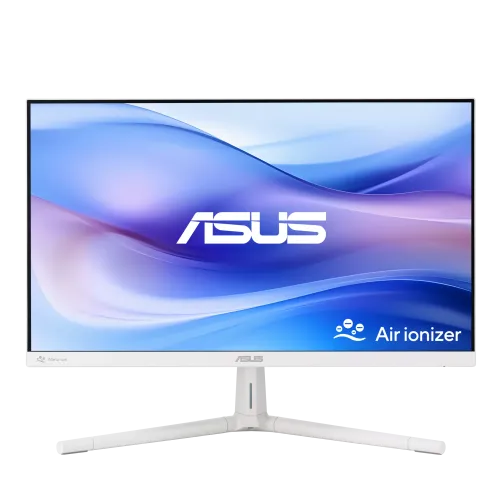
A white 23.8-inch Full HD monitor with an air ionizer
The ASUS VU249HFI-W is a white desktop monitor built around a 23.8-inch viewable Full HD display. ASUS identifies this exact model as an IPS monitor with a 1920 × 1080 resolution, up to 100Hz refresh, SmoothMotion and Adaptive Sync. Its built-in Air Ionizer and Eye Care Plus features distinguish it from a conventional office display. This combination is intended for everyday computer use, study, office applications, video and casual gaming where a familiar 16:9 screen and a higher-than-60Hz refresh rate are useful. The 23.8-inch viewable diagonal is the more precise size; “24-inch” is a common class label used by retailers. The white cabinet and stand shown in the BiponiBD gallery should be compared with the exact product label and regional revision before ordering. Model suffixes matter: VU249HFI-W identifies the white version and should not be confused with other VU or ASUS monitor models that share a similar name.
Resolution and IPS viewing
The native image grid is Full HD at 1920 × 1080 pixels, a 16:9 format supported by common laptops, desktops and many media sources. At 23.8 inches, this resolution provides a practical workspace for documents, spreadsheets, browser windows, online meetings and streaming. It is not a QHD or 4K panel, so people who need a particularly dense desktop for detailed design, large spreadsheets or high-resolution editing may prefer a higher pixel count. ASUS lists an IPS panel and 178-degree wide viewing angles. That figure describes a viewing-angle specification; it does not mean image appearance is identical from every position or under every lighting condition. Reflections, brightness, viewing distance and room light still affect comfort and perceived contrast. Use the operating system scaling and application zoom settings to make small text easier to read rather than assuming the panel changes the size of all interface elements automatically.
What the 100Hz refresh rate does
The VU249HFI-W supports refresh rates up to 100Hz according to ASUS. A refresh rate is how often the display can update the image each second. When the connected computer supplies compatible frames, a higher refresh can make pointer movement, scrolling, window motion and supported games appear smoother than on a 60Hz display. The monitor cannot create extra game frames by itself. The graphics processor, cable, selected input, driver and operating-system display mode must also support the chosen resolution and rate. If 100Hz is not available after connection, confirm that the display is set to 1920 × 1080, check the source’s output settings and use a port/cable combination supported by the manual. ASUS also lists Adaptive Sync, which can coordinate compatible source and display timing to reduce tearing in supported conditions. It is not a substitute for a capable graphics system, and compatibility depends on the source, driver and configuration.
Understanding the 1ms MPRT figure
ASUS advertises a response figure of 1ms MPRT for this model. MPRT means Moving Picture Response Time and is a motion-picture measurement. It should not be presented as an unqualified 1ms gray-to-gray (GTG) response value; those are different methods. MPRT results can depend on motion settings and measurement conditions. The practical display experience also depends on frame rate, refresh rate, pixel transitions and content. For everyday work, text clarity, viewing distance, lighting and color settings are often as noticeable as a response-time headline. If the monitor is selected mainly for competitive gaming, compare the manual’s supported modes and independent measurements for the exact VU249HFI-W revision. ASUS positions this model as an all-round Eye Care monitor with a 100Hz ceiling, rather than a high-refresh esports display. The product description therefore keeps the official MPRT label beside the number and avoids translating it into an unsupported GTG claim.
Air Ionizer: how to read ASUS’s claim
The built-in Air Ionizer is the product’s distinctive feature. ASUS says that when activated it can remove up to 90% of airborne dust within three hours, based on an independent test in an enclosed 1m³ space. That test condition is important: the published figure describes a small enclosed test volume and should not be interpreted as guaranteed whole-room cleaning, removal of every pollutant or a medical benefit. ASUS describes its Nano-Ion approach as filter-free, so a replacement air filter is not part of the advertised function. The monitor remains a display first; the ionizer does not replace ventilation or a room air purifier selected for a room’s size and needs. The BiponiBD product photos show an Air Ionizer label and rear vents, but pictures do not independently validate test performance. Buyers who need the exact activation control, recommended placement, operating guidance or maintenance instructions should review the user manual for the delivered regional version.
Eye Care Plus and viewing comfort
ASUS lists Eye Care Plus, an adjustable Blue Light Filter and Flicker Free technology for this model. The official product page identifies the adjustable blue-light feature as TÜV Rheinland-certified. These are display comfort features that can be selected to suit personal preference and the surrounding light. A blue-light mode can alter the screen’s color appearance, so users doing color-sensitive work may prefer a neutral picture mode and controlled lighting. Flicker Free is ASUS’s stated technology; it does not guarantee that every person will experience no fatigue. Regular breaks, readable text size, comfortable viewing distance and appropriate brightness also matter. Do not rely on a monitor feature to diagnose or treat eye symptoms. The color temperature choices listed by local sellers should be treated as seller-reported unless confirmed in the exact manual. This copy separates manufacturer-described eye-care functions from broader health claims that are not established by the product specifications.
Connections, sound and setup
The ASUS datasheet and Bangladesh retailer pages list two HDMI inputs and a headphone jack for the VU249HFI-W family. Check the rear connection labels and regional manual before relying on a particular port version, since the supplied configuration can vary by market. The headphone output is useful when a connected source sends audio over HDMI and the monitor passes it through, but buyers should confirm the exact audio behavior in the manual. Retailer specifications state that there are no built-in speakers, so plan for external speakers or headphones if sound is needed. HDMI connects compatible computers, consoles and media devices; it does not guarantee that every device can deliver 100Hz at the selected resolution. Cable capability and output settings matter. The gallery’s rear image gives a visual reference for the ports, but the product photo should not replace confirmation of a physical unit’s exact connection layout.
Stand adjustment and mounting
The ASUS family datasheet lists tilt and three height settings in 2.5cm increments, along with 75 × 75mm VESA mounting. The photographed stand appears to have a height-adjustment mechanism, but the exact stand and adjustment range should be checked against the product manual and delivered revision. Tilt changes the screen angle; it is not the same as swivel or portrait rotation. One Bangladesh seller lists the monitor as not rotatable, so do not assume pivot/portrait use from a generic retailer attribute. If the display will be mounted on an arm or wall bracket, verify both the VESA pattern and the mount’s weight capacity and screw requirements. A stand or VESA arm may affect desk depth, clearance and cable routing. The BiponiBD record does not contain verified parcel dimensions or weight, so this listing does not invent shipping measurements. Confirm the carton size and included stand if those details affect installation.
Color, brightness and contrast
The manufacturer datasheet for the VU249HFI-W family lists 250 cd/m² typical brightness and a 1300:1 contrast ratio; local listings also describe 16.7 million colors and a matte anti-glare surface. These specifications can help set expectations but do not replace a measured review of color accuracy or gamut. A 250-nit typical brightness is suitable for many indoor desks, while direct sunlight or strong reflections can reduce perceived visibility. Contrast figures are measured under defined conditions and do not describe black-level performance in every room. The screen is a white-finish model, while the pixels reproduce the image. Do not mistake cabinet color for color gamut. No color-space coverage or factory calibration result is established in the evidence used here, so this is not described as a professional color-grading display. For photography, print or design work, confirm gamut and calibration data for the exact unit and use a suitable color-management workflow.
Desk use, productivity and casual play
A 23.8-inch Full HD panel can suit a single-monitor desk for office applications, study, home browsing and video calls. The 100Hz ceiling can make compatible scrolling and motion look smoother, while the IPS panel offers broad specified viewing angles. Adaptive Sync and 1ms MPRT are relevant to motion, but neither turns the display into a high-resolution or high-refresh gaming monitor. Buyers should check their graphics source and the connection mode before expecting 100Hz. For productivity, consider how many windows fit comfortably at Full HD and whether a dual-monitor setup would be more useful than a larger resolution. The white finish may work with light-colored desks and accessories, but appearance is subjective and the gallery is illustrative. The absence of built-in speakers means audio requires another device. This makes the model a flexible display choice when the ionizer and eye-care features are relevant, while basic port and desk-fit checks remain essential.
Power and environmental use
The listing’s inherited electrical attribute states 100–240V, 50/60Hz; confirm the power label and supplied cable or adapter for the exact region before use. ASUS describes energy-efficient operation and paper packaging on its product page. That statement does not establish the certification status of an individual imported unit or the exact box contents. The record’s old combined certificate line included Energy Star, EPEAT Gold, TCO and FSC claims without evidence tying each claim to this exact white SKU and region; those unsupported certifications are not carried forward. Use the power specifications printed on the device and manual, keep the cable clear of heat and pinch points, and follow the included instructions. No package contents or country of origin are inferred from the seller pages. If a particular environmental certification, power draw or included accessory is important, ask the seller for the exact SKU documentation before purchasing.
Regional revision and model matching
The model code VU249HFI-W should appear on the monitor label, carton or invoice. ASUS pages and seller feeds can use the rounded “24-inch” class description while the viewable diagonal is 23.8 inches. The retail title may also say white, professional, Eye Care or dual HDMI, but those labels do not replace the product code. The ASUS datasheet referenced here is for the exact model family, while some connection and ergonomic details can be region-specific. Check the manual for the unit being supplied if HDMI count, refresh-rate timing, tilt, height adjustment, VESA fit or audio passthrough determines compatibility. The seller’s warranty is another separate matter: retailer pages publish their own coverage and claim terms. A model-family page cannot verify that the individual BiponiBD unit is eligible for local warranty or whether a box must be retained. Confirm the serial-number coverage and provider in writing before ordering.
What the product images show
The six catalog images show several views of the white monitor and its Air Ionizer feature. The first is a straight-on front view with the display on a light background; the second shows the front at an angle and the white stand; the third shows the monitor’s side profile and stand; the fourth shows the rear cabinet, power inlet, ports and ionizer area; the fifth is a promotional graphic stating “Up To 90% Less Dust”; the sixth is a close view of the rear Air Ionizer panel and airflow arrows. The promotional dust figure must be read with ASUS’s enclosed 1m³, three-hour test qualifier. The pictures help explain the design but do not prove stock, included cables, dimensions, warranty, color measurement or the exact regional port revision. Alt text should describe the visible view and model without repeating every keyword or turning promotional artwork into an independent performance guarantee.
Warranty, price and availability checks
The saved catalog variant has a BDT 18,000 MSRP, but that stored value is not live stock or a checkout quote. Retailer pages show their own prices and availability, which can change; they do not establish a BiponiBD offer. Local sellers commonly display warranty information for their own units, including three-year claims, but the coverage provider, dead-pixel policy, service location and exclusions may differ. Ask BiponiBD to confirm the exact unit’s serial-number eligibility, warranty provider, claim process and current delivered price. Check the final checkout total, delivery charge and available stock directly before payment. This description intentionally avoids inserting a seller’s current market price into static copy. If the catalog price changes, a descriptive paragraph should not become stale. Keep the invoice, warranty card and packaging according to the seller’s instructions, rather than assuming one retailer’s return policy applies here.
Who should consider this monitor
Consider the ASUS VU249HFI-W if you want a white 23.8-inch Full HD IPS display with a refresh rate up to 100Hz, Adaptive Sync, Eye Care Plus and an integrated Air Ionizer. It may be a practical fit for a home or office desk where those features matter and the HDMI-based setup suits the devices. It may be less suitable if you need a higher-resolution workspace, built-in speakers, verified professional color coverage, guaranteed whole-room air purification, or portrait rotation. Before ordering, compare the exact model suffix, port layout and stand against your intended computer or console. Decide whether the ionizer’s small-volume test claim matches your expectations; it is not presented here as a room purifier. Confirm live availability, final price and warranty terms with BiponiBD, as those operational facts are not proven by an active catalog status or a saved MSRP. These checks help match the monitor’s documented features to the actual desk and source device.