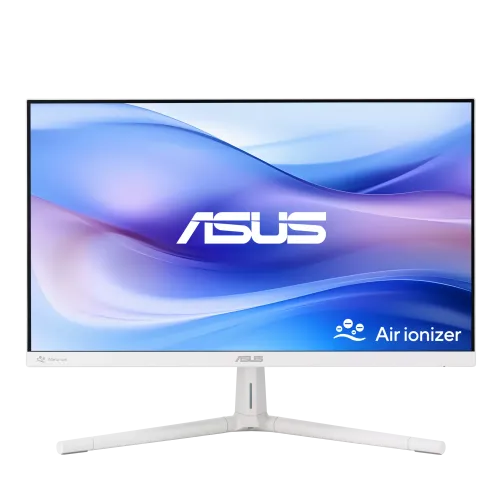
ASUS VU279HFI-W: 27-inch white Full HD Eye Care monitor
The ASUS VU279HFI-W is a white 27-inch monitor in ASUS’ VU Air Ionizer line. Its IPS panel has 1920 × 1080 Full HD resolution, a 16:9 shape and a maximum refresh rate of 100Hz. The model adds a built-in Nano-ion air ionizer, ASUS Eye Care+ options, Adaptive-Sync and a three-position height-adjustable stand. It is designed for everyday office, study, video and casual gaming use, not high-resolution creative work or high-refresh esports. The pages reviewed show some regional specification differences, including typical brightness of 250 cd/m² on the US and Bangladesh pages and 220 cd/m² on ASUS Denmark’s page. We identify the region when a figure differs rather than implying every market ships identical hardware.
Screen size, resolution and text detail
The 27-inch (68.6 cm) flat IPS screen displays 1920 × 1080 pixels in a 16:9 aspect ratio. ASUS lists a visible area of 597.88 × 336.31 mm and a pixel pitch of 0.311 mm. That works out to roughly 81.6 pixels per inch. At a normal desk distance this can make text comfortably large without requiring interface scaling, but it is less dense than a 24-inch Full HD screen or a 27-inch QHD display. Buyers who sit very close, inspect fine image detail or keep multiple dense windows open may prefer a higher-resolution model. Resolution does not set font size on its own; operating-system scaling, application zoom and viewing distance all affect readability. Consider how far you sit and how much screen detail your daily tasks require.
IPS picture, color and brightness
ASUS specifies an IPS panel with 178-degree horizontal and vertical viewing angles at CR ≥ 10, 16.7 million colors and 99% sRGB color space. The surface is anti-glare, and the display uses an LED backlight. The static contrast ratio is 1300:1; ASUS also lists a much higher 100,000,000:1 ASUS Smart Contrast Ratio (ASCR), which is a separate dynamic marketing measure and should not be confused with static contrast. Typical brightness is listed as 250 cd/m² on ASUS USA and on Bangladesh retail pages, while an ASUS Denmark regional specification lists 220 cd/m². This is a genuine published regional-document difference. ASUS does not publish DCI-P3 or Adobe RGB coverage in the reviewed US specifications. The model is best described by its published sRGB figure, not as a verified wide-gamut or factory-calibrated display.
100Hz refresh and 1ms MPRT
The maximum refresh rate is 100Hz. ASUS calls its motion feature SmoothMotion and lists a digital vertical signal range of 48–100Hz over HDMI. Compared with 60Hz, a compatible 100Hz signal can make scrolling, cursor movement and supported game motion feel smoother. The computer or console, HDMI connection, cable and chosen settings must all support the selected mode; confirm 100Hz in the operating system. ASUS lists a 1ms MPRT response rating, which is a motion-picture response measure rather than a published grey-to-grey transition time. ASUS does not provide a GtG figure on the reviewed specification. The screen has Adaptive-Sync/VRR support. ASUS’ official specification does not certify or explicitly name NVIDIA G-Sync for this model, even though one retailer table says “G-Sync: Yes”; buyers should treat that retailer label as unverified and check their exact GPU and setup.
Air ionizer: what ASUS actually claims
The built-in feature is a filter-free Nano-ion generator, with vents at the rear of the white monitor. ASUS says it can reduce airborne dust by up to 90% within three hours, based on test results in an enclosed 1 m³ space. That test condition matters: this result is not a guarantee for a whole room, every home, or all pollutants, and it does not establish medical or allergy benefits. The monitor has no replaceable purifier filter listed. Think of the ionizer as a model-specific desk feature rather than a substitute for a room air cleaner or ventilation. The fifth supplied product image is an ASUS feature illustration, not a measured result for the buyer’s own room. The VU279HFI-W’s standout combination is the air ionizer with its 27-inch white IPS screen, ergonomic stand and eye-care features.
Eye Care+, modes and Windows software
ASUS lists Eye Care+ technology, adjustable Low Blue Light, Flicker Free, Color Augmentation and Rest Reminder. Color Augmentation is intended to help distinguish onscreen colors; Rest Reminder can show prompts at configured intervals. ASUS also lists SPLENDID picture modes, four color-temperature selections, GamePlus, QuickFit, Trace Free and DisplayWidget Center software for adjusting supported monitor settings from Windows. TÜV Rheinland Low Blue Light and Flicker-free certifications appear in the manufacturer specification. These are settings and comfort tools, not a promise to prevent eye fatigue. Adjust brightness for the room, choose a comfortable viewing distance and take breaks as needed. The monitor also lists an ambient-light sensor/auto-brightness feature on the US specification/product page; buyers should check the delivered regional unit and OSD options if automatic brightness is important.
Ports, audio and compatible devices
The rear I/O panel has two HDMI 1.4 inputs and a 3.5 mm earphone/audio output. ASUS lists HDCP 1.4 and a 100–109 kHz horizontal / 48–100 Hz vertical HDMI signal range. There is no built-in speaker. The audio jack can pass sound from HDMI to headphones or external powered speakers, so check the source device’s audio output settings if sound does not appear. ASUS Power Sync/HDMI-CEC is listed for compatible equipment, but device behavior can vary. This model has no DisplayPort or USB-C video input in the reviewed specification. It can keep two HDMI sources connected at once, which is useful for a desktop and laptop or a computer and console, but it cannot accept a direct USB-C display connection without a suitable active adapter. Choose a model with USB-C or DisplayPort if those inputs are required.
Stand adjustment, VESA and desk fit
The supplied stand tilts from -5 to +20 degrees and has three selectable height positions separated by 25 mm. This is a screw-position adjustment using the included L-shaped screwdriver, not a sliding gas-spring lift. ASUS lists a 75 × 75 mm VESA mounting pattern and a Kensington lock. The white stand has a cable-management clip; the product photographs show its V-shaped base and blue-grey cable organizer. Maximum dimensions with the stand are 61.1 × 48.4 × 20.2 cm (width × height × depth); without the stand they are 61.1 × 36.3 × 4.6 cm. Check the table depth and the monitor’s height at each stand position before purchasing. If you use an arm, confirm it supports the display’s weight and the correct 75 × 75 mm plate.
Power use, weight and package contents
ASUS lists 10.28W power consumption, up to 0.5W in power-saving mode, below 0.3W when off, and AC 100–240V at 50/60Hz. The power inlet is built into the monitor, so a separate external power brick is not listed. ASUS’ estimated net weight is 4.7 kg with the stand and 4.2 kg without. The box is listed at 69.0 × 43.1 × 13.8 cm and 7.4 kg gross. ASUS lists a power cord, HDMI cable, L-shaped screwdriver, quick-start guide and warranty card; the product line uses recycled cardboard packaging that can be reused for small desk accessories. Regional accessories may vary, so check the box contents with the seller. Shipping weight and box dimensions are for courier planning, not the assembled screen footprint.
Warranty, price and buying in Bangladesh
The current variant price saved in this catalog is ৳26,500 and is preserved. Bangladesh listings reviewed show roughly ৳26,500 to ৳27,800, depending on seller and offer. Star Tech lists ৳26,500 at the time reviewed and a three-year warranty; Ryans and other retailers also list a three-year term. Confirm price, stock, warranty provider, invoice model code and service procedure at checkout. The ASUS model code is VU279HFI-W; the physical images do not reveal a serial-specific barcode or manufacturing-country label, so those product fields remain unset. Some retailers use inconsistent search labels for G-Sync or brightness. Rely on the ASUS Adaptive-Sync specification and check compatibility with your GPU rather than treating an unverified retailer checkbox as certification. Price and warranty terms can change.
Who should choose this monitor?
The VU279HFI-W suits a buyer who wants a white 27-inch Full HD IPS monitor with 100Hz refresh, modest power use, practical height and tilt adjustment, dual HDMI and the built-in Nano-ion feature. It can serve a home office, study desk, reception area or general entertainment setup. Its 99% sRGB figure and wide viewing angles suit everyday web and office content, while the documented sRGB percentage alone does not establish professional color calibration. Choose a higher-resolution screen for finer text, more desktop workspace or close-up creative work. Choose another model if you require DisplayPort, USB-C, built-in speakers, HDR, an automatically sliding height stand or confirmed NVIDIA G-Sync certification. Before ordering, verify the local brightness specification, included accessories, warranty, and whether the supplied stand’s three screw positions meet your preferred height.