A Full HD monitor for mixed work and play
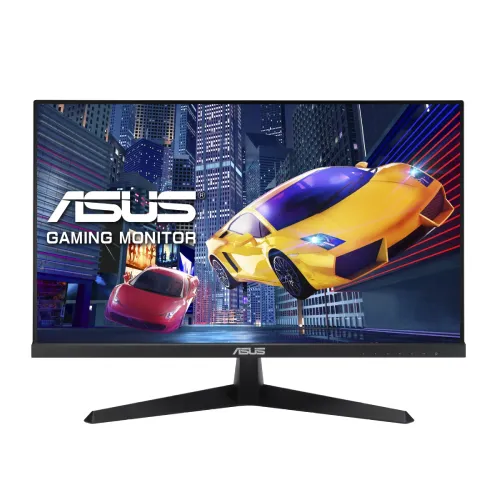
The ASUS VY249HGR is a 23.8-inch Full HD IPS monitor with a maximum 120Hz refresh rate over HDMI. It combines a familiar 1920 × 1080 desktop format with ASUS motion and eye-comfort functions, HDMI 1.4 and VGA inputs, a headphone jack and a VESA mounting pattern. ASUS’s own specification page and user guide are the primary references used for this product record. The supplied catalog gallery shows the black monitor from the front, two angled front views, a side profile and two rear views. The display is appropriate to consider for home, office, study and casual gaming uses, subject to the resolution and connection limits described below.
Panel size, resolution and desktop space
ASUS lists a 23.8-inch wide-screen panel with a 16:9 ratio and 1920 × 1080 maximum resolution. This Full HD size is common for office applications, web browsing, classroom material, video meetings and console or PC entertainment. It is straightforward to connect to a wide range of computers and does not require the extra graphics output bandwidth associated with higher-resolution screens. At the same time, Full HD has less pixel density and usable window area than QHD or 4K. Users who work with dense dashboards, large spreadsheets, detailed photographs or multiple editing timelines should compare higher-resolution options before settling on a 23.8-inch Full HD display.
IPS viewing and color characteristics
ASUS identifies an IPS panel and 178-degree horizontal and vertical viewing angles. The published viewing-angle figure can help when the screen is viewed away from its centre or shared with another person. The user guide lists 16.7 million colors using 6-bit plus A-FRC processing and a 0.2745 mm pixel pitch. These figures do not promise factory calibration or a specific professional color-gamut coverage. The display uses a non-glare surface. Reflections can still occur in bright rooms, so screen position and lighting affect comfort. The official typical brightness is 250 cd/m² and typical contrast is 1500:1. ASUS also lists a much larger maximum ASCR contrast figure when dynamic contrast is enabled; it should not be confused with the typical contrast measurement.
120Hz refresh and supported timing
The VY249HGR supports up to 120Hz over HDMI. ASUS’s manual lists 1920 × 1080 at 120Hz among supported HDMI modes, while the VGA mode table lists lower maximum refresh modes. A higher refresh rate can make pointer movement, scrolling and compatible game animation appear smoother when the computer can produce the corresponding frames. To use 120Hz, connect through a suitable HDMI source and cable, select Full HD and choose 120Hz in the operating system. If the mode is unavailable, check the graphics output, driver, cable, input selection and display settings. A high refresh ceiling alone does not guarantee a particular game frame rate or lower input latency in every system.
Response figures and motion features
ASUS publishes two different response measures: 1ms MPRT and 5ms GTG. MPRT describes perceived motion-picture response and often relates to a blur-reduction mode; GTG measures pixel transitions between gray shades. The numbers use different methods and should not be compared as if they were the same measurement. ASUS also lists Trace Free, GameFast Input, Motion Sync and GamePlus features. Adaptive-Sync can coordinate refresh behavior with compatible graphics sources, but support depends on the source hardware, driver, signal and selected settings. Review the on-screen menu and compatible source documentation when configuring these features.
Eye-care and accessibility functions
ASUS lists Flicker-Free and a Blue Light Filter, together with Eye Care+ functions, Color Augmentation and Rest Reminder. These options can adjust the image or provide a reminder during long sessions. The Color Augmentation option may help some users distinguish colors; it does not replace assistive tools or a calibrated workflow where precise color interpretation is required. The non-glare panel coating can reduce mirror-like reflections in common indoor conditions, though it cannot remove all glare. Set the brightness for the room, position the screen at a comfortable distance and use breaks as needed. Eye-care labels describe available settings rather than a medical claim.
Ports, audio and device compatibility
The rear connections include one HDMI 1.4 input, one VGA input and a headphone jack. HDMI is the connection for the documented 120Hz Full HD mode. VGA supports analog devices but does not reach 120Hz at 1920 × 1080 in ASUS’s supported timing table. There is no DisplayPort, USB hub or audio input listed. ASUS specifies that there are no built-in speakers. The headphone output can be used with headphones or external powered speakers, while the audio signal must come from the connected source. Check whether a laptop dock or adapter supports the desired resolution and refresh rate before relying on it.
Stand, mounting and physical placement
The included stand supports tilt from −5 degrees to +22 degrees. ASUS lists a 100 × 100 mm VESA pattern and a Kensington lock slot. Height adjustment, swivel and portrait pivot are not documented for the supplied stand; an external arm may be needed for those movements. ASUS’s user guide gives dimensions of 541 × 395 × 185 mm with the stand and 541 × 323 × 48 mm without it. Listed net weight is 3.4 kg with the stand and 2.9 kg without. Verify the mount’s screw length and load rating, and leave space behind the monitor for the HDMI/VGA and power leads.
Power and box contents
ASUS lists AC 100–240V at 50/60Hz, 20W power-on consumption, less than 0.5W standby and less than 0.3W powered off. The official manual lists a power cord, quick-start guide, warranty card, screws, HDMI cable and optional VGA cable and L-shaped screwdriver. Exact accessories can vary by market or box. The photos show the black finish and connection panel but cannot prove which regional cable or warranty card is in an individual carton. Inspect the model label and accessories on delivery, and use the correct power cord and connection for the unit.
Antibacterial treatment and realistic expectations
ASUS’s broader VY249HGR family material and Bangladesh exact-model listing describe antibacterial treatment on bezel and hotkeys. This is a surface treatment feature; it is not a substitute for normal cleaning and does not make the entire monitor sterile. The standard VY249HGR manual specifies a black finish, which matches the catalog gallery. Do not confuse it with the white VY249HGR-W variant. The title and model fields here use the exact VY249HGR designation.
Bangladesh warranty and purchase checks
Bangladesh retail listings advertise a three-year warranty and show changing prices and stock status. These are local seller claims and are not a guaranteed offer from BiponiBD. Before purchase, confirm the service provider, warranty coverage, dead-pixel policy, claim documents and invoice requirements. Check that the delivered box says VY249HGR rather than a similar model. The product record does not invent a live price, available stock quantity, country of origin, customer rating or review. Retail market context is retained only as research evidence, separate from the store’s sell price and inventory.
Recommended setup sequence
Place the monitor on a stable desk or install a rated 100 × 100 mm VESA mount. Connect power and choose HDMI for 1920 × 1080 at 120Hz. Open operating-system display settings, select Full HD and choose 120Hz if it is offered. If not, verify the cable, graphics output, driver, selected monitor input and any dock or adapter. Adjust tilt and brightness for the room, then choose the desired color temperature and eye-care settings from the on-screen menu. Connect headphones or powered speakers through the audio setup because the monitor itself has no speakers.
Technical specifications
Key features
- 23.8-inch IPS display with 1920 × 1080 Full HD resolution and 16:9 aspect ratio.
- Up to 120Hz refresh rate over HDMI for supported PC modes; ASUS manual lists 1920 × 1080 at 120Hz.
- Dual response specifications: 1ms MPRT and 5ms GTG, according to ASUS.
- 250 cd/m² typical brightness and 1500:1 typical contrast ratio.
- Adaptive-Sync, GamePlus, Shadow Boost, Trace Free and GameFast features listed by ASUS.
- Eye Care features include Flicker-Free, Blue Light Filter, Color Augmentation and Rest Reminder.
- One HDMI 1.4 and one VGA input; headphone jack present, audio input absent.
- No built-in speakers or USB ports; connect external audio equipment as needed.
- 100 × 100 mm VESA mount, Kensington lock and tilt adjustment from −5° to +22°.
- ASUS lists antibacterial treatment on the monitor bezel and hotkeys; gallery shows a black finish.
Advantages
- 120Hz at Full HD can make compatible games and desktop motion smoother than a 60Hz display.
- IPS panel and 178° viewing angles suit shared viewing and general productivity.
- ASUS publishes both MPRT and GTG response measures, making the 1ms figure easier to interpret.
- HDMI and VGA support newer digital and legacy analog sources; headphone output supports external audio.
- VESA mounting, Adaptive-Sync and eye-care controls add useful setup and viewing options.
Points to consider
- Full HD is less detailed and offers less workspace than QHD or 4K at this screen size.
- The maximum 120Hz mode is through HDMI; VGA timing tops out below 120Hz.
- No built-in speakers, USB hub or DisplayPort input is listed.
- The supplied stand provides tilt but no documented height, swivel or pivot adjustment.
- Three-year Bangladesh warranty claims are seller/local terms and should be verified for the delivered unit.
Frequently asked questions
What is the exact model?
The exact model is ASUS VY249HGR. ASUS’s product specifications and user guide identify that model. The separate VY249HGR-W model is not the SKU shown in this catalog listing.
What are its screen size and resolution?
It has a 23.8-inch (60.47 cm) IPS display with 1920 × 1080 Full HD resolution and a 16:9 aspect ratio.
Can it run at 120Hz?
Yes. ASUS lists 120Hz maximum refresh and its manual includes 1920 × 1080 at 120Hz for HDMI. The source graphics card, HDMI cable and operating-system display mode must support it.
What do 1ms MPRT and 5ms GTG mean?
ASUS publishes both figures: 1ms MPRT and 5ms GTG. They use different measurement methods and are not interchangeable; 1ms MPRT is a motion-picture response measure, while GTG measures pixel transition time.
What ports are included?
ASUS lists one HDMI 1.4 input, one VGA input and a headphone jack. It has no DisplayPort, USB input or audio input listed.
Does it include speakers?
No. ASUS specifies no built-in speakers. The headphone output can feed external headphones or speakers; connect the computer’s audio source as appropriate.
Does it support variable refresh?
ASUS lists Adaptive-Sync/VRR support. Availability and operating range depend on the graphics card, driver, connection and on-screen settings; check the manufacturer’s specifications for the exact compatibility range.
What are brightness and contrast?
The official specification lists 250 cd/m² typical brightness and 1500:1 typical contrast. The much higher 100,000,000:1 maximum contrast is specified with ASCR enabled and is a dynamic figure, not the typical static contrast.
What eye-care controls does it have?
ASUS lists Flicker-Free, Blue Light Filter, Eye Care+ features, Color Augmentation and a Rest Reminder function. These are display settings and reminders; they do not replace suitable lighting, comfortable viewing distance and breaks.
Can it be mounted on an arm?
Yes. ASUS lists a 100 × 100 mm VESA mount and Kensington lock. Check the mount’s supported pattern, screw requirements and load rating before installation.
How much can the stand tilt?
ASUS lists tilt from −5° to +22°. The manual does not list height adjustment, swivel or pivot for the included stand.
What warranty applies in Bangladesh?
Bangladesh listings advertise three years, and the catalog record also states three years. Confirm the local ASUS distributor or seller, covered components, claim process and invoice/carton requirements for the exact unit.
Specifications are based primarily on the ASUS VY249HGR technical page and user guide. Local warranty and carton accessories should be verified with the seller and delivered unit.