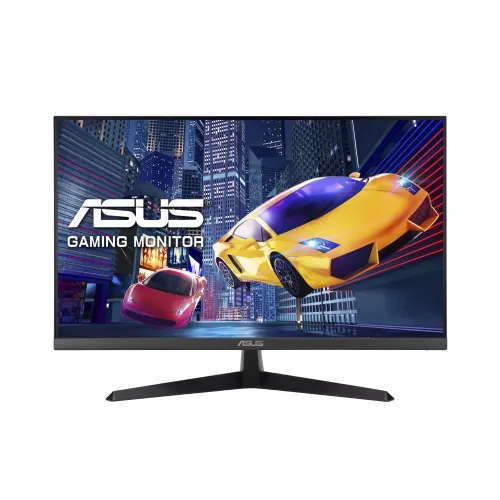
A 27-inch Full HD screen for play, study and everyday work
The ASUS VY279HG2 is a 27-inch flat IPS monitor with native 1920 × 1080 resolution. Its 16:9 panel and 178-degree horizontal and vertical viewing angles make it suitable for a single-user desk where the screen is viewed from directly in front or from the side. The stated 27-inch size describes the diagonal panel; ASUS lists the active image area as 597.888 × 336.312 mm. The anti-glare surface is intended to reduce distracting reflections in ordinary indoor lighting, though it cannot remove all glare from a bright window or lamp.
What the Full HD resolution means at 27 inches
Full HD provides 1,920 horizontal by 1,080 vertical pixels. On a 27-inch panel, text and interface elements appear larger than on a smaller Full HD screen, which some users may find comfortable for reading from a typical desk distance. The tradeoff is lower pixel density and workspace than a 27-inch QHD display. Buyers who edit fine-detail images, view dense spreadsheets or need more desktop area should compare a QHD alternative and consider their viewing distance, operating-system scaling and graphics performance before choosing.
144Hz motion and HDMI requirements
ASUS specifies a maximum 144Hz refresh rate and AMD FreeSync/variable refresh support, with the official product page stating that both are available through HDMI. A higher refresh rate can make pointer movement, scrolling and compatible games appear smoother than 60Hz when the computer renders enough frames. It does not by itself increase game frame rate or guarantee lower input lag. Use the HDMI 1.4 input with a capable graphics output and cable, then select the desired mode in the operating system or graphics control panel.
1ms MPRT is a specific motion measurement
The VY279HG2 is rated at 1ms MPRT, which describes moving-picture response and perceived motion clarity. It is not a statement of gray-to-gray pixel transition time. MPRT claims typically relate to motion handling under a particular display mode; the perceived result can vary with content, refresh rate, brightness and user sensitivity. We keep the measurement name beside the number so the figure is not mistaken for a different response-time test.
Brightness specification conflict to resolve before buying
ASUS’s official specification page lists 300 cd/m² typical brightness. Star Tech Bangladesh lists 250 cd/m², and the previous catalog value also said 250. This entry now follows ASUS’s published manufacturer specification and records the retailer disagreement in the evidence attribute. The exact source of the mismatch may be a listing error, data revision or regional model variation; available evidence does not prove which explanation is correct. If brightness affects your purchase, ask the seller to verify the carton model and current panel specification.
IPS color and viewing characteristics
ASUS identifies an IPS panel, a typical 1500:1 contrast ratio, 16.7 million display colors and 178-degree viewing angles. ASUS’s technical page does not provide a specific sRGB coverage percentage, so this description makes no percentage gamut or factory-calibration claim. IPS viewing angles can help keep the picture more consistent when viewed off-center than narrow-angle panels, but they do not guarantee professional color accuracy. For print, photography or design work, a measured and calibrated display with documented color coverage may be a better fit.
Eye Care Plus, flicker-free and low blue light
The monitor includes ASUS Eye Care Plus and a low-blue-light filter. ASUS lists TÜV Rheinland-certified flicker-free and low-blue-light functions. Users can adjust the blue-light setting to match reading, browsing or video use; stronger filtering may shift the image toward warmer colors. These tools can support viewing comfort for some people, but comfort depends on room lighting, viewing distance, breaks and individual sensitivity. They are not a medical treatment and do not make prolonged uninterrupted screen use harmless.
ComfortRate and Reading Strips
ASUS describes ComfortRate as a feature that stabilizes refresh behavior to reduce brightness fluctuations, with the manufacturer’s up-to-seven-times statement based on its internal testing at a selected level. ASUS says ComfortRate operates with FreeSync/VRR enabled. Reading Strips places an adjustable tinted overlay around text to reduce visual distractions. These are optional software/display functions; users can decide whether they improve their own workflow and turn them off if they prefer an unaltered image.
Antibacterial surface treatment: what it does and does not mean
ASUS states that the monitor’s bezels and hotkeys have an ionic-silver antibacterial treatment. ASUS describes testing under ISO 22196 and reports reduced bacterial activity on treated surfaces compared with untreated material. The treatment applies to specified surfaces rather than the entire device, does not make the screen sterile, and is not a replacement for cleaning or hand hygiene. Follow the monitor manual’s cleaning guidance and avoid spraying liquid directly onto the panel or openings.
Built-in features for games and desktop tasks
GamePlus provides on-screen tools such as crosshair, timer, FPS counter and display alignment. QuickFit offers alignment/grid overlays, while SPLENDID and four color-temperature presets let users adjust the viewing mode. Motion Sync, ASUS Power Sync and DisplayWidget Center are also listed by ASUS. Availability and control method can vary with firmware, operating-system support and connected hardware. These features supplement the monitor’s basic display functions; they do not replace a graphics-card feature or guarantee a specific competitive advantage.
Inputs, audio and connection limits
There is one HDMI 1.4 input, one VGA (D-Sub) input and a 3.5mm earphone jack. ASUS specifies digital vertical signal frequencies from 48 to 144Hz and analog vertical frequencies from 60 to 75Hz. For the advertised 144Hz and FreeSync combination, use HDMI. VGA can connect older computers, but its lower listed signal range means it is not the route for 144Hz. The headphone jack is audio output; ASUS lists no built-in speakers. There is no DisplayPort, USB-C input or integrated USB hub.
Tilt stand, VESA mounting and desk fit
The included stand supports tilt from −5 degrees to +23 degrees and has no height adjustment. ASUS specifies a 100 × 100 mm VESA mounting pattern for a compatible wall bracket or monitor arm. The technical page gives approximate dimensions of 61.2 × 43.5 × 20.1 cm with the stand and 61.2 × 36.5 × 5.0 cm without it. Measure desk depth and arm clearance before buying; the stand footprint and cable path also need room. The product has a Kensington lock slot for a compatible cable lock.
Power use and electrical rating
ASUS lists 14W power consumption, less than 0.5W in power-saving mode and less than 0.3W when off. The rated input is 100–240V AC, 50/60Hz. Actual energy use varies with brightness, selected modes, signal state and usage hours. These figures help compare displays but do not provide a household bill estimate without a usage schedule and local electricity tariff. Use the power cord supplied for the regional unit and follow its safety instructions.
Dimensions, mass and regional estimates
The manufacturer labels physical dimensions and weight as estimates that vary by region. Published net mass is 3.6 kg with stand and 3.0 kg without stand; estimated gross shipping mass is 4.9 kg. Box dimensions are listed as 66.3 × 42.0 × 10.4 cm. The Star Tech page additionally contains an unexplained 4.3 kg figure alongside manufacturer weights; this content uses ASUS’s stated values and keeps the retailer conflict in source notes. Carrier package measurements or the exact local carton may differ.
Regional packaging and included accessories
ASUS notes that accessories vary by region and lists a warranty card, quick-start guide, power cord, L-shaped screwdriver and HDMI cable. This is a manufacturer’s general regional list and does not establish what is inside BiponiBD’s specific carton. Confirm the local unit’s cables, paperwork, power cord and any adapter or mounting hardware with the seller before checkout, especially if a particular cable is needed to reach 144Hz. Do not assume a retailer’s promotional bundle is included unless it is stated for the exact SKU.
Warranty and Bangladesh purchase checks
Star Tech’s exact-model page currently displays BDT 17,000, a regular price of BDT 18,700, an in-stock status and a three-year warranty claim. These are observations on that retailer’s listing, not BiponiBD’s offer or stock. BiponiBD’s existing catalog has one active variant with saved MSRP BDT 17,000, which remains untouched here. Before ordering, verify the live checkout total, physical availability, serial eligibility, local warranty provider, warranty start date, return rules and dead-pixel policy directly with BiponiBD. Keep the invoice and serial information.
Who may find this display useful
The VY279HG2 may suit a user who wants a 27-inch IPS panel, Full HD resolution, smooth HDMI gaming, adjustable eye-comfort settings and a familiar HDMI/VGA connection mix. It can also serve for study, browser work and everyday video. It may be less suitable for someone who needs QHD detail, built-in audio, an adjustable-height stand, DisplayPort, USB-C laptop docking, a USB hub or a rigorously documented color gamut. Compare these tradeoffs with the connected computer and desk before deciding.
Practical setup checklist
Assemble the stand on a stable surface, or mount the panel to a compatible 100 × 100 mm VESA arm. Connect the computer by HDMI for the highest listed refresh and FreeSync support, then select 1920 × 1080 and up to 144Hz in display settings. Enable VRR/FreeSync on compatible hardware if desired. Set brightness for the room, choose an Eye Care mode only if it suits the image, and use the headphone output if external audio is needed. Review the local carton and warranty paperwork and confirm the seller’s terms before disposing of packaging.
Specification summary
Key features
- 27-inch Full HD IPS panel: 1920 × 1080 resolution, 16:9 aspect ratio and 178°/178° viewing angles.
- 144Hz maximum refresh rate and AMD FreeSync/VRR through the HDMI 1.4 connection.
- 1ms MPRT manufacturer-rated motion response; this is not a gray-to-gray figure.
- 300 cd/m² typical brightness and 1500:1 typical contrast according to ASUS; one local retailer lists 250 cd/m².
- Eye Care Plus with TÜV Rheinland-certified flicker-free operation and low-blue-light filter.
- Antibacterial treatment on monitor bezels and hotkeys; ASUS cites independent ISO 22196 testing.
- HDMI 1.4, VGA (D-Sub) and a 3.5mm earphone/headphone output; no built-in speakers.
- Tilt stand from −5° to +23°, 100 × 100 mm VESA mounting and Kensington lock slot.
- GamePlus, QuickFit, SPLENDID, Motion Sync, ComfortRate, Reading Strips and DisplayWidget Center.
- Typical 14W power use; <0.5W power-saving mode and <0.3W off mode per ASUS.
Advantages
- 27-inch IPS screen combines Full HD resolution with broad viewing angles for mixed work, learning and entertainment.
- 144Hz and FreeSync over HDMI can provide smoother compatible PC gameplay than a 60Hz display.
- Eye Care Plus, TÜV-certified flicker-free and low-blue-light functions add adjustable viewing-comfort options.
- Useful built-in monitor tools include GamePlus, QuickFit, ComfortRate and Reading Strips.
- VESA 100 × 100 mm support, tilt adjustment and a Kensington slot offer mounting and desk-security options.
Points to consider
- Full HD stretched across 27 inches is less detailed than QHD at the same viewing distance.
- 144Hz and FreeSync are specified via HDMI; VGA is limited to a 60–75Hz vertical range.
- Stand adjustment is tilt-only; it has no height, swivel or pivot adjustment.
- There are no built-in speakers, USB hub, USB-C video input or DisplayPort input.
- ASUS’s 300 cd/m² brightness conflicts with the 250 cd/m² figure shown by the Bangladesh retailer/catalog; confirm the exact stock revision.
Frequently asked questions
What is the ASUS VY279HG2?
It is a 27-inch Full HD IPS eye-care gaming monitor with a maximum 144Hz refresh rate, 1ms MPRT, HDMI 1.4 and VGA inputs. ASUS includes FreeSync/VRR, Eye Care Plus tools and antibacterial treatment on the bezel and hotkeys.
What resolution and refresh rate does it support?
The native resolution is 1920 × 1080 at a 16:9 aspect ratio. ASUS specifies up to 144Hz through HDMI. The monitor is rated at 1ms MPRT, which is not a gray-to-gray figure. Actual modes depend on the graphics device, cable, operating system and display settings. VGA is limited to a 60–75Hz vertical signal range in ASUS specifications.
Is the panel IPS and how large is it?
Yes. ASUS identifies a 27-inch IPS panel with an active viewing area of 597.888 × 336.312 mm, 178-degree horizontal and vertical viewing angles, anti-glare surface and 0.311 mm pixel pitch.
How bright is the display?
ASUS lists 300 cd/m² typical brightness. Star Tech Bangladesh and the pre-existing BiponiBD attribute show 250 cd/m², so those sources conflict. This product content follows ASUS’s current specification; confirm the exact revision and local unit if brightness is a deciding factor.
Does it support AMD FreeSync?
Yes. ASUS specifies AMD FreeSync/VRR and states that FreeSync and the 144Hz refresh rate apply through HDMI. Compatibility and the available VRR range depend on the connected graphics device and software.
What connections are available?
The display has one HDMI 1.4 input, one VGA (D-Sub) input and a 3.5mm earphone/headphone jack. The jack is an audio output. ASUS lists no built-in speakers, and there is no DisplayPort or USB-C video input.
Does the monitor include speakers?
No. ASUS lists Speaker: No. Connect speakers or a headset to the computer or to a compatible audio output. The 3.5mm monitor jack is for earphones/headphones and does not mean speakers are built into the display.
What eye-care tools does it include?
ASUS lists TÜV Rheinland-certified flicker-free and low-blue-light functions, Eye Care Plus, four color-temperature presets, ComfortRate and Reading Strips. These settings can change the image appearance and are comfort features, not medical treatment.
What does the antibacterial treatment cover?
ASUS states that the ionic-silver treatment is applied to the monitor bezels and hotkeys. Its published test claim concerns reduction of bacterial activity under ISO 22196 testing. It does not make the whole monitor sterile and does not replace routine cleaning.
Can I mount it on a monitor arm?
Yes. ASUS specifies a 100 × 100 mm VESA pattern and a Kensington lock slot. The supplied stand offers tilt from −5° to +23°; ASUS says there is no height adjustment. Check arm weight capacity and use suitable mounting screws.
What are the dimensions and weight?
ASUS lists 61.2 × 43.5 × 20.1 cm with stand and 61.2 × 36.5 × 5.0 cm without stand. Estimated net weights are 3.6 kg with stand and 3.0 kg without; estimated gross weight is 4.9 kg. ASUS notes these estimates can vary by region.
What is in the box and what warranty applies in Bangladesh?
ASUS says accessories vary by region and lists a power cord, quick-start guide, warranty card, L-shaped screwdriver and HDMI cable. A retailer listing says three-year warranty, but the local box contents, provider and serial eligibility for the actual BiponiBD unit must be confirmed with the seller before purchase.
Sources: ASUS official VY279HG2 product overview, technical specification and support pages; Star Tech Bangladesh exact-model listing; regional distributor part-number cross-check. Brightness discrepancy and regional offer limitations are explicitly recorded.