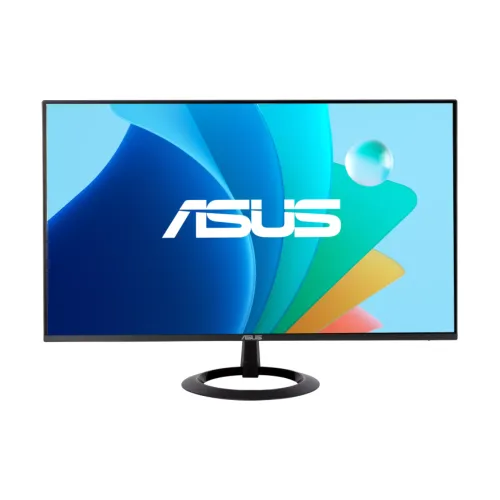
An everyday Full HD display with a faster refresh rate
The ASUS VZ249HG is a 23.8-inch Full HD IPS monitor with a maximum 120Hz refresh rate over HDMI. Its combination of a familiar desktop resolution, common video inputs and ASUS eye-comfort features is intended for general computing, study, office applications and casual gaming. A 120Hz mode can make compatible scrolling and motion look smoother than 60Hz, while the 16:9 Full HD format remains widely supported by desktop computers and laptops. The product is not a high-resolution workstation display, and its stand provides tilt only. ASUS model specifications are the primary source for the technical details in this listing.
Screen size, resolution and workspace
ASUS specifies a 23.8-inch diagonal panel with an active viewing area of 527.04 × 296.46 mm. The native resolution is 1920 × 1080 pixels in a 16:9 aspect ratio. This common Full HD format gives enough room for documents, browser tabs, class materials, spreadsheets and video on a compact desktop. At normal desk distance, the familiar scaling can be convenient for users moving from another Full HD display. QHD and 4K monitors show more detail and more workspace, so compare those options if your tasks involve dense timelines, many side-by-side windows or high-resolution image editing.
IPS panel and color characteristics
The IPS panel is rated for 178-degree horizontal and vertical viewing angles at the stated contrast threshold. That can help when the screen is viewed from slightly off center or shared by two people. ASUS lists 99% sRGB color space, 16.7 million colors and 250 cd/m² typical brightness. These specifications suit general web content and everyday creative tasks, but they do not certify factory calibration for color-critical print or video mastering. The surface is anti-glare to reduce mirror-like reflections under normal indoor lighting; a bright window or uncovered lamp can still reflect off the panel.
120Hz operation and input limits
The VZ249HG supports a maximum refresh rate of 120Hz over HDMI. ASUS lists HDMI’s vertical frequency range as 48–120Hz, while VGA is 56–75Hz. Use HDMI 1.4 for the advertised high-refresh mode. The computer’s graphics output, cable or adapter, driver and display settings must all provide 1920 × 1080 at 120Hz. A 120Hz screen can display up to 120 refreshes per second, but it does not make a game render at that rate by itself. Actual frame delivery depends on the computer and software. If 120Hz is missing in settings, verify every link in the video connection before assuming a hardware fault.
What 1ms MPRT does and does not mean
ASUS lists 1ms MPRT. MPRT is a motion-picture response-time mode that uses backlight behavior to reduce perceived blur. It should not be described as a 1ms Gray-to-Gray pixel response time. ASUS does not provide a GtG value on the VZ249HG specification page, so this catalog avoids inventing one. MPRT may change brightness and can cause flicker depending on the user and viewing conditions. Treat it as an optional setting: try it with motion-heavy content and turn it off if the picture becomes uncomfortable or too dim.
Adaptive-Sync and gaming features
ASUS lists Adaptive-Sync variable refresh rate, Trace Free, Motion Sync, GamePlus and SPLENDID picture presets. Adaptive-Sync can coordinate compatible display refresh with a supported graphics output to reduce tearing within the operating range. Compatibility depends on the graphics card, driver, connection and display settings. GamePlus provides on-screen gaming aids, while Trace Free controls pixel overdrive. These are convenience functions rather than guarantees of a particular game frame rate or competitive performance. The catalog describes the documented Adaptive-Sync support and does not present it as a separate NVIDIA certification.
Eye Care+ options
ASUS includes Low Blue Light and Flicker-free features, and its regional product page lists Eye Care+ elements such as Color Augmentation and Rest Reminder. The color-augmentation option can help some users distinguish colors on screen; it does not change the limits of the panel or substitute for accessibility support in the operating system. Rest Reminder is intended to prompt breaks during long sessions. These tools are optional, and comfortable use still depends on room lighting, screen distance, brightness and breaks. ASUS also provides four color-temperature modes, allowing the user to adjust the display’s tone through its settings.
Ports and audio
The rear I/O includes one HDMI 1.4 port, one VGA input and a 3.5mm earphone output. HDCP 1.4 is listed for protected HDMI content. The monitor does not have DisplayPort, USB-C or built-in speakers. HDMI carries a digital video signal and compatible audio to the display, but because this model has no internal speakers, audio needs to reach a headset or external speaker through the earphone jack or computer. VGA carries analog video and is limited to a 75Hz vertical rate. A USB-C-only laptop needs a compatible video adapter or dock.
Contrast figures and brightness
ASUS publishes 1500:1 typical contrast and 3000:1 maximum contrast. These are separate operating figures and should not be merged into one unconditional contrast claim. Typical brightness is 250 cd/m². These values are intended for ordinary indoor use rather than high-brightness HDR viewing. ASUS does not list HDR support for this model. Picture presets and color-temperature settings can adjust the look, but they cannot create HDR capability or change the underlying resolution.
Stand, VESA mounting and desk arrangement
The included stand tilts from −5 degrees to +23 degrees. ASUS lists no height adjustment, swivel or pivot. A riser or a compatible arm can help users bring the display closer to eye level. The back supports a 75 × 75 mm VESA mount, and ASUS lists a Kensington lock slot. Before fitting a bracket, confirm the mount’s screw pattern and load rating against the ASUS dimensions and weight. The product photographs show a compact circular stand base; leave enough desk depth for the stand and cable routing.
Physical size, net weight and packaging
ASUS lists approximate dimensions of 53.8 × 38.0 × 21.0 cm with the stand, with a net weight of 2.69 kg. Without the stand, the panel measures 53.8 × 31.3 × 3.96 cm and weighs 2.22 kg. The box measures 61.2 × 40.4 × 14.0 cm and gross weight is 4.76 kg. ASUS notes that these estimates can vary by region. The package values include the stand, cable and protective material; use the product dimensions when planning a desk or arm, and use gross package weight for shipping only.
Power and included items
The monitor uses an internal AC-to-DC supply with 100–240V input at 50/60Hz. ASUS lists 25W power consumption, below 0.5W in power-saving mode and below 0.3W when off. Accessories can differ by region; the ASUS specification page lists a warranty card, quick-start guide, power cord and HDMI cable. Check the supplied carton for its actual cable and paperwork. Because the power supply is internal, there is no separate adapter brick to place on the desk. Use the supplied rated cord and a safe power outlet.
Who may find it useful
This monitor can fit users seeking an IPS Full HD display with 120Hz HDMI, adaptive refresh support, anti-glare surface and low-blue-light settings. Students, home-office users and casual gamers can benefit from the compact footprint and common HDMI/VGA connections. It may be less suitable for people who require height-adjustable ergonomics, a USB-C dock, built-in sound, HDR or a QHD/4K workspace. Users who need exact color matching should consider hardware calibration and professional display requirements; the 99% sRGB figure is not itself proof of a calibrated unit.
Bangladesh warranty and seller context
Bangladesh retailers list a three-year warranty for the VZ249HG. Warranty providers, claim conditions and price offers are seller-specific and may depend on the exact regional suffix. Confirm the local service channel, covered components, dead-pixel policy, original-box requirements and invoice details before ordering. Retail prices vary by seller, promotion and stock, so the market context recorded in this catalog is not a live BiponiBD offer. No BiponiBD stock quantity, review, rating or seller-specific warranty promise is invented in the description.
Getting the best initial setup
Attach the stand on a level desk or install a compatible 75 × 75 mm VESA mount. Connect HDMI if you want access to 120Hz; connect VGA only when a legacy source requires it. In the operating system, select 1920 × 1080 and then choose 120Hz if supported by the computer and connection. Adjust tilt to reduce reflections, choose a color-temperature preset and set brightness for the room. Enable Adaptive-Sync only when the source supports it. Try MPRT for moving content and disable it if flicker or reduced brightness is distracting. For audio, use a headset or speakers connected to the 3.5mm output or computer.
Technical specifications
Key features
- 23.8-inch / 60.5 cm IPS display with 1920 × 1080 Full HD resolution and 16:9 aspect ratio.
- Maximum refresh rate of 120Hz over HDMI; ASUS lists VGA vertical frequency from 56Hz to 75Hz.
- 1ms MPRT motion-blur reduction mode; this is distinct from gray-to-gray pixel response time.
- 99% sRGB color space, 16.7 million colors and 250 cd/m² typical brightness.
- 1500:1 typical contrast and 3000:1 maximum contrast; the two published values describe different conditions.
- Adaptive-Sync / VRR, ASUS Trace Free, Motion Sync, GamePlus and SPLENDID modes.
- One HDMI 1.4 input, one VGA input, HDCP 1.4 and one 3.5mm earphone output.
- ASUS Eye Care+ features include Low Blue Light, Flicker-free, Color Augmentation and Rest Reminder.
- −5° to +23° tilt stand, 75 × 75 mm VESA mount and Kensington security slot.
- Internal AC supply; ASUS lists 25W maximum, under 0.5W power-saving and under 0.3W off mode.
Advantages
- 120Hz HDMI refresh can make compatible desktop motion smoother and support casual high-refresh gaming.
- IPS angles and 99% sRGB provide a practical combination for study, office work, browsing and general media.
- Adaptive-Sync, Eye Care+ options and rest reminders give users several settings for varied sessions.
- HDMI and VGA inputs cover a current digital connection and a legacy device; a 3.5mm output supports headphones.
- VESA mounting, tilt adjustment and a Kensington lock add useful setup and security choices.
Things to consider
- The included stand tilts only; it does not list height adjustment, swivel or pivot.
- VGA is limited to 75Hz; HDMI is required for the specified 120Hz refresh mode.
- There are no built-in speakers, and the product listing does not include DisplayPort or USB-C.
- Full HD provides less workspace and fine detail than QHD or 4K screens of similar size.
- The 1ms figure is MPRT strobing rather than a 1ms GtG response; MPRT can reduce brightness or cause flicker.
Frequently asked questions
What is the exact monitor model?
The model is ASUS VZ249HG. The ASUS specifications page uses that base model name. The regional sales suffix on the Bangladesh unit is not visible in the catalog images, so the product record uses VZ249HG without asserting a suffix.
How large is the screen?
ASUS specifies a 23.8-inch diagonal IPS panel. Its active image area is 527.04 × 296.46 mm, with 1920 × 1080 pixels and a 16:9 aspect ratio.
Does it support 120Hz?
Yes. ASUS lists a maximum 120Hz refresh rate and an HDMI vertical scan range of 48–120Hz at compatible output modes. The computer, cable and graphics settings must support Full HD at 120Hz.
Can VGA reach 120Hz?
No. ASUS lists the analog VGA vertical frequency range as 56–75Hz. Connect through HDMI 1.4 to use the 120Hz mode.
What does 1ms MPRT mean?
MPRT is ASUS’s motion-picture response-time blur-reduction mode. It is not a 1ms Gray-to-Gray pixel transition. Backlight strobing can affect brightness and may create visible flicker, so it is optional and should be tested for comfort.
What brightness, contrast and color coverage does ASUS specify?
ASUS lists 250 cd/m² typical brightness, 1500:1 typical contrast, up to 3000:1 maximum contrast, 16.7 million colors and 99% sRGB. The maximum and typical contrast figures should not be treated as the same static measurement.
Does the monitor support Adaptive-Sync or FreeSync?
ASUS lists Adaptive-Sync / variable refresh rate. The enabled range and compatibility depend on the graphics device, driver, cable, selected input and display mode. This entry does not claim a separate NVIDIA G-SYNC certification.
What connections are included?
There is one HDMI 1.4 input, one VGA input and a 3.5mm earphone/line-out jack. ASUS lists HDCP 1.4. There is no DisplayPort or USB-C input in the VZ249HG specification.
Does the display have speakers?
No. ASUS specifications list no built-in speaker for the VZ249HG. The 3.5mm jack is an audio output; use external speakers or headphones connected to the computer or monitor output.
Can I mount it on a monitor arm?
Yes. The display supports a 75 × 75 mm VESA mount and has a Kensington lock slot. Check that the bracket supports the monitor’s weight and correct screw pattern. The included stand adjusts by tilt from −5° to +23°.
What are its physical dimensions and weight?
ASUS lists 53.8 × 38.0 × 21.0 cm with stand and 2.69 kg net weight. Without the stand it is 53.8 × 31.3 × 3.96 cm and 2.22 kg. The carton is 61.2 × 40.4 × 14.0 cm and 4.76 kg gross. Regional measurements may vary.
What warranty applies in Bangladesh?
Bangladesh retailers advertise a three-year warranty, while ASUS notes specifications and warranty can vary by region. Confirm the exact unit suffix, local warranty provider, service location, covered components and invoice requirements with the seller before purchase.
Specifications are based primarily on ASUS VZ249HG model specifications. Regional suffix and local warranty terms must be checked on the actual unit.