Overview
ASUS VZ24EHF is a 23.8-inch Eye Care monitor with a Full HD IPS panel and a maximum refresh rate of 100Hz. ASUS’s official technical page lists HDMI 1.4 as the only video connector, Adaptive-Sync, 1ms MPRT and no built-in speaker. Its product category may be described by retailers as a gaming monitor, but the model also suits office, study and general home use when its resolution, input and stand meet the user’s needs. This page uses the exact model identifier VZ24EHF; model suffixes and names matter because nearby ASUS displays can use different panels and ports. The manufacturer’s technical specifications and user manual govern the product facts below. Local retail pages are used for Bangladesh market context only. They do not confirm live BiponiBD price, delivery availability, seller warranty, inventory or included regional accessories.
Screen size and Full HD picture
The panel measures 23.8 inches diagonally and displays 1920 × 1080 pixels in a 16:9 format. Full HD is widely supported by desktop computers, laptops, consoles and common video services. At this size it provides a familiar workspace for documents, browsing, email, remote meetings, school work, casual entertainment and an extra screen beside a laptop. A QHD or 4K display offers more pixels but may require more graphics performance and different scaling. ASUS lists the active viewing area as 527.04 × 296.46 mm and pixel pitch as 0.2745 mm. The anti-glare surface can reduce reflections in bright rooms, though it does not eliminate all glare. Configure the device at native resolution for the sharpest image and adjust text scaling and viewing distance to suit the desk and eyesight.
IPS panel and viewing angles
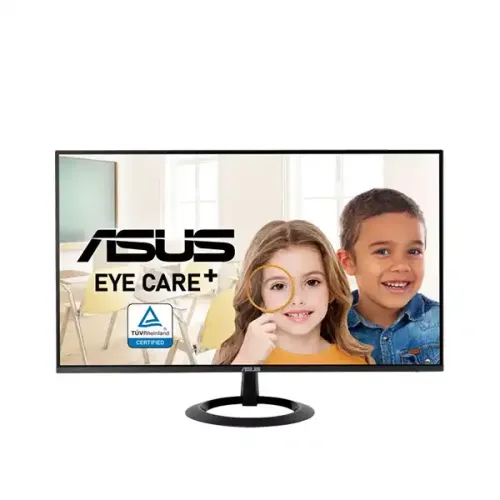
ASUS identifies an IPS panel with 178-degree horizontal and vertical viewing angles at a contrast threshold of CR≥10. IPS technology is commonly chosen for broad viewing flexibility when a user moves in front of the screen or when someone else looks over from the side. The viewing-angle figure is not a guarantee that brightness, contrast or color remain perfectly unchanged across every angle. The manufacturer lists 16.7 million display colors using a 6-bit panel plus FRC. It does not publish a factory calibration report or professional color accuracy guarantee on this technical page. If precise color reproduction is critical, seek independent tests for this exact model and check the available modes. The gallery pictures show a front view with Eye Care+ artwork, an angled view, a thin side profile and an underside view; the separate variant hero file duplicates the first gallery image and is aligned to that URL to avoid a repeated thumbnail.
100Hz refresh and Adaptive-Sync
The maximum refresh rate is 100Hz. A display can refresh more often than a 60Hz panel, so supported cursor movement, scrolling and animation may appear smoother. ASUS also lists Adaptive-Sync and Motion Sync. Variable refresh behavior depends on the graphics device, software, frame rate, cable, input timing and enabled settings. The official page specifies a 100Hz vertical signal ceiling over HDMI. It does not add a DisplayPort connector: this model has one HDMI 1.4 input. After connecting a PC or console, choose the native 1920 × 1080 mode and verify the refresh rate in display settings. An adapter or dock can restrict modes, and a source may use 60Hz until configured. The “gaming monitor” retail label should not be taken as proof of a particular response time, input lag or competitive gaming performance.
MPRT and gray-to-gray response
ASUS’s current technical page lists a 1ms MPRT figure. The English manual lists 5ms gray-to-gray for the panel. MPRT and GTG measure different aspects of response and should not be compared as if they were the same number. MPRT describes motion-picture visibility, while gray-to-gray describes pixel transitions between shades. Neither value is the same as end-to-end input lag. ASUS’s official specs do not claim 1ms GTG. Motion perception also depends on refresh rate, frame consistency, overdrive, game content and display mode. Keep the qualifier “MPRT” next to 1ms in titles, short descriptions and attributes. Buyers comparing monitors should compare like-for-like measurement methods and modes, not only the smallest number in a product title.
Brightness, contrast and image modes
ASUS lists typical brightness of 250 cd/m² and typical contrast of 1300:1. It specifies 16.7 million colors. Those figures describe manufacturer specifications rather than a guaranteed result for every room or unit; perceived brightness and black level depend on viewing conditions and picture settings. The ASUS manual describes Splendid picture modes, color temperature selection, Blue Light Filter, brightness and contrast controls. The catalog has four color-temperature choices because that appears on the exact official spec page. No HDR certification or HDR-ready claim is listed for this model, so this page does not make one. Users working with color-critical photographs or print should look for model-specific measured calibration data rather than inferring accuracy from an IPS label.
HDMI and audio connections
The VZ24EHF has one HDMI 1.4 input and no DisplayPort. ASUS also lists HDCP 1.4. The input supports the 1920 × 1080 signal and up to 100Hz timing. The HDMI connection can carry sound from the source to the monitor’s audio line-out, but the monitor itself has no built-in speakers. This means users who want sound should connect headphones, powered speakers or another compatible audio device and configure their source correctly. Before buying, check the graphics card, laptop dock or console has HDMI output and can supply the desired resolution and refresh rate. If a workstation requires DP, USB-C video or multiple input connections, choose a different model or use a compatible active adapter only after verifying its timing support.
Eye Care+, blue light and flicker-free features
ASUS lists Eye Care+ technology, Low Blue Light and Flicker-free support, and its technical page names TÜV certifications for low blue light and flicker-free behavior. The manual describes an adjustable Blue Light Filter and other on-screen controls. A warmer low-blue-light setting changes the screen’s color temperature, which may not suit color-sensitive work. The features can help users choose display settings that feel more comfortable, but they do not diagnose or treat an eye condition and do not guarantee that eye fatigue will not occur. Match screen brightness to the room, reduce reflections, use readable scaling, take breaks and maintain a comfortable viewing distance. Adjust the filter based on the task and personal preference.
Adaptive-Sync and ASUS gaming features
ASUS lists Adaptive-Sync, GamePlus, Trace Free, Motion Sync and Splendid technologies. GamePlus provides on-screen gaming aids such as crosshair, timer, FPS counter and display alignment. These are OSD overlays and do not upgrade the source device or raise the monitor beyond its 100Hz maximum. Trace Free changes response behavior and should be adjusted carefully to avoid unwanted artifacts. Adaptive-Sync requires a compatible graphics source and supported settings. Retailer reviews and marketing descriptions can be useful for local buying context, but they should not replace the official model sheet for connectors or display performance. The monitor may support casual gaming at FHD, but users seeking high refresh rates above 100Hz, multiple inputs or a DisplayPort connection should compare those needs before purchase.
Stand tilt and VESA mounting
The included stand tilts from −5 degrees to +23 degrees. ASUS lists no height adjustment. The display has a 75 × 75 mm VESA mounting pattern, so it can attach to a compatible arm or bracket. The stand’s ring-shaped base is visible in the product images, but the photos do not prove installation clearance or the screws for a third-party arm. Verify the mount pattern, screw depth, arm weight rating and whether the included stand cover must be removed before attaching a bracket. The monitor weighs about 2.85 kg without packaging with its stand, but a mount should also support the physical dimensions and intended movement. Follow the user manual and support the monitor while changing mounting hardware.
Dimensions, weight and shipping
ASUS lists approximate monitor dimensions with the stand as 54.02 × 39.39 × 21.01 cm (width × height × depth). Without the stand it measures approximately 54.02 × 31.65 × 3.89 cm. Net weight is 2.85 kg with stand, and 2.45 kg without stand. Gross package weight is 4.12 kg. The official regional box dimensions are 59.60 × 38.50 × 11.70 cm. Manufacturer notes that dimensions and weights can vary by region, so the physical carton is the best final reference for a courier booking. The variant logistics fields use the official box figures for catalog shipping data; those values are separate from the bare monitor weight used when choosing an arm or desk.
Power and package accessories
The monitor uses an external 19V DC power adapter, and the ASUS technical page lists 100–240V AC, 50/60Hz input, under 19W power-on consumption, below 0.5W in power-saving and below 0.3W powered off. Use the supplied compatible adapter rather than substituting one based only on output voltage. The manual and technical page list accessories such as a power cord, power adapter, HDMI cable, quick start guide and warranty card, with regional variation noted. Check the actual carton for the adapter label, local plug type, cable and documentation. The supplied HDMI connection carries video and audio to the line-out, but does not create built-in speakers.
Certifications and Kensington lock
ASUS lists TÜV Low Blue Light, TÜV Flicker-free, EPEAT Bronze and Energy Star references for the model, along with a Kensington lock. Certification scope and registration can vary by region, so users who need formal procurement evidence should verify the exact model and market in the certification program’s own records. A Kensington-compatible lock is useful in shared workspaces, but the security cable and lock are typically separate accessories unless the seller explicitly includes them. These certifications and security options complement the display specifications; they do not establish a seller warranty, stock status or the origin of a particular unit.
Warranty, seller offer and model label
Bangladesh listings show three-year warranty references for their own sales. Warranty duration, service provider, serial eligibility, coverage, claim process and dead-pixel policy depend on the exact seller and distributor. Confirm terms for the specific BiponiBD order and keep the purchase invoice and serial details. Retail pages may show a current discount or stock message, but those details change and are not evidence of BiponiBD inventory or price. Verify the exact carton label says VZ24EHF rather than a similar ASUS code before relying on the model-specific facts on this page. The original product slug remains the same to preserve links to the catalog record.
Who may choose this monitor
This model may suit a home office, study desk or general desktop setup that needs a 23.8-inch Full HD IPS display, up to 100Hz, Adaptive-Sync and ASUS Eye Care+ features. It may also work for casual games where HDMI and the 100Hz ceiling meet the user’s needs. It may be less suitable for a user who requires built-in speakers, DisplayPort, USB-C, a USB hub, an adjustable-height stand, QHD resolution or a higher-than-100Hz refresh rate. Use external audio through the line-out and a compatible HDMI source. The gallery imagery shows the screen front, angled display, edge profile and underside; it does not prove an item’s condition, included accessories or seller warranty. Match the exact model and connection requirements before ordering.
Specification summary
Features
- 23.8-inch IPS LCD panel with 1920 × 1080 Full HD resolution and 16:9 aspect ratio.
- Maximum 100Hz refresh rate, with ASUS Adaptive-Sync / VRR support over HDMI.
- ASUS lists 1ms MPRT; the English manual lists 5ms gray-to-gray, which are different measurements.
- 250 cd/m² typical brightness, 1300:1 typical contrast and 178° horizontal/vertical viewing angles at CR≥10.
- The screen supports 16.7 million colors using 6-bit panel output plus FRC.
- One HDMI 1.4 input carries video and audio; there is no DisplayPort connector.
- One audio line-out port is provided; the display has no built-in speaker.
- Eye Care+ includes a blue-light filter, flicker-free display, GamePlus, QuickFit and Splendid features.
- Adaptive-Sync, Motion Sync and Trace Free technology are listed by ASUS for supported input/device modes.
- Anti-glare screen surface and four color-temperature selections support common room and viewing preferences.
- The stand tilts from −5° to +23°; height adjustment is not provided.
- 75 × 75 mm VESA mounting and a Kensington lock support alternate mounting and cable security.
- External 19V power adapter, <19W power-on, <0.5W power-saving and <0.3W power-off are documented.
- ASUS lists 2.85kg net, 2.45kg without stand, 4.12kg gross and regional box dimensions of 59.60 × 38.50 × 11.70cm.
Advantages
- A 23.8-inch FHD IPS panel with a manufacturer-specified 100Hz ceiling offers a higher refresh option than standard 60Hz monitors.
- Adaptive-Sync, GamePlus and Trace Free tools give users options for supported casual games and smooth motion.
- ASUS Eye Care+ and TÜV flicker-free / low-blue-light certifications address common comfort preferences without promising a health outcome.
- The monitor includes HDMI audio passthrough and a separate audio line-out for external headphones or speakers.
- 75 × 75mm VESA support, Kensington lock, external adapter and published carton data make installation planning clearer.
Points to consider
- The only video input is HDMI 1.4; there is no DisplayPort or USB hub.
- There are no built-in speakers, so use the audio-out jack with external headphones or speakers.
- Full HD at 23.8 inches is standard desktop resolution, not a higher-density QHD or 4K workspace.
- 1ms MPRT does not mean 1ms GTG; the manual lists 5ms GTG and ASUS also notes the response metric distinction.
- The supplied stand tilts only and lacks height, swivel and pivot adjustment.
- Warranty references on Bangladesh seller pages do not establish coverage or claim terms for a BiponiBD order.
Frequently asked questions
What is the exact model?
The exact ASUS model is VZ24EHF. Its manufacturer identifier is VZ24EHF; the size and refresh rate do not form part of the model or MPN.
What screen size and resolution does it have?
ASUS specifies a 23.8-inch IPS panel with 1920 × 1080 Full HD resolution and a 16:9 aspect ratio.
Does this display support 100Hz?
Yes. ASUS lists 100Hz as the maximum refresh rate. The device and HDMI timing must support the selected mode, and the display setting may need to be changed from the initial default.
What does 1ms MPRT mean?
ASUS lists 1ms MPRT on the tech-spec page. MPRT is a motion-picture response measure, not GTG response time or input lag. The English manual lists 5ms GTG.
Which video connector is included?
The ASUS specification lists one HDMI 1.4 input only. There is no DisplayPort. The same HDMI path can carry audio to the monitor’s audio line-out.
Does it include speakers?
No. ASUS lists no built-in speaker. Use external speakers or headphones connected through the audio line-out as supported by the source setup.
What are brightness and contrast?
The manufacturer lists 250 cd/m² typical brightness and 1300:1 typical contrast. These are manufacturer figures; room light and picture settings affect perceived performance.
What is Adaptive-Sync?
ASUS lists Adaptive-Sync as its variable-refresh technology. It can help reduce tearing when supported by the source and settings; it does not increase the 100Hz panel maximum.
How does the stand adjust?
The stand tilts from −5° to +23°. Height adjustment is not included. The display also supports a 75 × 75 mm VESA mount.
What are its dimensions and weight?
ASUS lists 54.02 × 39.39 × 21.01 cm with stand, 2.85 kg net, 2.45 kg without stand and 4.12 kg gross. Box dimensions are listed as 59.60 × 38.50 × 11.70 cm and can vary by region.
What power supply and accessories are included?
The manual specifies a 19V external power adapter. ASUS lists a power cord, adapter, HDMI cable, quick-start guide, warranty card and certificate; actual regional contents should be confirmed with the seller.
What price and warranty apply to BiponiBD?
Bangladesh retailer pages show their own prices and three-year warranty references. Those do not establish BiponiBD price, stock, seller, warranty provider or claim terms; confirm the live offer before ordering.
Technical information follows the ASUS VZ24EHF manufacturer specification and English user manual. Confirm current BiponiBD price, stock, seller warranty and box contents for the specific offer.