ASUS ZenScreen MB169CK 15.6-inch FHD IPS Portable Monitor
A portable 15.6-inch IPS display
The ASUS ZenScreen MB169CK is a portable external monitor with a 15.6-inch diagonal viewing area. ASUS uses the MB169CK model name; some product listings call it a 16-inch monitor as a rounded class size. The panel itself is 15.6 inches, with a 16:9 shape and an active area of 344.16 × 193.59 mm. It uses an IPS panel with LED backlighting and a non-glare surface. That combination makes it useful as a second screen for a laptop when working at a desk, in a meeting room or while travelling. It is still a separate display: a computer, phone or console must provide a compatible video signal through one of its supported inputs.
Full HD resolution and 60Hz performance
The native resolution is Full HD at 1920 × 1080, and the maximum refresh rate is 60Hz. The pixel pitch is 0.179 mm, with typical brightness of 250 cd/m² and typical contrast of 800:1. ASUS specifies 16.7 million display colors, a 5ms gray-to-gray response time and viewing angles of 178 degrees horizontally and vertically at a contrast ratio above 10. These are standard portable-monitor specifications for office documents, browser windows, presentations, video and general desktop use. The 60Hz refresh rate is not a high-refresh gaming specification, and Full HD provides a familiar laptop-like workspace rather than the larger desktop area of a QHD display.
USB-C and Mini HDMI connectivity
A portable screen is most useful when it can connect without a bulky dock. MB169CK has two USB Type-C ports that support DisplayPort Alt Mode and one Mini HDMI input. Either compatible USB-C connection can carry display video; the second port can provide another connection route according to the source setup. USB-C is not guaranteed to work with every phone or computer simply because a USB-C-shaped connector is present. The host USB-C port must support DisplayPort Alt Mode video. A USB-C port that handles data or charging only will not send a picture. For computers without USB-C video, use the Mini HDMI input and the appropriate HDMI cable or adapter.
Video signal and audio
The Mini HDMI input accepts a digital video signal and supports HDCP 1.4. ASUS lists a digital horizontal signal range of 24–83 kHz and a vertical range of 50–60 Hz for both USB-C and HDMI. The monitor has no built-in speakers. Exact-model listings and product views show a 3.5 mm headphone/audio output, although ASUS’s main specifications table does not list that jack; it can pass audio to headphones or external speakers. Mini HDMI is physically smaller than the standard HDMI socket on most computers and TVs. A full-size HDMI plug does not fit directly; the correct Mini HDMI cable or adapter is needed. Check the cable in the retail box before travelling, since ASUS notes that accessory bundles can vary by region.
USB-C power and external adapter
The two USB-C sockets support DisplayPort Alt Mode, but the MB169CK is not a high-wattage laptop charging monitor and ASUS does not advertise USB Power Delivery pass-through for charging a laptop. The screen typically consumes 7.64W. ASUS lists a 100–240V, 50/60Hz supply rating, less than 0.5W in power-saving mode and less than 0.3W when off. Depending on the computer port and its available power, the display may draw operating power over USB-C. A compatible external power adapter can be useful if the source cannot supply enough power, or if brightness or stability is limited. Confirm the exact adapter included in the Bangladesh package; the adapter is not listed uniformly by every seller.
360-degree kickstand and portrait placement
ASUS specifies a 360-degree kickstand and a 1/4-inch tripod socket. The stand lets the portable display rest in landscape or portrait orientation and can support different viewing positions. ASUS also lists Auto Rotation through DisplayWidget Center, which can rotate the image orientation in supported Windows setups. This software feature is distinct from a physical rotation motor: the user positions the screen and the computer/software changes the picture orientation. ASUS lists no height adjustment. For a camera tripod or a dedicated portable-monitor arm, the 1/4-inch socket provides a mounting point, but the tripod or arm is an optional accessory unless the seller confirms it is included.
Size, travel weight and sleeve
The monitor weighs approximately 0.78 kg without the stand and measures about 360 × 226 × 12 mm without the stand. The box dimension is approximately 434 × 290 × 76 mm and the listed gross package weight is 1.70 kg; packaging dimensions and weight can vary by region. Its slim body and modest panel weight make it easier to pack than a conventional desktop monitor. The sleeve listed by ASUS helps protect the display in a bag, but it is not a hard case. A soft sleeve does not replace careful packing or protection from pressure, liquids and sharp objects.
Display features and software
ASUS lists several software and image features: SPLENDID modes, Trace Free, four color-temperature modes, QuickFit photo and alignment grids, GamePlus, DisplayWidget Center, Low Blue Light and Flicker-free operation. TÜV Low Blue Light and TÜV Flicker-free certificates and Energy Star are also listed on the product specification page. ASUS regional specification pages differ on the color-count line: several pages state 16.7 million colors, while another ASUS regional page states 262K; some Bangladesh sellers also list 262K. The exact regional panel specification for this catalog unit is unknown, so the listing records this difference instead of implying a calibrated color depth. The QuickFit grid is an on-screen alignment aid rather than a physical measuring tool.
How MB169CK differs from similar ZenScreens
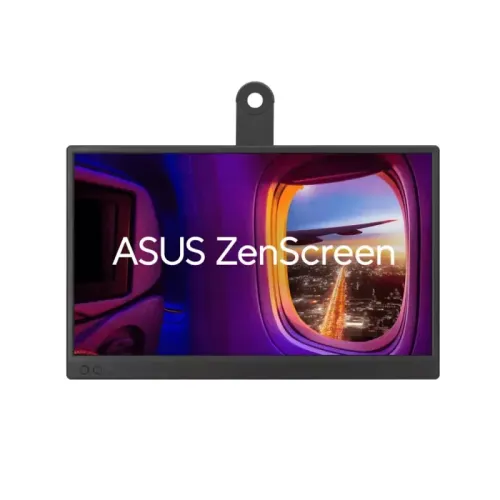
The MB169CK should not be mixed up with other ASUS ZenScreen model numbers. MB169C+ and MB169B+ are distinct products with different generations and connection layouts; MB16AC and MB16AH are also separate models, not alternative suffixes that can be substituted into this listing. For this exact MB169CK, ASUS lists dual USB-C DisplayPort Alt Mode ports and Mini HDMI. Do not copy a micro-HDMI label from another ZenScreen model or describe the MB169CK as a single-cable USB-only monitor. The visual product images in this catalog show a landscape front view, an angled landscape view, a portrait orientation and the rear kickstand, consistent with a portable display that can be repositioned.
Bangladesh price and warranty
Bangladesh listings reviewed for this exact model ranged from about ৳19,500 to ৳22,800, with Star Tech and Ryans showing offers around ৳20,000–৳22,000 and Ultra Technology showing ৳19,500. One TechLand listing was marked upcoming rather than in stock at ৳22,800. These are seller-specific offers and availability can change. The existing BiponiBD price of ৳20,000 is supported by current local listings and is retained. Several Bangladesh sellers advertise a three-year warranty, but the authorized distributor, service terms and claim requirements must be confirmed with the retailer. Do not describe the warranty as universal across imports.
What this portable monitor is best for
For a buyer, the main benefit of the ZenScreen MB169CK is the ability to add a lightweight Full HD screen to a compatible mobile setup. It can be positioned beside a laptop for documents, messaging, reference material or a presentation, then moved away when the session ends. Check the host device before ordering: USB-C video needs DisplayPort Alt Mode, while HDMI users need Mini HDMI connectivity. Also confirm that the computer can provide sufficient power or ask about the included power adapter. The two USB-C inputs and Mini HDMI port make it more flexible than a USB-only display, while its 60Hz refresh, 250-nit typical brightness, 800:1 contrast and lack of speakers describe its limits clearly.
Complete model and specification accuracy
The listing should state 15.6 inches as the actual panel size and may explain that ASUS and retailers market it as a 16-inch class product. It should identify Full HD 1920 × 1080, IPS, anti-glare, 60Hz and 5ms GtG, then give the actual port count and types. In particular, a Ports field that mentions USB-C and Mini HDMI but omits the second USB-C socket is incomplete. The catalog’s 262K color claim conflicts with ASUS’s official 16.7M figure; use the manufacturer specification and record the retailer inconsistency. Do not imply the monitor has speakers, a battery, touch input, USB-C laptop charging or a full-size HDMI socket.
Box contents and rotation clarification
ASUS’s official specifications list a sleeve, warranty card, USB-C cable, quick start guide, Mini HDMI-to-HDMI cable and 360-degree kickstand as regional accessories. Actual Bangladesh cartons may differ; ASUS explicitly warns that accessories vary by region. Retailer pages disagree about adapters and physical rotation: ASUS lists Auto Rotation through DisplayWidget Center and a 360-degree kickstand, while Ryans marks “Rotatable: No” in one overview field. The accurate explanation is that the monitor can be physically positioned in portrait or landscape and supported software can rotate the image; it does not have motorized rotation. Confirm the accessory set and exact warranty with the seller before purchase.