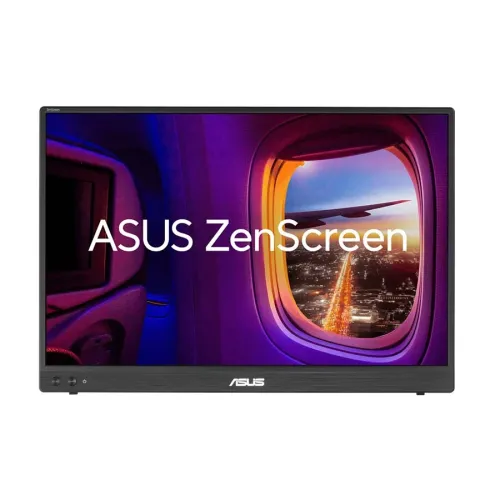
The ASUS ZenScreen MB16NCG is a 16-inch WQXGA portable IPS monitor with a 16:10 screen, up to 155Hz refresh over USB-C DisplayPort Alt Mode, USB-C power pass-through and Mini HDMI connectivity.
Product identity and intended use
The ASUS ZenScreen MB16NCG is a portable external monitor designed to add a second screen to a compatible laptop, handheld computer, console or other video source. The exact model identifier matters: ASUS sells multiple ZenScreen products with different sizes, resolutions, refresh rates and port combinations. This record refers specifically to MB16NCG and uses its official product specification page for the core display and connectivity facts. The model should not be confused with another MB-series display simply because the product names look similar.
The screen measures 16 inches diagonally and uses a 16:10 aspect ratio. That shape gives a little more vertical room than a 16:9 display of comparable width, which can be useful for documents, code, spreadsheets, web pages and side-by-side reference material. It can function as an extension of a laptop desktop or as a separate screen for a compatible device. It is still a compact portable panel, so it does not offer the physical viewing area of a large desktop monitor.
The monitor can be useful for hybrid work, study, presentations, travel and temporary desk setups where a second display is helpful. It can also connect to compatible gaming sources, but the usable resolution and refresh rate depend on the device output, operating system, cable and selected display mode. A high maximum refresh-rate figure is a capability of the monitor; it does not mean every source will send that mode or that every application will render at that frame rate.
ASUS lists USB-C DisplayPort Alt Mode and Mini HDMI connections. USB-C is convenient when the host supports video over that port, while Mini HDMI supports a conventional HDMI signal through the correct connector or supplied cable. Before purchase, check the laptop or device specification for DisplayPort Alt Mode support, confirm the required cable arrangement and identify how the display will receive power. A USB-C connector by itself does not prove video compatibility.
Resolution, aspect ratio and viewing
The native resolution is 2560 × 1600 pixels, which ASUS identifies as WQXGA. The 16:10 panel has 4,096,000 image pixels. Compared with a 1920 × 1080 Full HD image, WQXGA contains more pixels and adds vertical workspace. This can make a document or web page show more content at once, subject to scaling and the software layout. Text size depends on operating-system scaling, viewing distance and application settings; a higher pixel count does not force every interface to appear smaller.
ASUS identifies the panel as IPS with an LED backlight. Its specification lists 178-degree horizontal and vertical viewing angles, an anti-glare display surface and a 0.135mm pixel pitch. These details describe the panel design and listed viewing-angle threshold. They do not mean the image is completely unchanged from every position, and reflections, room lighting, display angle and brightness still affect comfort and appearance. The anti-glare surface helps diffuse reflections but cannot eliminate bright reflections in every environment.
The listed typical brightness is 400 cd/m² and typical contrast ratio is 1500:1. ASUS reports 16.7 million display colors and 100% sRGB color-space coverage. These values can help compare the product with other portable monitors, but they do not by themselves prove color calibration, uniformity, gamut volume or identical performance across every unit. For color-critical photo, print or design work, use a calibration workflow and verify the color profile on the actual device.
ASUS also lists HDR10 support. HDR10 is a supported signal format, while the experience depends on compatible content, software and source output. This product specification does not state an HDR certification class or a peak HDR brightness figure. Buyers should therefore treat HDR10 as a compatibility feature and avoid assuming that the monitor will provide the brightness or local-dimming performance of a dedicated high-end HDR display.
The panel supports a maximum refresh rate of 155Hz. ASUS publishes signal-frequency details that distinguish the connections: USB-C is listed for vertical frequencies from 48 to 155Hz, while Mini HDMI is listed from 48 to 120Hz. The maximum mode available in practice depends on source capability, resolution, cable quality, operating-system mode selection and the connection used. If a computer does not offer 155Hz in its display settings, check the source port, cable, driver and resolution before assuming the monitor is defective.
The 5ms GTG response-time figure is ASUS’s listed specification. Gray-to-gray response describes pixel transitions under the manufacturer’s testing conditions; it is not the same as input lag, frame rate or refresh rate. ASUS also lists Adaptive-Sync, which can coordinate supported refresh timing with a compatible source. The result depends on supported graphics hardware, driver configuration and the selected connection. For fast games, compare both the source’s output and the signal-frequency limit of the port being used.
Color, control and viewing comfort
ASUS specifies 100% sRGB color-space coverage. This coverage figure indicates the listed color-space reach and can make the monitor suitable for common web imagery and general productivity when the unit is set up appropriately. Coverage is not a substitute for measured accuracy: the official specification reviewed does not provide an individual calibration report or a Delta E tolerance for the delivered unit. Creators who need repeatable color should use a calibrated workflow, control ambient light and check whether their software is color-managed.
The display offers ASUS SPLENDID technology and four color-temperature selection modes. These controls let users adjust the image to suit a task or preference. ASUS also lists GamePlus functions and QuickFit, including photo and alignment grids. These utilities can help with framing, layout or visual guides, but they do not change the panel’s native resolution or guarantee exact physical print dimensions without application and scaling checks.
Auto-rotation is listed as supported through ASUS DisplayWidget Center. This is a software-supported behavior; it depends on the connected computer, operating system, application and software configuration. The physical monitor does not automatically guarantee that every phone, laptop or console will rotate its image. Confirm operating-system support if portrait orientation is important to the intended setup.
ASUS lists flicker-free operation and Low Blue Light. These are monitor features for adjusting the image and reducing certain viewing discomforts for some users. They are not medical treatments and cannot guarantee that a particular person will avoid eye strain. Set a comfortable brightness for the room, position the screen to reduce glare, take regular breaks and use accessibility or display settings that suit the user.
Ports, power and compatibility
The MB16NCG has two USB-C ports with DisplayPort Alt Mode and one Mini HDMI input. A USB-C host must support DisplayPort Alt Mode for video through USB-C. Some ports on computers carry data or charging only, so check the host manual or manufacturer specification. If the host lacks video-capable USB-C, Mini HDMI may be an option when the computer provides a compatible HDMI output and the correct cable. Confirm connector direction and cable compatibility before relying on an adapter.
ASUS lists power pass-through up to 65W. The maximum is a ceiling for the pass-through feature, not a promise that every connected laptop will receive that amount. The charger, source device, USB-C cable and negotiated power profile affect charging. A computer that needs more power may charge slowly or continue to consume its battery while operating. Check the laptop’s power requirement and use a compatible charger and cable, especially when the display and computer are connected through one cable.
The monitor’s listed power consumption is at most 6.79W, with power-saving mode below 0.5W and power-off mode below 0.3W. ASUS lists a 100–240V, 50/60Hz voltage range. Actual consumption depends on brightness, input mode, connected equipment and operating conditions. The product can receive power through supported connections; ASUS marks the external power adapter as optional and notes that accessories may vary by region. Verify the included adapter and cable set with the seller before ordering.
For sound, ASUS lists no speaker. It does list an earphone jack, so the product should be treated as a display with audio output rather than as a monitor with built-in speakers. Audio behavior depends on the connected source and selected signal path. If sound is needed at a desk, plan to use headphones or separate speakers and confirm how the source routes audio over HDMI or USB-C.
Portability, mounting and accessories
The official estimated physical dimensions are 35.8 × 24.6 × 1.1cm, and the estimated net weight is 0.90kg. ASUS notes that dimensions and weights may vary by region. These measurements make the display practical to carry with a laptop bag, but the buyer should account for the sleeve, cables, charger and protective packing when estimating the total travel load. Protect the panel from pressure and sharp objects in a bag, and use the sleeve when included.
The monitor includes a one-quarter-inch tripod socket and a Kensington lock feature according to ASUS. A tripod socket can provide an alternative mounting point when used with an appropriate support rated for the device. The lock feature can help secure the product in some environments when a compatible lock is used. Neither feature replaces a stable setup: keep the monitor on a secure support and route cables so they do not pull it over.
The accessory list includes a ZenScreen sleeve, warranty card, USB-C cable, quick-start guide and Mini HDMI-to-HDMI cable. A power adapter is listed as optional. ASUS explicitly notes that accessories can vary by region, so the exact Bangladesh retail box may not contain every listed item. Confirm the package contents and any adapter requirements with the seller, and retain the invoice, serial information and warranty documents after purchase.
A portable monitor is most useful when the connection and support plan is clear before travel. Check that the source device can output video at the intended resolution, verify the supplied or planned cable, decide how the monitor will be powered and confirm that a stand or support is available. In a fixed workspace, position the panel at a comfortable height and angle, keep the cable slack, and avoid placing the device where it can be knocked or obstructed.
Bangladesh price, warranty and buying checks
The Star Tech Bangladesh page for the exact ZenScreen MB16NCG identifies the model and lists the matching core specifications, but its live status reads “Up Coming” and its price reads “To be announced.” Search-result snippets surfaced ৳29,000 offers, yet the direct Star Tech page did not confirm an active price or available stock when checked. A search snippet can be stale, so this product record does not turn it into a current market-price estimate. Confirm price and availability directly with a seller before making a purchase decision.
The checked Star Tech page lists a three-year warranty. Warranty duration and service conditions can depend on the seller, distribution channel and delivered unit. Ask whether the warranty is local, which organization handles service, what documents are required and what exclusions apply. Match the invoice and product label to ASUS ZenScreen MB16NCG, retain the serial number and invoice, and inspect the display and included accessories soon after delivery.
Before purchase, verify four points: the exact MB16NCG model code; the host device’s USB-C DisplayPort Alt Mode or Mini HDMI capability; the refresh rate supported by the chosen connection and source; and the included power and cable accessories. If using USB-C pass-through, confirm the laptop’s charging needs. If using a console, check its supported output modes and whether the supplied cable fits the console and monitor.
The MB16NCG’s strengths are its WQXGA 16:10 IPS resolution, 155Hz maximum USB-C refresh, lightweight body, two USB-C ports, Mini HDMI, 100% sRGB listing and useful setup features. Its practical trade-offs are the smaller physical panel, source-dependent refresh modes, USB-C video compatibility requirements, lack of built-in speakers and regional variation in accessories. The Bangladesh listing did not show an active offer at the time of review, so the final buying decision should be based on a confirmed local quote and written warranty terms.
Key features
- 16-inch portable display with a 16:10 aspect ratio and 2560 × 1600 WQXGA native resolution.
- IPS panel with 178° horizontal and vertical viewing angles, anti-glare surface and LED backlight.
- Up to 155Hz refresh over USB-C DisplayPort Alt Mode; Mini HDMI supports up to 120Hz vertical frequency.
- 5ms GTG response time and Adaptive-Sync variable refresh technology.
- 100% sRGB color-space coverage, 16.7 million colors and HDR10 signal support.
- 400 cd/m² typical brightness and 1500:1 typical contrast ratio.
- Two USB-C ports with DisplayPort Alt Mode and up to 65W power pass-through.
- One Mini HDMI input for compatible computers, consoles and other HDMI sources using a suitable cable.
- 3.5mm earphone jack; ASUS lists no built-in speakers.
- Auto-rotation support through ASUS DisplayWidget Center; orientation behavior depends on the connected computer and software.
- ASUS GamePlus, QuickFit alignment/photo grids, SPLENDID presets and four color-temperature modes.
- Flicker-free and Low Blue Light features for user-adjustable viewing comfort.
- Compact body measuring approximately 35.8 × 24.6 × 1.1cm and weighing approximately 0.90kg.
- One-quarter-inch tripod socket and Kensington lock support for flexible mounting and security.
- ASUS lists a ZenScreen sleeve, USB-C cable, Mini HDMI-to-HDMI cable, warranty card and quick-start guide; power adapter is optional and regional contents vary.
Advantages
- The official ASUS specification confirms a detailed 2560 × 1600 WQXGA image on a 16-inch 16:10 panel, providing more vertical pixels than a Full HD portable display.
- A 155Hz maximum refresh rate, Adaptive-Sync and 5ms GTG response make supported motion smoother than conventional 60Hz portable screens.
- Two USB-C DisplayPort Alt Mode connections and Mini HDMI give users more than one way to connect compatible devices.
- The 0.90kg estimated net weight, slim 1.1cm profile and included sleeve support travel and temporary desk setups.
- ASUS specifies 100% sRGB coverage, 400-nit typical brightness, anti-glare treatment, flicker-free operation and Low Blue Light options.
Limitations to consider
- A 16-inch workspace is still physically smaller than a full-size desktop monitor, even though WQXGA provides high pixel density.
- The 155Hz maximum is specified for USB-C DisplayPort Alt Mode; ASUS lists Mini HDMI vertical frequency up to 120Hz, and actual modes depend on the source, cable and settings.
- USB-C video requires a host port that supports DisplayPort Alt Mode; a USB-C-shaped connector alone does not guarantee video output.
- The product has no built-in speaker, and the power adapter is described as optional with box contents varying by region.
- Star Tech marks its Bangladesh listing Upcoming with no announced price, so current local availability and a dependable market price could not be confirmed.
Frequently asked questions
What is the ASUS ZenScreen MB16NCG?
It is a 16-inch portable IPS monitor with a 2560 × 1600 WQXGA resolution, 16:10 aspect ratio, USB-C DisplayPort Alt Mode and Mini HDMI inputs.
What is the resolution and screen shape?
ASUS lists 2560 × 1600 pixels, known as WQXGA, with a 16:10 aspect ratio. This taller workspace can show more vertical content than a 16:9 Full HD panel of similar width.
Does it support 155Hz?
ASUS specifies a maximum 155Hz refresh rate. Its signal table lists USB-C at up to 155Hz vertical frequency and Mini HDMI at up to 120Hz. The connected device, cable, resolution and selected mode determine the usable refresh rate.
Which connections are available?
There are two USB-C ports supporting DisplayPort Alt Mode, one Mini HDMI input and a 3.5mm earphone jack. Check that the laptop USB-C port supports video before choosing a single-cable setup.
Can USB-C power the monitor and pass power to a laptop?
ASUS lists power pass-through up to 65W. The monitor can receive power through a compatible USB-C arrangement and pass through up to the specified limit; this does not mean every laptop will receive 65W. Verify the charger, cable, host and power requirements.
Is the panel suitable for color work?
ASUS lists 100% sRGB coverage, IPS technology, 16.7 million colors and 400 cd/m² typical brightness. These specifications describe coverage and panel characteristics, not a guarantee of factory calibration for every unit.
Does it include speakers?
No. ASUS lists the speaker field as “No.” The 3.5mm jack is an earphone output; use headphones or speakers connected to the source device.
Does it support HDR?
ASUS lists HDR10 support. HDR playback also depends on the source, application, connection and content; HDR10 support alone does not specify a particular peak-HDR brightness certification.
How heavy and large is it?
ASUS lists approximate dimensions of 35.8 × 24.6 × 1.1cm and an approximate net weight of 0.90kg. Measurements and packaged weight can vary by region.
What comes in the box?
ASUS lists a ZenScreen sleeve, warranty card, USB-C cable, quick-start guide and Mini HDMI-to-HDMI cable. A power adapter is marked optional, and the included accessories may vary by region. Confirm the exact box contents with the Bangladesh seller.
What is the current Bangladesh price and availability?
When checked, Star Tech marked the exact model Upcoming and showed “To be announced” for price. Search-result snippets showed figures but the live listing did not confirm an active offer, so this product record does not publish an estimated market price.
What warranty applies in Bangladesh?
The reviewed Star Tech listing says three years. Confirm the delivered unit’s written warranty, local service provider and coverage conditions with the seller before ordering; warranty service is subject to the seller and distribution channel.
Check live Bangladesh availability, current price, exact package contents and written warranty with the seller before ordering.