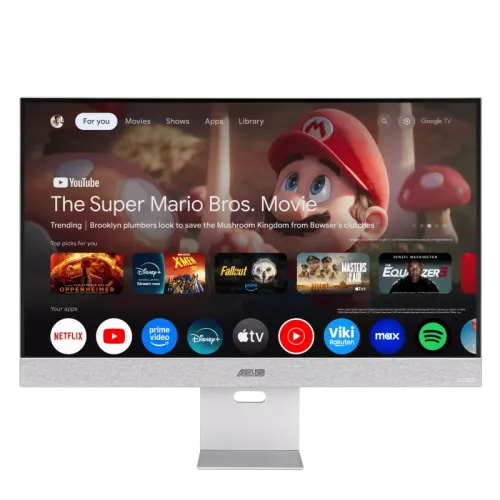
ASUS ZenScreen Smart Monitor MS32UC is a 31.5-inch 4K UHD smart monitor with IPS imaging, Android smart functions, built-in Harman Kardon speakers and USB-C connectivity. ASUS specifies a 60Hz refresh rate, so this is positioned for connected work and entertainment rather than high-refresh competitive gaming.
A 4K smart display for a connected desk
The ASUS ZenScreen Smart Monitor MS32UC combines a high-resolution IPS panel with built-in smart functions. ASUS identifies it as a 31.5-inch model, while local shop titles may round that size to 32 inches. Its 3840 × 2160 resolution provides four times the pixel count of Full HD and gives users room for detailed documents, large spreadsheets, editing timelines, dashboards and high-resolution video. The anti-glare coating helps reduce distracting reflections from ordinary room lighting, although screen placement and direct sunlight still affect comfort. The 16:9 shape is familiar for desktop work and streaming. This product is best understood as a smart monitor for mixed everyday use: work, media, video calls through connected devices, casual console play and supported Android services.
IPS image and colour characteristics
ASUS specifies an IPS display with 178-degree horizontal and vertical viewing angles. IPS technology is useful when more than one person is viewing the screen or when the user shifts position, because colour and contrast generally remain more consistent off-axis than on many basic panel types. The manufacturer lists 98% DCI-P3 colour coverage and 10-bit colour support, represented as approximately 1.07 billion colours. Those figures make the panel relevant to creative workflows that benefit from a wider colour range, but they do not replace calibration or a measured colour-accuracy report. The typical contrast ratio is 1000:1, which is common for IPS monitors. The flat panel and 0.182mm pixel pitch help provide a fine image at native 4K resolution, especially when viewed at a comfortable distance.
Brightness and HDR expectations
The technical information distinguishes between 350 cd/m² typical brightness and a 400 cd/m² HDR peak figure. Typical brightness describes normal operation; a peak value applies only under specified HDR conditions and should not be read as sustained full-screen output. ASUS lists VESA DisplayHDR 400 and HDR10+ and HLG support in its regional materials. These formats allow compatible sources to send HDR content, but the visible result depends on the video, the connected device, software settings and the panel’s actual brightness and contrast. The product can therefore play HDR-enabled material, while users should keep expectations appropriate for an IPS display with a 1000:1 typical contrast ratio. For accurate work, use a consistent picture preset and suitable ambient lighting rather than relying on an HDR badge alone.
Refresh rate and gaming use
The MS32UC is specified for a 60Hz refresh rate and 5ms GTG response time. It can be connected to a PC or game console and display games at supported settings, but its refresh specification is much lower than the 144Hz, 240Hz or faster panels built for competitive gaming. The existing retailer title calls it a gaming monitor; that wording can mislead shoppers who interpret gaming as high-refresh performance. This listing instead explains the actual 60Hz capability. For adventure games, strategy titles, casual play and console entertainment, a 4K image and built-in smart features may be attractive. For esports or fast competitive play, buyers should compare a dedicated high-refresh gaming display and confirm the graphics card or console can drive the desired resolution and refresh rate.
Android smart functions and wireless sharing
A stated Android 11 platform adds smart functions directly to the display. ASUS lists embedded Wi-Fi, Google Home device support and voice control, alongside wireless projection. This can make it easier to access supported media or share a compatible device screen without routing every task through a desktop computer. The monitor also lists Multi View, Multi Control and Multi-Platform Streamer Plus, features intended to support viewing and control across multiple sources or devices. HDMI Reverse Control is also listed. Exact services and user experience depend on regional firmware, app availability, network access, accounts and connected equipment. Buyers should confirm the apps they rely on are available for their region. A smart monitor remains useful as a conventional display when a PC, console or streaming device is connected through a video input.
USB-C power and the other connections
The USB-C port supports DisplayPort Alt Mode and up to 90W power delivery. With a compatible laptop, one cable can carry video and provide power, reducing cable clutter on a desk. The computer must support display output over USB-C, and its charging requirements must fit the monitor’s delivered power. The connection list also includes one DisplayPort 1.4 input and one HDMI 2.0 input for desktop computers, consoles and other sources. Two USB 2.0 Type-A ports provide connections for compatible accessories, while the audio jack supports private listening or an external sound setup. Check the input capabilities of the exact regional unit and use suitable cables. The HDMI input is HDMI 2.0 according to the ASUS and retailer specification details reviewed for this listing.
Built-in sound and everyday use
Two built-in 5W speakers use Harman Kardon audio technology. Integrated speakers are convenient for everyday video, news, meetings and casual entertainment, and they keep a basic desk setup simple. They do not replace a dedicated speaker system for a large room or a headphone setup for detailed listening. The audio output jack provides another option when privacy matters or when the user wants to connect external audio equipment. Picture and sound settings can be adjusted to match the room and source. For video calls, a separate webcam and microphone may still be required because built-in speakers do not mean the monitor includes every communication accessory. Retailer and manufacturer details should be checked for the exact package contents in Bangladesh.
Ergonomics, mounting and physical fit
The stand provides height adjustment from 0 to 100mm and tilt from -5° to +20°. Those adjustments help place the panel closer to eye level and reduce neck strain during longer sessions, although comfort depends on desk and chair height. A 100 × 100mm VESA mounting pattern supports compatible monitor arms or wall brackets. The white finish gives the product a distinct look compared with common black monitors. ASUS lists dimensions of 71.4 × 57.9 × 17.7cm with the stand and 71.4 × 44.9 × 5.0cm without it; dimensions can vary by region. Listed weight is 8.6kg with stand and 6.92kg without stand. Measure the desk or mounting area, check bracket capacity and leave room for cables before installation.
Eye-care features and power
Flicker-free operation and low-blue-light modes are listed among the eye-care features. These settings may help some users reduce discomfort during long sessions, but they do not guarantee that eye fatigue will disappear. Good viewing distance, regular breaks, appropriate brightness and room lighting also matter. Power information varies between the available sources: ASUS shows 32W in its typical specification, while the Star Tech specification table lists below 23.1W and also shows below 0.5W in power-saving mode and below 0.3W when off. Since the published operating figures differ, this page does not merge them into one unqualified consumption claim. The monitor accepts 100–240V, 50/60Hz according to the retailer specification table. Check the product label and included regional power cable at delivery.
What to know before ordering in Bangladesh
The exact-model Star Tech page reviewed for this product currently shows the status “Up Coming” and the price “To be announced.” The same page contains older descriptive copy mentioning ৳83,000, so that number is not presented here as a current offer. The seller page lists a three-year warranty; buyers should ask the seller to confirm the warranty provider, coverage and start date in writing once stock is released. ASUS also notes that specifications and accessories can vary by region. Confirm the supplied remote, cables, power cord and other items with the Bangladesh seller. Current stock, final selling price, delivery timing and return terms can change, so check those details before placing an order. This listing avoids estimating a price when the live exact-model page has not announced one.
Who this monitor suits
The MS32UC suits users who want a large 4K screen with smart functions, integrated speakers and a USB-C dock-like connection for a compatible laptop. It can support office work, research, streaming and general home entertainment in one display. Creative users may value its listed DCI-P3 coverage, while still checking calibration and workflow requirements. A family may find the smart interface, wireless projection and speakers convenient for shared viewing. Buyers who primarily want esports performance should prioritise a faster refresh-rate model. People who need reliable access to a particular streaming platform should confirm regional app support. Laptop users should verify USB-C video compatibility and power needs. As with any display, the best match depends on desk space, viewing distance, computer outputs, software and the availability of the exact regional variant.
Summary of verified details
The core verified identity is ASUS ZenScreen Smart Monitor MS32UC. Key specifications include a 31.5-inch IPS panel, 4K UHD resolution, 60Hz refresh rate, 5ms GTG response, 98% DCI-P3 coverage, 10-bit colour, 350 cd/m² typical brightness, Android 11 smart functions, Harman Kardon 2 × 5W speakers, USB-C DP Alt Mode with up to 90W power delivery, DisplayPort 1.4, HDMI 2.0, height adjustment and VESA mounting. Some supporting figures and supplied accessories can differ by region. The Bangladesh exact-model seller page currently lists the monitor as upcoming and its price as unannounced, so no live price range is claimed. Check local stock and written warranty terms at the time of purchase.
Frequently asked questions
What is the exact model and screen size?
The product is ASUS ZenScreen Smart Monitor MS32UC. ASUS specifies a 31.5-inch panel; Bangladesh retailer titles often round it to 32 inches.
Is the MS32UC a high-refresh gaming monitor?
No. Its specified refresh rate is 60Hz and response time is 5ms GTG. It can display games, but it is not positioned here as a high-refresh competitive gaming model.
What is the native resolution?
3840 × 2160 pixels, commonly called 4K UHD, in a 16:9 format.
What panel and colour coverage does it use?
ASUS specifies an IPS panel with 98% DCI-P3 colour coverage and 10-bit colour support.
What brightness should I expect?
ASUS lists 350 cd/m² typical brightness and 400 cd/m² HDR peak brightness. Peak brightness is not the same as continuous typical brightness.
Does it include HDR?
ASUS regional specifications list VESA DisplayHDR 400, HDR10+ and HLG support. HDR performance depends on the source, content and regional model.
Does it work as a smart monitor without a computer?
It includes Android 11, embedded Wi-Fi, Google Home device support and voice control. App availability and setup requirements can vary by region and service.
Can I connect and charge a laptop over USB-C?
The USB-C port supports DisplayPort Alt Mode and up to 90W power delivery. The laptop must support video over USB-C, and actual charging varies by device.
Which video inputs and USB ports are listed?
The listed connections include DisplayPort 1.4, HDMI 2.0, USB-C DP Alt Mode with 90W PD, two USB 2.0 Type-A ports and an audio jack.
Are speakers built in?
Yes. The monitor has two 5W speakers with Harman Kardon audio technology. It also includes an audio output jack.
Can I adjust or wall-mount it?
The stand supports -5° to +20° tilt and 0–100mm height adjustment. It also supports a 100 × 100mm VESA mount.
What is the Bangladesh price and warranty?
Star Tech currently labels the exact-model listing Up Coming and Price: To be announced. Its listing separately mentions a three-year warranty, but confirm the final local warranty in writing when the product becomes available.