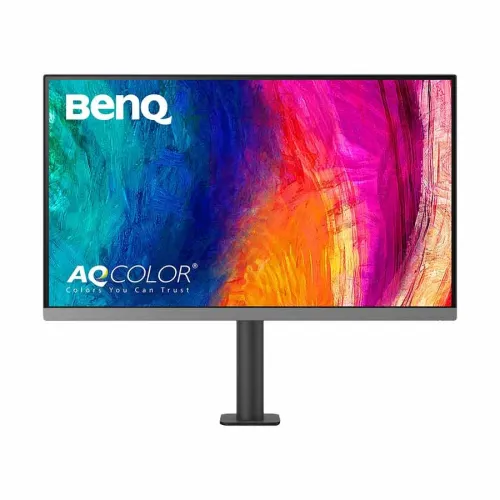
BenQ PD2706UA at a glance
The BenQ PD2706UA is a 27-inch 4K designer monitor supplied with an Ergo Arm mounting system. Its IPS panel supports native 3840 × 2160 resolution at 60Hz. BenQ lists 100% sRGB, 100% Rec.709 and 95% P3 color coverage, along with factory calibration and a Delta E average of 3 or less. The model combines creative color modes, USB-C docking, KVM and dual-source viewing.
The articulated arm is the main distinction from the similar PD2706U: it lets the user position the screen across a broader desk area and can reduce the space occupied by a conventional stand. Before buying, check that the desk edge and available space suit the arm clamp. This listing records current Bangladesh seller prices separately from catalog MSRP and clearly marks the Star Tech page as out of stock.
A high-detail 4K workspace
The 3840 × 2160 panel provides four times as many pixels as a Full HD display. On a 27-inch screen this can make fine lines, small interface elements and detailed images appear crisp. Designers can inspect image edges, video editors can arrange timeline panels, and office users can place multiple documents side by side. The 16:9 format remains familiar for desktop software and video.
Higher resolution can make text and controls too small at default scaling for some users. Operating-system display scaling changes the apparent size while keeping the panel at its native resolution. Confirm that the computer, graphics output, cable and any dock can deliver 4K at 60Hz. When troubleshooting, connect the display directly first, choose the native mode in display settings, and add intermediate adapters only after the expected mode works.
Color spaces and factory calibration
BenQ identifies coverage of 100% sRGB, 100% Rec.709 and 95% P3. These color spaces are common targets for web content, standard video and a broad range of creative work. The product page also describes factory calibration and lists an average Delta E of 3 or less. These features give users a color-focused starting point; final accuracy still depends on the specific unit, settings, software and viewing environment.
A published gamut percentage does not guarantee that every export will match another screen or printed output. For color-critical work, use the appropriate application profiles and output target. A compatible calibrator can help measure the display for a particular brightness and color space. Keep ambient light stable and review the final work on the target devices or proofing process required by the project.
Creative modes and software
The PD2706UA includes modes intended for different tasks. CAD/CAM mode emphasizes drawing lines and shapes; Animation mode is intended to reveal detail in darker areas; Darkroom mode adjusts the image for low-light work; ePaper mode resembles a publication-reading presentation; and DualView can show two modes side by side. These options can make certain work easier to inspect but do not replace a final export check.
BenQ Display Pilot 2 and ICCsync support compatible color workflows. BenQ describes ICCsync as synchronizing monitor color profiles when display modes change. M-Book mode is designed for compatible Mac systems, and some keyboard brightness functions apply only to Mac. Software support, connected calibration devices and operating-system permissions affect which features are available. Confirm the current software compatibility before building a workflow around them.
Ergo Arm mounting and desk fit
The supplied Ergo Arm differs from a traditional monitor foot. It attaches to the desk and allows the screen to move across a wider range of positions. Local listing tables describe up to 120mm height adjustment, 90° pivot, -5° to +30° tilt and 275°/275° swivel. An arm can make it easier to bring the monitor closer, move it aside or rotate into portrait orientation while keeping more open desk surface.
Measure desk thickness and inspect the clamp edge, rear wall distance and cable path before installation. Confirm the desk material can safely hold the clamp and display weight, and follow the supplied assembly instructions. Retailers report swivel as 275°/275°, so check the local manual for exact movement limits and avoid forcing the arm beyond its stops. Provide enough cable slack for full repositioning without pulling connectors.
USB-C video, data and charging
The PD2706UA’s USB-C input supports DisplayPort Alt Mode and up to 90W Power Delivery according to BenQ and local listings. On a compatible laptop, one cable can carry the picture and data while charging the computer. The display also offers a downstream USB-C connection and USB hub ports. BenQ states that Thunderbolt 3 and 4 devices can work with its USB-C display connection when the host and cable support the relevant functions.
The 90W figure is a maximum. A laptop with a high power requirement can still need its original adapter, particularly during demanding work. Verify that the computer’s USB-C port supports video output rather than data only. Use a cable rated for the needed video and power functions. Connect the host to the correct upstream port, then test display, charging and attached peripherals separately.
KVM for a two-computer workspace
Built-in KVM lets a single keyboard and mouse control two connected computers. This can suit someone who uses both a work laptop and a desktop, or keeps separate personal and production machines at one desk. To use KVM, connect each computer’s video and the corresponding USB upstream path. The monitor can then switch the selected system while keeping shared input devices attached to its hub.
Hotkey Puck G2 offers an external way to reach selected controls and switch between systems. KVM behavior depends on the cabling and active source; a video cable alone does not connect keyboard and mouse data. Label the two computer cables during setup and confirm which input and USB path correspond to each system. If a device does not follow the active source, check the USB upstream connection and KVM menu before replacing a peripheral.
PIP and PBP for multiple sources
Picture-in-Picture (PIP) places one input in a smaller window over the main source. Picture-by-Picture (PBP) divides the screen to show two sources at once. These modes can help compare images, monitor a second workstation or reference a separate system while editing. The available layout depends on the input combination and timing supported by the monitor.
When using split-screen modes, consider how much workspace remains for each application. A 4K desktop can retain legible detail, but the computer may scale its interface or provide a different resolution to the screen. Consult the manual for supported PIP/PBP combinations. If one source disappears, confirm that both input cables are connected and that each computer is outputting a supported signal.
Inputs, USB hub and audio
Local PD2706UA specifications list HDMI 2.0, DisplayPort 1.4, USB-C video input with charging, a downstream USB-C connection, three USB-A downstream ports, one USB-B upstream port and a headphone jack. This mix can support a laptop, a desktop and commonly used desk accessories. The USB hub can keep a keyboard, mouse or other compatible device attached to the monitor when the relevant upstream data connection is active.
HDMI and DisplayPort carry video but do not by themselves provide USB hub data or laptop charging. Choose USB-C when the combined functions are required and supported by the computer. Use the manual to identify each port and its intended role. For audio, select the monitor as the output device when desired, and use a separate microphone for video calls because speaker specifications do not imply a built-in microphone.
HDR and brightness claims
BenQ’s comparison information and local retailer specification tables list HDR10 and VESA DisplayHDR 400 for the PD2706UA. Retailers report 400 nits brightness. These specifications describe supported HDR input and a peak brightness rating; they do not mean the monitor behaves like a high-end mastering reference display. HDR results depend on the content, operating system, application, signal path and settings.
For color-sensitive delivery, use the mastering and output requirements of the intended project. Verify HDR mode configuration in the manual and computer settings. HDR certification and peak brightness are separate from wide color coverage and factory calibration. A user who mainly edits standard SDR web or video content may prioritize consistent sRGB or Rec.709 settings, then switch modes only when working with HDR material.
Eye care and extended sessions
BenQ describes low-blue-light and flicker-free technologies and references TÜV Rheinland certification. These display settings are intended to support viewing comfort over longer work sessions. Set brightness to suit room lighting, position the arm to avoid reflections, and increase text size if the user is leaning toward the display. Comfort remains individual and also depends on breaks, seating, ambient light and how the applications are arranged.
The monitor’s anti-glare surface can reduce reflections but cannot eliminate direct light from every direction. The arm makes it easier to adjust screen angle and distance as the desk changes. Avoid working at maximum brightness in a dark room unless a particular task requires it. For color judgement, a stable neutral environment makes results more repeatable than frequently changing lighting and display settings.
Speakers and day-to-day audio
Tech Land and Star Tech list two integrated speakers rated at 2.5W each. They can provide convenient sound for calls, system notifications and casual media without separate desktop speakers. An audio jack is also listed by sellers. Audio output depends on the selected input and computer sound settings, so users should confirm the active playback device after switching between a laptop and another source.
The built-in speakers are designed as a convenience feature. Users who need stronger bass, precise editing reference or more room-filling sound may prefer external speakers or headphones. The product listings do not identify a built-in microphone. For calls, use the laptop’s microphone or connect a separate microphone and select it in meeting software independently of the display’s speaker output.
Power, dimensions and installation
Local listings specify an internal power supply, 100–240V input and power consumption of 45W typical, 230W maximum and 0.5W in sleep mode. The published physical dimensions and arm movement are useful for planning a desk setup, but allow extra room for the clamp, cable loops and full arm travel. Ensure that the wall or partition behind the desk will not block the screen as it is repositioned.
Install the arm on a stable desk surface and follow the included weight and assembly guidance. Route the power, video and USB cables so they can move without snagging. Keep ventilation open behind the screen. The monitor’s own power draw is separate from the USB-C power it can deliver to a laptop. If charging or hub functions do not work, check the USB-C path and the computer compatibility before assuming the panel is faulty.
Bangladesh prices, stock and warranty
On 6 November 2026, Tech Land BD displayed ৳66,799 discounted and ৳78,500 regular, with in-stock status. Skyland displayed ৳66,699 instant cash discount and ৳72,500 regular, also in stock. Star Tech currently shows Out Of Stock and To be announced; its older search snippet price is excluded from the observed in-stock range. These seller prices may change and can depend on payment method.
Tech Land and Skyland list three-year warranty terms, while Star Tech states a three-year period with an internal-dust exclusion. Written warranty details should be confirmed with the seller, including official service provider, exclusions and claim requirements. Keep invoice, serial number and packaging information. Catalog variant MSRP remains the existing BDT66,799 and no external seller observation is added as a live BiponiBD store offer.
Who should consider the PD2706UA?
The PD2706UA can suit a designer or editor who wants a sharp 27-inch 4K panel, broad sRGB/Rec.709/P3 coverage, a more mobile desk arm and USB-C docking. KVM and split-source display modes can make it useful in a multi-computer setup. A compatible USB-C laptop can use the display for video, data and up to 90W charging through a single supported cable.
It may be less suitable for someone whose main goal is high-refresh gaming or whose laptop requires more than 90W while working. Before ordering, verify desk clamp fit, monitor clearance, laptop video support, USB-C power needs, current seller availability and the written warranty. Those checks help confirm that this Ergo Arm version matches the workstation rather than relying only on similar model names.