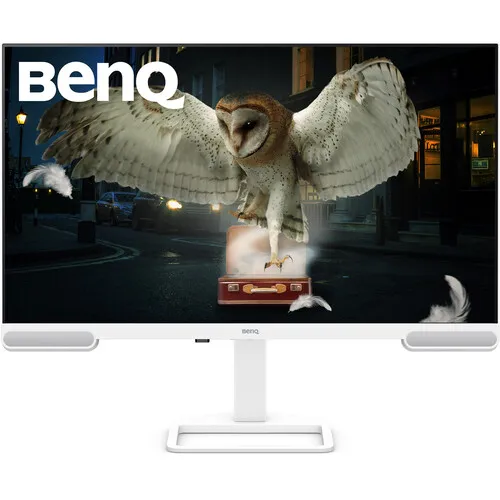
BenQ EW2790U overview
The BenQ EW2790U is a 27-inch 4K UHD home entertainment monitor built around an IPS panel. BenQ specifies a maximum resolution of 3840 × 2160, 60Hz refresh rate, 5ms grey-to-grey response time, 350 nits typical brightness and 400 nits peak HDR brightness. The screen supports HDR10 and carries VESA DisplayHDR 400 certification. BenQ lists 95% P3 colour gamut, 1.07 billion colours, 1000:1 native contrast and 163 pixels per inch. For connectivity it provides three HDMI 2.0 ports, one USB-C upstream connection with DisplayPort Alt Mode, data and up to 65W power delivery, three USB-A downstream ports and one USB-C downstream port. It also has two built-in 5W speakers and a headphone jack. The stand adjusts height, tilt, swivel and pivot. This listing was assigned to Others even though an active BenQ brand exists; the brand has been corrected and model/MPN normalized to EW2790U. Existing product slug, Active status, Monitors category, variant SKU, ৳50,000 MSRP and three-year catalog warranty remain unchanged.
4K detail and 27-inch workspace
The EW2790U’s native 3840 × 2160 resolution displays four times as many pixels as Full HD across the same 16:9 shape. On a 27-inch screen, the resulting 163 pixels per inch can render fine text, detailed photographs and 4K video with high pixel density. Some users may want operating-system scaling so menus and text remain comfortably sized; the best setting depends on eyesight, applications and viewing distance. The IPS panel has a stated 178° horizontal and vertical viewing angle. BenQ lists an anti-glare coating, which can reduce reflections in some environments but will not eliminate bright window or lamp reflections. The 27-inch size fits many desks, though a monitor arm and cable routing still need space. 4K output depends on the source computer, graphics output, cable and selected refresh mode. Video apps, games and operating systems may handle scaling differently, so check that your devices support 3840 × 2160 at 60Hz before purchase.
60Hz performance and 5ms GTG
BenQ specifies a 60Hz refresh rate and 5ms grey-to-grey response time for this model. Those ratings suit general computing, media playback and casual games. A 60Hz screen updates up to sixty times per second; it is not intended to provide the high refresh experience of 120Hz, 144Hz or 240Hz gaming monitors. The 5ms GTG response figure describes pixel transition under the manufacturer’s measurement method. Actual motion appearance depends on the content, response setting, frame rate and source. For film, office work and browsing, refresh requirements may differ from competitive gaming. If fast competitive play is central to your use, choose a model whose exact manufacturer specification lists the refresh rate you require. For 4K60 playback, check the graphics adapter, USB-C/HDMI mode and cable certification. BenQ lists AMA response-time adjustment; the monitor’s picture and motion settings can be configured through its on-screen menu. The selected display mode should match both the content and the source device’s capabilities.
Colour, HDR10 and DisplayHDR 400
BenQ lists 95% P3 colour gamut and 1.07 billion display colours. The manufacturer also specifies HDR10 and VESA DisplayHDR 400 certification, with typical brightness of 350 nits and peak HDR brightness of 400 nits. These are distinct details: HDR10 describes a supported HDR signal format, while DisplayHDR 400 is a VESA certification tier. Certification does not mean that the screen has OLED-level black levels or local dimming. HDR appearance depends on the source, the content, operating-system settings and room lighting. BenQ provides colour modes including Rec.709, sRGB, HDR, M-Book, User, Standard, Game, Cinema HDRi and Game HDRi. Gamut coverage does not guarantee factory colour accuracy for every unit. People doing colour-critical design or photo work should verify calibration requirements and use a suitable calibration tool. Native contrast is listed as 1000:1. Picture mode, brightness and ambient light all affect perceived colour and contrast.
HDMI and USB-C connections
The official EW2790U specification lists three HDMI 2.0 inputs, one USB-C upstream port and one USB-C downstream port. The upstream USB-C connection carries DisplayPort Alt Mode video, data and up to 65W power delivery. The downstream USB-C port is USB 3.2 Gen 1 with 5Gbps data and up to 7.5W charging. Three USB-A downstream ports are also USB 3.2 Gen 1 with 5Gbps data and 7.5W charging. BenQ lists HDCP 2.2. This differs from retailer summaries that say “2× Type-C” without specifying which one carries video or 65W charging. A single USB-C cable can simplify a compatible laptop setup, but the laptop must support video over USB-C and the 65W supply may not meet every computer’s needs under heavy load. HDMI inputs are useful for consoles, media devices and computers. Check the precise port labels and cable bundle with the seller if a specific multi-device configuration is required.
Speakers, headphone output and eye care
The EW2790U has two built-in 5W speakers, which can provide audio for video calls, streaming and everyday media without external speakers. BenQ also lists a headphone jack for private listening or connection to another audio system. Sound quality and loudness depend on content and room acoustics, so listeners who need more bass or higher volume may prefer dedicated speakers. BenQ’s eye-care feature list includes Brightness Intelligence Plus Gen2, Low Blue Light Plus, Flicker-Free and Color Weakness modes. Brightness Intelligence Plus can adjust picture behavior based on surrounding light and the image; users can choose settings that suit their workspace. Eye-care functions are not a replacement for comfortable screen brightness, room lighting or regular breaks. The monitor’s colour modes and audio modes can be selected for different uses. With several HDMI sources and USB-C, users may connect a laptop, console and media player and switch inputs through the monitor controls.
Stand adjustment, VESA and dimensions
The supplied stand supports 110mm height adjustment, tilt from −5° to +20°, left-right swivel of 20° in each direction and 90° pivot. This allows landscape or portrait positioning and makes it easier to align the display with the user’s eye level. BenQ lists a 100 × 100mm VESA mounting pattern for compatible monitor arms or wall mounts. The official dimensions with the stand are 614.2mm wide, 427.4–536.9mm high and 211.2mm deep. Without the base, the display measures 614.2 × 387.8 × 67.7mm. Listed net weight is 7.7kg with stand and 5.6kg without the base. A monitor arm should support the actual installed weight and use the appropriate screws. Leave room for USB and power cables, especially if the display is rotated. The stand can be raised, tilted and swiveled to reduce awkward posture; desk height, chair position and viewing distance still matter.
Power and everyday operation
BenQ lists a built-in power supply and 100–240V voltage rating. Normal consumption is specified at 25W, maximum at 180W and sleep-mode use at 0.5W; actual power draw changes with brightness, audio, connected USB devices and enabled settings. USB-C power delivery is up to 65W, which may reduce the number of laptop cables on a desk. Use the compatible supplied power cord and keep the rear ventilation area unobstructed. The monitor can function as a USB hub when its upstream connection is properly connected to a computer. Downstream USB ports may provide charging, but device power and data behavior depend on which upstream source is connected. BenQ lists firmware update by USB and Display Pilot 2 / Display Quickit software support. Install software only from BenQ’s official support resources for the correct model and operating system. The specific package contents can differ by country, so confirm power and video cable inclusion before ordering.
Bangladesh price and warranty
On 5 November 2026, four public Bangladesh listing sources showed exact-model prices ranging from ৳46,500 to ৳54,500. PriceHunter BD showed a multi-store range of ৳46,500–৳49,900, Star Tech displayed ৳50,000 in its indexed product listing, and Techland displayed ৳54,500 when its product page was reviewed. Ryans also listed the EW2790U, with price and stock subject to the seller page. These figures can change and are market references only; they are not BiponiBD store offers. The catalog variant MSRP of ৳50,000 remains as recorded. The catalog also retains its existing three-year warranty. BenQ service eligibility, claim location, invoice and serial-number coverage can vary by market and distributor, so confirm the written terms with the seller. Ask whether the offered unit is EW2790U rather than EW2790Q or EW3290U, and confirm stock, delivery, return/dead-pixel policy, warranty provider and included USB-C cable. BenQ’s product page and local descriptions use “home entertainment” and “professional monitor” interchangeably; the exact model number is the key identity.
Who should consider the EW2790U
This monitor may suit home users, laptop owners and creators who want a sharp 4K picture, multiple HDMI ports, USB-C laptop connectivity and built-in speakers in a 27-inch screen. The 95% P3 figure and HDR support can be useful for compatible media, while the 60Hz refresh and 5ms GTG response are aimed at everyday viewing rather than high-refresh competitive play. A USB-C connection with 65W power delivery can simplify a compatible laptop desk, but users with high-wattage laptops should check their charging needs. The three HDMI inputs accommodate several devices. The stand’s height, tilt, swivel and pivot adjustments, plus VESA support, allow flexible positioning. Users should consider how 4K scaling looks at their preferred viewing distance and whether 27 inches is large enough for their workflow. The 5W × 2 speakers may reduce the need for external audio in casual settings. HDR certification is available, but those seeking deep blacks or advanced local dimming should compare display technologies and specifications carefully.
Setup and buying checklist
Before purchase, confirm the BenQ EW2790U model printed on the unit, the current BiponiBD offer, local stock, return policy and written warranty details. Check that a laptop’s USB-C port supports DisplayPort Alt Mode if you plan to use video through one cable, and confirm that 65W is sufficient for the laptop’s power needs. Otherwise, use HDMI 2.0 or the source’s supported connection and a separate power adapter. Configure 3840 × 2160 at 60Hz in the operating system, then select a suitable scaling level and picture mode. If you intend to use the USB hub, connect its upstream cable to the host computer. For a monitor arm, verify 100 × 100mm VESA support and load rating. BenQ’s exact-model specification lists a 27-inch IPS 4K panel, 95% P3, HDR10/DisplayHDR 400, three HDMI 2.0 inputs, USB-C with up to 65W power delivery, USB hub ports, 5W × 2 speakers and a fully adjustable stand. Those details distinguish the EW2790U from nearby EW2790Q and EW3290U models.