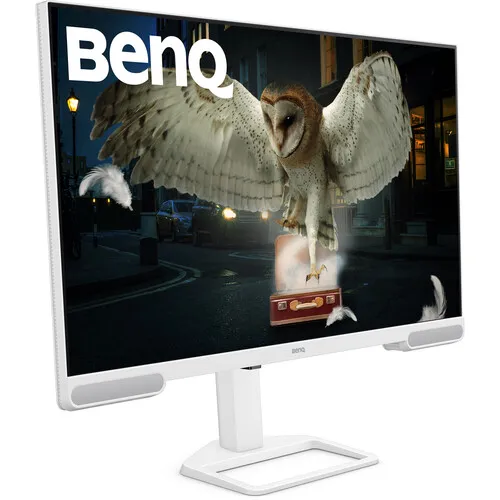
BenQ EW3290U 31.5-inch 4K UHD IPS monitor
The BenQ EW3290U is a large-format 4K home entertainment monitor with a 31.5-inch IPS panel, a 3840 × 2160 native resolution and a 60Hz refresh rate. Its model name ends in “U,” and BenQ’s product specifications identify the maximum resolution as 3840 × 2160 pixels. That is 4K UHD, not Full HD. The existing catalog phrase “FHD 3840x2160” combines two different resolution labels and is incorrect; this product content uses 4K UHD consistently. The display uses a 16:9 widescreen ratio, LED backlighting and a matte screen surface. BenQ specifies 350 nits typical brightness, 400 nits peak HDR brightness, 1000:1 native contrast, 178-degree viewing angles and a 5ms gray-to-gray response time.
The EW3290U is designed to handle television-style viewing, work, study and general computer use from one desk display. Its UHD pixel grid can show fine detail in high-resolution photos and video and provide substantial desktop space for supported computer applications. A monitor’s size and resolution do not guarantee a specific result from every computer: the graphics device, cable, output settings, application and content resolution determine what signal is displayed. The monitor accepts many lower-resolution sources, but the sharpest native image uses a compatible 3840 × 2160 signal. BenQ specifies a 60Hz panel, making the EW3290U a general-purpose and entertainment monitor rather than a high-refresh esports display.
BenQ identifies the EW3290U panel as IPS with LED backlighting. IPS is a liquid-crystal display technology, so it should not be described as OLED or QD-OLED. The 178°/178° viewing-angle rating indicates a wide specified viewing range, which can help when more than one person watches the screen or when the monitor is positioned off-centre. The stated contrast is 1000:1, a typical LCD contrast specification. It is distinct from dynamic contrast features that adjust image processing based on content. The matte coating helps manage reflections but does not make the screen reflection-proof; window position, room lighting and viewing angle still influence perceived contrast.
4K UHD resolution and 31.5-inch workspace
The monitor’s native matrix contains 3840 horizontal by 2160 vertical pixels, or 8,294,400 pixels in total. That is four times the pixel count of 1920 × 1080 Full HD. “FHD 3840×2160” in some retailer and catalog text is therefore a specification error: Full HD refers to 1920 × 1080, while 3840 × 2160 is 4K UHD. When connected to a device that can output UHD, the EW3290U can display detailed 4K video and fine image content. When the source sends Full HD or another lower resolution, the monitor scales that input; the source does not become native 4K merely because it is shown on a 4K panel.
BenQ’s specification lists a 31.5-inch diagonal. Some retailers title it as a 32-inch monitor, which is a rounded category label. Both descriptions refer to the same model when the code EW3290U is present. The 16:9 aspect ratio matches common video formats and provides a familiar widescreen desktop layout. BenQ lists 140 pixels per inch for the panel. Pixel density describes how tightly pixels are packed; it does not by itself define an ideal operating-system scale or viewing distance. Users can choose operating-system scaling to keep text comfortable while retaining high-resolution image detail. Applications may handle scaling differently, so test the specific editing, office or media software used most often.
60Hz means the display can refresh up to sixty times per second when the source provides a compatible signal. This rate is suitable for desktop interfaces, films, television, study and many casual games. It is below the refresh rate of monitors marketed specifically for competitive gaming. The listed 5ms response time describes a gray-to-gray pixel transition rating, not total input latency from a game controller or computer. Applications, source frame rate, signal processing and motion content all affect perceived motion. Buyers who need 120Hz, 144Hz or a higher gaming refresh rate should compare a product that explicitly supports those rates rather than infer high refresh from the 4K label.
Color, HDR and picture modes
BenQ specifies 1.07 billion display colors and a range of picture modes: Rec.709, sRGB, HDR, M-Book, Standard, User, Game, Cinema HDRi and Game HDRi. These named modes offer different picture settings for common content types. A mode name does not certify professional color calibration or make every application color-managed. For work that depends on color matching, use a suitable workflow and the target color profile. The manufacturer’s Singapore specification page lists 95% P3 gamut, while BenQ’s US overview page advertises 98% P3. Because official regional pages differ, the catalog records both values with their source context rather than presenting one as an undisputed universal result.
Color gamut describes a display’s reproducible color range. P3 is wider than sRGB for many saturated colors and is used in modern video and cinema workflows. A 95% or 98% P3 figure needs its measurement context to be directly comparable with another screen. The specification page also lists a color temperature selection of Bluish, Normal, Reddish and User Define, plus a gamma range of 1.8–2.6. These adjustments allow the user to tailor the image, but a chosen preset can change the perceived white point, brightness and tonal response. If consistency matters across devices, choose one mode and use the same workflow when reviewing content.
The EW3290U supports HDR10 and is listed by BenQ with VESA DisplayHDR 400. BenQ specifies peak HDR brightness of 400 nits and typical brightness of 350 nits. HDR output requires compatible video or game content, a source device capable of HDR output, a suitable connection and the correct operating-system or application settings. HDR compatibility does not mean every scene will display at 400 nits, nor that SDR footage becomes native HDR. The 400-nit peak and the 1000:1 native contrast ratio are distinct specifications: HDR peak brightness describes a highlight rating, while native contrast compares the panel’s typical white and black levels under the stated conditions.
The monitor also includes BenQ’s HDRi picture modes and AI Contrast features in its product overview. BenQ describes AI Contrast as adjusting image contrast according to displayed content. Dynamic picture processing can alter the image from scene to scene; users who prefer a consistent reference picture may choose a fixed picture mode or adjust the feature according to the menu and instructions. Cinema HDRi and Game HDRi are named modes for those content categories. A processing feature should not be confused with a separate panel technology, backlight type or HDR certification.
Video inputs and USB connectivity
The official specification lists three HDMI 2.0 inputs and one upstream USB-C port with DisplayPort Alt Mode, data transfer and up to 65W Power Delivery. A compatible USB-C laptop can send display and data through that connection and receive up to 65W charging from the monitor. The exact charging result depends on the computer’s power requirements and the USB-C cable. The USB-C port supports display output only when the connected device’s port supports DisplayPort Alt Mode or a compatible video mode. A USB-C shaped connector alone does not guarantee video support. Check the laptop manual and power requirements before relying on the monitor as its only charger.
BenQ separately lists three USB Type-A downstream ports, each USB 3.2 Gen 1 at up to 5Gbps with 7.5W charging, and one USB Type-C downstream port at USB 3.2 Gen 1 up to 5Gbps with 7.5W charging. The downstream ports provide peripheral connectivity when the monitor’s USB upstream connection is linked to a computer. They are different from the upstream USB-C port that carries DisplayPort Alt Mode and up to 65W power delivery. The catalog previously mixed these counts, describing three HDMI inputs, three USB-A ports and two Type-C ports as if all connections were interchangeable. The corrected port map distinguishes video inputs, upstream host connection and downstream accessories.
The three HDMI 2.0 inputs can be used for multiple source devices such as a desktop, media player and console. Only the selected source is shown at a time unless the manual specifies a supported picture-in-picture or multi-view mode. HDMI 2.0 is the stated input generation; do not relabel these ports as HDMI 2.1. Supported resolution, refresh rate, color depth and HDR behavior may vary by source, cable and configuration. HDCP 2.2 support is listed by BenQ and is relevant to protected digital content. For a 4K streaming service, the source, account, display path and application may each have compatibility requirements beyond the monitor itself.
Built-in treVolo 2.1-channel audio
The EW3290U includes a 2.1-channel speaker system listed as two 2W speakers and a 5W woofer. BenQ promotes the built-in system under its treVolo audio branding. Six audio modes are described in the product overview: User, Dialog/Vocal, Live/POP, Cinema, Game and Studio Monitor. The monitor can therefore provide sound for video calls, casual viewing, music or games without requiring desktop speakers to be connected first. Speaker wattage describes the rated output components; it does not guarantee a particular loudness, bass extension or studio-reference accuracy in every room.
The headphone jack allows listening through a compatible wired headset when a quieter setup is needed. The built-in speakers and headphone path are separate listening options; connect the headphone plug carefully and check the selected audio output. If the display is connected over HDMI or USB-C, confirm which playback device the computer has selected. On consoles and media players, audio output settings vary by model. This is a 2.1 speaker arrangement with an internal woofer, not a separate external subwoofer unit in the package description.
Ergonomics and physical installation
The included stand provides 110mm of height adjustment, tilt from -5 degrees to +20 degrees, horizontal swivel of 20 degrees left and 20 degrees right, and a 90-degree pivot. BenQ’s specification lists the pivot as 90 degrees; it does not state a two-direction ±90-degree range in the cited specification. Height adjustment helps position the large screen at a comfortable eye level. Tilt changes the panel’s viewing angle, and swivel turns it modestly to either side. Pivot rotates the display to portrait orientation where the stand, operating system and application support that use.
The monitor can also attach to a compatible 100 × 100mm VESA mount. Check the mount’s supported VESA spacing, weight capacity, screw requirements and reach before installation. BenQ lists 8.1kg net weight with the base and 6.0kg without the base. The screen should be supported during stand assembly or removal, and the panel should not be lifted by pressing on its surface. The included stand footprint and the room needed for swivel should be considered before placing the monitor on a shelf or near a wall.
With the stand in landscape orientation, BenQ lists dimensions of 714.5mm wide, 211.2mm deep, and 483.8–593.5mm high depending on stand position. Without the base, the monitor measures 714.5mm wide, 67.8mm deep and 443.9mm high. In pivot orientation, the listed height is about 730.3–737.8mm and width 443.9mm. Measure the full desk depth and height, including cables and wall clearance. A 31.5-inch 16:9 screen occupies significantly more horizontal desk space than smaller desktop panels even though its active diagonal is a rounded 32-inch class.
The matte white casing is listed for the EW3290U. Retail product images and regional listings may depict lighting or color differently; check the model code and local images if the exact finish matters. The VESA mount is a separate way to support the display, not evidence that a wall bracket is included. If using a monitor arm, confirm its tilt and pivot range and make sure the clamp can attach securely to the desk. Keep the arm within its rated load and avoid blocking connectors or ventilation.
Eye comfort and control software
BenQ lists Flicker-Free technology, Low Blue Light Plus, Brightness Intelligence Plus Gen2 and Color Weakness mode. Brightness Intelligence Plus uses ambient-light sensing to adjust brightness and color temperature based on room conditions according to BenQ’s product description. Users can choose whether automatic adjustment suits their workspace and can set brightness manually if they need a stable image. Low Blue Light Plus provides a lower-blue-light picture option; some modes can change how colors appear, so use a mode that fits the work being done.
The model has TÜV-related Eye Comfort, EyeSafe 2.0, flicker-free and hardware low-blue-light certifications listed by BenQ. These are product feature and certification claims from the manufacturer, not medical guarantees. The monitor also includes a Color Weakness mode. BenQ lists several OSD languages and supports a color temperature selection including Bluish, Normal, Reddish and User Define. Adjust the image gradually and choose a comfortable viewing position. Regular breaks, readable text scaling and appropriate room lighting remain useful during long sessions.
BenQ’s product specification lists Display Pilot 2 and Display Quickit software support, as well as firmware update by USB. Display Pilot 2 includes monitor control and scenario features; BenQ’s overview describes Scenario hotkey switching among work, study, gaming and viewing presets, plus a Pomodoro timer and on-screen control. Availability and software behavior can depend on the operating system and software version. Download utilities only from BenQ’s official support channel and follow the manual when updating firmware. A computer’s built-in settings may still be required for resolution, HDR, color management and USB-C video output.
A remote control is listed among the accessories on BenQ’s official specification page. Its functions can simplify common display and audio controls from a viewing distance. The exact remote features and software controls should be checked in the user manual for the regional product revision. The front display and OSD controls remain the direct fallback if a remote is not included in a particular local shipment or its battery is unavailable. BenQ identifies a quick-start guide, warranty card, remote control and safety instruction as standard accessory information, while the signal cable is listed as USB-C and may vary by region.
Power, energy use and environmental limits
BenQ’s Singapore specifications identify a built-in power supply and a 100–240V voltage rating. The page lists 29W normal power consumption, 180W maximum and 0.5W sleep-mode consumption. These are different operating states: normal draw is an indicative ordinary-use rating, maximum is a limit under specified conditions, and sleep mode is a low-power state. Techland’s direct listing carries 29W normal, 180W maximum and 0.5W sleep data in one table, while other retailer summaries show an apparent contradiction of 258W normal and 180W maximum. This audit follows BenQ’s official product specification and records the retailer discrepancy.
The built-in supply means the official specification does not require a separate 24V-style monitor adapter for normal connection; use the correct regional mains power cable and outlet. The voltage range supports common AC mains standards, but the supplied cord and plug can vary by destination. Check the label on the actual unit before connecting power if it was imported from another region. Do not open the monitor chassis or substitute internal electrical parts. Keep the power cable accessible and route it where it cannot be pinched by the stand or desk.
What is included and local warranty
BenQ’s official specification lists a quick-start guide, warranty card, remote control and safety instruction. The signal cable may vary by region and is listed as USB-C in the product specification. Before buying, confirm the exact cable, power cord, remote and warranty documents included in the Bangladesh retail box. An online photo may show an accessory that is optional or not supplied in every regional package. The model’s built-in USB hub and 65W host charging are most useful when an appropriate upstream USB-C cable and a compatible computer are available.
Direct Bangladesh seller pages checked for this audit list a three-year warranty for the EW3290U. That is a local retailer warranty statement; BenQ’s general technical specification page does not itself establish the exact local claim process. Keep the purchase invoice, serial number and warranty card. Confirm the warranty provider, display-panel coverage, claim conditions, dead-pixel policy, service location and whether the warranty applies to the exact imported unit before ordering. Retailer prices and stock change, so the checked price is a dated observation rather than a future guarantee.
Specification recap and buyer checks
The official BenQ EW3290U specification identifies a 31.5-inch IPS LED-backlit display, 3840 × 2160 4K UHD resolution, 16:9 aspect ratio, 60Hz refresh rate, 5ms GtG response time, 350-nit typical and 400-nit HDR peak brightness, 1000:1 native contrast, 178°/178° viewing angles, 1.07 billion colors, 140 PPI, matte coating, HDCP 2.2 and HDR10/VESA DisplayHDR 400. BenQ’s Singapore page lists 95% P3 and its US product overview lists 98% P3; the regional difference is recorded. Picture settings include Rec.709, sRGB, HDR, M-Book, Standard, User, Game, Cinema HDRi and Game HDRi.
Connectivity includes three HDMI 2.0 inputs, one upstream USB-C port with DisplayPort Alt Mode/data/up to 65W Power Delivery, three USB-A downstream ports at USB 3.2 Gen 1 and 5Gbps with 7.5W charging, one USB-C downstream port at USB 3.2 Gen 1 and 5Gbps with 7.5W charging, and a headphone jack. Audio is a 2.1-channel system with two 2W speakers and a 5W woofer. The stand provides 110mm height adjustment, -5° to +20° tilt, ±20° horizontal swivel and a 90° pivot; VESA spacing is 100 × 100mm. The casing is listed as white.
BenQ lists built-in power at 100–240V, 29W normal, 180W maximum and 0.5W sleep consumption. Stand-mounted dimensions are 714.5mm wide, 211.2mm deep and 483.8–593.5mm high; without the base the panel is 714.5mm wide, 67.8mm deep and 443.9mm high. Net weight is 8.1kg with base and 6.0kg without base. BenQ lists a remote, quick-start guide, warranty card and safety instruction; regional signal cable may vary. Bangladesh retailer pages checked listed three-year warranty, with displayed prices from roughly ৳73,500 to ৳79,999 among pages that showed a current model price. Confirm stock, current amount, accessories, warranty provider and the exact cable before purchase.