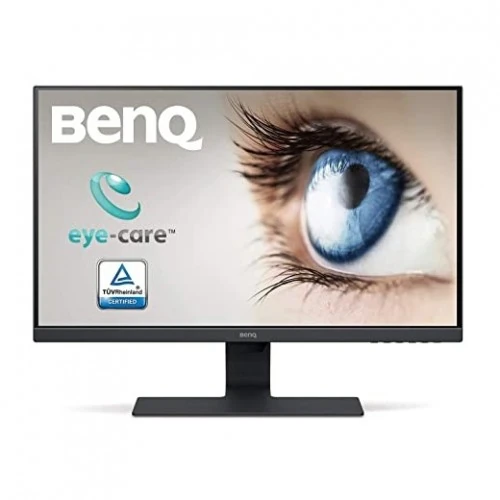
BenQ GW2283 21.5-inch IPS Full HD Eye-Care Monitor
Compact Full HD screen for everyday setups
The BenQ GW2283 is a 21.5-inch monitor built around an IPS panel and a 1920 × 1080 Full HD resolution. Its 16:9 format fits common work documents, web pages, video and everyday desktop layouts. At this size and resolution, the image density is approximately 102 pixels per inch, giving text and interface elements a compact presentation. BenQ lists a matte screen surface, 250-nit typical brightness and a 1000:1 native contrast ratio. These are the manufacturer’s stated figures, not a guarantee of identical perceived brightness in every room or picture mode. The display is specified at 60Hz, making it a conventional office and home monitor rather than a high-refresh gaming model. BenQ lists 5ms GtG response time; that figure describes pixel transition behavior and should not be confused with refresh rate or advertised as 1ms.
IPS viewing and color specifications
The IPS panel is specified for 178-degree horizontal and vertical viewing angles at contrast ratio above 10. This wide viewing range can help the image remain more consistent when a person shifts position or when two people look at the screen together. BenQ lists 16.7 million colors, 72% NTSC gamut and 8-bit color in its datasheet. These figures describe the published color capability; the monitor is not positioned as a wide-gamut professional color-grading display. Its picture modes include ECO, Game, Low Blue Light, Movie, Photo, sRGB, Standard and User, while color temperature choices include Bluish, Normal, Reddish and User Define. Individual modes can change the appearance of brightness and color, so users preparing color-sensitive work should select a consistent mode and calibrate with suitable equipment where accuracy matters.
Brightness Intelligence and eye-care options
Brightness Intelligence (B.I.) is a BenQ feature that monitors ambient light and the intensity of displayed content, then adjusts image presentation. BenQ describes it as helping prevent bright scenes from appearing overexposed while improving visibility in darker content. Low Blue Light modes offer alternate viewing profiles, and Flicker-Free technology is also listed for this model. BenQ documentation references TÜV eye-care certifications. These features give users controls for adapting the picture to different tasks and room conditions, but results depend on settings, content and individual preference. They should be described as monitor features, not medical guarantees. Users can choose from the listed picture modes and color temperatures to find a comfortable balance for reading, general work, photos or video.
Inputs and device connections
The GW2283 has two HDMI 1.4 inputs and one VGA input, according to BenQ’s exact model specifications. The dual HDMI connections can keep two compatible sources attached at once, such as a desktop and a laptop dock or media device, and users can switch sources using the monitor controls. VGA supports older computers and equipment. The published specification does not list DisplayPort, USB-C, a USB hub or an Ethernet connection, so those should not be assumed. BenQ lists HDCP 1.4. The monitor also includes an audio line-in and a headphone jack. Check the source device’s video output and cable before purchase; supported resolution and refresh behavior depend on the connected source and input.
Integrated audio for basic playback
Two built-in 1W speakers provide a convenient way to hear system sounds, calls or basic video playback without first connecting desktop speakers. BenQ also lists audio line-in and a headphone jack. The compact speaker rating indicates modest output intended for everyday convenience rather than room-filling sound, deep bass or detailed music listening. Customer reviews on retailer listings likewise describe the audio as limited. For clearer dialogue, louder playback or music, external speakers or headphones may be preferable. The product copy describes the actual integrated speaker configuration and does not claim a subwoofer or enhanced multi-channel audio system.
Design, stand and mounting
BenQ describes the GW2283 with a slim-bezel design, textured finish and a sculpted stand. A cable-management channel in the stand helps route connected wires for a tidier desk. The supplied stand supports tilt from −5 degrees to +20 degrees. The official specification does not list stand height adjustment, swivel or portrait pivot. For greater positioning flexibility, the back supports a 100 × 100 mm VESA mount; use an arm or wall bracket that matches the pattern and supports the monitor’s weight. BenQ lists dimensions of 489.5 × 394.4 × 175.1 mm with the base and a net weight of 3.7 kg with stand, or 2.9 kg without the base. Leave room for the stand footprint and connected cables.
Power and operating details
The monitor has a built-in power supply and BenQ lists a 100–240V AC voltage rating. Its datasheet reports up to 25W on-mode consumption and 0.5W in off and power-saving modes; the specification page lists sleep-mode consumption below 0.5W. Actual consumption can vary with brightness, picture mode, input, content and regional measurement method. The datasheet lists a 60,000-hour MTBF figure excluding the lamp, which is a component reliability metric and not a promised service life for every unit. Allow ventilation around the monitor and follow the supplied safety and installation instructions. A signal cable and other included accessories may vary by region, so confirm the local package contents with the seller.
What the 60Hz and 5ms figures mean
The official BenQ specification identifies a 60Hz refresh rate and 5ms GtG response time. A 60Hz display refreshes the image up to 60 times per second. It is suitable for common productivity, browsing, study and video use, while people seeking high-refresh gaming should compare a monitor designed for higher refresh rates. The 5ms GtG figure is the manufacturer’s gray-to-gray response specification. It is not evidence of 1ms response, and no FreeSync or G-SYNC certification is claimed for this model. Retail pages sometimes copy feature labels from other displays; the catalog uses the exact GW2283 manufacturer page and datasheet for these points.
Resolution, workspace and realistic use
A 21.5-inch Full HD panel offers a compact workspace that can fit smaller desks and standard office tasks. It provides enough pixels for documents, spreadsheets, browser tabs, online classes and common media. It has fewer total pixels and less physical workspace than a larger QHD display, so users who keep many dense windows open may prefer a larger or higher-resolution model. Picture clarity also depends on viewing distance, operating-system scaling and source quality. The monitor’s published resolution is 1920 × 1080; it should not be described as QHD, 4K or HDR. Its 250-nit typical brightness is a standard indoor figure, and suitability in bright environments depends on room lighting and screen placement.
Warranty and local purchase checks
Bangladesh retailer listings advertise a three-year warranty for the GW2283. Warranty terms can depend on the importer, authorized distributor, invoice, product condition and seller policy. One listing specifies that the box is required for a claim, and another excludes internal dust, so buyers should verify the exact issuer and terms printed on their invoice and warranty card. Package cable selection may vary by region; BenQ’s datasheet notes regional variation for signal cables and lists an HDMI cable in its referenced bundle. Confirm whether the local unit includes the needed power and video cables. This product description does not promise live BiponiBD stock, delivery time, customer rating or a specific current retail price.
Strengths and trade-offs
The GW2283 combines an IPS Full HD panel, dual HDMI, VGA, integrated speakers, audio connections and a VESA pattern in a compact monitor. Brightness Intelligence, Low Blue Light and Flicker-Free options add configuration choices for home and office use. Trade-offs include its standard 60Hz refresh rate, 5ms GtG specification, compact Full HD workspace and tilt-only stand. The pair of 1W speakers can handle basic system audio but are not a substitute for dedicated speakers where sound quality matters. These practical points help shoppers decide whether the monitor matches their desk, input devices and use pattern without implying capabilities that BenQ does not publish.
Setup and care
Place the monitor on a stable surface with adequate clearance behind the stand for cables and ventilation. Connect the power cord and the selected HDMI or VGA cable, then choose the matching input in the on-screen display. Adjust tilt within the listed −5° to +20° range and select a picture mode appropriate to the task. If using the VESA mount, use a compatible 100 × 100 mm bracket and follow BenQ’s mounting instructions. Keep the screen clean with a soft, suitable cloth and avoid liquids entering the housing. Store the box and warranty documents if the local seller requires them for service. For a full technical or warranty decision, verify the region-specific documentation supplied with the unit.
Key features
- 21.5-inch IPS LED-backlit Full HD display, 1920 × 1080 at 60Hz.
- 250-nit typical brightness, 1000:1 native contrast and 178° viewing angles.
- 5ms GtG response; 72% NTSC gamut, 16.7 million colors and 102 PPI.
- BenQ Brightness Intelligence adjusts image presentation using ambient light and content intensity.
- Low Blue Light modes and Flicker-Free technology; TUV documentation listed by BenQ.
- Two HDMI 1.4 inputs plus one VGA input for multiple devices.
- Two 1W speakers, audio line-in and headphone output.
- Matte screen, slim-bezel design and stand-integrated cable management.
- Tilt adjustment from −5° to +20°; 100 × 100 mm VESA mounting.
- Built-in 100–240V AC power supply; black finish.
Pros
- IPS Full HD panel with wide 178° viewing angles for desk work and shared viewing.
- Brightness Intelligence, Low Blue Light and Flicker-Free options for configurable eye-comfort settings.
- Two HDMI inputs allow two HDMI sources to remain connected, with VGA as a legacy input.
- Integrated 2W total stereo speakers, line-in and headphone output reduce the need for separate basic audio devices.
- VESA 100 × 100 mm compatibility and tilt adjustment support common desk and arm setups.
Things to consider
- 60Hz is a standard office/home refresh rate, not a high-refresh gaming specification.
- 5ms GtG is not a 1ms response claim; fast-action expectations should account for its listed panel speed.
- Full HD at 21.5 inches is suited to compact desk use but provides less workspace than QHD or larger 4K panels.
- The stand lists tilt only; height, swivel and pivot adjustment are not specified.
- Built-in speakers are 1W each and intended for basic audio; reviews note limited speaker output.