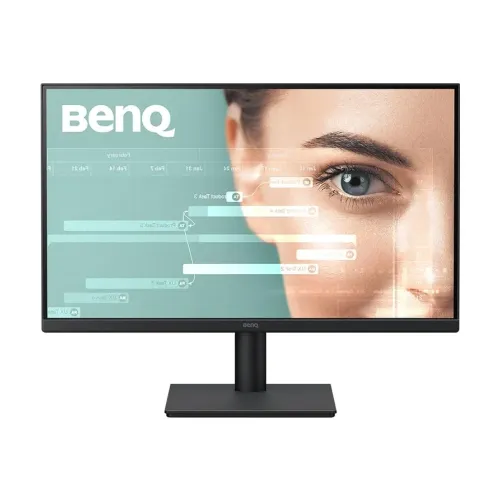
BenQ GW2291 21.5-Inch 100Hz Full HD IPS Eye-Care Monitor
A compact Full HD monitor for work and study
The BenQ GW2291 is a 21.5-inch flat IPS monitor with native Full HD resolution. It is designed for everyday computer use in an office, study corner, reception desk or home workstation where a compact display is useful. Its 1920 × 1080 pixels are arranged in a 16:9 widescreen format, so common desktop applications, web pages, documents and Full HD video fit a familiar layout. At this screen size BenQ lists about 102 pixels per inch and a 0.248 mm pixel pitch. Those figures describe the panel density; the visible sharpness also depends on the source resolution, operating system scaling and viewing distance.
The model name matters when comparing BenQ monitors. GW2291 is the target product, not GW2290, GW2491, GW2791 or the older GW2283. The GW2291 is 21.5 inches and uses one HDMI 1.4 input plus VGA. The GW2290 is a related 21.5-inch model with a different input arrangement and physical B.I. sensor on some specifications. GW2491 and GW2791 are larger screens, while GW2283 is an older 60Hz model. Product titles and catalog filters should therefore retain the exact GW2291 code. BenQ’s APAC pages list a regional part-code family such as 9H.LMRLB.QBE; the exact suffix for this individual local stock unit is not verified, so the normalized catalog model/MPN is GW2291.
IPS image, contrast and color specifications
The GW2291 uses an IPS panel with LED backlight. BenQ specifies typical brightness of 250 cd/m², a native static contrast ratio of 1300:1 and horizontal and vertical viewing angles of 178 degrees. The matte anti-glare surface can help reduce reflections from ambient room lighting, though it cannot remove direct glare or sunlight. The stated viewing angles describe the manufacturer’s measurement criterion and should not be read as a guarantee that the image looks identical from every possible position.
BenQ lists 16.7 million colors and a gamut figure of 99% sRGB or 72% NTSC across different regional specification pages. These two notations are commonly used to describe the same approximate coverage class; preserving both makes the source values clear. This monitor can be used for general office graphics, presentations, browsing and media. The gamut figure is not a substitute for an individual color calibration report, and no factory calibration certificate is claimed here. Users doing color-critical print or video work should check whether a measured, calibrated display better fits their process.
BenQ’s OSD includes Standard, Game, Cinema/Movie, Care, User, Coding and ePaper style display modes, alongside color-temperature settings such as Bluish, Normal, Reddish and User Define. Exact menu labels can vary by firmware or regional documentation. These are selectable viewing presets, not different hardware panels.
100Hz refresh and 5ms GtG response
The GW2291’s maximum listed refresh rate is 100Hz when using the HDMI 1.4 input. A refresh rate indicates how often the display can update its image each second. On a compatible computer, the higher mode can make scrolling, window movement and supported video motion appear smoother than 60Hz. The graphics output, cable and operating-system display setting must also support 1920 × 1080 at 100Hz. BenQ lists VGA timing up to 1920 × 1080 at 60Hz, so a VGA connection does not provide the advertised 100Hz maximum.
The response rating is 5ms Grey-to-Grey (GtG). GtG measures a pixel transition under a defined test method; it is different from MPRT, which is a motion-picture response metric. For that reason this product copy states 5ms GtG and does not relabel it as 1ms or as an MPRT result. Actual motion appearance depends on the source frame rate, connection, selected picture settings and content. The 100Hz refresh rating alone does not establish a particular game frame rate or promise that every moving object will be blur-free.
Eye-care settings and software support
BenQ lists Flicker-Free and Low Blue Light functions for the GW2291, including hardware and software low-blue-light approaches in regional material. The product page also identifies Eye Comfort 2.0 and Eyesafe 2.0, while its listed certifications include TCO Certified 9.0 and Energy Star 8.0. These labels identify product features and certifications; they are not medical advice or a promise to prevent eye conditions. For comfortable computer use, users can also adjust brightness to suit the room, avoid strong reflections, take regular breaks and set a viewing position that feels natural.
Coding Mode and ePaper Mode are useful examples of the monitor’s selectable profiles. Coding Mode adjusts the screen presentation for code and text work, while ePaper Mode offers a more subdued, monochrome-style appearance for long reading sessions. BenQ Eye-CareU software is listed as compatible, providing desktop-side controls and reminders on supported systems. It is software support rather than a sensor built into the bezel. In particular, the GW2291 should not be described as having the physical Brightness Intelligence (B.I.) sensor found on some sibling models such as GW2290 or older GW2283 configurations. Visual review of this product’s front also showed no separate sensor pod on the lower chin.
Connections, HDMI audio and regional speaker detail
At the rear, the published GW2291 connection set includes one HDMI version 1.4 input, one VGA (D-Sub) input and a 3.5 mm headphone jack. HDMI is the digital video connection for a modern computer, laptop, mini PC or compatible media source. It supports the monitor’s Full HD 100Hz mode according to the official timing information. VGA is an analog input for older office computers and equipment; it supports up to Full HD at 60Hz and does not carry audio. HDCP 1.4 support is listed for protected digital content.
Audio details require attention to regional sources. The exact Bangladesh Star Tech listing (store code 47930) and APAC/BD materials list built-in 2W × 2 speakers as well as a 3.5 mm headphone jack. Some global BenQ GW2291 sheets omit internal speakers. This is a regional documentation or hardware-lot difference, so the product record retains the Bangladesh/APAC listed 2W × 2 configuration but qualifies the claim. A buyer who depends on monitor speakers should verify the exact unit or box label before purchase. The headphone jack is an audio output; it is not a VGA audio input, and VGA itself carries no sound.
Stand, dimensions and mounting
The supplied stand supports tilt from −5 degrees downward to +20 degrees upward. BenQ does not list height adjustment, swivel or pivot movement on this stand, so users needing those positions may consider a compatible monitor arm. The official VESA pattern is 100 × 100 mm. The rear gallery image shows the central mounting area and the attached stand, but the actual mounting screws and arm are not part of the standard accessories listed unless the seller says otherwise. Check the arm’s VESA pattern and weight range before installation.
BenQ publishes dimensions in height × width × depth order. With the stand attached, the GW2291 measures 379.5 × 489.4 × 191.4 mm and its net weight is 2.56 kg. Without the stand/base, the listed dimensions are 291.5 × 489.4 × 53.3 mm. Stating the axes explicitly helps prevent the width and height from being swapped when planning a desk or shelf. The black housing, narrow bezel treatment and rectangular base are visible in the supplied gallery views. The monitor also lists a Kensington security slot for a compatible lock.
Power use and package contents
The GW2291 uses an internal power supply rather than a separate external DC adapter. BenQ specifies a 100–240V AC input and lists typical power consumption at 15W, maximum at 24W and sleep-mode consumption below 0.5W. Actual electricity use depends on brightness, audio use, picture mode and operating conditions; the published values are manufacturer ratings. Energy Star 8.0 and TCO Certified 9.0 appear in the APAC specifications reviewed. The standard power connection uses the included AC cord; the power supply itself is housed inside the monitor.
The regional package list includes the monitor and stand, an AC power cord, an HDMI 1.4 cable listed at 1.5 m on the Japan regional spec page, quick-start material and a warranty card. Retail packaging can vary by market and sales lot. A VGA cable is not listed among the standard items in that source, so do not assume one is included. Check the delivered box contents if a particular cable length or connection is required. The gallery images document the monitor’s appearance; they do not prove that a cable, bracket or other accessory is in a specific local carton.
Warranty and Bangladesh purchase checks
Smart Technologies (BD) Ltd. identifies itself as the official BenQ distributor and its exact-model page lists a three-year official warranty. Exact-model Bangladesh listings from Star Tech, Ryans, TechLand, SkyLand and Ultra Technology also advertise three years, though the responsible seller or distributor and claim procedure should be checked on the supplied invoice. Warranty terms can depend on the unit’s regional label and the seller’s documentation, so this description does not promise a claim outcome without those details.
Before selecting the monitor, confirm which input your computer has, whether you need the 100Hz HDMI mode, whether the tilt-only stand is sufficient, and whether built-in audio is important. Check that the actual regional box includes the needed cable and verify the speaker configuration for your unit if you plan to rely on its internal speakers. The exact model should read GW2291; retailer numbers are internal shop identifiers and should not be mistaken for its manufacturer model. The current BiponiBD page remains the source for BiponiBD price and availability, since third-party retailer listings are not this store’s offer.
Specification recap
BenQ GW2291; 21.5-inch flat IPS LED; 1920 × 1080 Full HD; 16:9; 0.248 mm pixel pitch; approximately 102 PPI; 100Hz maximum over HDMI 1.4 and 60Hz maximum over VGA; 5ms GtG; 250 cd/m² typical brightness; 1300:1 native contrast; 178° horizontal and vertical viewing angle; 16.7 million colors; 99% sRGB / 72% NTSC; anti-glare matte surface; HDMI 1.4, VGA and 3.5 mm headphone output; 2W × 2 speakers listed on BD/APAC configuration with regional variation; internal 100–240V AC supply; 15W normal, 24W maximum and under 0.5W sleep; −5° to +20° tilt; 100 × 100 mm VESA; 379.5 × 489.4 × 191.4 mm with stand; 2.56 kg net; Energy Star 8.0, TCO 9.0, TÜV-related Eye Comfort and Eyesafe features; three-year Bangladesh warranty advertised by the distributor and local retailers.