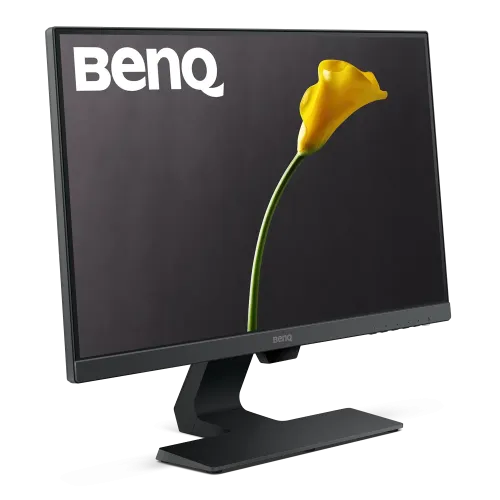
BenQ GW2480L: complete home and office monitor guide
BenQ GW2480L overview
The BenQ GW2480L is a 23.8-inch Full HD IPS monitor designed for home, study and general office use. Its 1920 x 1080 resolution, 60Hz refresh rate and 5ms gray-to-gray response target everyday productivity, browsing and video. BenQ lists 250-nit typical brightness, 1000:1 native contrast, 178-degree viewing angles and 72% NTSC color gamut. The display includes HDMI 1.4, DisplayPort 1.2 and VGA inputs, two 1W speakers, a headphone jack and an audio line-in connection. Eye-care features include Brightness Intelligence, Flicker-Free and Low Blue Light Plus. This catalog record was incorrectly associated with “Others”; it will be connected to the active BenQ brand. Confirm the exact local price, seller warranty card, regional bundle and stock before placing an order.
Full HD resolution and 23.8-inch workspace
The monitor has a 23.8-inch diagonal IPS panel with a native resolution of 1920 x 1080 pixels and a 16:9 aspect ratio. BenQ lists 93 pixels per inch. This format works well for common websites, office applications, online classes, video calls and streaming content. Full HD is less demanding for an older PC than QHD or 4K, while providing a familiar amount of desktop space for text and documents. Users who need several large application panels, high-resolution photo detail or dense spreadsheets may prefer a higher-resolution model. The matte surface helps manage reflections from typical indoor lighting, but it cannot eliminate glare from a bright window. Choose a comfortable viewing distance and use operating-system scaling that keeps text readable.
IPS viewing and picture characteristics
The GW2480L uses an LED-backlit IPS panel. BenQ specifies 178-degree horizontal and vertical viewing angles at a contrast-ratio threshold, which can help maintain a consistent view when the user shifts position or shares the screen. Native contrast is listed at 1000:1, and typical brightness is 250 nits. These are standard SDR monitor characteristics rather than HDR performance claims. The model is not listed as an HDR display, so do not infer HDR10 support from the product name or from a similar BenQ model. IPS technology can provide useful color consistency for general work, but 72% NTSC coverage is modest compared with a wide-gamut professional screen. For color-critical design, compare a calibrated monitor with a broader documented gamut.
Refresh rate and response for everyday work
BenQ specifies a 60Hz refresh rate and 5ms gray-to-gray response time. These specifications suit documents, browser use, study, video meetings and ordinary media playback. The monitor is not intended for high-refresh competitive gaming. A 60Hz panel refreshes up to 60 times per second; the computer still needs to provide the selected resolution and supported signal. The display can show games and casual entertainment, but players seeking faster motion should compare models with higher refresh rates and gaming-oriented response behavior. BenQ lists AMA overdrive support in its specification. Choose an appropriate setting and check for unwanted visual artifacts rather than assuming the highest setting is always best.
Eye-care and ambient brightness features
The GW2480L includes Flicker-Free technology, Low Blue Light Plus and Brightness Intelligence. BenQ describes Brightness Intelligence as a feature that detects ambient light and screen content brightness to adjust the display for a more comfortable viewing experience. Low Blue Light Plus offers settings that reduce blue-light output while aiming to retain a usable color balance. These are comfort features, not medical treatment, and their effect varies by person and room. Set the monitor brightness for the actual lighting conditions, take breaks and maintain a comfortable viewing distance. Eye-care modes can alter color appearance; switch to a standard or calibrated mode when color matching matters. BenQ's product information also identifies Eyesafe certification for this model family/market; verify local packaging if certification details are important.
Inputs and legacy device compatibility
The monitor provides one HDMI 1.4 input, one DisplayPort 1.2 input and one VGA input. The mix supports modern computers as well as some older devices that still use analog VGA. It also has a headphone jack and audio line-in. BenQ lists HDCP 1.4. The input count means users switching between several devices may need to select a different input or reconnect a cable; the monitor does not provide a USB hub or USB-C laptop docking. For best digital image quality, use HDMI or DisplayPort when available. VGA is an analog connection and may require the host to set a compatible resolution and timing. Check which cable is included in the local box before buying separate accessories.
Built-in speakers and audio connections
Two built-in speakers rated at 1W each provide basic sound for system alerts, calls and casual video. The monitor also supports a headphone jack and audio line-in. These speakers are convenient for a desk where space is limited, but their low power rating means they should not be expected to replace dedicated speakers or headphones for music, gaming or detailed listening. Audio routing depends on the computer's selected playback device and the connected cable. If sound does not play through the monitor, check the operating-system audio output and the monitor's volume and mute settings. Use external audio if the room or application needs more volume, clearer speech or stronger bass.
Stand, tilt and VESA installation
BenQ specifies a tilt range from -5 to +20 degrees and a 100 x 100mm VESA mount pattern. The official GW2480L specification does not list height adjustment, swivel or portrait pivot for the standard stand, so this review does not claim those functions. A compatible VESA arm can provide positioning options if its load capacity and mounting hardware match the monitor. Install the display on a stable surface, avoid overtightening screws and leave room for power and signal cables. Adjust tilt to reduce reflections and maintain a comfortable neck position. If users require height adjustment out of the box, compare a model with an explicitly listed ergonomic stand such as a GW2480T variant; do not assume the L model shares another series member's stand.
Dimensions, weight and desk planning
BenQ lists the GW2480L with stand dimensions of about 420mm high by 540mm wide by 175mm deep. Without the base, the display measures about 340mm high by 540mm wide by 50mm deep. Net weight is listed as 4.23kg with stand and 3.45kg without the base. Allow clearance behind the monitor for the power plug and video connectors, and confirm desk depth if the screen will sit close to a wall. A VESA arm should be rated for the unit's weight. Regional product pages may show measurements in a different order, so confirm the manual diagram before choosing a shelf or mount.
Power and operating efficiency
The GW2480L has a built-in power supply rated for 100-240V input. BenQ's Asia-Pacific specification lists typical power consumption at 15W, maximum at 23.5W and sleep-mode consumption below 0.5W. Power consumption varies with brightness, input signal, audio use and operating state. Connect the monitor to a grounded outlet and use the supplied power cable where possible. Turn off the display or allow sleep mode when it is not in use. These power numbers are manufacturer test values, not a guarantee of a specific household bill; actual energy cost depends on hours of use and the local tariff.
Setup with desktop PCs and laptops
Connect a desktop through HDMI or DisplayPort, then set 1920 x 1080 resolution and 60Hz in the computer's display settings. Older PCs may use VGA, but the image can require manual adjustment and may be less crisp than a digital connection. A laptop can connect through HDMI or a compatible USB-C-to-DisplayPort/HDMI adapter if the laptop supports external video output. The monitor itself does not supply USB-C power to charge a laptop, and it does not include a USB data hub. Confirm the computer's connector and supported display mode before purchasing adapters. For dual-screen setups, check that the graphics card supports the number of attached displays.
Color modes and accessibility
BenQ lists picture modes including Color Weakness, ECO, Game, Low Blue Light, Movie, Photo, sRGB, Standard and User, with selectable color temperatures. Color Weakness mode provides red and green filters intended to help some users distinguish certain colors. ECO mode can support reduced power use, while sRGB or Standard modes may be more appropriate for ordinary desktop color. Presets adjust the monitor image; they do not change source-file color data or guarantee universal color accuracy. Accessibility needs differ, so test the settings with the applications and content the user relies on. For consistent output across multiple displays, use a documented calibration workflow and suitable measurement equipment.
Bangladesh price, stock and warranty
The captured variant has no price, and this review did not verify a current Bangladesh checkout quote for the exact GW2480L. The variant MSRP remains null rather than using a price for GW2480, GW2480T or another related model. The catalog says three years warranty, but the manufacturer's international specification page does not establish coverage of a particular Bangladesh-market unit. Ask the seller for the exact model code on the box, stock status, local warranty card, authorized service location, return policy and included cable. Confirm whether the unit is new and sealed and keep the invoice for service. Regional bundles can vary; BenQ's US page lists an HDMI cable, but the Bangladesh package must be confirmed with the retailer.
Who should consider the GW2480L
The GW2480L can suit a student, home-office user or general desktop setup that needs a compact 23.8-inch IPS display with Full HD resolution, basic stereo speakers and multiple digital/legacy inputs. Its eye-care settings and ambient brightness feature can be useful during everyday reading and office tasks. It is not a high-refresh gaming monitor, color-critical wide-gamut display, HDR screen or USB-C docking station. The fixed/basic stand feature set also makes an adjustable arm or riser worth considering for users who need more ergonomic positioning. Compare local price and warranty with similar monitors and confirm the exact GW2480L model before purchase.
Model identity and source notes
This listing is specifically BenQ GW2480L, the L variant, and must not be treated as identical to GW2480, GW2480T or newer GW2490 models. The official BenQ Asia-Pacific specification page provides exact GW2480L display, connection, audio, power, dimensions, eye-care and stand data. BenQ's official buying page describes the product positioning and a regional example of package contents. Product-family material can differ by region, so the physical box label and local warranty card govern the unit delivered in Bangladesh. Local price, warranty coverage and GTIN remain unverified. The catalog's previous “Others” brand relationship was corrected to the active BenQ brand record, while status, category, identifiers, variant SKU and media relationships were retained.
Frequently asked questions
1. What is the resolution of GW2480L?
It is a 23.8-inch Full HD display with 1920 x 1080 resolution and a 16:9 aspect ratio.
2. Is the GW2480L an IPS monitor?
Yes. BenQ lists an LED-backlit IPS panel with 178-degree viewing angles.
3. What is the refresh rate?
BenQ specifies a 60Hz refresh rate and 5ms gray-to-gray response time.
4. Which ports does it have?
One HDMI 1.4, one DisplayPort 1.2, one VGA, a headphone jack and audio line-in.
5. Does it have built-in speakers?
Yes. It includes two 1W speakers for basic desktop audio.
6. Does it support HDR?
The official GW2480L specification does not list HDR support; do not confuse it with HDR-capable BenQ models.
7. Can I mount it on a monitor arm?
Yes. The listed VESA pattern is 100 x 100mm; check the arm rating and installation guide.
8. Does the stand adjust in height?
BenQ lists tilt adjustment only for the standard GW2480L stand; height adjustment is not specified.
9. Does it have USB-C or laptop charging?
No USB-C connection or USB-C laptop power delivery is listed for this model.
10. How bright is the screen?
BenQ specifies 250 nits typical brightness.
11. What is the price in Bangladesh?
A current exact-model Bangladesh checkout price was not verified; the variant price remains unset.
12. What local warranty applies?
The catalog lists three years, but ask the seller to confirm the exact Bangladesh warranty card and service terms.