BenQ GW2486TC 23.8-inch USB-C 100Hz monitor: Bangladesh guide
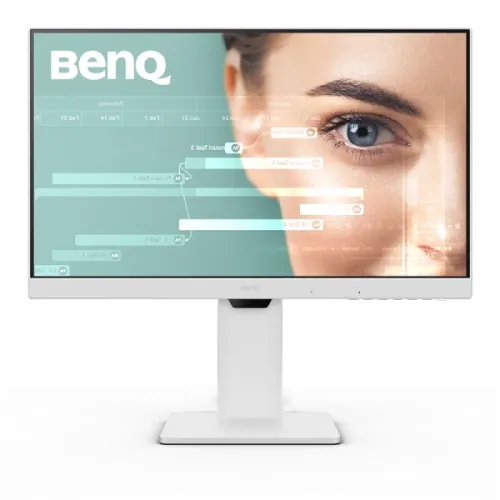
The BenQ GW2486TC is a 23.8-inch Full HD IPS monitor for home office, study, coding and everyday computing. BenQ’s official product and specification pages identify a 1920 × 1080 panel, 100Hz refresh rate, 5ms gray-to-gray response time, 250-nit typical brightness, 1300:1 native contrast and 99% sRGB coverage. The distinguishing feature is its USB-C connection: one cable can carry DisplayPort Alt Mode video, USB data and up to 65W power delivery to a compatible laptop. The display also supports daisy chaining through DisplayPort Multi-Stream Transport, has two downstream USB-A ports, built-in speakers and an integrated noise-cancelling microphone. These features make the GW2486TC a practical desk hub, while its Full HD resolution and modest 250-nit brightness set clear limits for buyers comparing it with QHD or high-brightness displays. BiponiBD’s existing ৳22,500 variant price is retained; retailer prices and stock are time-sensitive.
Panel, resolution and workspace
The 23.8-inch diagonal IPS panel uses a native 1920 × 1080 resolution and a 16:9 aspect ratio. BenQ lists 93 pixels per inch, 178-degree horizontal and vertical viewing angles, a matte coating and 16.7 million colors. This is a familiar size and pixel density for office documents, browser tabs, code editors, video calls and streaming at a typical desktop distance. IPS viewing angles help the image remain usable when viewed slightly off-centre, which is helpful when sharing a screen. Full HD gives less workspace and fine detail than a similarly sized QHD panel, so users who regularly compare dense spreadsheets or large design canvases should decide whether the extra pixels matter more than the USB-C docking and ergonomic features here. The matte surface can reduce distracting reflections, but it does not eliminate glare in a brightly lit room. The published figures describe the model specification; individual units and user settings can affect perceived uniformity and color.
100Hz refresh and response
The monitor supports a maximum refresh rate of 100Hz. Compared with a conventional 60Hz mode, a compatible computer can refresh the image more often, making scrolling, pointer movement and supported video or games look smoother. The PC, cable, operating system and selected display mode must all allow 100Hz; after connecting, check the operating system’s advanced display settings. BenQ lists a 5ms gray-to-gray response time. That is a manufacturer response-time rating and should not be read as a guarantee that all pixel transitions take exactly five milliseconds or that motion blur is impossible. The GW2486TC is designed primarily as an eye-care productivity display rather than a high-refresh competitive gaming monitor. It can handle casual play, but its 100Hz ceiling, Full HD resolution and office feature set should guide expectations. The user’s graphics hardware and application frame rate determine how much benefit a higher refresh mode provides.
Brightness, contrast and color
BenQ’s model specification gives 250 nits typical brightness, a 1300:1 native contrast ratio and 99% sRGB color gamut. The 250-nit rating is appropriate for many indoor workspaces, though direct sunlight or strong window reflections may call for a brighter screen or better placement. The 1300:1 contrast ratio is a stated native panel figure; it does not mean the monitor offers local dimming or OLED-like black levels. BenQ lists 16.7 million colors and multiple picture modes, including Coding, ePaper, Low Blue Light Plus, sRGB, Standard, Movie, Game, M-book, Care, Color Weakness, ECO and User. These presets change the viewing profile; gamut coverage alone is not a factory calibration certificate. No measured Delta E report or hardware calibration guarantee is claimed here. Users doing color-critical print or professional grading should use a calibrated workflow and a display specifically specified for that purpose.
USB-C single-cable laptop connection
The USB-C port supports DisplayPort Alt Mode video, USB data and power delivery up to 65W. With a compatible laptop and a suitable USB-C cable, one connection can drive the monitor, link the monitor’s USB hub and charge the laptop within that power budget. Actual charging speed depends on the laptop’s demand, battery state, cable and power negotiation; 65W is the monitor’s maximum delivery rating, not a promise that every laptop will charge at its full rate. Check that the laptop’s USB-C port supports video output, because a USB-C-shaped connector alone does not guarantee DisplayPort Alt Mode. A separate HDMI or DisplayPort connection can be used for video where needed, with USB upstream separately connected for the hub and microphone functions. Keep the supplied cable and laptop compatibility in mind when planning a one-cable setup.
Ports, hub and daisy chain
The reviewed exact-model sources identify one HDMI 1.4 input, one DisplayPort 1.2 input and one DisplayPort 1.2 output, plus USB-C upstream and two USB-A downstream ports. The USB-A ports use USB 3.2 Gen 1, rated up to 5Gbps, with up to 4.5W charging per port. A headphone jack is also available. The DisplayPort output supports daisy chaining via Multi-Stream Transport (MST), allowing a compatible source and display chain to extend the desktop to another monitor. This feature depends on GPU, operating-system, bandwidth and monitor compatibility. BenQ notes that Mac devices only support monitor daisy chaining via Thunderbolt, so Mac users may need a suitable Thunderbolt dock or device. The USB hub’s peripherals require the upstream connection to the computer. The integrated noise-cancelling microphone is also specified to work with a laptop or other external PC over USB-C. Check the official port diagram and the actual laptop ports before buying cables or planning a multi-monitor layout.
Stand ergonomics and mounting
The included stand offers tilt from -5 to +20 degrees, swivel up to 45 degrees in either direction, 90-degree pivot and approximately 130mm of height adjustment. Those adjustments let users position the screen for seated work, portrait reading or a shared view, and can reduce the need for a separate arm. A standard 100 × 100mm VESA mount is also listed for compatible monitor arms or wall mounts. BenQ’s product page emphasizes height, pivot, swivel and tilt flexibility. Published dimensions from retailer specification tables are approximately 541 × 500.4 × 185.4mm with the stand and 541 × 330.2 × 61mm without it (width × height × depth); the monitor weight is 6.2kg with the stand and 3.8kg without. These dimensions are sourced from B&H and should be treated as secondary regional product data; verify desk clearance and mounting load before installation. Carton dimensions and shipping weight are different measurements.
Eye-care tools and integrated audio
BenQ lists Flicker-Free, Low Blue Light Plus and Brightness Intelligence features for viewing comfort. Brightness Intelligence uses an ambient-light sensor to adapt screen brightness, and its second generation allows more user adjustment. Eye-CareU software offers timers and distance reminders on supported systems. These are convenience and comfort tools, not a substitute for sensible breaks, room lighting or an ergonomic setup. The monitor has two built-in 2W speakers for calls, system sounds and casual media, as well as a headphone output. The noise-cancelling microphone is designed to reduce ambient noise during online meetings and requires a USB-C connection to an external computer according to BenQ’s product information. Integrated audio helps reduce desk clutter, but users who need richer sound, stronger bass or a dedicated microphone for recording may prefer external equipment. Confirm the operating system and connection method for the microphone before relying on it in a meeting workflow.
What the GW2486TC is best suited for
The GW2486TC is a strong fit for a laptop-based desk where cable simplicity, screen positioning and day-long office tasks matter. USB-C with 65W power delivery, a USB hub, speakers, microphone, 100Hz refresh and ergonomic stand combine into a convenient home-office setup. Coders can use the Coding and ePaper picture modes and rotate the panel vertically; spreadsheet users can adjust height and angle; laptop owners can reduce cable clutter when their device supports USB-C video. Its 23.8-inch Full HD IPS panel is less suited to buyers who need QHD detail, very high brightness, professional color validation or a higher gaming refresh rate. The microphone and daisy-chain features have host-device requirements, and Mac monitor chaining has a specific Thunderbolt limitation. Choosing based on the complete connection chain—not only the USB-C connector—helps avoid incompatibility surprises. The listing should be understood as a productivity and eye-care monitor with useful docking features, not as a workstation dock with universal laptop support.
Bangladesh price, stock and warranty
The checked Bangladesh seller snapshots ranged from ৳21,999 at Star Tech to ৳26,500 at Smart Technologies; TechLand showed ৳22,500 promotional against ৳28,000 regular, and Eastern IT listed ৳25,800. These are retailer display prices checked on 4 November 2026, not guaranteed offers or proof that every seller has stock. The product variant price stored in BiponiBD remains ৳22,500; this update does not change the selling price. Before ordering, confirm the exact GW2486TC model printed on the monitor and box, seller stock, invoice price, warranty issuer, service location, dead-pixel policy, return period and what the warranty excludes. Local sellers advertise three years, while Star Tech notes that internal dust is excluded. Retailer warranty terms apply only to that seller’s local offer and should not be generalized to every imported unit. Confirm which USB-C and video cables are included in the local package, as regional box contents can differ. Keep the invoice and warranty documents for service.
Setup and compatibility checklist
For a one-cable laptop setup, confirm the laptop USB-C port supports DisplayPort Alt Mode and that its charging requirement is within the monitor’s 65W delivery rating. Use the supplied or a certified USB-C cable suitable for video, data and charging, then select the BenQ input and choose the preferred resolution and 100Hz refresh in the computer settings. Connect the USB-C upstream link when using the monitor’s USB-A ports or microphone. For daisy chaining, verify that the graphics output, driver, operating system and downstream monitor support the required MST mode; follow BenQ’s Mac and Thunderbolt note where relevant. Adjust stand height, tilt, swivel and pivot for a comfortable position, and check that portrait orientation is supported by the computer’s display settings. If connecting by HDMI or DisplayPort instead, USB peripherals and microphone functions may require a separate USB-C data connection. If a feature does not appear, check the host port capability, cable, selected input and display settings before assuming the monitor is defective.