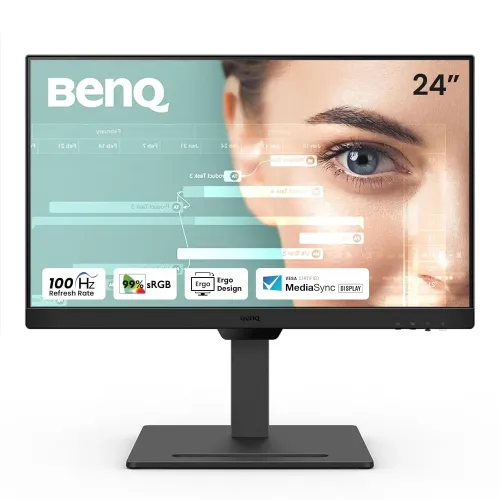
BenQ GW2490T 23.8-inch Full HD 100Hz IPS Eye-Care Monitor
Panel size and resolution
The BenQ GW2490T is a 23.8-inch Full HD monitor with a 1920 × 1080 IPS panel, LED backlight and 16:9 aspect ratio. BenQ specifies a 527.04 × 296.46 mm viewable area, 93 pixels per inch, a matte screen coating and 178-degree horizontal and vertical viewing angles. The GW2490T model suffix is significant: its T version includes an ergonomic stand with height, tilt, swivel and pivot adjustments. It is not the same configuration as the standard GW2490, GW2490C, GW2491 or USB-C-equipped GW2490TC. Confirm the full model code on the carton and listing before comparing stands and ports. The broad IPS viewing angles support a shared desk or side-by-side document review; Full HD at this size is an everyday productivity resolution, while users needing finer text detail may prefer a higher-resolution panel.
100Hz and VESA MediaSync
The maximum refresh rate is 100Hz. This can make supported desktop scrolling, pointer movement, animation and compatible video look smoother than a typical 60Hz mode. A compatible computer, output and cable must be set to 1920 × 1080 at 100Hz; select the refresh mode in the operating system's advanced display controls after connecting. The display's 100Hz capability does not guarantee that every application or game produces 100 frames each second. BenQ also lists VESA MediaSync certification, which is intended for consistent media playback at different video frame rates. MediaSync is not the same as advertising this model as a FreeSync gaming monitor: the official specification does not list FreeSync or G-SYNC for the GW2490T.
GtG response and use
BenQ rates the response time at 5ms GtG and lists its AMA pixel-response setting. GtG is a gray-to-gray response measurement; do not describe it as 1ms MPRT. The monitor is positioned for home office, study and everyday media, and its 100Hz refresh can support casual gaming. Buyers seeking a purpose-built competitive gaming display should compare higher refresh models and look at the complete motion performance rather than using the 5ms number alone.
Brightness, contrast and color
The panel is rated at 250 nits typical brightness, 1300:1 native contrast and 99% sRGB color gamut, with 16.7 million display colors. BenQ lists gamma adjustment from 1.8 to 2.6, four color temperature choices (bluish, normal, reddish and user-defined), and color modes such as Standard, Game, ePaper, Care, Coding, Cinema, M-Book and User. These are display controls, not a per-unit color calibration report. The anti-glare matte surface can reduce reflections, although ambient light and window position still affect how comfortable and readable a screen feels. The official exact-model specification does not list HDR support.
Eye-care modes and certifications
The GW2490T includes BenQ's eye-care set: Flicker-free, Low Blue Light, Brightness Intelligence Generation 2, Color Weakness mode, ePaper mode and Eye Reminder. The built-in sensor can respond to room light and image brightness; adjust its behavior in the on-screen display and review the user guide. Low Blue Light and ePaper can change the screen's color tone, which may be useful for particular reading settings but is not a medical treatment. Eye-CareU software is listed for supported computers. BenQ also identifies TÜV Eye Comfort 2.0, EyeSafe 2.0, flicker-free and hardware Low Blue Light certification, plus Energy Star 8.0 and EPEAT Bronze. The certifications and features do not guarantee that extended sessions will never cause discomfort.
HDMI, DisplayPort and audio
The rear has two HDMI 1.4 inputs and one DisplayPort 1.2 input, with HDCP 1.4 listed. There is a headphone jack and built-in stereo speakers rated at 2W per channel. The speakers are suited to simple calls, lessons and low-volume playback; headphones or separate speakers may work better for music and a fuller room sound. BenQ lists an HDMI 1.4 signal cable, though the included cable may vary by region. No USB-C video input, USB hub or Ethernet port is listed for this exact model. The GW2490TC is a related but separate product and should not be used as evidence that this GW2490T includes USB-C.
Four-way ergonomic stand and VESA
The supplied stand makes the GW2490T more adjustable than a basic tilt-only monitor. BenQ specifies 110 mm of height movement, tilt from -5° to +20°, swivel 20° left and right, and 90° pivot to portrait orientation. In landscape orientation, BenQ estimates height at 374–484 mm depending on stand position, with 540 mm width and 241 mm depth. In pivot orientation, the listed dimensions are 589 × 343 × 241 mm (height × width × depth). Without the base, the monitor is 343 × 540 × 66 mm. BenQ lists a 100 × 100 mm VESA mounting pattern and Kensington lock slot. Use the included stand for ergonomic adjustments or check bracket compatibility, weight and screw requirements before switching to a monitor arm.
Weight and power
The estimated net weight is 6.4 kg with the base and 3.5 kg without it. These values differ from some regional datasheet figures and reseller page details; use the current local carton and BenQ manual if the shipping or arm capacity depends on exact weight. The display has a built-in power supply and supports 100–240V input. BenQ's Asia-Pacific product specification lists 20W normal consumption, 30W maximum and less than 0.5W in sleep mode. An older India datasheet lists 20W normal, and a Bangladesh retailer table lists 25W typical and 35W maximum. Use the region-specific user guide and local adapter label for the purchased unit; the difference in reported power figures does not change the 100–240V input rating.
Regional accessories and warranty
BenQ's regional accessory list includes a quick-start guide, warranty card and safety instructions, and identifies an HDMI 1.4 signal cable while warning that the cable may differ by region. Confirm the Bangladesh package contents at checkout. Seller pages list a three-year warranty. The warranty provider, on-site or service-center handling, dead-pixel terms, box retention rules and eligibility can vary, so ask the seller for the exact written terms and keep the invoice. The local seller warranty is the useful buyer-facing information; a BenQ India datasheet is not proof that the same service terms apply in Bangladesh.
Bangladesh prices and model comparison
Bangladesh offer snapshots during this review range from roughly ৳21,000 to ৳23,000: Ryans shows about ৳21,000, Star Tech about ৳21,900–৳23,000 depending on the displayed offer, and TechLand ৳23,000. Ultra Technology lists around ৳22,000. Offers, stock and terms change. The existing BiponiBD variant price is ৳22,000 and is retained. Before ordering, confirm that the exact listing says GW2490T, 100Hz, the 4-way adjustable stand and three-year local warranty; don't compare it with the cheaper GW2490 base stand or USB-C-equipped GW2490TC without checking exact model specifications.
Setup and suitability
For first setup, connect the PC using HDMI or DisplayPort, select the corresponding input and then choose 100Hz from the operating system's advanced display settings. The VGA port is not part of the GW2490T's listed connector set. Set the stand height near eye level, swivel the screen to reduce glare, and rotate it to portrait when that orientation suits a document or code editor. Use a compatible VESA arm only if the 100 × 100 mm pattern and installation hardware match. For a compact office display with speakers, an adjustable stand, 100Hz refresh and eye-care modes, the GW2490T provides more ergonomic flexibility than the non-T variant; its trade-offs are Full HD resolution, one DisplayPort and two HDMI 1.4 ports, no USB-C, and no listed HDR or FreeSync.