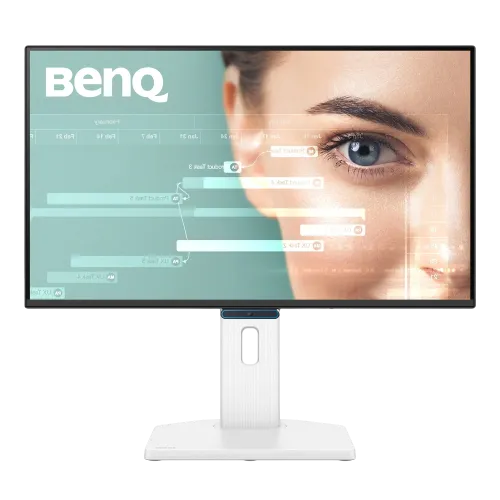
BenQ GW2490TC: a 23.8-inch 144Hz USB-C monitor
The BenQ GW2490TC is a 23.8-inch Full HD IPS monitor designed for coding, home and office work, and casual gaming. BenQ specifies a native resolution of 1920 x 1080, 144Hz refresh, 5ms gray-to-gray response time, 250-nit typical brightness and 1500:1 native contrast. Its USB Type-C port carries DisplayPort Alt Mode video and data and provides up to 20W Power Delivery. The display also has HDMI 1.4, DisplayPort 1.2, built-in 2W x 2 speakers and a 3.5mm headphone jack. The full ergonomic stand supports 150mm of height travel, tilt, swivel and portrait pivot. BenQ positions it as an eye-care and coding monitor; local stores also promote its 144Hz refresh for gaming.
Full HD IPS screen and 99% sRGB color
The 23.8-inch IPS panel has 1920 x 1080 pixels, a 16:9 aspect ratio and about 93 pixels per inch. BenQ lists 99% sRGB coverage, 16.7 million colors and 178-degree horizontal and vertical viewing angles. This specification suits everyday office work, web content, code editors and general photo viewing. The matte coating helps reduce reflections, though direct sunlight can still affect visibility. A 250-nit typical brightness is appropriate for many indoor desks but is not intended for very bright rooms or HDR presentation. Color gamut coverage describes the range of colors the panel can display; it is not a per-unit color calibration report. If color-critical work is planned, use a calibrated workflow and review the exact unit.
144Hz refresh and 5ms GTG response
BenQ lists 144Hz as the monitor's native maximum refresh rate, without an overclock mode. A compatible computer can send up to 144 frames per second to make scrolling, pointer movement and supported games appear smoother than a standard 60Hz office screen. The official response time is 5ms GTG, not 1ms; the AMA setting in the monitor menu adjusts motion response. VESA MediaSync is listed for variable refresh, and BenQ documentation reports AMD FreeSync in the 48–144Hz range. Actual performance depends on the graphics output, cable, driver, game and selected display settings. This makes the GW2490TC a work-first monitor with useful casual-gaming support, rather than a dedicated 1ms esports panel.
USB-C: video, data and 20W power delivery
One USB Type-C connection supports DisplayPort Alt Mode, data and up to 20W Power Delivery. A compatible laptop can send video to the monitor and receive limited charging power over one cable. Twenty watts can suit phones, tablets and some low-power devices; it is below the charging capacity expected by many performance laptops, so keep the laptop's main charger available if needed. The monitor does not provide the USB-A hub ports or DisplayPort-out daisy chain found on some related BenQ models such as the GW2486TC. The USB-C data function should not be confused with a multiport dock. Confirm that the computer's USB-C port supports DisplayPort Alt Mode and that the cable is suitable for video before relying on a single-cable setup.
HDMI, DisplayPort and audio connections
The input panel has one HDMI 1.4 port, one DisplayPort 1.2 port and one USB-C input with DisplayPort Alt Mode. BenQ lists the 144Hz maximum across supported input modes at Full HD. A 3.5mm headphone output and two built-in 2W speakers provide basic audio options. The speakers can handle calls, system sounds and casual video playback; external speakers or headphones are preferable when richer sound or stronger volume is needed. Connect a source to the corresponding port, select it in the on-screen menu and check the computer's display settings if 144Hz is not available. Only one external video source can be active at a time; this model does not advertise a built-in KVM switch.
Coding modes, eye-care tools and ambient brightness
The GW2490TC includes dedicated Coding, ePaper, Care, Game, M-Book, Movie, Standard and User picture modes. Coding Mode is intended to improve readability in programming workflows, while ePaper gives a monochrome reading option. BenQ's Brightness Intelligence Gen2 sensor can adjust screen brightness according to ambient lighting. Low Blue Light Plus, Flicker-Free operation, Color Weakness Mode, Eye-CareU software and listed TÜV Rheinland and Eyesafe 2.0 certifications add display comfort and accessibility options. These functions are settings and product certifications, not medical claims. Adjust the modes to suit the task and room, and take regular breaks during long sessions.
A fully adjustable white stand and VESA mounting
The included white ergonomic stand supports 150mm of height adjustment, tilt from -5 to +35 degrees, swivel 45 degrees left and right, and 90-degree portrait pivot. Landscape height ranges from 372 to 522mm. The display also supports a 100 x 100mm VESA mount for a compatible monitor arm. The stand can help align the screen with seated eye level and rotate a page or code window into portrait orientation. Check desk depth and arm compatibility before installation; the complete monitor is 539.8mm wide and 241.6mm deep at the listed stand configuration. The white rear housing and stand contrast with the black front bezel, as shown in the product images.
Dimensions, weight and built-in power supply
BenQ lists dimensions of 372–522 x 539.8 x 241.6mm in height, width and depth with the stand in landscape orientation. In portrait position the listed dimensions are 639.6 x 315.1 x 241.6mm. Without the base, the monitor measures 315.1 x 539.8 x 63.6mm. Net weight with stand is 5.7kg and without the base is 3.2kg. Power supply is built in, so the rear panel uses an AC inlet rather than a separate external power brick. The voltage range is 100–240V; typical consumption is 12W, maximum consumption 54W, and sleep-mode consumption less than 0.5W. The maximum figure includes operating conditions such as USB-C charging and audio.
What comes in the box
BenQ's published accessories list includes a quick start guide, warranty card and safety instructions. The signal cable is listed as HDMI 1.4 and may vary by region. The official specification does not publish a universal regional package weight, so the product page does not invent one. Confirm the power cord and any USB-C or DisplayPort cable with the Bangladesh seller before checkout, especially if you intend to use a one-cable laptop setup. The product images show the complete stand and port layout but cannot establish which cable is packed in a particular retail box.
Bangladesh price and warranty
The BiponiBD variant remains ৳25,500. The reviewed Star Tech and TechLand listings show ৳25,500, with regular-price references around ৳27,200–৳27,900; Ryans also lists the product around ৳25,500. Local retailers advertise a three-year warranty. Offers, availability and warranty handling can differ, so check the seller's current listing and ask who provides service, what the dead-pixel policy is and how claims are handled. The saved product price and SKU are preserved; external seller prices are a comparison snapshot rather than a promise for future orders.
GW2490TC versus GW2490T and GW2486TC
The model suffix matters. The GW2490TC reviewed here is the 23.8-inch 144Hz version with 1500:1 contrast and USB-C offering 20W Power Delivery, DisplayPort Alt Mode and data. It has a 150mm stand and built-in speakers. The related GW2490T is a different model family member and may have a different refresh rate, contrast and port selection. The GW2486TC is also different: it is associated with 100Hz, 65W USB-C charging, USB-A hub ports and DisplayPort daisy chaining. Do not transfer those features to the GW2490TC. Check the label and invoice for the full model code before buying accessories or comparing specifications.
Who should choose this monitor?
The GW2490TC is a fit for someone who wants a compact 23.8-inch desktop display for work, coding and entertainment, with a higher-than-office 144Hz refresh, adjustable stand and convenient USB-C laptop connection. Its 20W PD is a light charging convenience, not a replacement for every laptop charger. The 5ms GTG panel, 250-nit brightness and Full HD resolution should be considered against faster esports monitors, brighter displays and QHD alternatives. The integrated speakers, eye-care modes, portrait pivot, sensor-based brightness and coding/ePaper presets make it versatile for home office and study use. If HDR, higher brightness, USB-A hub ports or a higher-wattage USB-C dock are essential, compare another model.
Setup checklist
Attach the stand and place the monitor on a stable desk, or use a compatible 100 x 100mm VESA arm. For a laptop, connect a USB-C port that supports DisplayPort Alt Mode; the monitor can pass video and data and supply up to 20W. For a desktop PC, use DisplayPort 1.2 or HDMI 1.4 and select 1920 x 1080 at up to 144Hz in the operating system. Enable variable refresh in the compatible graphics driver if desired. Adjust height, tilt, swivel and pivot for the task, then choose Coding, ePaper, Care or Game mode as appropriate. Connect headphones to the 3.5mm jack when private audio is needed. BenQ's Eye-CareU software and the on-screen menu provide further display adjustments.
Specification transparency
The product attributes follow the BenQ GW2490TC specification sheet and are kept separate from similarly named GW2490T and GW2486TC models. The verified basics are 23.8-inch FHD IPS, 144Hz native, 5ms GTG, 250 nits, 1500:1 native contrast, 99% sRGB, USB-C 20W PD with DisplayPort Alt Mode and data, HDMI 1.4, DisplayPort 1.2, dual 2W speakers and a 3.5mm headphone jack. The panel is SDR; HDR support is not listed. Net weight with stand is 5.7kg. No GTIN or manufacturing country is assigned without a verifiable unit label. Local warranty claims remain seller terms and should be checked on the invoice.