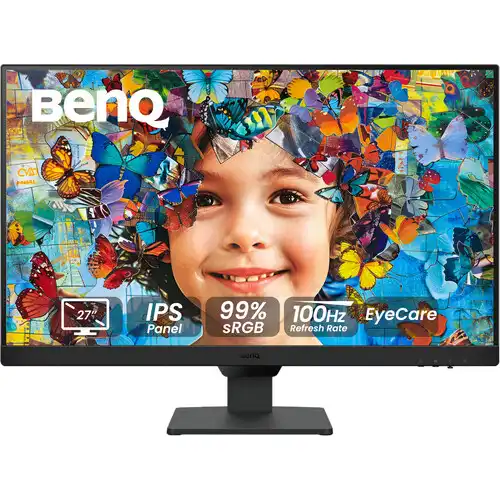
BenQ GW2790 27-inch Full HD IPS 100Hz Eye-Care Monitor
Panel, size and resolution
The BenQ GW2790 is a 27-inch Full HD monitor for home, study and general office use. BenQ specifies a 27-inch IPS panel with LED backlighting, a 1920 × 1080 resolution, 16:9 aspect ratio, matte screen coating and 178-degree horizontal and vertical viewing angles. Its 82 pixels per inch are typical for a 27-inch Full HD display: text and interface elements appear larger at the same viewing distance than they would on a 27-inch QHD screen, while fine edges and small text are less dense. The model is flat, not curved. Its slim black housing has a three-side narrow-bezel presentation in the supplied product imagery. The model code is GW2790; check the complete label because similarly named GW2790Q, GW2790T and GW2790QT products have different resolutions or stands.
100Hz refresh and MediaSync
The maximum refresh rate is 100Hz. BenQ's exact-model specification lists 100Hz, but the video signal's available resolution and refresh depend on the computer or other source, graphics output, selected port, cable, operating system and settings. A compatible PC can select 1920 × 1080 at up to 100Hz; confirm the active mode in the source's display settings after connecting. The 100Hz panel refreshes more often than a conventional 60Hz mode and can make pointer movement, scrolling and supported games look smoother. It does not mean every application renders 100 frames per second, and it is not a 144Hz or 165Hz gaming monitor. BenQ also lists VESA MediaSync certification. Do not confuse MediaSync certification with an unspecified gaming-oriented variable refresh feature; consult the source and exact connection if variable refresh behavior is important.
Response time and intended use
BenQ specifies a 5ms gray-to-gray response time. This is the manufacturer's GtG measure and should not be relabeled as MPRT or as a guaranteed result for every transition and overdrive setting. The on-screen Advanced Motion Acceleration (AMA) setting can alter pixel response behavior; users can compare the available setting with their own content. The screen is appropriate for everyday work, video and light gaming, but buyers seeking competitive high-refresh play, a 1ms-class marketing mode or a 144Hz-and-above panel should compare a dedicated gaming model.
Brightness, contrast and color
The IPS panel is rated at 250 nits typical brightness and 1300:1 native contrast. BenQ lists 99% sRGB color gamut and 16.7 million colors, with gamma selection from 1.8 to 2.6 and adjustable color temperature presets for bluish, normal, reddish and user-defined settings. Those specifications describe gamut coverage and available controls; they are not a report that each individual unit is factory calibrated to a specific Delta E. The matte coating helps reduce reflections compared with a glossy screen, though bright windows and direct lighting can still affect visibility. The normal 16:9 shape fits common desktop layouts and Full HD video. BenQ does not list HDR support for this model, so it should not be advertised as an HDR monitor.
Eye-care modes and software
BenQ positions the GW2790 as an Eye-Care monitor. The exact-model spec lists flicker-free technology, Low Blue Light, Brightness Intelligence Generation 2, ePaper mode, Eye Reminder, Color Weakness mode and Eye-CareU software support. Brightness Intelligence can adjust the display in response to ambient lighting; users should check the on-screen menu and follow the manual for sensor operation. Low Blue Light and ePaper change the screen's color appearance, so a warmer or less saturated image is expected in those modes. Color Weakness mode offers a display adjustment for some color-vision needs, but it does not diagnose or treat a medical condition. Eye-CareU is optional computer software, and supported functions may vary by operating system and connection. BenQ's listed TUV Eye Comfort 2.0, EyeSafe 2.0, flicker-free and hardware Low Blue Light certifications are product certifications; they are not a promise that long sessions cannot cause discomfort.
Ports, speakers and headphones
The connection panel has two HDMI 1.4 inputs and one DisplayPort 1.2 input. BenQ's specification also lists HDCP 1.4. Connect a desktop, laptop, console or streaming device to an available digital input, then select that input in the monitor menu. The product includes a 3.5mm headphone jack and two built-in 2W speakers. The speakers provide basic playback without a separate speaker set, while headphones can be connected for private listening. No USB hub, USB-C video input or microphone input is listed for the GW2790. The HDMI cable shown or included may vary by market; BenQ notes that the signal cable may vary by region and identifies an HDMI 1.4 cable in its Asia-Pacific specification. Confirm the contents of the Bangladesh unit before purchase.
Stand, VESA and dimensions
The included stand supports tilt from -5 degrees down to +20 degrees up. BenQ does not list height adjustment, swivel or pivot rotation for this stand. For a different ergonomic range, the display has a 100 × 100 mm VESA mounting pattern; choose a compatible monitor arm or wall bracket that supports the monitor's weight and uses the correct screws. The official dimensions with the base are 449 × 612 × 182 mm (height × width × depth), and without the base they are 384 × 612 × 64 mm. Net weight is 5.00 kg with the base and 4.50 kg without it. Measure desk depth and mounting clearance, and route the cables without putting strain on the connectors.
Power and package details
BenQ lists a built-in power supply, 100–240V input and normal, maximum and sleep-mode consumption of 25W, 35W and less than 0.5W respectively. Energy Star 8.0 and EPEAT Bronze are listed in the specification. The regional accessory list includes a quick-start guide, warranty card and safety instructions; the signal cable can vary by region. The Bangladesh seller package and included cable should be checked at checkout or on delivery. The product imagery shows a black display and stand. BenQ's exact specification does not identify a Bangladesh-specific bundled cable length or local package weight.
Daily work, study and entertainment
The 27-inch Full HD resolution is a practical choice when a buyer wants a large workspace at a modest price, readable interface scaling, IPS viewing angles and a 100Hz refresh without stepping into a higher-resolution or high-refresh budget. It can be used for office documents, browsing, online classes, coding, streaming and casual games. At 82 PPI, users who spend long hours reading small text or editing detailed images may prefer a higher pixel density, such as 27-inch QHD, and should compare it at their usual viewing distance. A larger screen is not automatically a sharper screen: GW2790Q is a separate QHD model, and its specifications must not be copied into this Full HD GW2790 listing.
Bangladesh price and warranty
Current Bangladesh exact-model listings observed during this review were around ৳21,200 at Star Tech and Ryans, ৳23,000 at TechLand, with another seller snapshot near ৳22,799. These are retailer offers that may change with stock, date, promotions and seller. The catalog's existing variant price is ৳22,300 and is retained; this review does not silently change the selling price based on an external snapshot. Local seller pages advertise a three-year warranty, but service provider, official/importer status, dead-pixel policy and exclusions can differ. The warranty field therefore directs the buyer to confirm the written terms with the seller and invoice instead of treating a retailer's headline duration as a universal manufacturer promise.
Before buying and first setup
Before ordering, confirm the complete GW2790 model on the carton and product label, that the listing says Full HD 1920 × 1080 and 100Hz, and that the included stand, cable and warranty match the seller's current offer. For setup, connect with HDMI or DisplayPort, choose the corresponding input, install or update the computer graphics driver if needed, and select 100Hz from the operating system's advanced display options. If 100Hz is unavailable, check the chosen source output, cable, adapter, port and resolution. Place the monitor on a stable surface, set a comfortable tilt, and adjust brightness and color mode for the room. These steps do not alter the product's stated limits: it remains a 27-inch FHD IPS, 100Hz display with two HDMI 1.4 inputs, one DisplayPort 1.2, built-in 2W × 2 speakers and a tilt-only included stand.