BenQ GW2790C 27-inch 144Hz FHD IPS Eye-Care Monitor — Complete Buyer Guide
Exact model and naming
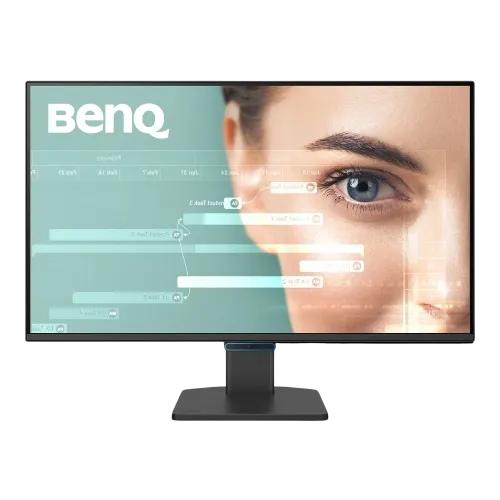
BenQ GW2790C is a 27-inch Full HD Eye-Care monitor in BenQ’s G Series. BenQ’s official product page identifies the model as GW2790C; the model name is also the part identifier used by official support documentation. This is not the GW2790, which is a distinct 100Hz model, nor the GW2790Q QHD model or GW2790TC USB-C docking/gaming variant. A Bangladesh retailer’s current details confirm a 144Hz IPS GW2790C with HDMI, DisplayPort and USB-C. The catalog had the generic brand “Others” and a model field padded with screen-size and refresh text, so the brand is normalized to BenQ and model/MPN to GW2790C. The catalog name, slug, Monitors category, active status, variant ID/SKU, ৳23,500 price and all five image asset IDs and URLs are retained.
27-inch Full HD IPS screen
The flat IPS LCD panel has a 27-inch diagonal, 16:9 aspect ratio and maximum Full HD resolution of 1920 × 1080. BenQ lists 82 pixels per inch, 16.7 million colors and a matte display surface. Full HD is compatible with common office PCs and can be easier to drive at a high refresh rate than QHD or 4K, but text and fine details are not as dense as on a higher-resolution 27-inch panel. BenQ lists 178-degree left/right viewing angles at a contrast-ratio threshold of 10. The IPS panel and viewing angles are useful for shared desks and normal seated use; the screen’s image still depends on room lighting, display mode and settings.
144Hz refresh and response
BenQ specifies a 144Hz maximum refresh rate, so supported games, mouse movement and scrolling can appear smoother than on a 60Hz screen. Actual available refresh depends on the computer’s graphics output, port, cable and selected resolution. The GW2790C includes HDMI 1.4, DisplayPort 1.2 and one USB-C connection that supports DisplayPort Alt Mode and data. BenQ’s product summary promotes the 144Hz monitor, while regional materials and retailer specs list the ports; check the BenQ resolution support file for timing details when selecting a connection. The published response time is 5ms gray-to-gray (GtG). That is the named response metric; do not replace it with a different 1ms gaming claim from other models.
Brightness, contrast and color
The BenQ specification page lists typical brightness of 300 nits, native contrast of 1500:1 and 99% sRGB color gamut. A current Bangladesh retailer page lists 250 nits for this exact model, creating a regional/listing conflict. The catalog is being set to BenQ’s official 300-nit typical figure, with the discrepancy recorded so buyers can confirm the local panel label or regional specification if the exact brightness matters. BenQ also specifies 16.7 million display colors and Full HD resolution. The 99% sRGB figure is a gamut coverage claim; it is not a per-unit calibration certificate or guarantee of a particular Delta E. The monitor is designed for general work, entertainment and casual gaming rather than professional color-proofing without a measured calibration workflow.
Eye-care features and picture modes
BenQ describes the GW2790C as a home and office Eye-Care monitor with Triple Eye Protection and Visual Optimizer. Its official specification lists Flicker-Free, Low Blue Light Plus, Color Weakness, ePaper, Visual Optimizer and Eye-CareU software. The BenQ Canada spec page lists TÜV Eye Comfort 3.0 and EyeSafe 2.0 certification. These are comfort and display-control features, not medical treatment or a promise that users will never experience eye fatigue. The screen includes multiple modes, including Standard, Game, ePaper, Care and Cinema; BenQ also advertises automatic brightness and color-temperature optimization. Users can choose and adjust modes to suit the task and lighting.
Inputs, USB-C and audio
For video and data, the official BenQ specifications list one HDMI 1.4 port, one DisplayPort 1.2 port and one USB-C port with DisplayPort Alt Mode and data transfer. The USB-C connection does not support USB Power Delivery, so it should not be advertised as charging a laptop. A USB-C source must support video over DisplayPort Alt Mode to use it for display output. BenQ’s quick-start guide identifies USB-C, DP and HDMI as available video connection methods. There is also a headphone jack. Verify the selected cable and computer port can output the desired 1920 × 1080 mode and refresh rate. The USB-C port adds video/data convenience but is not an all-in-one docking station with laptop charging.
Speakers and daily use
The monitor has two built-in 2W speakers and a headphone jack according to BenQ. The integrated speakers can handle system sounds, calls and basic media without separate desktop speakers, while an external headset or speaker remains an option through the audio output. Sound quality and volume are limited by compact monitor speakers, so users who need fuller audio should choose dedicated speakers or a headset. The speakers and monitor input should be selected correctly in the computer’s audio settings after connecting over HDMI, DisplayPort or USB-C. This model is an office and home display with 144Hz capability, rather than a high-end gaming monitor marketed with faster 1ms response, higher refresh, advanced HDR or a broad competitive feature set.
Stand, mounting and physical fit
BenQ lists a tilt range from −5° to +20°, a fixed-height stand and a 100 × 100mm VESA mounting pattern. The included stand allows angle adjustment but does not provide height adjustment, pivot or swivel in the listed specifications. The images in the catalog show the monitor from front, oblique and rear angles with a centered stand/base; the rear views show its connection area and VESA pattern. Dimensions with the base are 450 × 612 × 207mm (H × W × D); without the base they are 368 × 612 × 65mm. Net weight is 4.4kg with the base and 3.96kg without it. Leave room for cables and the base, or use a separately purchased compatible VESA arm.
Power and what is in the box
The GW2790C has a built-in 100–240V power supply. BenQ specifies 22W normal consumption, up to 36W maximum and below 0.5W in sleep mode. The official regional product page lists a package including one HDMI 1.4 cable, warranty card, safety instructions and quick-start guide; the quick-start guide says package contents vary by region and also illustrates the monitor, stand and base. A DP or USB-C cable may not be included in every market package, so confirm the local box contents before purchase. The monitor uses a 3-prong AC power cable rather than a separate external DC adapter. Check that the correct regional power cord and warranty paperwork are supplied.
Who this monitor is for
This model suits users who want a 27-inch IPS workspace with 144Hz motion, built-in speakers, useful USB-C video/data and BenQ’s eye-care controls in one display. It can serve for office tasks, online meetings, study, general browsing and casual gaming. Its 99% sRGB specification supports common web and office color work, while 144Hz provides smoother movement when the connected device supports it. USB-C can simplify video/data connections for compatible laptops but does not charge them. The fixed-height stand is appropriate for a basic desk arrangement; users requiring ergonomic adjustment can use a monitor arm or choose a different model.
Limitations and model distinctions
There are limits to consider. Full HD at 27 inches gives about 82 PPI, less fine detail than QHD at the same size. The stand is tilt-only and does not adjust height. USB-C carries video and data but does not provide Power Delivery or laptop charging. The 5ms GtG response is not the faster 1ms claim found on other products. Typical brightness differs between the official BenQ spec (300 nits) and one Bangladesh seller listing (250 nits); confirm local-region detail if brightness is critical. The model is distinct from GW2790 (100Hz, two HDMI inputs), GW2790Q (QHD variant) and GW2790TC (different connectivity/features). Do not transfer their refresh, ports or ergonomic features to this C model.
Bangladesh price and warranty
Bangladesh listings checked during this review ranged from around ৳21,899 at Skyland to ৳22,000 at Star Tech, while TechLand displayed around ৳24,000. BiponiBD’s current ৳23,500 variant price is retained. Retailer prices and availability change. Local seller pages advertise a three-year warranty, but the exact warranty provider, serial eligibility, invoice requirements and dead-pixel policy depend on the sold unit and distributor. Confirm current stock, final price, box contents and local service process before paying.
Before you order
Before ordering, check the carton and invoice for BenQ GW2790C. Confirm the local unit’s brightness specification because official BenQ and one Bangladesh listing differ. For video, select HDMI 1.4, DisplayPort 1.2 or a USB-C source that supports DisplayPort Alt Mode. Do not expect USB-C laptop charging or a height-adjustable stand. Confirm the desired 144Hz mode is available from the host device, choose whether the built-in speakers meet your needs, and verify that the stand’s tilt-only movement is sufficient. Confirm the retailer’s three-year warranty route and the in-box cable bundle, since BenQ says accessories can vary by region.