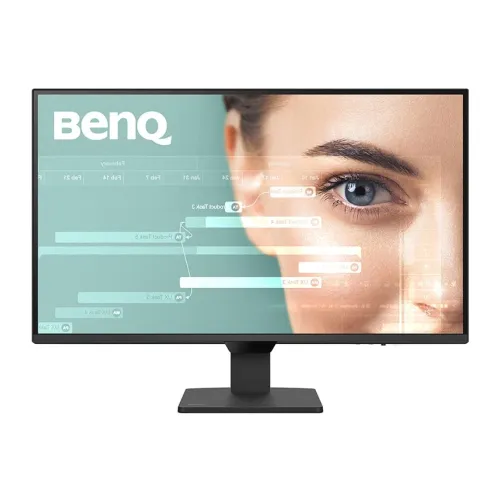
BenQ GW2790Q 27-inch IPS 2K QHD 100Hz Monitor: Bangladesh Buying Guide
Product identity and intended use
The BenQ GW2790Q is a 27-inch QHD IPS monitor designed for home offices, study spaces and everyday productivity. Its 100Hz refresh rate and higher pixel density make it suitable for smoother desktop navigation and casual gaming, while BenQ’s Eye-Care features focus on prolonged reading and computer work. This model is different from the Full HD GW2790 and GW2790E, and also different from the USB-C docking GW2790QT. Check that the product box identifies GW2790Q and the relevant regional part number before purchase. Similar product names do not mean the panels, connections or stands are identical.
QHD resolution and desktop workspace
The native 2560 × 1440 resolution places about 3.69 million pixels on the 27-inch screen, giving approximately 109 pixels per inch. Compared with a 1920 × 1080 display of the same size, QHD provides substantially more room for spreadsheets, code, documents and browser windows. It can reduce horizontal scrolling and make small text edges appear more defined. The exact comfort of text depends on operating-system scaling, font size and viewing distance, so adjust these settings after installation. If the computer is used with very small text or a distant seating position, test scaling before committing to a permanent desk layout.
100Hz refresh and motion response
The monitor refreshes at up to 100Hz, which can make pointer movement, window dragging, long-page scrolling and supported video playback look smoother than a typical 60Hz office screen. BenQ also lists VESA MediaSync support. The source device must output a supported mode for the benefit to appear. Response time is specified as 5ms gray-to-gray and 1ms MPRT; these values describe different operating conditions. MPRT is a motion clarity setting and should not be interpreted as the panel’s ordinary GtG response. If a motion mode changes brightness or introduces artifacts, compare it with the standard setting and choose the clearer image for your use.
Panel, contrast and color
The GW2790Q uses an IPS panel with a 1500:1 native contrast ratio, 350 nits typical brightness and 99% sRGB coverage. These specifications support everyday web content, office documents, presentations and general graphics work. The anti-glare surface helps diffuse reflections from windows and overhead lights, while the 178-degree horizontal and vertical viewing angle specification supports shared viewing. Color coverage describes a gamut, not a guarantee that every individual unit is calibrated to a particular professional standard. For color-critical projects, use a suitable profile and calibration process. This model is an SDR sRGB monitor and is not positioned as a wide-gamut DCI-P3 or HDR display.
BenQ Eye-Care modes
A central feature is Brightness Intelligence Gen2, or B.I. Gen2. Its ambient sensor detects room lighting and automatically adjusts screen brightness, while still allowing manual fine-tuning. BenQ also lists Low Blue Light Plus, Eyesafe 2.0 and Flicker-Free certifications. Coding Mode changes image presentation for dark editor themes; ePaper Mode is intended for long-form reading; M-Book Mode aims to align the visual appearance more closely with a MacBook; and Color Weakness Mode offers red/green adjustment options. These settings are practical choices to try rather than medical treatments. Users may prefer different brightness and color settings, and should take regular breaks during extended sessions.
Ports and connected devices
The rear input bay has two HDMI 2.0 ports and one DisplayPort 1.2 input, along with a 3.5mm headphone output. BenQ lists native QHD at up to 100Hz for the display. This lets a user keep several sources connected, such as a desktop computer, laptop, console or media device. A dedicated front Input Switch hotkey can change source without navigating the full on-screen menu. The monitor does not include USB-C video, laptop power delivery or a USB hub; the GW2790QT is a different model with docking features. Check which cables are included with the exact Bangladesh retail unit, since box contents may differ by seller or region.
Built-in sound and daily meetings
Two integrated 2W speakers provide convenient sound for video calls, system notifications and basic tutorial playback. They reduce the need to connect separate speakers for simple tasks. The 3.5mm output can be used with wired headphones or compatible external speakers. Small monitor speakers have limited low-frequency response and maximum volume compared with dedicated desktop audio, so a headset or powered speaker set is preferable for music, films or noisy rooms. The display’s speakers are not a replacement for a microphone; if using it for meetings, confirm the computer has a separate microphone or headset.
Stand, dimensions and VESA mounting
The included base supports tilt adjustment from -5° to +20° and does not raise, swivel or rotate into portrait mode. The stand dimensions with the display are about 614.0mm wide, 448.5mm high and 181.9mm deep; official net weight is about 4.7kg with the stand and 4.3kg without it. A 100 × 100mm VESA mounting pattern is available under a removable rear cover, allowing a compatible arm to provide more ergonomic movement. Check that the arm’s load rating covers the screen and that the correct screws are used. These assembled dimensions and net weights are not the packaged carton dimensions used by couriers.
Power use and setup
The GW2790Q has an internal universal 100–240V AC supply and connects with a standard mains power cord rather than an external adapter brick. BenQ lists 20W typical consumption, 42W maximum and less than 0.5W in sleep. This is a modest load for ordinary desktop power protection, but actual backup duration depends on the UPS battery, other connected equipment and battery condition. Place the monitor where the screen is not facing strong glare, connect a supported source and select 2560 × 1440 at 100Hz. Set brightness for the room, then explore B.I. Gen2 and the picture modes. Keep the invoice, box and serial number for warranty service.
Bangladesh price and warranty
Local listings reviewed for this audit showed promotional prices around ৳26,299 at Star Tech, ৳26,499 at TechLand and approximately ৳26,400–৳27,000 at Ryans; some regular prices were higher, reaching roughly ৳30,700. The current catalog price of ৳26,499 is preserved. Sellers list a three-year warranty, but coverage and service handling should be confirmed with the seller before payment. Ask whether the warranty is provided through the authorized Bangladesh channel, what proof is needed for a claim, and how panel defects or accessories are handled. Offers can change as stock and promotions change, so treat the observed range as a dated comparison rather than a guaranteed quote.
Model comparisons to avoid confusion
GW2790Q is the QHD 100Hz version with 350-nit brightness and 1500:1 contrast. GW2790 and GW2790E are Full HD 100Hz products with lower listed brightness and different connection versions. GW2790QT is also QHD, but is a 75Hz workstation dock with USB-C 65W charging, a USB hub, daisy-chain capability, a microphone and an adjustable stand. The GW2790Q instead prioritizes QHD resolution, 100Hz refresh, the 1500:1 contrast ratio and multiple HDMI/DisplayPort inputs. Compare the exact rear I/O and the full suffix on the carton; avoid copying a GW2790QT feature into a GW2790Q listing.
Who this monitor suits
This BenQ may suit students, programmers, office users and home buyers who want sharp QHD text, a smoother-than-60Hz interface and useful eye-care settings. The 99% sRGB gamut and IPS viewing angles support general visual work, while the built-in speakers and front input switch simplify everyday use. Competitive gamers seeking 180Hz or higher, HDR movie viewers, or laptop users who require one-cable USB-C docking should compare other models. Buyers who need a raised screen should budget for a VESA arm because the included stand tilts only. Matching the model to the job is more useful than comparing refresh rate or brand name by itself.
Before-you-buy checklist
Confirm the carton and invoice say GW2790Q, then match the regional BenQ 9H part number and EAN if barcode tracking matters. Confirm the offer price, three-year warranty provider, availability and included power cord. Check that the PC has HDMI 2.0 or DisplayPort 1.2 output and supports QHD at 100Hz. Decide whether the tilt-only stand is sufficient or whether a 100 × 100mm arm is needed. After setup, inspect the panel, select native resolution and refresh, and test the picture modes with normal applications. Keep the packaging and warranty paperwork until the monitor has been checked and registered if the seller or distributor requires it.