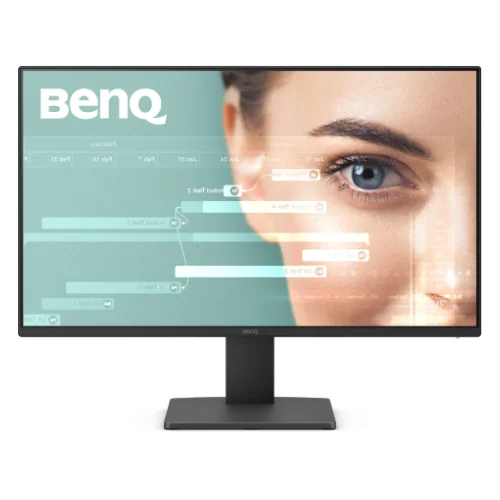
BenQ GW2791 27-inch FHD 100Hz IPS Eye-Care Monitor
The BenQ GW2791 is a 27-inch Full HD IPS monitor designed for office, study, browsing, video and everyday home use. BenQ specifies a 1920 × 1080 native resolution, 16:9 aspect ratio and 100Hz refresh rate. The 27-inch diagonal is paired with Full HD, so the manufacturer lists 82 pixels per inch. Text and icons are physically larger than on a same-resolution 23.8-inch display, while fine detail is less dense than on a 27-inch QHD panel.
For the sharpest image, use the native 1920 × 1080 resolution. BenQ’s GW2491/GW2791 signal timing document lists 1920 × 1080 at 100Hz as a supported PC timing on both DisplayPort 1.2 and HDMI 1.4. The actual mode also depends on the graphics device, cable, operating system and driver. After connecting, choose 100Hz in the computer’s display settings and confirm the monitor reports the expected input mode.
The panel is IPS with LED backlighting, a matte screen surface and 178-degree horizontal and vertical viewing angles at the stated contrast criterion. Typical brightness is 250 nits, or 250 cd/m². BenQ’s specification lists native contrast at 1300:1 and 16.7 million display colors. These are manufacturer ratings; they are not independent measurements of a particular unit, brightness uniformity, black level or factory calibration.
BenQ rates the response time at 5ms gray-to-gray (GtG) and lists AMA pixel overdrive. GtG describes a pixel transition and should not be confused with MPRT motion-picture response. A 100Hz refresh rate can make cursor movement and scrolling look smoother than 60Hz when the computer outputs compatible frames, but it does not make every application or video source run at 100 frames per second.
BenQ markets the panel as 99% sRGB color gamut and the product overview describes the color space as 99% sRGB. No calibration report or Delta E result is published in the reviewed spec, so treat this as the manufacturer gamut rating rather than a guarantee of unit-level color accuracy. The display offers Standard, Game, ePaper, Coding and Cinema picture modes, allowing a user to change the image for different tasks without promising professional color certification.
Connectivity includes one HDMI 1.4 input and one DisplayPort 1.2 input, with HDCP 1.4 listed. BenQ’s included-cable line says HDMI, and the current quick-start guide lists an HDMI cable and power cord; included signal cable can vary by region. The official specification lists a headphone jack. It does not list VGA, USB-C, a USB hub, DVI or a built-in speaker, so check the exact port layout before ordering.
This monitor has no built-in speakers according to BenQ’s regional specification sheet and product data. Its headphone jack is an audio output, not a speaker or microphone input. Connect headphones or powered external speakers to the source computer, or use the monitor’s headphone output if audio is delivered over HDMI or DisplayPort. Do not assume that an audio jack means the screen can play sound on its own.
The stand supports tilt from −5° downward to +20° upward. BenQ lists a 100 × 100mm VESA wall-mount pattern, so a compatible arm or bracket can be used after checking its load rating and screw requirements. The official specification does not list height adjustment, swivel or pivot; position the screen with the stand tilt, a riser or a suitable VESA mount. A wall-mount pattern does not mean mounting hardware is included.
BenQ gives dimensions as height × width × depth: 451 × 615 × 182mm with the base and 358 × 615 × 48mm without the base. For a width × height × depth catalog convention, these are 615 × 451 × 182mm and 615 × 358 × 48mm respectively. Net weight is 4.13kg with the stand and 3.63kg without it. These measurements help check desk clearance and mounting capacity; allow extra room for cables.
The power supply is built into the monitor, so normal setup uses the supplied mains power cord rather than a separate external DC adapter. BenQ specifies 100–240V AC input, 20W normal consumption, 25W maximum and less than 0.5W in sleep mode. Actual usage varies with brightness, image content and operating conditions. Use a properly grounded outlet and the supplied or region-approved power cord.
BenQ lists Flicker-Free, Low Blue Light and ePaper features, plus Eye-CareU software. The regional spec page identifies TUV EyeSafe 2.0, Flicker-free and hardware Low Blue Light, along with Energy Star 8.0, TCO Certified 9.0 and EPEAT Bronze. These features may help users tune their viewing setup, but they do not guarantee that every person will avoid eye strain; room lighting, breaks, distance and screen height still matter.
The GW2791 is a standard dynamic-range monitor. BenQ’s reviewed specifications do not list HDR10, a DisplayHDR tier, local dimming or a variable-refresh certification such as FreeSync or G-SYNC. Sellers sometimes add gaming or HDR filter tags to monitor listings, but those should not be treated as confirmation of a specific certification. Choose the GW2791 for its 100Hz everyday display and eye-care functions rather than assuming HDR or certified adaptive sync.
The GW2791 PPI field has a documented regional-source conflict. BenQ US/EU specs list 82 PPI, matching the calculated 81.59 PPI for a 27-inch 1920 × 1080 panel; BenQ Asia-Pacific and copied retailer tables show 93, a value consistent with the smaller 23.8-inch GW2491. The physical geometry supports about 82 PPI for GW2791, so the catalog records 82 and flags the AP sheet/table value as an apparent sibling-model template error.
Local in-stock listings observed for this model show cash or special prices around ৳21,000–৳22,000, with regular prices varying by seller. Star Tech and Ryans display about ৳21,000; TechLand shows about ৳21,800 and Ultra Tech about ৳22,000. Skyland displays a lower ৳20,800 offer but is marked out of stock, so it is not an available-price floor. This range is a market snapshot only, not a BiponiBD variant offer or manufacturer-set price. Confirm delivery, payment and stock directly with the chosen retailer.
Star Tech, TechLand and Ryans advertise a three-year warranty for their Bangladesh listings. Warranty is provided through the seller or local distribution channel, and claim conditions can depend on the invoice, serial number, importer and panel policy. Keep the dated purchase document and supplied accessories, inspect the screen promptly and ask the seller to state the dead-pixel, replacement and service terms before payment. The catalog preserves its own existing variant price rather than replacing it with another retailer’s offer.
The product is listed in black, model GW2791. BenQ’s wider catalogue can use regional product codes, so the retail carton and warranty card should match the GW2791 family name and local distribution label. Use HDMI or DisplayPort for video at up to the documented 100Hz PC timing, connect the power cord, set native resolution, and choose a comfortable refresh rate and picture mode. The catalog correction replaces generic placeholder copy with verified model information and separates manufacturer data from local seller claims.