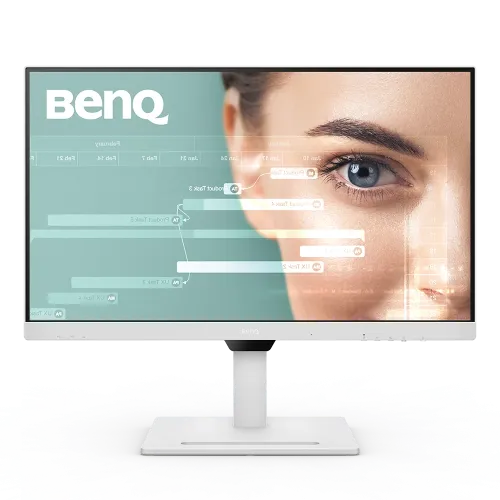
BenQ GW3290QT: complete 31.5-inch monitor guide
BenQ GW3290QT overview
The BenQ GW3290QT is a 31.5-inch QHD IPS monitor designed for home-office, study and hybrid work. Its 2560 x 1440 resolution, 75Hz refresh rate and 350-nit typical brightness support everyday productivity on a large desktop canvas. BenQ lists 99% sRGB coverage, 1.07 billion colors, 178-degree viewing angles, a 1000:1 native contrast ratio and a 5ms gray-to-gray response time. The integrated feature set includes USB-C video/data with up to 65W laptop charging, a USB hub, DisplayPort out with MST, built-in speakers, a noise-cancellation microphone, and an ergonomic stand with 110mm height adjustment. The catalog currently assigns “Others” as the brand and has inconsistent pixel density and color fields. This item is GW3290QT; the brand and manufacturer specifications will be corrected to BenQ's official model record.
31.5-inch QHD desktop workspace
The monitor uses a 31.5-inch diagonal panel with native 2560 x 1440 resolution and a 16:9 aspect ratio. BenQ lists a pixel density of 93ppi and a 698.11 x 392.69mm active display area. QHD at this size provides room for documents, browser tabs, spreadsheets, code and communication apps without the GPU load of 4K. The text and image detail are less dense than a 4K panel at the same screen size, so users should choose a viewing distance and operating-system scale that keep text comfortable. The anti-glare surface is intended for ordinary indoor lighting; placement and room lighting still affect reflections. A large panel can make split-screen work easier, but desk width and viewing distance should be considered before choosing a 31.5-inch monitor.
IPS panel and color performance
The GW3290QT uses an LED-backlit IPS panel. BenQ specifies 99% sRGB coverage, 1.07 billion displayed colors, a typical 1000:1 contrast ratio and 178-degree horizontal and vertical viewing angles. Those characteristics can suit web content, office design and general media. The manufacturer lists color modes such as M-Book, Standard, Game, ePaper, Care mode, Coding and Movie. Presets can adapt the picture for different tasks, but the screen is not a substitute for a hardware-calibrated wide-gamut production display. If delivering print or video to a specific standard, set the correct color profile and use calibration tools. The 31.5-inch panel also benefits from even viewing distance so the user can see the whole desktop without repeated head movement.
75Hz refresh rate and response
BenQ specifies a 75Hz refresh rate and 5ms gray-to-gray response time. This is a modest improvement over a 60Hz office display, while remaining aimed at productivity and everyday entertainment rather than high-refresh competitive gaming. A 75Hz screen refreshes up to 75 times per second when the computer provides a compatible signal. Motion performance also depends on the source frame rate and monitor settings. The panel's AMA overdrive can be adjusted in the on-screen display; check for artifacts at the selected level. For esports, compare a dedicated 144Hz-or-higher monitor. For office work, video calls and browsing, the GW3290QT's larger QHD canvas and ergonomic stand may matter more than a high gaming refresh rate.
Brightness Intelligence and eye-care modes
BenQ includes Brightness Intelligence Gen2, Low Blue Light Plus, Flicker-Free, Color Weakness and ePaper features. Brightness Intelligence uses ambient conditions and screen content to adjust brightness for a more comfortable viewing experience. Low Blue Light Plus provides a lower-blue-light picture mode, while Flicker-Free aims to reduce visible flicker. ePaper and Coding modes alter presentation for reading or text work. These are comfort and accessibility options, not medical treatments, and individual preference varies. For accurate color tasks, disable modes that change the image and use the appropriate color preset. Adjust monitor brightness to the room rather than relying on a single fixed setting for every environment. Take breaks and set text size for comfortable viewing.
USB-C one-cable laptop setup
The monitor has a USB-C upstream connection with DisplayPort Alt Mode, data and up to 65W Power Delivery. A compatible laptop can send video and data while receiving power over one cable, reducing desk cabling. BenQ says the 65W output supports many Windows laptops and MacBook models, but the computer port must support DisplayPort Alt Mode and USB Power Delivery. A high-performance laptop may need its own charger when it requires more than 65W under load. The supplied USB-C cable must support video, data and power; a charging-only cable will not provide the full monitor connection. BenQ also provides a separate USB-C downstream port with BC 1.2 charging, so distinguish the laptop upstream connection from the accessory charging port.
Ports, MST daisy chain and USB hub
The GW3290QT offers one HDMI 1.4 input, one DisplayPort 1.2 input, DisplayPort out with MST, one USB-C upstream connection and three USB-A downstream ports. It also includes a USB-C downstream port with charging support. The DisplayPort output can support a daisy-chain arrangement when the source computer, operating system and downstream display support MST. The USB hub needs an active upstream USB-C connection to the host. Confirm the port diagram and connect the appropriate upstream path for the desired video and peripheral functions. The monitor is not an Ethernet dock, and no wired network port is listed. The HDMI and DisplayPort versions set practical limits on supported signal formats; check the computer's output and cable capabilities before planning multiple displays.
Noise-filter speakers and microphone
BenQ lists two built-in 2W noise-filter speakers and a microphone with noise-cancellation capability. This can support video meetings and casual listening without separate desk devices. The microphone and speaker functions depend on the computer's selected audio input/output and the USB-C or USB upstream connection. Verify device selection in the meeting application and operating system. Built-in speakers provide convenient voice and system audio, but should not be expected to replace dedicated speakers or headphones for music production or detailed listening. A noise-cancellation microphone can reduce some background sound but cannot guarantee clean calls in every room. Position the monitor as recommended and test voice pickup in the user's actual meeting setup.
Ergonomic stand and VESA mounting
BenQ specifies 110mm of height adjustment, tilt from -5 to +20 degrees, swivel 20 degrees left and right, and 90-degree pivot. The stand supports changes in desk height and viewing posture, while portrait mode can help with long documents or code. The display also supports a 100 x 100mm VESA mount. Check the manual and arm load rating before moving to a third-party mount. Leave clearance for the large panel, stand base and rear connectors. Adjust height so the screen is comfortable without forcing a raised neck posture. Rotate only after checking cable slack and setting display rotation in the computer's operating system.
White finish and physical fit
BenQ's GW3290QT datasheet identifies the product color as white; the catalog's old black color entry was inaccurate. The datasheet lists dimensions with stand of approximately 714.6mm wide by 251.5mm deep, with height varying from about 488.1mm to 597.7mm according to stand position. Without the stand, the display measures about 714.6mm wide by 428.7mm high and 62.6mm deep. Net weight is listed at 10.1kg. Measurements should be checked against the regional box label if furniture clearance is tight. Use a stable desk that can support the monitor and allow space for its base, cables and ventilation. Keep the panel surface protected during installation.
Power and certifications
The monitor has a built-in power supply and BenQ specifies 100-240V input. The GW3290QT specification lists 25W typical consumption, up to 152W maximum and below 0.5W in sleep mode; maximum power can include USB charging load. BenQ lists Eyesafe, TÜV Flicker-Free and Low Blue Light certifications, plus Energy Star 8.0, TCO Certified 9.0 and EPEAT Bronze on the model's regional specification. Certifications and power figures are model-specific and may vary by market. Use the original power cable and follow the user manual when connecting devices to charging ports. Actual energy consumption varies by brightness, attached peripherals and operating mode.
Compatibility and shared workstations
The monitor supports USB-C DisplayPort Alt Mode for compatible laptops, and traditional HDMI and DisplayPort for desktop computers. BenQ also lists Windows 10/11 compatibility and software such as Eye-CareU and Display Quickit for supported systems. A Mac or other computer can use the display through compatible video connections, but USB-C charging and data features depend on the host's port support. For MST daisy chaining, check that the graphics hardware and operating system support the required display count and resolution. When two computers share the same screen and USB peripherals, select the correct input and upstream connection. Test camera, microphone, speaker, USB hub and charging functions separately during setup so that each application uses the intended devices.
Bangladesh price and warranty checks
The captured catalog variant has no price, and this audit did not verify a current exact-model Bangladesh checkout price. The variant MSRP remains null rather than being filled with an unverified amount. The catalog currently lists a three-year warranty, while BenQ's global specification pages provide accessories and technical details but do not establish coverage for this specific Bangladesh unit. Ask the seller for the exact GW3290QT model code, local warranty card, authorized service location, stock status, return terms and package contents. Confirm the unit color and USB-C/USB-C downstream features against the carton label. Keep the invoice and serial number. Do not assume warranty coverage from another country's product page or a retailer's generic product description.
Who should consider the GW3290QT
The GW3290QT can suit a home-office user, developer, student or hybrid worker who wants a large QHD canvas with an ergonomic stand, USB-C laptop connection, 65W charging, USB hub and integrated meeting audio. It may reduce cable clutter for a compatible laptop desk and provide useful options for reading, coding and video calls. Trade-offs include its 75Hz refresh, 99% sRGB rather than a broader professional gamut, and the need to confirm laptop power requirements and daisy-chain compatibility. Users seeking 4K resolution, gaming refresh above 75Hz, HDR certification or higher USB-C power should compare other products. Confirm local price, warranty and exact white finish before ordering.
Model identity and research notes
This record is specifically BenQ GW3290QT, the white 31.5-inch QHD IPS USB-C monitor. It should not be confused with GW3290U or other 32-inch BenQ models. BenQ's official specification and datasheet list a 93ppi panel, 1.07 billion colors, 99% sRGB, 65W USB-C PD, USB-C downstream BC 1.2, DisplayPort MST output, 2 x 2W speakers, noise-cancellation microphone and white finish. The previous catalog had several mismatches, including brand, PPI, color depth, USB port count and VGA input. Local price, Bangladesh warranty and box contents remain unverified. The brand association is corrected to the active BenQ brand; other product and variant identifiers remain intact.
Frequently asked questions
1. What is the screen size and resolution?
GW3290QT is a 31.5-inch IPS monitor with 2560 x 1440 QHD resolution and 16:9 aspect ratio.
2. What is the correct pixel density?
BenQ specifies 93 pixels per inch for this 31.5-inch QHD model.
3. How much power does USB-C provide?
The upstream USB-C connection supplies up to 65W and supports DisplayPort Alt Mode and data.
4. Does it have a USB-C charging port for accessories?
Yes. It has a separate USB-C downstream port with BC 1.2 charging, in addition to USB-C upstream.
5. Can it daisy-chain another monitor?
DisplayPort out supports MST; the host computer and downstream display must also support the required mode.
6. What ports are included?
One HDMI 1.4, one DisplayPort 1.2 input, DisplayPort out, USB-C upstream, USB-C downstream and three USB-A ports.
7. Does it include speakers and a microphone?
Yes. BenQ specifies two 2W noise-filter speakers and a microphone with noise cancellation.
8. What color is the GW3290QT?
BenQ’s datasheet identifies the GW3290QT finish as white. Confirm the delivered regional unit on its box.
9. Can I adjust the stand?
Yes. The stand offers 110mm height adjustment, -5° to +20° tilt, 20° swivel each way and 90° pivot.
10. Does it support VESA mounting?
Yes. BenQ lists a 100 x 100mm VESA pattern; check the arm load rating and manual.
11. What is its Bangladesh price?
A verified current exact-model Bangladesh checkout price was not captured; the variant price remains unset.
12. What warranty applies in Bangladesh?
Confirm the seller’s exact local warranty card, service center and terms for the unit.