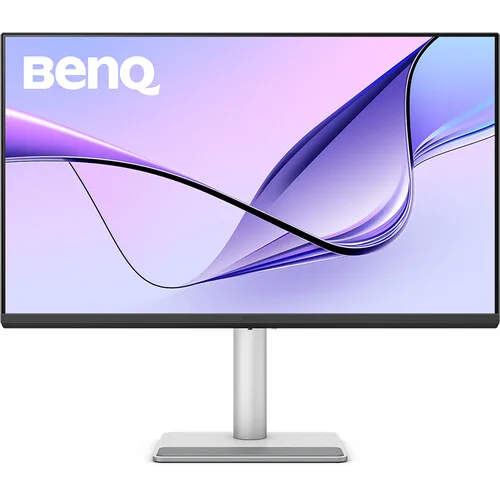
BenQ MA270U is a 27-inch 4K UHD IPS monitor for MacBook workflows, with 95% P3, HDR400, USB-C 90W charging, an adjustable stand and two HDMI inputs. Check the BenQ MA270U price in Bangladesh, specifications, colour modes and warranty details on BiponiBD.
Model identity and intended use
The BenQ MA270U is a 27-inch 4K UHD monitor in BenQ’s MA series for MacBook users. Its official specification page identifies an IPS panel, LED backlight, 3840 × 2160 maximum resolution and 60Hz refresh rate. BenQ also describes Mac Colour Tuning and Display Pilot 2 software on its regional product pages. These features place the model in a productivity and creative-work category for people who want a high-resolution desktop display with USB-C docking. The exact model name is MA270U; do not confuse it with MA270UP or MA270S, which are separate product names. Check the model printed on the box, rear label and invoice so the included ports and warranty correspond to the listing.
4K resolution and 27-inch workspace
The 3840 × 2160 pixel grid provides four times as many pixels as Full HD and a dense 163 pixels per inch on the 27-inch diagonal. This can make fine interface elements, photographs and text appear sharply defined when the computer and operating system use appropriate scaling. The 16:9 aspect ratio is common for desktops, video and general office work. A 27-inch display occupies less desk width than a 32-inch model while still offering a large canvas for side-by-side documents. The best scaling level depends on viewing distance, eyesight and application design; high pixel density does not automatically make every interface comfortable at its smallest setting. BenQ lists 0.155mm pixel pitch, which describes the spacing of adjacent pixels.
IPS panel and Nano Matte surface
BenQ identifies the panel as IPS with LED backlighting and a Nano Matte screen coating. IPS technology is commonly chosen for broad viewing angles and consistent picture presentation across a desktop. The official specification lists 178-degree horizontal and vertical viewing angles, a 1200:1 native contrast ratio and 400 nits typical brightness. These are manufacturer ratings rather than guarantees that every viewing position or room will look identical. Nano Matte is the named display coating; it should not be interpreted as making the screen immune to reflections, scratches or cleaning damage. Use a soft clean cloth and follow the user manual when cleaning the panel. Place the monitor to reduce direct window or lamp reflections, then set brightness for the surrounding room.
Colour modes and Mac Colour Tuning
BenQ lists 99% sRGB and 95% P3 gamut coverage, with selectable Display P3, sRGB, HDR, M-book, User, Game, ePaper, Coding and Cinema modes. The M-book mode and Mac Colour Tuning are intended to help align the display’s appearance with a compatible MacBook workflow. ICCsync is listed as a professional feature; BenQ describes it as a way to simplify colour mapping by synchronizing ICC profiles between the display and source device. Actual colour appearance depends on the selected mode, computer profile, application colour management, ambient light and viewing conditions. Gamut coverage describes colour-space reach, not perfect accuracy for every panel. For print-critical work, use calibrated profiles, proofing and a documented workflow rather than relying only on a preset mode.
HDR10 and DisplayHDR 400
The official specification names HDR10 support and VESA DisplayHDR 400 certification. It lists 400 nits as both typical brightness and peak HDR brightness. HDR can preserve a wider range of highlight and shadow information when the computer, operating system, connection and video or game support the format. DisplayHDR 400 is an entry-level certification tier; the listing should not imply the sustained brightness, local dimming or contrast performance of more advanced HDR monitors. The monitor’s native contrast is listed at 1200:1. To use HDR, select an HDR-capable source and enable the operating-system or application setting where needed. The monitor’s HDR mode and source content can affect how the image looks, so compare the result with the intended viewing conditions.
Refresh rate and response time
BenQ specifies a 60Hz refresh rate and a 5ms grey-to-grey response time. At 60Hz, the panel refreshes up to sixty times per second, which suits common office applications, browsing, video playback and many creative tasks. It is not positioned as a high-refresh competitive gaming monitor. The 5ms GtG figure is a manufacturer response-time rating and should not be read as a promise that all pixel transitions finish at the same speed or that motion blur is eliminated. The connected computer, graphics hardware, selected resolution, cable and software determine the mode available in practice. If display output does not appear at 3840 × 2160 and 60Hz, check the system display settings and the source-device specifications.
USB-C single-cable connection
The MA270U’s upstream USB-C connection supports DisplayPort Alt Mode video, data and Power Delivery up to 90W. With a compatible laptop and cable, the monitor can carry a display signal and USB data while charging the computer, which can reduce the number of desk cables. BenQ’s official FAQ says users should check whether their laptop supports the needed USB-C charging and video functions. The 90W maximum is not a guarantee for every computer, and power delivery may be shared or limited by the host, cable or selected configuration. A laptop with a higher-power adapter may still need its own charger during demanding workloads. Connect USB-C directly first and verify the charging indicator and display mode before relying on a docking setup.
Video and hub ports
The official connectivity table lists two HDMI 2.0 inputs, one USB-C upstream port with 90W Power Delivery, two USB Type-A downstream ports at USB 3.2 Gen 1 speeds up to 5Gbps and 7.5W charging, plus one USB Type-C downstream port at 5Gbps and up to 15W charging. A headphone jack is also specified. This configuration allows several video sources and common peripherals to remain connected. The upstream USB-C path is distinct from the downstream USB-C charging port: only the upstream connection is listed for video and 90W laptop power delivery. The USB-A ports provide lower device-charging output than a dedicated wall charger. Confirm the port labels and the connected device’s protocol requirements when planning a desk setup.
Speakers and everyday audio
BenQ lists two built-in speakers rated at 3W each, plus a headphone jack. Integrated speakers can handle system alerts, calls and casual video playback without adding another device to the desk. Their compact enclosure is not intended to provide the depth, stereo separation or output of dedicated speakers or headphones. For video calls, the computer and meeting application determine the selected microphone and audio outputs; the official specification does not list a built-in microphone. Connect headphones to the monitor or directly to the computer depending on the setup, and verify the active output device in the operating system. This prevents a common setup issue where audio continues to play through a laptop after an external monitor is connected.
Ergonomic stand and mounting
The supplied stand supports 115mm height adjustment, a 90-degree pivot, 15 degrees of swivel in each direction and tilt from -5 degrees to +20 degrees. BenQ also lists auto pivot, which can detect a rotation for supported software workflows. These adjustments make it easier to position the screen at eye level, reduce glare or turn the display for long documents. The monitor supports a 100 × 100mm VESA mount for compatible arms or wall brackets. Check the mounting accessory’s supported load, screw length, installation steps and desk clearance before removing the stand. Portrait use may require software rotation and adequate clearance for cables. Ergonomics are personal; make adjustments gradually and center the screen with the primary seating position.
Eye-care and accessibility tools
BenQ lists Brightness Intelligence Plus Gen 2, Flicker-Free technology, Low Blue Light, Color Weakness and ePaper features. The manufacturer describes Brightness Intelligence as using an ambient-light sensor to adjust screen brightness. Colour Weakness and ePaper modes can help users preview particular display conditions or choose a different reading appearance, but they do not guarantee accessibility for every person or replace testing content on real devices. TÜV Eye Comfort 2.0, Flicker-free, Low Blue Light software solution and Reflection Free certifications are named on the official page. Eye comfort also depends on brightness, font size, viewing distance, breaks, room lighting and individual needs. Treat these as monitor functions and certification claims, not as medical advice or a promise to prevent eye strain.
Software and professional functions
BenQ lists Display Pilot 2 and Display Quickit software, along with ICCsync and firmware updates by USB. Software availability may vary by operating system and version, so check the vendor’s current compatibility notes before depending on a particular function. Display controls can make it easier to change modes and settings from the computer. ICCsync is intended to coordinate colour profiles across compatible source and display devices. Firmware updates should follow the manufacturer’s instructions, use the correct model file and avoid interrupting power during installation. The official page also lists Energy Star certification and a Safety Instruction in the package contents. These features complement the monitor’s hardware but do not replace correct calibration, backup of a critical workflow or colour-managed application settings.
Power, dimensions and package information
BenQ specifies an internal power supply for 100–240V input. The official table lists 40W normal consumption, up to 220W maximum and less than 0.5W in sleep mode. Actual electricity use changes with brightness, USB devices, HDR mode and operating conditions. With the stand, the monitor measures approximately 613.8mm wide and 220.2mm deep; height varies between roughly 445.1mm and 560.1mm as the stand moves. The listed net weight is 8.2kg with the base and 5.14kg without it. Package accessories include a quick-start guide, warranty card, safety instructions and signal cables that may vary by region; HDMI 2.0 and USB-C are listed examples. Confirm the Bangladesh bundle if a particular cable is required.
Bangladesh price and warranty checks
The existing catalog MSRP is ৳68,000 and is preserved as the product’s recorded price. A Google result for the direct EERNA model page showed ৳67,900 and In Stock on 6 November 2026; this is a search-result snapshot and should be rechecked on the seller page before purchase. It is not a BiponiBD store offer and does not establish a current price from every retailer. The current catalog record says three years of warranty, but the BenQ regional specification page consulted here does not define the local Bangladesh provider, exclusions or claim procedure. Ask the seller to state in writing whether the coverage is manufacturer or seller warranty, where service is handled, and what invoice or packaging is needed. Retain the invoice and serial number.
Who may prefer this display
The MA270U may suit MacBook owners, office users, photographers and designers who want a sharp 27-inch 4K screen, a wide colour gamut claim and one-cable USB-C docking. Its adjustable stand, two HDMI inputs, built-in speakers and downstream USB ports can support a tidy desk with more than one source device. A buyer who needs a refresh rate above 60Hz, a larger 32-inch image, stronger HDR brightness, an integrated webcam or high-power audio should compare alternatives. Creative teams should also consider how the monitor fits their colour-management requirements and whether calibration is needed. Mac compatibility depends on the specific computer, operating-system version and port capabilities; Windows laptops can use USB-C as well if they support the required DisplayPort Alt Mode and power delivery.
Setup and compatibility checklist
Before setup, confirm that the computer can output 3840 × 2160 at 60Hz through the selected connection. For USB-C, verify DisplayPort Alt Mode, data support and adequate charging capability; for HDMI, use a compatible source and cable. Connect peripherals to the monitor’s downstream USB ports and make sure the upstream path is active so the computer can see them. In display settings, choose the native resolution, set scaling for comfortable text size and select the colour mode appropriate to the task. If using HDR, enable it only when the source and content support it. Adjust the stand for eye level and position the display to avoid direct glare. Confirm any required software and monitor firmware from BenQ’s official support pages for MA270U.
Features
- 27-inch IPS LED panel with 3840 × 2160 4K UHD resolution, 16:9 aspect ratio, 163 pixels per inch and 60Hz refresh rate.
- Nano Matte screen coating, 400-nit typical and peak HDR brightness, HDR10 and VESA DisplayHDR 400 certification.
- BenQ lists 99% sRGB and 95% Display P3 gamut coverage, nine color modes and Mac Colour Tuning for compatible Mac workflows.
- One USB-C upstream connection carries DisplayPort Alt Mode video, data and up to 90W power delivery to a compatible laptop.
- Two HDMI 2.0 inputs, two USB-A downstream ports rated up to 7.5W and one USB-C downstream port rated up to 15W.
- Built-in 2 × 3W speakers and a headphone jack support basic desktop audio.
- Stand supports 115mm height adjustment, 90-degree pivot, ±15-degree swivel and -5° to +20° tilt.
- 100 × 100mm VESA wall mounting; auto pivot and BenQ Display Pilot 2 software support are listed.
- Brightness Intelligence Plus Gen 2, Flicker-Free, Low Blue Light, Color Weakness and ePaper features are specified by BenQ.
- Internal power supply; BenQ lists 40W normal, 220W maximum and below 0.5W sleep-mode power consumption.
Pros
- A 4K 3840 × 2160 IPS panel provides detailed workspace on a 27-inch screen.
- The manufacturer lists 95% Display P3, Mac Colour Tuning, Display P3 mode and ICCsync for Mac-oriented colour workflows.
- USB-C can carry display and data while delivering up to 90W to compatible laptops through a single cable.
- Two HDMI inputs, USB-A, an additional USB-C charging port and a headphone output give the display flexible desk connectivity.
- Height, tilt, swivel and portrait pivot adjustments make the supplied stand more flexible than a tilt-only stand.
- HDR10 and VESA DisplayHDR 400 certification are listed, alongside 400-nit peak HDR brightness.
Cons
- The 60Hz refresh rate is suited to standard productivity but below high-refresh gaming displays.
- The 27-inch screen has less physical workspace than larger 32-inch 4K displays, though its pixel density is higher.
- USB-C provides up to 90W only when the laptop supports USB-C DisplayPort Alt Mode and the required charging profile.
- Peak HDR brightness is specified at 400 nits; buyers seeking stronger HDR impact should compare higher-brightness displays.
- Built-in 3W speakers are convenient for basic sound but may not replace dedicated desktop speakers.
- Bangladesh seller stock, final price and local warranty terms need confirmation at checkout.
Frequently asked questions
What is the BenQ MA270U price in Bangladesh?
The catalog price is ৳68,000. A direct EERNA product search result showed ৳67,900 and In Stock when checked on 6 November 2026; confirm the live product page and checkout amount because seller prices and stock can change.
What is the exact model and screen resolution?
The model is BenQ MA270U. BenQ specifies a 27-inch IPS panel with a maximum resolution of 3840 × 2160 pixels, commonly called 4K UHD.
Is the MA270U suitable for MacBook?
BenQ positions the MA series for Mac users and lists Mac Colour Tuning, Display P3 mode, Display Pilot 2 and ICCsync. A compatible Mac can connect over USB-C; available features depend on the macOS version and device.
Can USB-C charge a laptop?
Yes. The upstream USB-C port supports DisplayPort Alt Mode, data and up to 90W Power Delivery. Confirm that the computer supports video over USB-C and that 90W meets its charging needs.
What is the refresh rate?
BenQ lists a 60Hz refresh rate and 5ms GtG response time. This is a standard productivity refresh rate rather than a high-refresh gaming specification.
Does it support HDR?
BenQ lists HDR10 and VESA DisplayHDR 400, with 400 nits typical and peak HDR brightness. HDR playback also depends on the connected device, operating system, cable and content.
What ports are included?
The official specification lists two HDMI 2.0 inputs, one upstream USB-C with up to 90W PD, two USB-A downstream ports rated up to 7.5W, one USB-C downstream port rated up to 15W, and a headphone jack.
What colour coverage does BenQ specify?
BenQ lists 99% sRGB and 95% P3 colour gamut. It also lists Display P3, sRGB, HDR, M-book, User, Game, ePaper, Coding and Cinema colour modes.
Does it include speakers?
Yes. BenQ specifies two built-in 3W speakers and a headphone jack. Use external speakers for louder playback or more detailed audio.
Can the stand rotate to portrait?
The stand supports height adjustment up to 115mm, 90-degree pivot, 15-degree swivel in each direction and tilt from -5° to +20°. BenQ also lists auto pivot.
Can I use a monitor arm?
BenQ specifies a 100 × 100mm VESA mount. Confirm the arm’s load capacity and screw requirements against the monitor manual before installation.
What warranty applies in Bangladesh?
The catalog currently says three years, but the official specification page consulted does not define the Bangladesh seller’s warranty provider or claim terms. Confirm the written local coverage with the retailer before purchase.