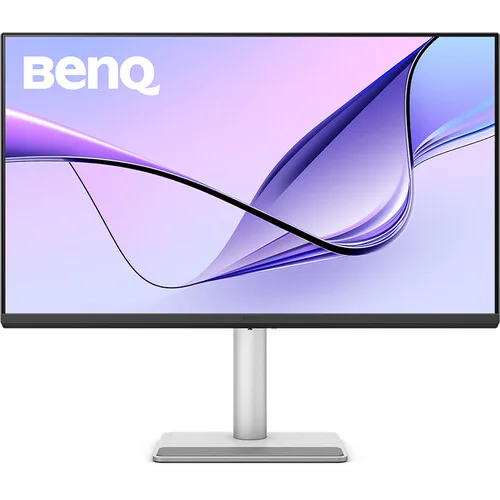
A Mac-focused 31.5-inch 4K display
The BenQ MA320U is a 31.5-inch viewable, 32-inch-class monitor built around a 3840 × 2160 4K UHD IPS panel. Its 16:9 format provides a wide desktop for code, documents, timelines, image editing and side-by-side windows. The 140 PPI pixel density gives detailed text and interface rendering; macOS scaling settings determine the effective workspace and the apparent size of interface elements.
BenQ specifies a 60Hz refresh rate and 5ms gray-to-gray response time. These are conventional productivity-monitor specifications rather than high-refresh gaming performance. The flat IPS panel has a typical 1300:1 contrast ratio and 178-degree horizontal and vertical viewing angles at the stated contrast threshold. Actual appearance varies with viewing distance, room light, operating mode and source content.
The display uses BenQ’s Nano Matte Panel, intended to reduce reflections while maintaining a matte appearance. BenQ lists TÜV Rheinland Reflection-Free certification. A matte surface can help in rooms with windows or overhead lighting, though placement and light direction still affect perceived contrast and reflections. The chassis uses a light metallic Mac-compatible design; confirm the exact finish and regional package from product photos and seller inventory.
Mac Color Tuning and Display Pilot 2
MA320U includes an M-Book color mode and BenQ Mac Color Tuning, with listed coverage of 97% P3 and 99% sRGB. BenQ positions the mode to make the external screen’s color presentation more consistent with supported MacBook displays. These gamut figures describe coverage, not a promise that every unit or application will look identical to every Mac screen. Color appearance also depends on calibration, brightness, viewing conditions, panel variation and the application’s color management.
BenQ Display Pilot 2 provides Mac-oriented controls including ICC profile synchronization and iKeyboard functions for monitor brightness and speaker-volume adjustment from compatible MacBook keyboard keys. BenQ also describes brightness synchronization with the MacBook ambient-light sensor and FocuSync features. Availability depends on the compatible computer, operating-system version, software release, USB-C data connection and selected settings. Check BenQ’s current support notes for your Mac model before relying on a particular function.
The monitor offers Display P3, sRGB, HDR, M-Book, User, Game, ePaper, Coding and Cinema color modes. Color-temperature presets are 5000K, 6500K, 9300K and User Define; gamma selections include 1.8–2.6 and sRGB. These modes let users choose a starting point for different work, but regulated print, broadcast or color-critical workflows may still need a measured calibration and managed pipeline.
HDR, brightness and eye-comfort features
BenQ lists 550 nits typical brightness and a 600-nit HDR peak, with HDR10 support and VESA DisplayHDR 600 certification. HDR mode availability depends on the connected device, signal, operating system and content. HDR certification and peak brightness do not make every SDR application or video an HDR source; select the right operating-system and monitor modes for the material being viewed.
Brightness Intelligence Plus Gen 2 uses an ambient-light sensor to adapt display behavior to room conditions. BenQ also lists Flicker-Free, Low Blue Light software modes, Color Weakness, ePaper and Eye Reminder functions, alongside Eye Comfort 2.0 and Reflection-Free certifications. These are viewing and image options, not health guarantees. Choose brightness and color settings that remain comfortable in the actual room.
The specification lists 1.07 billion colors, 99% sRGB and 97% P3 coverage, 1300:1 typical contrast and HDCP 2.2. Together with 4K resolution, these details make the monitor suitable to evaluate for design, photo and video tasks that match its gamut and refresh limits. Compare its 60Hz ceiling, color-management workflow and port requirements with the specific application before choosing it for a production pipeline.
USB-C, HDMI and the important port distinction
The upstream USB-C input supports DisplayPort Alt Mode video, USB data and up to 90W Power Delivery. With a compatible MacBook and USB-C cable, one connection can carry display signal and data while charging the laptop. The 90W figure is the maximum supported supply; actual charging depends on the host, power demand and cable. This is a USB-C connection, not a Thunderbolt port.
The monitor also has two HDMI 2.0 inputs. BenQ’s official specification does not list a dedicated full-size DisplayPort connector. Video over DisplayPort is supported through the USB-C upstream port’s DisplayPort Alt Mode, which is different from a separate DisplayPort socket. The Bangladesh retailer specification scraped a DisplayPort 1.4 field; that claim conflicts with BenQ’s input list and should not be relied on.
For downstream accessories, one USB-C port supports USB 3.2 Gen 1 at up to 5Gbps and up to 15W charging. Two USB-A downstream ports also support USB 3.2 Gen 1 at up to 5Gbps and up to 7.5W charging each. Distinguish the 90W upstream laptop port from the 15W downstream accessory port. BenQ lists a USB hub but does not list a dual-host KVM feature for MA320U; switching between computers may require changing the video input and reconnecting USB host access as appropriate.
A 3.5mm headphone jack provides an audio output. Two built-in 3W speakers use BenQ treVolo audio modes. BenQ’s official specification does not list a built-in microphone; a retailer’s “microphone: yes” claim appears unsupported and may confuse the ambient-light sensor on the top bezel with a microphone. Use an external microphone for calls unless the actual supplied regional model explicitly documents one.
Stand, dimensions, mounting and power
The supplied stand adjusts through 115mm of height, tilts from −5 to +20 degrees, swivels 15 degrees left and right, and pivots 90 degrees. The 100 × 100mm VESA pattern supports compatible arms or mounts. The panel is large and weighs 9.1kg with its base, so check desk, arm and mount ratings before installation. Leave room for the stand footprint and cable movement.
BenQ lists dimensions with stand as 608.8–493.8 × 714.5 × 220.2mm (height range × width × depth) and without the base as 424.4 × 714.5 × 82.7mm. Net weight is 9.1kg with stand and 6.05kg without the base. These measurements help plan a desk layout, arm installation or transport; allow additional clearance for connectors and cable bends.
The monitor uses a built-in power supply and accepts 100–240V AC. BenQ lists 45W normal consumption, up to 250W maximum under demanding display and USB charging conditions, and less than 0.5W in sleep mode. The maximum value can include power delivered to attached devices; it is not the monitor’s typical draw. A power cord is included, so this model does not use the external adapter suggested by its catalog “Type: Adapter” attribute.
Package contents, market price and warranty
BenQ lists a 1.5m USB-C cable, a 1.5m HDMI 2.0 cable, a 1.8m power cord, Quick Start Guide, safety instructions and warranty card. Regional carton contents can vary, so verify the sealed package and invoice with the Bangladesh seller. The built-in power supply means no external power brick should be assumed.
Bangladesh listings checked showed Star Tech cash pricing as low as ৳86,499, with its regular/list pricing around ৳92,500; TechLand showed approximately ৳88,500 cash and ৳89,500 regular; Ryans pages showed offers in the broader ৳89,000–৳95,000 band. The snapshot range is therefore ৳86,499–৳95,000. Offers and stock change; the existing variant MSRP of ৳89,000 is preserved rather than replaced by a temporary cash offer.
Retailer pages commonly state a three-year warranty. Confirm the warranty provider, service location, panel policy, invoice model code and coverage terms before purchase. Catalog country of origin remains null because the official BenQ specification reviewed does not declare a country. BenQ’s retail part number varies by region; this record uses the verified model code MA320U rather than asserting an unconfirmed Bangladesh-specific suffix.
Choose the right MA Series model
MA320U uses a Nano Matte panel. The catalog also contains the MA320UP, a separate Nano Gloss sibling; the suffix matters because the surface changes from matte to glossy. The MA320U is not the MA320UG, another distinct model in BenQ’s product family. Compare exact model codes, panel coating, connectivity, refresh capability and warranty instead of treating similarly named MA-series displays as interchangeable.
The inventory contains another active record for the exact MA320U product. This review updates the current product ID only and preserves the other record without merging or deleting it. That duplicate should be considered separately in catalog deduplication work so its offers, merchant relationships and traffic history can be checked before any consolidation decision.
Connection setup and compatibility checklist
For a MacBook one-cable setup, connect the computer to the monitor’s upstream USB-C port, identifiable by its video and power-delivery role. Confirm that the Mac recognizes the 3840 × 2160 display and that charging is active. The second USB-C connector is downstream for accessories and does not replace the upstream input. A cable rated only for charging may not carry video or the data rate needed for the intended display mode.
For a desktop or second source, use either HDMI 2.0 input. The exact refresh and color options available can depend on the computer’s graphics output, cable, operating system and selected HDR mode. The product has no separate DisplayPort socket even though the USB-C input accepts DisplayPort Alt Mode video. If a source exposes only DisplayPort, a compatible adapter path must be checked for resolution, refresh, HDR and USB functionality before purchase.
The USB hub requires a functioning upstream connection to the host. Downstream charging ratings are maximums and can be shared with other connected devices or constrained by power-saving settings. A 90W USB-C source rating does not mean the downstream accessory port also provides 90W. Check each device’s charging requirement and use the appropriate connector.