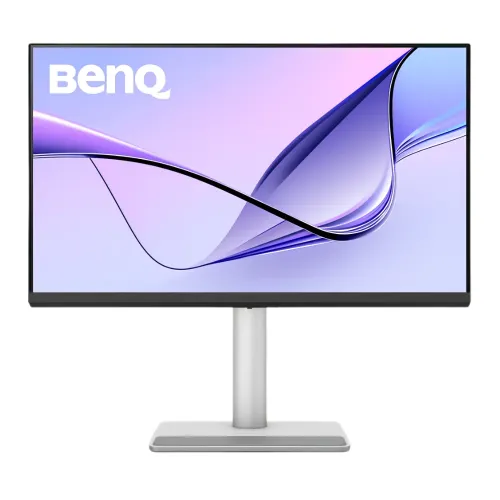
4K IPS detail for a large Mac workspace
The BenQ MA320UP is a 31.5-inch class monitor with an IPS panel, LED backlight, 16:9 aspect ratio and 3840 × 2160 4K UHD resolution. At 140 pixels per inch, this panel places a dense 4K desktop on a screen large enough for timelines, documents, browser windows and creative applications. BenQ lists a 60Hz refresh rate and 5ms gray-to-gray response time, so the product should be described as a productivity and Mac workflow monitor rather than a high-refresh gaming display. Its flat panel uses a Nano Gloss surface. The official display specification lists 1,300:1 native contrast, 178° horizontal and vertical viewing angles and 1.07 billion display colors. Color coverage is listed at 99% sRGB and 97% P3. BenQ also provides Display P3, sRGB, HDR and M-book modes. Color coverage is a manufacturer specification, not a claim that every individual unit has been independently calibrated. Users preparing print or video work should configure the correct color mode, application color management and viewing environment.
Nano Gloss surface and Mac color workflow
The MA320UP is the glossy member of this model pair. BenQ calls its coating Nano Gloss and positions the MA Series for MacBook users who want colors and appearance to align more closely across a MacBook and an external screen. The workflow includes M-book Mode, iDevice Color Sync, ICCsync and BenQ Display Pilot 2 software. BenQ describes iDevice Color Sync as automatically detecting MacBook models and applying matching color profiles; actual behavior depends on the connected device, macOS version, software installation and settings. These features aim to make an external screen easier to use beside a MacBook, while the 97% P3 coverage provides a wide-gamut reference point for supported content. The glossy finish can present deep-looking blacks and clear highlights, but reflected windows or lamps may be more visible than on a matte screen. Placement, ambient light and screen angle matter. Users who work in a bright office or face a window should consider whether a glossy panel suits that environment. The similar MA320U is a separate Nano Matte model, so its finish must not be assigned to this MA320UP listing.
Brightness, HDR and display modes
BenQ lists 550 nits typical brightness and 600 nits peak brightness in HDR mode. The MA320UP supports HDR10 and carries VESA DisplayHDR 600 certification. Those claims should be stated with the typical and peak figures clearly separated: 550 nits is the typical brightness specification, while 600 nits is the HDR peak specification. Native contrast is listed as 1,300:1. Display modes include Display P3, sRGB, HDR, M-book, User, Game, ePaper and Cinema. The official specification also lists gamma settings from 1.8 to 2.6 and sRGB. HDR appearance depends on the source content, application, operating system, connection and configuration; a certification does not mean every video or webpage is HDR. Likewise, wide color gamut does not by itself promise identical colors across every MacBook display. BenQ’s color-sync tools and the display’s modes are designed to help with matching, while user calibration remains available for color-critical workflows. The monitor is a standard 60Hz screen with 5ms GtG response rather than a 120Hz gaming product.
USB-C docking, charging and video inputs
A key convenience is the upstream USB-C port, which BenQ specifies with DisplayPort Alt Mode, data and up to 90W Power Delivery. When the host laptop supports USB-C video output and the cable supports the needed data and power, one connection can carry display signal, data and charging. The 90W figure is the port maximum; actual charging is negotiated with the host and may be lower depending on the laptop, cable, workload and power conditions. Two HDMI 2.0 inputs provide additional connections for computers or media devices. The built-in hub includes two USB-A downstream ports rated USB 3.2 Gen 1 at 5Gbps with up to 7.5W charging, plus one USB-C downstream port rated USB 3.2 Gen 1 at 5Gbps with up to 15W charging. The latter is separate from the 90W upstream connection. Connect the upstream cable to the host before expecting downstream peripherals to communicate. BenQ lists HDMI and USB-C signal cables among included accessories but notes the signal cable bundle may vary by region; verify local box contents. The monitor has no claimed DisplayPort connector in the published port list.
Stand adjustments, pivot and mounting
The stand is designed for desk adjustment rather than fixed-height installation. It has 115mm of height travel, tilt from −5° to +20°, swivel up to 15° left or right and a 90° pivot function. Landscape dimensions with the stand are listed as approximately 493.8–608.8mm high, 714.5mm wide and 220.2mm deep. In portrait pivot orientation, BenQ lists 739.6 × 424.4 × 220.2mm. Without the base, the monitor measures 424.4 × 714.5 × 82.7mm. Net weight is 9.1kg with the stand and 6.05kg without the base. The VESA mounting pattern is 100 × 100mm, allowing compatible arms or wall mounts; check the mount’s load rating for a 31.5-inch screen. Auto Pivot is listed as supported. Pivoting the display physically does not guarantee that every connected operating system or application rotates content automatically. The stand range and dimensions are useful when planning a desk layout, particularly if the screen will sit near a wall, shelf or second display.
Audio, eye care and power
The MA320UP includes two 3W speakers and a headphone jack for everyday video calls, system sounds and media playback. The official BenQ specifications do not list a built-in microphone, so this catalogue description does not promise one; use a laptop, webcam or separate microphone for voice input. Eye-care features listed by BenQ include flicker-free technology and Low Blue Light, and the product page also identifies ePaper and Visual Optimizer functions. The specification notes TÜV Eye Comfort 3.0, flicker-free and software-solution Low Blue Light certification. These features can support viewing comfort but do not replace sensible breaks, suitable brightness and proper room lighting. Power uses a built-in supply rather than an external brick. The official specification lists 100–240V AC input, 45W normal consumption, 250W maximum consumption and less than 0.5W in sleep mode. Electrical consumption varies with brightness, signal, USB charging and operating mode. The monitor’s built-in power supply and USB-C charging are distinct: the screen plugs into AC power while its upstream USB-C port can supply up to 90W to a compatible laptop.
Exact model identity and comparison with siblings
The exact product code is MA320UP. The final “P” matters: BenQ identifies the MA320UP as a Nano Gloss model and the MA320U as the Nano Matte counterpart. BenQ also lists an MA320UG as a separate 120Hz model. The MA320UP’s official specifications state 60Hz, so claims for the MA320UG’s refresh rate or features should not be copied to this page. Similarly, the MA320U’s surface is not the MA320UP’s finish. The product is assigned to BenQ’s existing brand entity and its model and manufacturer part number should be stored as MA320UP without the screen size or resolution appended. A separate MA320U product exists in the BiponiBD catalog; it is a related but distinct model and should not be merged or redirected into this product. This exact-code wording helps shoppers compare listings and reduces the chance of ordering a matte or higher-refresh variant when they intended to buy the Nano Gloss model. The product URL slug already includes MA320UP and can remain the canonical identifier.
Bangladesh price, warranty and package checks
At the time of this review, Star Tech’s Bangladesh listing showed a discounted price of ৳96,000, a prior price of ৳99,900, a regular price of ৳103,080 and a three-year warranty. This is retailer market information and can change with stock, promotion and warranty source. The variant MSRP is kept at ৳96,000 as the listed local discounted value, while product copy advises buyers to confirm the payable price and service terms before ordering. BenQ’s official specification lists QSG, warranty card and safety instruction, and indicates HDMI 2.0 and USB-C signal cables may vary by region. Confirm included cables and the actual unit’s condition with the seller. The reviewed Star Tech page lists two HDMI 2.0 inputs, two USB-A ports and two USB-C ports, consistent with the official specification when the USB-C ports are correctly distinguished as one upstream 90W connection and one downstream 15W connection. The package weight and outer carton dimensions are not asserted because no verified source for the specific regional bundle was found. Country of origin is also left unclaimed; it should be read from the label on the exact unit rather than inferred from brand or model.
Display Pilot 2 controls and compatible devices
BenQ lists the MA320UP as compatible with Display Pilot 2 for supported macOS and Windows versions. With a compatible host and the required USB connection, the software can provide monitor control, iKeyboard Control, brightness synchronization, color profile tools and Auto Pivot functions. These software features are separate from the panel’s resolution, refresh rate and power specifications. Install the current version that supports the connected operating system, then confirm each function in the app. iDevice Color Sync and ICC profile behavior depends on supported Apple hardware and software versions; color modes can be selected for different workflows, but a numeric Delta E accuracy claim is not published in the model’s official specification. The upstream USB-C port supports DisplayPort Alt Mode, data and up to 90W Power Delivery. Its USB-C downstream port is for data and charging, not a video input. The MA320UP lists two HDMI 2.0 inputs, so a laptop can connect by USB-C while another source uses HDMI. BenQ’s listed specifications do not identify a dedicated multi-host KVM switch or picture-in-picture mode. Plan the cable layout around the exact published inputs and hub ports.