BenQ MOBIUZ EX271 27-inch 180Hz Full HD IPS Gaming Monitor: Bangladesh Buying Guide
Product identity and purpose
BenQ MOBIUZ EX271 is a 27-inch Full HD gaming monitor with an IPS panel and 180Hz maximum refresh over DisplayPort. It combines fast motion support with HDR400-class brightness, a wide DCI-P3 color specification, built-in speakers and a USB hub in a distinctive white chassis. It is important to separate this model from older EX2710 and EX2710S displays, and from the QHD EX271Q. Those products have different refresh rates, ports, stands and resolutions. Check the exact EX271 name and the part label on the unit or carton rather than relying on the MOBIUZ family name alone.
Full HD at 27 inches
The native 1920 × 1080 resolution provides a familiar Full HD image that can be easier for midrange graphics cards to drive at high frame rates than QHD. At 27 inches the pixel pitch is about 0.311mm, equal to roughly 82 pixels per inch. This is comfortable for gaming at typical desk distance, though fine text will look less dense than on a 27-inch QHD display. One retailer table incorrectly places a PPI number into a millimeter pixel-pitch field; the actual pixel pitch is about 0.311mm. Buyers who spend most of their day reading small text or working with detailed spreadsheets may prefer a higher-resolution monitor.
180Hz refresh and motion
When connected through DisplayPort 1.2, the EX271 can refresh at up to 180Hz. That means the screen can present a new frame every 5.56 milliseconds when the computer renders enough frames. The two HDMI 2.0 inputs support up to 165Hz on PC, and supported consoles can output 1080p at 120Hz. BenQ lists 1ms GtG response time with AMA overdrive. Choose the response setting carefully because stronger overdrive can create bright inverse trails. FreeSync helps coordinate refresh with a compatible graphics card to reduce tearing when frame rates change. The monitor cannot increase the frame rate the game or computer produces.
Brightness, HDR and color
BenQ specifies 400 nits typical and peak brightness, HDR10 input support and VESA DisplayHDR 400 certification. Color coverage is listed at 95% DCI-P3 with 16.7 million colors. Those features can make games look vivid and give more headroom than a basic low-brightness office display. HDR400 does not mean the panel has local dimming; the EX271 uses a conventional IPS backlight and lists 1000:1 native contrast. Dark HDR scenes therefore do not have the deep blacks of OLED or a Mini-LED monitor. Try the HDRi profiles with game content and switch back to SDR or a standard profile if the image looks less natural.
PixSoul Engine and gaming controls
PixSoul Engine brings together BenQ picture processing features such as Shadow Phage, Light Tuner and Color Vibrance. Shadow Phage adjusts contrast in darker parts of a scene, while Light Tuner and Color Vibrance allow further image adjustments. Color Shuttle software can apply game-oriented color profiles. BenQ HDRi offers Sci-Fi, Fantasy, Realistic and Cinema modes. These are ways to tailor the screen; they do not change the panel’s resolution or refresh limit. In competitive games, a neutral picture may make opponents easier to see than a heavily stylized profile. Compare modes in the games you actually play and disable enhancements that obscure detail or introduce latency.
Ports and USB hub behavior
The rear input area has two HDMI 2.0 ports, one DisplayPort 1.2 input and one USB-C upstream connection. Two USB-A 3.2 Gen 1 ports sit beneath the screen, with a 3.5mm headphone output. The USB-C port provides data for the USB hub only: it does not accept video and does not charge a laptop. Connect the upstream cable from the monitor to the computer before expecting the USB-A ports to work. Use DisplayPort for 180Hz PC gaming; use HDMI for another PC, laptop or console. Check the box contents because the hub cable or video cable may not be included with every seller’s unit.
Speakers, console and everyday sound
Two 2.5W speakers provide convenient audio for game dialogue, calls, alerts and video. The 3.5mm headphone jack supports wired headphones or external speakers. The speakers are useful for a simple setup, but they cannot reproduce the bass or output of dedicated audio. Console users can connect via HDMI and select supported 1080p 120Hz modes in the console settings. A specific game may use a lower frame rate even when the monitor and console support a higher output mode. If the console has no sound, verify the selected HDMI input, audio output format and headphone connection.
Eye-care and room lighting
B.I.+ Gen2 uses an ambient sensor to adapt brightness and color warmth to room conditions, with manual adjustments available. BenQ also lists hardware-level Low Blue Light and Flicker-Free features certified by TÜV Rheinland. They may help make extended viewing more comfortable, but personal preference differs. Set brightness for the room, reduce reflections and take regular breaks. Picture modes and blue-light reduction can alter color appearance, so turn them off while checking color-critical material. Eye-care tools are not medical treatment and should not replace good desk posture or professional support for persistent eye discomfort.
Stand, color and mounting
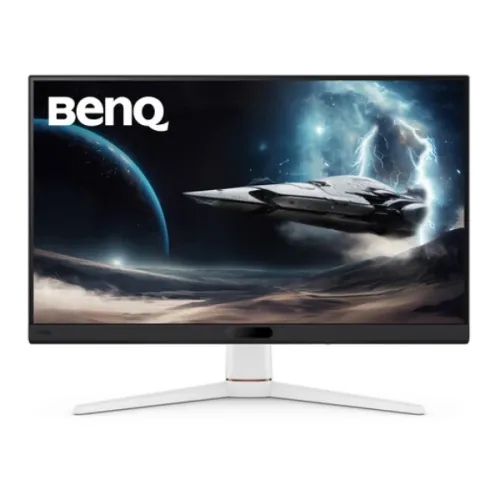
The package images show the white spacecraft-inspired stand with dark front trim, copper accent and PixSoul Engine branding. The supplied stand tilts from -5° to +20° but does not raise, swivel or pivot. A 100 × 100mm VESA pattern is available under the rear cover for a monitor arm. With the stand, the official dimensions are approximately 613.8mm wide, 464.33mm high and 211.74mm deep; net weight is 6kg with the stand and 5.44kg without. The boxed gross weight is about 8.2kg. Product dimensions are not courier carton dimensions; confirm actual parcel measurements when calculating shipping.
Power and desk setup
An internal 100–240V AC supply means the monitor connects directly to mains through a standard power cord. BenQ lists 22W normal operation, 65W maximum and less than 0.5W sleep. Actual draw changes with brightness, HDR and USB accessory load. After placing the screen, connect the PC by DisplayPort and set 1920 × 1080 at 180Hz. For HDMI, select up to 165Hz on a PC or a supported console mode. Enable FreeSync in the graphics settings if desired. Use the USB-C upstream cable to activate the USB-A hub, then arrange the headset and input devices around the stand. Keep the invoice, serial number and packaging paperwork for service.
Bangladesh price and warranty
At the time of review, local listings ranged roughly from ৳28,899 to ৳31,000, with the catalog selling price of ৳29,500 preserved. Star Tech, TechLand and other local sellers list three-year warranty coverage. Prices depend on promotions, payment method, location and stock. Before purchase, ask who handles the warranty, where service is available, whether accessories are covered, what documents are required and how the panel defect policy works. Retain the invoice and check the serial number against the paperwork. A warranty advertised by one retailer does not necessarily describe the unit offered by another seller.
Compare MOBIUZ models carefully
EX271 is Full HD 180Hz over DisplayPort, 165Hz over HDMI and includes 2.5W speakers and a data-only USB hub. EX2710S is an older 165Hz Full HD model with a darker chassis, different color and brightness figures, and no USB hub. EX2710 is another earlier Full HD model with 144Hz. EX271Q is a separate QHD 2560 × 1440 180Hz monitor with USB-C 65W charging, KVM and an adjustable stand; it omits built-in speakers and costs more. Decide whether you value higher QHD pixel density, the EX271 hub, speakers, adjustment or 1080p frame rate before comparing prices.
Who should choose this display
The EX271 may suit a player who wants high refresh at Full HD, a compatible GPU that can deliver high frame rates, vivid wide-gamut color and integrated sound. Its USB hub is useful when the monitor sits closer than a desktop tower. It may not suit a user who needs QHD text density, a USB-C laptop dock, height-adjustable stand or deep local-dimming HDR. Think about the games and computer hardware you already own, the connection available and the ergonomics of the desk. A monitor arm can address height, but adds to the overall cost and setup.
Purchase and setup checklist
Before ordering, confirm EX271 and its regional 9H part number on the product box, the current offer price and the exact three-year warranty terms. Confirm that DisplayPort is available if 180Hz is important. For HDMI PC use, expect up to 165Hz; consoles may use 1080p 120Hz in supported games. Remember the USB-C port is upstream data only. After unboxing, inspect the panel and accessories before disposing of the carton. Set native 1920 × 1080 and the desired refresh rate, then configure FreeSync and HDR to match your setup. Keep the invoice and serial number for warranty registration or service.