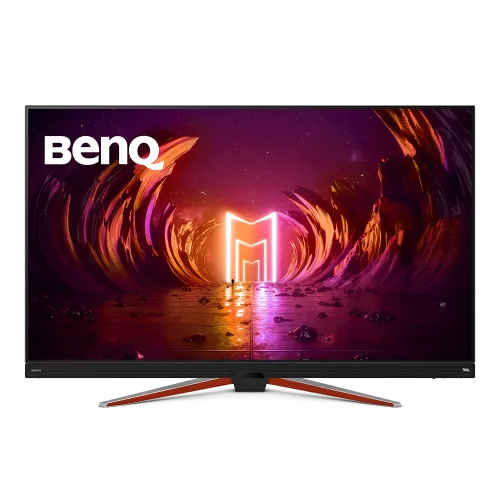
BenQ MOBIUZ EX480UZ: complete 48-inch OLED gaming monitor guide
Product overview
The BenQ MOBIUZ EX480UZ is a 48-inch 4K UHD OLED gaming monitor with a 3840 x 2160 resolution, 16:9 aspect ratio and 120Hz refresh rate. BenQ lists a 0.1ms gray-to-gray response time, 135,000:1 native contrast, 98% P3 color gamut and a 2.1-channel speaker system with two 5W speakers and a 10W woofer. The large OLED screen is designed for immersive gaming and video, while HDR10, BenQ HDRi and AMD FreeSync Premium add display options. Connections include HDMI 2.1, DisplayPort 1.4 and USB-C with DisplayPort Alt Mode, data and up to 90W Power Delivery. The 48-inch size requires suitable viewing distance and desk or wall support.
48-inch 4K OLED display
EX480UZ combines a 48-inch OLED panel with 3840 x 2160 pixels, 16:9 aspect ratio and 92 pixels per inch. OLED pixels emit their own light and can switch off individually, so this is not an LED-backlit LCD. BenQ lists a matte screen surface and 178-degree viewing angles at its stated contrast criterion. The large 4K image can suit a living-room-style gaming setup, media viewing and split-screen desktop work. At typical monitor distance, however, 48 inches takes up substantial visual and physical space. Measure the table, wall, viewing distance and path into the room before deciding where to install it.
OLED contrast and response
The manufacturer lists 135,000:1 native contrast and 0.1ms gray-to-gray response time. These figures describe the panel's contrast and pixel transition specification; they do not guarantee a particular input-lag result or frame rate in every game. OLED's pixel-level light control can display deep blacks in dark scenes, while source content and room lighting still affect perceived image quality. BenQ's official support material includes OLED protection guidance: use reasonable screen-sleep settings, avoid leaving static high-brightness images on-screen for long periods, and follow built-in protection functions. These are practical care recommendations, not a claim that burn-in is impossible.
120Hz gaming and FreeSync
EX480UZ supports a 120Hz refresh rate and AMD FreeSync Premium. A compatible PC or console, input, cable and game are needed to use supported refresh and variable-refresh modes. BenQ lists FreeSync and VRR support for compatible Xbox Series X/S through HDMI and PS5 VRR through HDMI 2.1. Actual resolution and refresh are determined by the source device and game settings. A 4K 120Hz signal requires a capable graphics output and suitable HDMI 2.1 or DisplayPort path; USB-C is an additional DisplayPort Alt Mode input. Check the connected device's output capabilities before assuming every port supports every timing.
HDR10 and BenQ HDRi
The monitor accepts HDR10 and includes BenQ HDRi modes. BenQ describes HDRi as picture optimization for color tone, contrast and detail, with automatic adaptation to ambient light in supported behavior. The EX480UZ specification lists a typical brightness of 450 nits but does not provide a separate peak HDR brightness figure in the published specification table. This description therefore avoids turning the typical value into an unsupported peak claim. HDR appearance depends on the game, source, operating system and selected mode. Display modes include HDR, Display P3, sRGB, M-book, Custom, Cinema HDRi, Game HDRi, FPS, RPG and Racing game.
Color coverage and accuracy
BenQ lists 98% P3 color gamut, 1.07 billion display colors and average Delta E of 2 or less. The monitor offers Display P3, sRGB, HDR, M-book, Custom and game-focused modes. These specifications can support vivid gaming, movies and broad-gamut content, though the EX480UZ is positioned as a gaming display rather than a dedicated reference monitor. Use an appropriate color mode for the source and verify the actual unit if the work requires tight color tolerances. Bluish, Normal, Reddish and User Define color temperature choices and gamma settings from 1.8 to 2.6 provide further adjustment.
Connectivity and USB-C power
Video inputs include two HDMI 2.1 ports, one DisplayPort 1.4 port and one USB-C connection with DisplayPort Alt Mode, data and up to 90W Power Delivery. BenQ also specifies one USB Type-B upstream connection and two USB 3.2 downstream ports. USB-C can carry video, data and charging over one compatible cable, but the host device must support DisplayPort Alt Mode and the cable must support the required signal. The 90W delivery limit may not fully power every workstation laptop under heavy load. Use the computer's original charger if needed. The USB-B upstream path connects the monitor's USB hub to a separate host.
Built-in 2.1-channel audio
A 2.1-channel sound system is built into the EX480UZ: two 5W speakers and a 10W woofer. BenQ's audio modes include FPS, RPG, SPG, Pop/Live and Cinema, designed to tune sound emphasis for different content. The headphone jack supports private listening or a separate audio setup. Built-in audio can simplify a game or media station, but personal preference and room acoustics vary. It may not replace a dedicated headset for voice chat or a separate speaker system for every use. The monitor's remote control offers another way to adjust settings from a couch or desk.
Picture-in-picture and multi-device use
BenQ lists PIP/PBP support, allowing multiple connected sources to appear together in supported arrangements. A large 4K canvas may help users compare two devices or keep secondary content visible while using a main source. Each layout has its own input and resolution limitations; consult the manual for supported signal timing and screen arrangement. HDR10 and FreeSync may be unavailable for some PIP/PBP combinations. Do not assume every source can display at native resolution in every multi-view mode. Use the manual's timing table when planning two or more connected systems.
Stand, installation and dimensions
The supplied stand supports tilt from -2 to +15 degrees. The product page lists dimensions with the base as 1068.5mm wide, 267.6mm deep and 700mm high; without the base it is 1068.5mm wide, 105.5mm deep and 646.9mm high. Net weight is 19.3kg with the stand and 16.2kg without it. VESA mounting is 200 x 200mm. The large panel needs a stable surface or a properly rated wall mount with compatible fixings. Keep the power and signal cables free from strain and check the installation surface before lifting or mounting the display.
Power requirements
EX480UZ uses a built-in power supply rated for 100-240V input. BenQ specifies maximum power consumption of 330W and less than 0.5W in sleep mode. The high maximum is expected for a large 48-inch OLED display and varies with brightness and operating mode. Leave ventilation space around the enclosure and follow the supplied manual's electrical and placement guidance. Use a suitable outlet and avoid placing the monitor where heat, moisture or blocked airflow can affect operation. The monitor's USB-C port provides up to 90W to a compatible host but is separate from the display's own AC power.
Eye comfort and OLED care
BenQ includes Low Blue Light, Brightness Intelligence Plus and Color Weakness features. Brightness Intelligence Plus can use ambient sensing to adjust brightness and color temperature. OLED care guidance includes setting a suitable screen-sleep period, avoiding a static high-brightness image for extended periods and allowing the display's protection features to operate. These actions can help manage image-retention risks but do not replace the product warranty or guarantee that burn-in cannot occur. Use the monitor's operating instructions for screen-care options and avoid disconnecting power during maintenance cycles if the manual instructs otherwise.
Bangladesh price, stock and warranty
This review did not verify an exact-model Bangladesh checkout price, current local stock or unit-specific warranty card. The catalog's variant MSRP remains null rather than using an overseas price or a price for another MOBIUZ model. The product record lists three years warranty, but BenQ's global product specifications do not establish local distributor coverage for a particular Bangladesh unit. Before purchase, confirm stock and serial number, sealed or open-box condition, invoice, delivery and return policy, authorized service provider, OLED burn-in terms and warranty coverage in writing. BenQ lists a remote control and IO cover among accessories; the cable bundle may vary by region.
Who should consider EX480UZ
EX480UZ may suit a user looking for a very large 4K OLED display for gaming, movies and a mixed PC-console setup. It offers 120Hz, 0.1ms GtG, FreeSync Premium, HDMI 2.1, USB-C 90W charging and substantial built-in audio. It may be less suitable for a small desk, close viewing, a color-critical studio that requires a validated reference workflow, or a user who wants a compact monitor. Consider viewing distance, desk depth, screen-care habits, GPU output and local warranty terms together. This model is a 48-inch gaming monitor and should not be confused with smaller EX-series displays.
Model identity and source notes
This listing is the BenQ MOBIUZ EX480UZ, model EX480UZ, a 48-inch 4K UHD OLED gaming monitor. The exact-model manufacturer page verifies the 450-nit typical brightness, 0.1ms GtG, 120Hz, 135,000:1 contrast, 98% P3, USB-C 90W, HDMI 2.1, 2.1 audio, built-in power and physical dimensions. Its published specification lists HDR10 but not VESA DisplayHDR certification. The catalog's LED-backlight claim is incorrect and is corrected because the display is OLED. Local price, warranty card, GTIN and country of origin remain unknown and are not invented.
Frequently asked questions
1. What are the screen size and resolution?
EX480UZ is a 48-inch 16:9 OLED monitor with a native 3840 x 2160 4K UHD resolution and 92ppi.
2. What is the refresh rate?
BenQ specifies a 120Hz refresh rate. The source device, cable, input and game must support the selected timing.
3. What is the panel response time?
BenQ lists 0.1ms gray-to-gray response time for the EX480UZ.
4. How bright is the display?
The published specification lists 450 nits typical brightness. It does not list a separate peak HDR figure.
5. Does it support HDR?
Yes. It supports HDR10 and BenQ HDRi modes including Game HDRi and Cinema HDRi.
6. Does it support FreeSync and console VRR?
BenQ lists AMD FreeSync Premium and support for compatible console VRR through supported HDMI connections.
7. How much power can USB-C deliver?
USB-C supports DisplayPort Alt Mode, data and up to 90W Power Delivery for compatible host devices.
8. Which video ports are available?
It has two HDMI 2.1 inputs, one DisplayPort 1.4 and one USB-C DisplayPort Alt Mode input.
9. What speakers are built in?
The 2.1-channel system has two 5W speakers and a 10W woofer. A headphone jack is also included.
10. How should I care for the OLED panel?
Use a suitable screen-sleep period, avoid leaving static high-brightness images for long periods, and follow BenQ's built-in OLED protection guidance.
11. Can it show more than one source at once?
BenQ lists PIP/PBP. Supported inputs and timing combinations vary; check the user manual for mode limits.
12. What is the price and warranty in Bangladesh?
An exact-model local price and the unit-specific Bangladesh warranty card were not verified; confirm both with the seller before purchase.