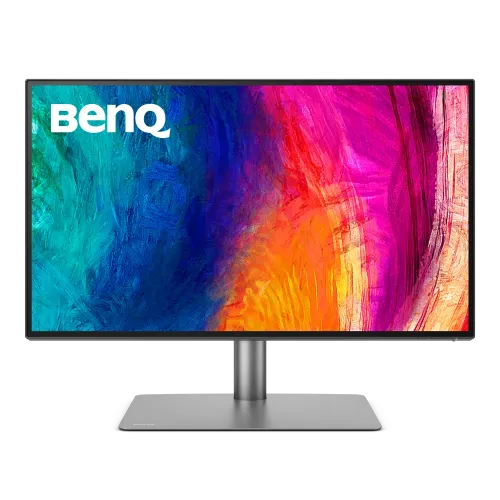
BenQ PD2725U: complete 27-inch 4K designer monitor guide
BenQ PD2725U overview
The BenQ PD2725U is a 27-inch 4K UHD professional display designed for creative work, editing and productivity. BenQ specifies an IPS panel, 3840 x 2160 resolution, 60Hz refresh, 250-nit typical brightness, 400-nit peak HDR brightness and a 1200:1 native contrast ratio. Color coverage is 100% sRGB, 100% Rec.709 and 95% P3, with average Delta E at or below 3 and factory calibration. It supports HDR10 and VESA DisplayHDR 400, and offers Thunderbolt 3 connectivity, a 65W laptop charging input, a 15W downstream Thunderbolt port, USB hub, KVM, PIP/PBP and an ergonomic stand. The record currently assigns “Others” as its brand; it will be corrected to the active BenQ brand record. Confirm exact local price, regional bundle and warranty card before purchase.
4K resolution and 27-inch pixel density
The PD2725U has a 27-inch diagonal 16:9 display with a native 3840 x 2160 resolution. BenQ lists 163 pixels per inch and a matte display coating. This high pixel density can render detailed images, fine interface elements and text on a compact professional desk. Operating-system scaling may help keep menus and documents comfortable to read. A 4K canvas provides more pixel detail than QHD, but graphics applications and video timelines also require more system resources. The 60Hz panel is designed for professional work and media rather than high-refresh gaming. Consider desk distance, application scaling and the graphics card's output capability before connecting the monitor.
IPS panel and viewing conditions
BenQ specifies an IPS panel with 178-degree horizontal and vertical viewing angles at its stated contrast criterion. The native contrast ratio is 1200:1. IPS viewing consistency can be useful when reviewing designs with a colleague or moving between different positions at a desk. The matte coating helps manage reflections but cannot eliminate direct glare. For consistent work, set the screen perpendicular to strong light sources and keep ambient lighting stable. The panel is not OLED; black levels and HDR behavior should be judged against its published contrast and DisplayHDR 400 specifications rather than assumed from the product's professional positioning.
Color coverage, accuracy and calibration
The PD2725U covers 100% sRGB, 100% Rec.709 and 95% P3 according to BenQ. The manufacturer specifies average Delta E at or below 3 and includes a factory calibration report. It is CalMAN Verified and Pantone Validated in BenQ's product documentation. A wide range of color modes includes DCI-P3, Display P3, Rec.709, sRGB, HDR, M-Book, DICOM, CAD/CAM, Animation, Darkroom, Low Blue Light and User. Use the mode that matches the delivery requirement. Coverage and factory calibration make the monitor useful for common design and video work, but color-critical production may still require a controlled environment, a calibrated workflow and verification for the specific unit.
HDR10 and DisplayHDR 400
The monitor accepts HDR10 and is VESA DisplayHDR 400 certified. BenQ lists 250 nits typical SDR brightness and 400 nits peak HDR brightness. These are distinct values: the typical figure should not be replaced with the peak HDR number in ordinary product copy. DisplayHDR 400 is an entry HDR certification, not a claim of OLED contrast or extensive local dimming. The actual result depends on source, content, operating-system HDR settings and picture mode. Enable HDR for compatible work or media and compare with SDR when evaluating color. For reference HDR mastering, confirm that the monitor's brightness and contrast capabilities fit the production specification.
Thunderbolt 3 and one-cable workflow
The PD2725U includes one Thunderbolt 3 upstream connection with DisplayPort Alt Mode, data and up to 65W Power Delivery. A compatible laptop can send video and data to the monitor while receiving power over one cable. The host must support Thunderbolt or compatible USB-C video and charging, and the cable must support the required bandwidth. Laptops that draw more than 65W may still need their original charger under heavy load. A second Thunderbolt 3 downstream port provides up to 15W and supports daisy-chaining compatible Thunderbolt devices or another display within the source system's limits. Verify the exact port path and monitor chain in the user manual.
Video inputs and USB hub
BenQ lists two HDMI 2.0 inputs, one DisplayPort 1.4 input and two Thunderbolt 3 connections (one upstream and one downstream). The monitor also has one USB-B upstream connection and two USB 3.1 downstream ports. The USB hub requires an upstream connection to the computer. Connect the USB-B path when using video inputs that do not carry the hub connection, or use the Thunderbolt path as appropriate. The catalog previously described VGA and generic USB-C ports; the official specification does not list VGA. Use HDMI or DisplayPort for a desktop source, and Thunderbolt 3 for a compatible laptop workflow. Confirm cable versions and supported resolution when planning peripherals or daisy chaining.
KVM, PIP/PBP and creator controls
The monitor provides a built-in KVM switch, PIP/PBP, DualView and BenQ's Hotkey Puck G2. KVM can share a keyboard and mouse between compatible connected systems after the video and USB upstream connections are configured. PIP/PBP can display two sources at once, which may help compare content or work with separate computers. DualView can present the same work in different color modes for comparison. The Hotkey Puck G2 gives quick access to selected monitor controls. These features simplify workflows but do not transfer files between computers or replace application-level color management. Follow the manual when assigning inputs and USB paths.
Design modes and uniformity
BenQ includes CAD/CAM, Animation and Darkroom modes, plus a uniformity technology intended to improve brightness and color consistency across the panel. M-Book mode is designed to coordinate appearance with compatible Mac displays. The monitor also supports ICCsync and BenQ software including Display Pilot 2, Palette Master Ultimate and Display ColorTalk. Software compatibility depends on operating-system version and hardware. Presets can alter the image; select a mode that matches the task and color profile. Use the supplied factory calibration report as a starting reference, then verify the display if the project requires tighter tolerances.
Stand ergonomics and VESA mounting
BenQ specifies a height-adjustable stand with 150mm of travel, tilt from -5 to +20 degrees, swivel 30 degrees in each direction and 90-degree pivot. The monitor supports 100 x 100mm VESA mounting. These adjustments help position the screen for a seated workstation and portrait documents. The base and monitor should be installed on a stable surface with enough clearance for cables. If using a third-party arm, check load capacity and mounting instructions. Pivoting to portrait may require software display rotation. The product includes a Hotkey Puck G2; route its cable so it does not interfere with stand movement.
Brightness, response and eye-care
BenQ specifies 250 nits typical brightness, 5ms gray-to-gray response, Flicker-Free operation and Low Blue Light support. The display is designed for professional productivity and creative applications, not competitive high-refresh gaming. Set brightness for the actual room and use Low Blue Light only when its color shift is acceptable for the current task. Flicker-Free is a comfort feature, not a medical guarantee. The 60Hz refresh rate is appropriate for common desktop work and video editing timelines, while users seeking smoother competitive play should compare a faster gaming display.
Power, dimensions and package
The display uses a built-in power supply rated for 100-240V. BenQ lists 37W normal power consumption, 185W maximum and below 0.5W in sleep mode; maximum consumption can include connected USB power delivery. Listed dimensions with stand are 614.8mm wide, 273.3mm deep and 449.8 to 599.8mm high. Without the base, it measures 614.8 x 360 x 80.3mm. Net weight is 8.3kg with stand and 5.6kg without base. Regional package details can vary; BenQ lists a calibration report, Hotkey Puck G2 and HDMI, mDP-to-DP, Thunderbolt 3 and USB cables in the specification. Confirm the Bangladesh package on the seller's listing and carton.
Compatibility and workstation planning
A Thunderbolt 3 or compatible USB-C host can use video, data and up to 65W charging through one upstream connection. The downstream Thunderbolt port supplies up to 15W. HDMI 2.0 and DisplayPort 1.4 support other computer connections. Check the source computer's supported output mode, cable, color depth and operating system before planning 4K work. Daisy chaining depends on the host graphics system, Thunderbolt support, bandwidth and downstream display. A 65W limit may not fully charge a high-performance workstation laptop under heavy load. Keep the laptop's original power adapter available if needed. BenQ lists compatibility with Mac and Windows workflows, but individual software features may have different system requirements.
Bangladesh price and warranty verification
The captured variant has no price, and this review did not verify a current Bangladesh checkout quote for the exact PD2725U. The variant MSRP remains null rather than borrowing an overseas price or another PD monitor's offer. The catalog lists three years warranty, but BenQ's global specifications do not establish the warranty coverage of the particular unit sold in Bangladesh. Ask the seller for the exact model label, local warranty card, service location, stock status, return policy, dead-pixel terms and included accessories. Confirm that the package includes the Hotkey Puck G2, calibration report and required cables if these are important to the workflow. Keep the invoice and serial number for service.
Who should consider PD2725U
The PD2725U may suit designers, video editors, photographers and Mac-centered workstation users who want a compact 27-inch 4K display with broad common color-space coverage and Thunderbolt 3 docking features. The KVM, PIP/PBP, Hotkey Puck and daisy-chain support can help with multi-system workstations. Trade-offs include 60Hz refresh, 65W laptop charging and DisplayHDR 400's entry-level HDR capability. Users needing higher charging power, higher refresh, larger screen size or stronger HDR should compare other monitors. Check the laptop's Thunderbolt support, local warranty, exact package and seller price before choosing.
Model identity and source notes
This listing is BenQ PD2725U, a 27-inch 4K IPS DesignVue display. It should not be confused with PD2720U, PD2705U or newer PD-series products with different ports and charging levels. BenQ's official specification page confirms 250-nit typical brightness, 400-nit peak HDR, 1200:1 native contrast, 163ppi, 95% P3, 100% sRGB/Rec.709, two HDMI 2.0 inputs, DP 1.4 and Thunderbolt 3 with 65W upstream and 15W downstream power. It also lists KVM, PIP/PBP, DisplayHDR 400, factory calibration, Hotkey Puck G2 and stand adjustment. The catalog brand was corrected to active BenQ. Local price, warranty and GTIN remain unverified.
Frequently asked questions
1. What is the resolution and size?
PD2725U is a 27-inch monitor with 3840 x 2160 4K UHD resolution and 163ppi.
2. What is the native contrast ratio?
BenQ specifies a typical native contrast ratio of 1200:1 for PD2725U.
3. How bright is the monitor?
BenQ lists 250 nits typical brightness and 400 nits peak HDR brightness.
4. Does it support HDR?
Yes. It supports HDR10 and VESA DisplayHDR 400 certification.
5. What color gamut does it cover?
BenQ specifies 100% sRGB, 100% Rec.709 and 95% P3 coverage, with average Delta E at or below 3.
6. How much power does Thunderbolt provide?
Thunderbolt 3 upstream provides up to 65W to the host; its downstream port provides up to 15W.
7. Which video ports are included?
Two HDMI 2.0 inputs, one DisplayPort 1.4 input and two Thunderbolt 3 ports are specified.
8. Can it daisy-chain another monitor?
Yes. BenQ lists Thunderbolt daisy chaining; host and downstream display compatibility determine the available setup.
9. Does it include a KVM switch?
Yes. KVM is supported for compatible computers connected through the required video and USB paths.
10. What stand adjustments are available?
The stand has 150mm height travel, -5° to +20° tilt, 30° swivel each way and 90° pivot.
11. What is its price in Bangladesh?
A current exact-model Bangladesh checkout price was not verified, so the variant price remains unset.
12. What warranty applies locally?
The catalog lists three years, but confirm the exact Bangladesh warranty card and service terms with the seller.