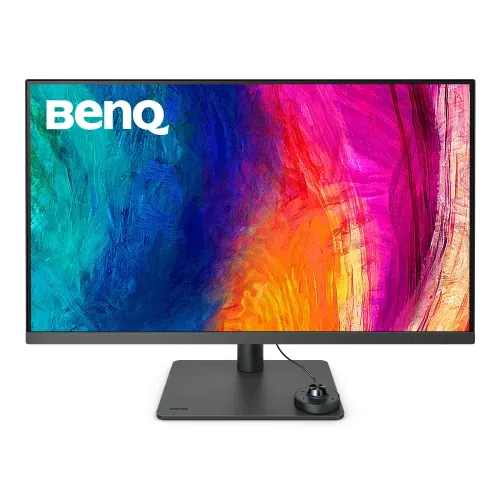
BenQ DesignVue PD3205U designer monitor
The BenQ DesignVue PD3205U is a 31.5-inch viewable, 32-inch-class 4K UHD IPS monitor designed for color-aware office, design and content work. Its native resolution is 3840 × 2160 pixels in a 16:9 aspect ratio, with a 60Hz refresh rate and 5ms gray-to-gray response specification. The panel uses LED backlighting and an anti-glare surface.
The exact model is PD3205U. BenQ also sells the PD3205UA, a related 32-inch-class designer monitor with an Ergo Arm desk-clamp mount. The PD3205U in this listing is the standard ergonomic desktop-stand version. Keep the letter suffix accurate when checking support, dimensions, mounting, manuals or accessories.
The display provides approximately 140 pixels per inch and 0.1816mm pixel pitch. At 4K resolution, desktop applications can show detailed images and substantial workspace. The amount of readable content depends on operating-system scaling, application layout, viewing distance and user preference. Choose a comfortable scaling level rather than assuming that maximum resolution should be used at the smallest text size.
AQCOLOR, calibration and color modes
BenQ lists 99% sRGB and 99% Rec.709 color coverage and includes an individual factory calibration report with a Delta E target of 3 or less. The display is Pantone Validated, Pantone SkinTone Validated and Calman Verified according to the manufacturer. These claims support its designer positioning, but the report applies to an individual unit at calibration time; color-critical workflows should use an appropriate managed environment and verify the display when necessary.
BenQ AQCOLOR features include Uniformity Technology for corner-to-corner luminance and chromaticity consistency and ICCsync for matching an ICC profile to the selected color mode. Display Pilot software adds functions such as ICC profile synchronization, desktop partitioning, automatic pivot behavior and application-based picture mode assignment. These features depend on supported computer software and operating-system configuration.
Available picture modes include Animation, CAD/CAM, Darkroom, DICOM, HDR, Low Blue Light, M-Book, Rec.709, sRGB, Standard and User. Color temperature options include 5000K, 6500K, 9300K and a user-defined setting. These modes help tailor the image to different tasks. DICOM mode on a monitor is not a substitute for a certified medical display or a clinical diagnostic workflow.
Brightness, contrast, HDR and viewing
The reviewed BenQ specification lists 250 cd/m² typical SDR brightness and 350 cd/m² peak HDR brightness. Native contrast is 1000:1, and the stated viewing angle is 178 degrees horizontally and vertically at a contrast ratio above 10. HDR10 content is supported. These are manufacturer ratings; actual output varies with mode, signal, picture content and ambient light.
For accurate SDR design work, select an appropriate sRGB or Rec.709 mode and avoid changing multiple color controls without checking the profile. HDR mode is intended for supported HDR signals and content; HDR10 support alone does not mean the monitor has a high-tier HDR certification. Compare picture modes using the same source and room conditions.
The anti-glare surface reduces reflections from ordinary room lighting but cannot eliminate strong direct glare. Place the monitor to avoid bright windows reflected in the screen, and adjust brightness for the workspace. The 31.5-inch panel benefits from sufficient viewing distance and a stable desk that can support the monitor and stand.
Resolution, refresh, response and Adaptive-Sync
The native signal is 3840 × 2160 at up to 60Hz. BenQ lists a 5ms GtG response time. AMD FreeSync is supported within a 48–60Hz variable-refresh range. This is a designer monitor focused on 4K image quality, connectivity and color features rather than high-refresh competitive gaming.
A 60Hz display refreshes up to 60 times each second. FreeSync can coordinate compatible graphics output within the supported 48–60Hz range and may reduce tearing. Enable the feature in the monitor menu and graphics driver where supported. The computer’s graphics card, video output, cable and software affect the available resolution and refresh rate.
For 4K 60Hz, confirm that the source and cable support the required signal through HDMI 2.0, DisplayPort 1.4 or USB-C DisplayPort Alt Mode. If the computer does not offer 3840 × 2160 at 60Hz, check its output specification, cable, display settings and driver. The monitor’s USB-C connector supports video when the host port supports DisplayPort Alt Mode.
USB-C single-cable connection, hub and KVM
The upstream USB-C port supports DisplayPort Alt Mode video, USB 3.2 Gen 1 data and up to 90W Power Delivery. A compatible laptop can send display output, connect to the monitor’s USB hub and receive power through one USB-C cable. Actual charging depends on the computer’s power requirements and whether it supports USB-C charging. A 90W limit may not meet the needs of every high-power workstation laptop under load.
For a second computer, the monitor provides a USB Type-B upstream connection. Its built-in KVM switch can share one keyboard-and-mouse set between two connected systems through the USB-C and USB-B upstream paths. Downstream connections include one USB-C port rated at 5Gbps and 4.5W charging, plus three USB-A 3.2 Gen 1 ports rated at 5Gbps. This makes the display more than a video panel; it can act as a basic shared-peripheral hub.
A dedicated Mini-USB port connects the included Hotkey Puck G2 controller. The video and data cable layout should follow the current BenQ manual. Some host systems require a USB-B cable in addition to a video cable for KVM or hub features. Check the source connection and monitor input selection if peripherals do not switch with the image.
Picture-by-Picture, DualView and sound
The PD3205U supports Picture-in-Picture, Picture-by-Picture and DualView modes. Picture-by-Picture can show two sources side by side, while Picture-in-Picture places one source in a smaller window. DualView allows a side-by-side comparison using different color modes. The exact display arrangement and resolution depend on the source devices and monitor settings.
Two built-in 2.5W speakers provide stereo audio for meetings and everyday use. A 3.5mm headphone output is also available. The integrated speakers are convenient for basic sound but are not a replacement for dedicated studio monitors or headphones when mixing or critical listening. Audio output can depend on the selected computer display device and operating-system sound settings.
The Hotkey Puck G2 is an included wired controller with a rotary dial, three customizable function keys and shortcuts for screen rotation, brightness, contrast and color mode. It connects to the dedicated Mini-USB port. The physical controls can make switching between designer modes quicker than navigating the on-screen menu.
Designer workflows and specialized modes
CAD/CAM mode is intended to make lines and fine details more visible in compatible design workflows. Animation mode adjusts dark-area visibility for animation work. Darkroom mode offers a dimmer viewing option for low-light environments. M-Book mode is designed to coordinate the image appearance with compatible Mac displays. These presets adjust the display picture and should be evaluated with the actual content and room.
Rec.709 and sRGB modes support common web, video and general design workflows. The included factory calibration report and BenQ color validation help users understand the display’s initial color performance. Uniformity compensation and ICCsync are intended to support consistency across the screen and profiles. Professional output still depends on software, source files, lighting, calibration and the requirements of the delivery platform.
The monitor includes low-blue-light and flicker-free features for user comfort. These are display settings, not medical claims. Use a suitable room brightness, take breaks and position the screen to reduce glare. Change the color mode to suit the work rather than leaving a heavily adjusted mode active for every task.
Ergonomic stand, dimensions and mounting
The supplied stand supports 110mm of height adjustment, tilt from −5 to +20 degrees and swivel 15 degrees left and right. It also supports a 90-degree clockwise pivot into portrait orientation. Auto Pivot can work with BenQ Display Pilot software on compatible systems. Leave enough cable slack before rotating the monitor and check the clearance behind the stand.
The VESA pattern is 100 × 100mm. A compatible monitor arm or wall bracket can be used when its load rating supports the monitor. The PD3205U also lists a Kensington lock slot. Keep the stand or mount securely fastened and use the correct screws; use only the mounting instructions for this exact PD3205U version, not the clamp-mounted PD3205UA instructions.
With the stand at its highest position, dimensions are approximately 589.0 × 714.7 × 256.8mm (height × width × depth). At the lowest position, height is approximately 479.0mm with the same width and depth. Without the stand, the panel is approximately 422.0 × 714.7 × 85.24mm. The desk footprint and viewing distance should be checked before installation.
Power, weight, color and included accessories
The monitor uses a built-in internal power board with AC input rated at 100–240V. Typical power consumption is listed as 31.5W, maximum as 168W when the 90W USB-C power delivery and USB hub are used, and sleep consumption below 0.5W. Total power depends on display brightness, attached devices and USB-C charging demand.
BenQ’s global specification lists net weight of approximately 9.4kg with the stand and 6.2kg without it, with gross carton weight around 12.6kg. Some regional BenQ documents report 8.2kg, likely reflecting a different stand revision. Check the regional manual or the shipped unit’s documentation for the precise value. Use two people if needed when lifting or mounting the large monitor.
The manufacturer color is Dark Gray / Metallic Gray, although a Bangladesh retailer table calls it black. The box contents listed by BenQ include the monitor and stand, Hotkey Puck G2, factory calibration report, power cord, HDMI 2.0 cable, DisplayPort 1.4 cable, USB-C cable, USB 3.0 Type-B-to-Type-A upstream cable, quick-start guide and warranty card. Confirm the accessories on the delivered carton.
Bangladesh market price and warranty
Direct Bangladesh retailer pages reviewed showed prices from approximately ৳89,500 to ৳93,490. Star Tech displayed a special cash price of ৳91,000 and a regular price of ৳93,490, though stock status may change. TechLand listed around ৳91,000, Computer Vision listed ৳89,500, and Ryans showed out of stock at the time of review. The existing variant MSRP of ৳91,000 is retained as the observed street price.
Retailers commonly listed three years of warranty. Confirm the seller, warranty provider, service location, parts coverage and claim process with the invoice. Stock and price vary by shop, location, payment method and promotion. A page showing an out-of-stock product or a zero price should not be treated as a current purchasable offer.
BenQ provides model-specific support and manuals for setup, driver/software and warranty guidance. Keep the model label and invoice. If purchasing from a reseller, ask whether the product is officially distributed in Bangladesh and whether local service is available for the serial number.
Who should consider the PD3205U
The PD3205U may suit designers, editors and office users who need a large 4K screen with sRGB and Rec.709 modes, factory calibration reporting, Pantone and Calman validation, USB-C 90W, a built-in KVM, USB hub, speakers and an ergonomic stand. Hotkey Puck G2 and Display Pilot can make frequent mode changes easier.
Consider whether 60Hz refresh, 250-nit typical SDR brightness and 350-nit peak HDR brightness meet the intended work. This monitor emphasizes sRGB and Rec.709 workflows; users requiring wider DCI-P3 coverage or stronger HDR capability should compare other displays. Mac users can use M-Book mode, but the actual USB-C display and charging compatibility depends on the Mac model and cable.
A large 31.5-inch panel needs a sufficiently deep and sturdy desk. Verify the correct PD3205U stand rather than the PD3205UA clamp model, the available ports, the KVM cable arrangement and local warranty terms. For a shared setup, connect both computers and their USB upstream cables as directed so keyboard and mouse switching works as expected.
Model identity and listing lifecycle
The manufacturer and brand are BenQ, and the exact model is PD3205U. Regional product part numbers include 9H.LJVLA.TBE and 9H.LJVLA.TPE. The catalog previously assigned “Others” and included “32 inch” in the model and manufacturer part number fields. The revised record uses the existing BenQ brand and a clean PD3205U model identifier.
The related PD3205UA is a different model that uses an Ergo Arm C-clamp desk mount. The PD3205U uses a standard ergonomic desktop stand. The catalog slug is valid and publicly resolves, so it remains unchanged to protect existing links. The product category, product identity and current Active status are retained.
The public route is Active and returns HTTP 200. This update corrects the product details while preserving its product ID, variant and media relations. Price and stock data are snapshots from Bangladesh sellers; recheck availability, current offer and written warranty before purchasing.