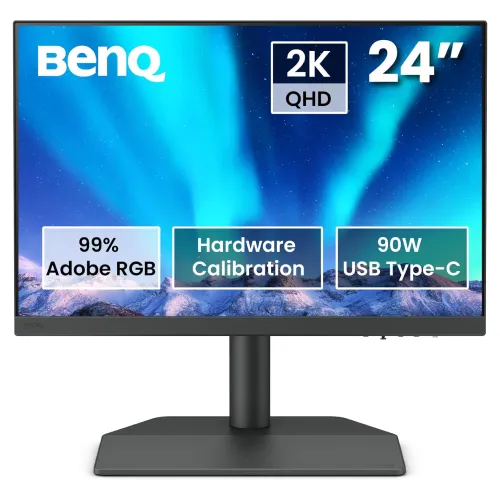
BenQ PhotoVue SW242Q is a 24.1-inch 2560 × 1600 IPS creative monitor with a 16:10 aspect ratio, 99% Adobe RGB, 98% Display P3, 100% sRGB, factory calibration and USB-C 90W Power Delivery. Compare the BenQ SW242Q price in Bangladesh and confirm live stock, included accessories and local warranty with the seller.
Product overview
BenQ PhotoVue SW242Q is a 24.1-inch professional monitor built around a 2560 × 1600 IPS panel and 16:10 aspect ratio. The resolution is commonly described as 2K QHD+, but the precise pixel dimensions are more useful when comparing products. BenQ positions this PhotoVue display for photographers, videographers and other creators who need broad color coverage and a managed output workflow. The product combines a Nano Matte surface, a factory calibration report, 16-bit 3D-LUT, hardware calibration support and multiple selectable color modes. It also functions as a workstation display through USB-C, USB hub, SD card reader, ergonomic stand and multi-input tools. It is a 60Hz display; buyers prioritizing competitive gaming should compare refresh rate and motion performance separately.
Resolution and 16:10 workspace
The 2560 × 1600 native pixel grid gives a 16:10 canvas. Compared with a 16:9 2560 × 1440 panel, this adds vertical room for a taller image preview, editing controls, code, documents or browser content. At 24.1 inches, BenQ lists approximately 125 pixels per inch, which supports crisp text and detailed image work at typical desk distance. Resolution does not by itself determine usable sharpness: operating-system scaling, viewing distance, source quality and application layout also affect the experience. Confirm that the connected computer can output 2560 × 1600 at the desired mode through its chosen port. The panel is 60Hz, so the extra vertical pixels serve creative and productivity work rather than a high-refresh gaming target.
Panel, brightness and viewing
BenQ specifies an IPS panel with 400 nits typical brightness, 1000:1 native contrast and 178-degree viewing angles. Those figures describe the model’s stated performance and are not measurements of a specific retail unit. IPS viewing behavior helps preserve the image across normal seated positions, while room lighting and screen angle still affect perceived contrast and color. The Nano Matte fine-coated surface is intended to limit reflections and provide a paper-like viewing texture. It does not make the screen reflection-proof, so avoid placing bright windows or lamps directly opposite the panel. The monitor is flat and includes an adjustable stand. Set brightness to suit the room and the intended print or video environment rather than assuming the maximum brightness is the most accurate setting.
Color spaces and color management
The official BenQ specification lists 99% Adobe RGB, 98% Display P3 and 100% sRGB coverage. These wide-gamut options matter when a workflow needs to preview images in different delivery spaces. Coverage percentages describe the range of colors the display can reproduce; they do not by themselves prove that every color is accurate or that an unmanaged application will show the intended result. BenQ lists a factory calibration report and average Delta E of 1.5 or less, along with selectable Adobe RGB, DCI-P3, Display P3, Rec.709, sRGB, HDR, M-Book, black-and-white, calibration, Paper Color Sync, DICOM and custom modes. Use the profile and mode appropriate for the source, application and output target. For print matching or repeatable production, check the panel using a compatible calibration instrument and a controlled workflow.
Calibration and creator tools
BenQ specifies a 16-bit 3D-LUT, hardware calibration capability and Palette Master Ultimate software support. A LUT can map input colors to the display’s output behavior, while hardware calibration can store adjustments in supported monitor electronics instead of relying only on the computer’s graphics card. BenQ also lists Calman Verified, Calman Ready, Pantone Validated and Pantone SkinTone Validated credentials, plus Display Quickit and Paper Color Sync. These tools and certifications are relevant reference points for production teams, but they do not remove the need to confirm software, instrument, operating-system and application compatibility. Paper Color Sync is intended to help preview a print workflow under its supported settings; it cannot account for every printer, paper, ink, room light or lab condition.
Connectivity and laptop docking
The USB-C port supports DisplayPort Alt Mode, data and up to 90W Power Delivery according to BenQ. With a compatible computer and cable, it can carry display signal and USB data while charging a laptop. The monitor also has one HDMI 2.0 input and one DisplayPort 1.4 input, plus a USB-B upstream connection, two USB downstream ports and a card reader. The SD/SDHC/SDXC/MMC reader can make camera-card access convenient, but transfer speed depends on the card and reader implementation. The USB hub needs an upstream connection to the host. Check source-port capabilities, cable ratings, USB-C charging needs and the supported resolution before choosing a one-cable setup. A laptop that draws more than 90W during demanding work may need its own power supply.
Stand, mounting and ergonomics
The included stand is specified for 120mm height adjustment, tilt from -5° to +20°, swivel 30° in either direction and 90° pivot. Auto Pivot can assist supported orientation changes, while the physical stand still needs enough clearance to rotate. A 100 × 100mm VESA mounting pattern gives the option of a compatible arm or wall mount. BenQ lists a net weight of 7.8kg, so verify the mount’s capacity and installation instructions. Adjust the top of the display and viewing distance to suit the user, then route cables so they do not pull when rotating the panel. A flexible stand is helpful for portrait document review or a multi-display workspace, but it does not replace checking desk depth and stability.
Multi-device workflows
GamutDuo is listed as a way to view content from two color spaces side by side under supported input arrangements. KVM can share a keyboard and mouse across connected computers when the required USB connections are made. Picture-by-Picture and related display modes can help compare sources, while actual supported combinations should be checked in the current manual. These features can be practical in studios with a workstation and laptop, or when comparing a source device with an edited result. They do not guarantee that two separately configured computers use matching profiles, brightness or application settings. Label cables and confirm the selected input, USB upstream and color mode for each workflow. If a project depends on a specific dual-view or KVM arrangement, validate that arrangement before relying on it in a production deadline.
Video, HDR and motion expectations
The maximum refresh rate is 60Hz and response time is listed as 5ms GtG. HDR10 input support is listed, with typical brightness of 400 nits. HDR compatibility means the display can accept supported HDR signals; it should not be confused with a guarantee of premium HDR impact, high peak brightness or a local-dimming backlight. The specification lists a native 1000:1 contrast ratio. These characteristics fit general editing, preview and desktop work, but gamers seeking 120Hz, 144Hz or faster should choose a different class of monitor. For video work, verify the project frame rate, color space, HDR mastering requirements and reference monitor expectations. A creator display is useful within a controlled workflow, yet final delivery should be checked on the intended target devices.
Dimensions, power and packaging
BenQ lists the monitor at 7.8kg net weight and includes a built-in power supply. The power input range and exact consumption depend on operating mode; consult the current regional manual and label for electrical details. The official accessories section lists a quick start guide, calibration report, IO cover and safety instructions, and notes that cables may vary by region. It lists DP 1.4, HDMI 2.0, USB and USB-C cables among possible included items. Confirm the box contents, cable type, adapter and any region-specific details with the Bangladesh seller. Leave room behind the display for its stand, cables and airflow. For an arm installation, check the VESA dimensions, fastener requirements and monitor mass before mounting.
Bangladesh price, availability and warranty
The Star Tech direct listing opened in Chrome on 6 November 2026 showed ৳61,500 and In Stock, with a regular price of ৳65,100. Google search results for the same model showed Skyland at ৳61,299 in stock and Ryans at a special ৳61,500 with ৳65,100 regular price, but those two pages were not opened directly in this check. Treat those search snippets as discovery evidence and confirm the live seller page before using them for a purchase decision. The BiponiBD variant MSRP is ৳61,500 and remains unchanged. The existing product warranty field says three years; the BenQ US specification page does not define Bangladesh coverage. Ask the seller to confirm whether it is official local or seller warranty, the service provider, coverage conditions, dead-pixel policy and invoice requirements.
Who should consider this monitor
The SW242Q may suit photographers, retouchers, designers, illustrators and video editors who can use its 16:10 workspace, selectable wide-gamut modes and calibration support. USB-C charging, card access, KVM, GamutDuo and an adjustable stand can help consolidate a creative workstation. It can also serve general office work where readable text and an ergonomic portrait option are useful. It is less suitable for buyers whose main goals are 4K resolution, a large screen, built-in speakers, high-refresh gaming or charging beyond 90W. Consider the computer’s port capability, desired scaling, color-management process and desk size before purchase. If production depends on print matching, validate the complete monitor, instrument, software, printer and paper workflow rather than treating product specifications as a standalone guarantee.
Key features
- 24.1-inch IPS display with native 2560 × 1600 resolution and a 16:10 workspace.
- Fine-Coated Nano Matte panel finish is designed to reduce distracting reflections.
- Color coverage is specified at 99% Adobe RGB, 98% Display P3 and 100% sRGB.
- Factory calibration report and average Delta E ≤1.5 support color-critical setup checks.
- 16-bit 3D-LUT and hardware calibration support help maintain a managed color workflow.
- USB-C carries DisplayPort video and data and provides up to 90W Power Delivery.
- One HDMI 2.0, one DisplayPort 1.4 and USB-C provide three host video connection options.
- USB hub, USB-B upstream connection, SD card reader and headphone output aid workstation use.
- Stand supports 120mm height adjustment, tilt, 30° swivel each way and 90° pivot.
- Paper Color Sync, GamutDuo, KVM, Auto Pivot and Palette Master Ultimate are listed tools.
- Calman Verified, Calman Ready, Pantone Validated and Pantone SkinTone Validated credentials are listed by BenQ.
- HDR10 input support, 400-nit typical brightness and 1000:1 native contrast are specified.
Pros
- 16:10 2560 × 1600 resolution gives extra vertical workspace compared with common 16:9 QHD screens.
- Broad Adobe RGB, Display P3 and sRGB coverage supports workflows that benefit from selectable color spaces.
- BenQ lists factory calibration and average Delta E ≤1.5, plus hardware calibration and a 16-bit 3D-LUT.
- USB-C with up to 90W PD can connect and charge a compatible laptop using one suitable cable.
- A flexible stand, SD reader, USB hub, KVM and GamutDuo can reduce friction in a multi-device studio.
- Star Tech directly showed the exact model in stock at ৳61,500 in the dated browser check.
Considerations
- The 60Hz refresh rate is intended for color-focused creation and general work rather than high-refresh competitive gaming.
- A 24.1-inch screen has less physical workspace than larger professional displays, despite its 16:10 resolution.
- A 90W USB-C budget may be insufficient for some high-performance laptops under sustained load.
- Wide-gamut output requires color-managed apps and suitable profiles; gamut percentages alone do not guarantee a correct workflow.
- Hardware calibration benefits require a compatible measurement device, software and an understood calibration process.
- Bangladesh price, stock and warranty provider can vary; the local three-year warranty needs seller confirmation.
Frequently asked questions
What is the BenQ SW242Q price in Bangladesh?
Star Tech direct page showed ৳61,500 in stock on 6 November 2026, with ৳65,100 regular price. Google results showed Skyland at ৳61,299 in stock and Ryans at a special ৳61,500, but those pages were not opened directly for this review. Verify checkout price, stock and delivery before paying.
What resolution and aspect ratio does this monitor have?
BenQ specifies a 24.1-inch IPS display with 2560 × 1600 pixels in a 16:10 aspect ratio. This gives more vertical pixels than a 2560 × 1440 display and is useful for editing palettes, documents and timelines.
Is the SW242Q suitable for photo editing?
Its 99% Adobe RGB, 98% Display P3 and 100% sRGB coverage, factory calibration report, average Delta E ≤1.5 and hardware calibration support are relevant to photo workflows. Results still depend on calibration, software color management, ambient light and the individual unit.
Does it support USB-C laptop charging?
Yes. BenQ specifies USB-C with DisplayPort Alt Mode, data and up to 90W Power Delivery. The computer must support USB-C video and charging, and a compatible cable is needed. Some demanding laptops may still require their own charger.
What video inputs are available?
The official specification lists one HDMI 2.0, one DisplayPort 1.4 and one USB-C DisplayPort Alt Mode input. Check the source output, cable and selected resolution/refresh combination when planning a multi-device setup.
Does it have built-in speakers?
The official specification lists a headphone jack but no built-in speakers. Use headphones or separate speakers connected to the computer or suitable audio output.
Is this a 4K monitor or a high-refresh gaming display?
No. Its native resolution is 2560 × 1600 and maximum refresh rate is 60Hz. The product is positioned for color-conscious creative work, not 4K or high-refresh gaming.
What color modes and workflow tools are included?
BenQ lists Adobe RGB, DCI-P3, Display P3, Rec.709, sRGB, HDR, M-Book, black-and-white, calibration, Paper Color Sync, DICOM and custom modes. It also lists GamutDuo, KVM, Auto Pivot and Palette Master Ultimate support.
Can I mount the SW242Q on an arm?
Yes. The official specification lists a 100 × 100mm VESA pattern. Verify the arm supports the display weight and mounting requirements before installation.
What are the stand adjustments?
BenQ lists -5° to +20° tilt, 30° swivel left and right, 90° pivot and 120mm height travel. These adjustment ranges help position the panel; desk clearance and cable slack still matter.
What is the local warranty?
The saved BiponiBD record says three-year warranty and Star Tech lists three years. BenQ’s US specification page does not establish Bangladesh warranty coverage. Confirm the warranty provider, service location, exclusions, dead-pixel terms and invoice requirements with the chosen local seller.
What is included in the box?
BenQ lists setup and safety documents, an IO cover and a calibration report. Its page notes that included cables can vary by region and lists DP 1.4, HDMI 2.0, USB and USB-C cables. Confirm the Bangladesh package contents with the seller before ordering.