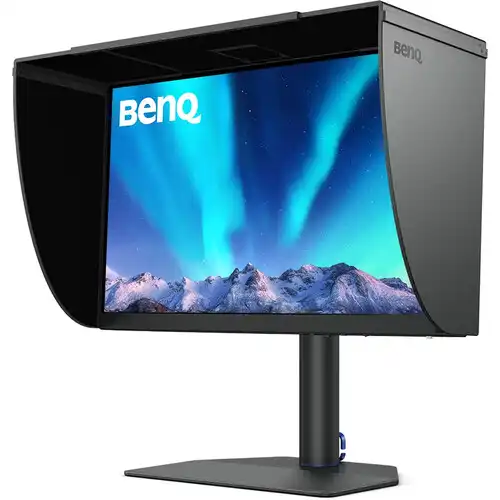
BenQ PhotoVue SW272Q: 27-inch QHD monitor for photo and color work
The BenQ PhotoVue SW272Q is a 27-inch professional monitor built for photographers, retouchers, designers and print studios that need a wide-gamut display and a repeatable color workflow. Its IPS panel has a native QHD resolution of 2560 × 1440, a 16:9 aspect ratio, 109 pixels per inch, 300 cd/m² typical brightness and a 1000:1 native contrast ratio. The specification lists a 60Hz refresh rate, 5ms GtG response time, 178-degree horizontal and vertical viewing angles, and support for HDR10 signals.
This is the QHD SW272Q model. It should not be confused with the 4K SW272U: the model code matters when comparing resolution, brightness, HDR formats and included accessories. The SW272Q is aimed primarily at color-aware still-image and design work, rather than high-refresh competitive gaming or high-brightness HDR mastering.
Wide-gamut color and calibration
BenQ specifies coverage of 99% Adobe RGB, 98% P3 and 100% sRGB/Rec.709, with 1.07 billion colors. The monitor uses a 16-bit 3D LUT and BenQ states an average Delta E of 1.5 or lower. Its factory calibration report documents the factory measurement for the individual unit; it is a useful starting reference, while the result in a particular studio still depends on calibration, settings, software, ambient light and the colorimeter used.
Palette Master Ultimate supports hardware calibration on the display. A compatible calibration instrument and the software are needed for a user calibration; they should not be assumed to be included in the carton. The built-in calibration slots allow saved calibration results to be selected from the monitor. Calman Verified, Pantone Validated and Pantone SkinTone Validated credentials are listed by BenQ for this model. These features are intended to help creative teams build a more controlled workflow; they do not guarantee that every screen, printer, paper and viewing environment will look identical.
The monitor includes color modes such as Adobe RGB, Display P3, sRGB, Rec.709, HDR, M-Book, black-and-white and Paper Color Sync. GamutDuo can show the same source in two color spaces through picture-in-picture or picture-by-picture. Paper Color Sync is BenQ's workflow software for previewing a print-oriented appearance with supported printer, paper and color settings. It is a soft-proofing aid, not a guarantee of the final physical print.
Fine-Coating panel surface
The SW272Q uses BenQ's Fine-Coating anti-reflection surface, which BenQ associates with TÜV Rheinland Reflection-Free certification. The coating is designed to reduce distracting reflections in a bright studio. It does not eliminate the need to manage room lighting, and users who prefer a glossy display may want to compare the surface in person.
Connections and one-cable setup
For video input, the monitor provides two HDMI 2.0 ports, one DisplayPort 1.4 input and one USB-C connection with DisplayPort Alt Mode. BenQ specifies USB-C Power Delivery up to 90W, alongside data transfer. The delivered power is a maximum capability; actual laptop charging depends on the computer and connected devices.
The display also has a USB-B upstream connection, two USB-A downstream ports, an SD/SDHC/SDXC/MMC card reader, HDCP 2.2 support and a 3.5mm headphone jack. The USB hub and card reader require an active upstream data connection to the computer. There are no built-in speakers, so plan on headphones or external speakers for audio.
Stand, hood and studio operation
The included stand supports 140mm height adjustment, tilt from −5° to +20°, swivel of ±30° and 90° pivot. A 100 × 100mm VESA mounting pattern is available for a compatible arm or wall mount. The official specifications list the monitor at 613.9mm wide and 274mm deep with the stand; height varies from 451.8mm to 591.8mm. The panel without its base measures 613.9 × 374.7 × 74.6mm. Check desk depth and arm capacity before installation.
BenQ's product information lists the detachable SH272 shading hood and wireless Hotkey Puck G3 as included accessories for the relevant regional retail package. Accessory bundles can vary by market, so confirm the box contents and warranty with the Bangladesh seller for the specific unit. The Hotkey Puck provides a physical way to access selected monitor controls and modes.
Who should consider the SW272Q?
The SW272Q is worth comparing if your work benefits from Adobe RGB coverage, hardware calibration, print soft-proofing tools, USB-C docking and an anti-reflection coating. It can suit photo editing, retouching, color-managed design and print preparation when the computer, application and color workflow are configured correctly. Its QHD resolution on a 27-inch panel offers more workspace than Full HD while keeping the system requirements below a 4K workflow.
Consider another model if you need 4K detail at 27 inches, a refresh rate above 60Hz, built-in speakers, or a display designed for high-brightness HDR mastering. The SW272Q's 300-nit typical brightness and HDR10 input support should not be mistaken for a high-end HDR mastering specification. For gaming, compare response behavior and refresh rate against gaming-oriented displays.
Specifications at a glance
- Panel: 27-inch IPS LED, 2560 × 1440 QHD, 16:9
- Refresh and response: 60Hz; 5ms GtG
- Brightness and contrast: 300 cd/m² typical; 1000:1
- Color: 99% Adobe RGB, 98% P3, 100% sRGB/Rec.709; 1.07 billion colors
- Color processing: 16-bit 3D LUT; average Delta E ≤1.5 as specified by BenQ
- HDR: HDR10
- Inputs: 2 × HDMI 2.0, 1 × DisplayPort 1.4, 1 × USB-C with DP Alt Mode and up to 90W PD
- USB and audio: USB-B upstream, 2 × USB-A downstream, card reader, 3.5mm headphone jack; no built-in speakers
- Ergonomics: 140mm height, −5° to +20° tilt, ±30° swivel, 90° pivot; 100 × 100mm VESA
- Typical listed net weight with stand: 8.3kg
Price, warranty and before-you-buy checks
Product pricing and stock can change between Bangladesh retailers. Check the current BiponiBD offer, delivery terms, warranty provider and whether the quoted amount includes VAT before ordering. BenQ specifications describe product capability; they do not establish local stock or the warranty attached to a particular imported unit. Confirm the local seller's written warranty and included accessories for the exact model and regional part number.
Use the model name SW272Q when checking compatible downloads, manuals and calibration software. Keep the product's serial number and factory calibration report with the purchase documents. Before connecting a laptop, check that its USB-C port supports DisplayPort output and that its power requirement is within the monitor's 90W maximum delivery.
KVM and multi-computer desk workflows
BenQ lists a KVM switch for the SW272Q. In a workstation used with more than one computer, a KVM can help route connected peripherals when switching between display sources. To use this function, connect the relevant computers and USB upstream paths as described in the user guide, then configure the monitor's on-screen menu. The exact switching behavior depends on the selected inputs and setup; check the manual before purchasing if KVM is central to your desk workflow.
The USB-C connection can carry video, data and laptop power in one cable when the host computer supports DisplayPort Alt Mode. A separate desktop computer can use HDMI or DisplayPort for video and USB-B for the monitor's USB hub and card reader. Cable choice and port mapping matter: a video cable by itself does not activate USB peripherals. Confirm host compatibility and use the supplied or suitable data cables.
Planning a color-managed editing workflow
Wide gamut is most useful when the full workflow is managed. Start by selecting the appropriate monitor color mode for the task and the file color space, then set the operating system and creative application to use the correct display profile. For print work, soft-proof inside a color-managed application using the printer and paper profile supplied by the printer or paper maker. Paper Color Sync can assist with supported combinations, while the final print still depends on ink, paper, printer condition, room lighting and viewing practice.
BenQ's average Delta E claim describes its stated factory performance; it is not a promise that each user's setup will show every color identically. For recurring paid work, use a supported colorimeter and a defined calibration target, record the date and settings, and periodically recheck the display as it ages. Avoid judging a print under mixed or strongly colored lighting. These workflow steps are relevant to any wide-gamut monitor, including the SW272Q.
Choosing between QHD and 4K
At 27 inches, QHD provides 2560 × 1440 pixels and 109 PPI. It is a practical resolution for photo editing, general design and multi-window work, while leaving more scaling and graphics headroom than a 4K panel. If your work depends on inspecting very fine detail at native size, or you want a denser desktop at the same physical size, compare a 4K monitor such as the separate SW272U. Evaluate the applications and scaling settings you use rather than relying on the model names alone.
Desk fit, mounting and electrical planning
The official dimensions vary according to how the monitor is assembled. With the stand, the width is 613.9mm, depth 274mm and height 451.8–591.8mm. The bare panel without the base is 613.9mm wide, 374.7mm high and 74.6mm deep; a shading hood changes the dimensions. Its listed net weight with the stand is 8.3kg. Allow additional clearance for cables and movement, and check the hood's dimensions if your desk sits under shelves or cabinets. For an arm, verify both the arm's load rating and its mounting compatibility.
The monitor uses an internal power supply and BenQ lists 100–240V AC input. Power figures vary by operating condition: the specification lists typical/normal consumption, a maximum figure and a low sleep-mode figure. The 160W maximum includes a high-load case with USB-C charging; it is not the monitor's expected continuous draw in ordinary use. Use a properly grounded outlet and follow the supplied safety and installation instructions.
Regional part number and purchase checklist
BenQ's SW272Q is sold in regional configurations, and power-cord or accessory bundles may differ. The catalog MPN recorded here is 9H.LLPLB.QBE for the researched APAC/EU configuration. Before ordering, compare the label on the carton and device with the seller's invoice, confirm the unit is the QHD SW272Q, and ask which local entity provides warranty service. Check whether the factory calibration report, Hotkey Puck G3, shading hood, USB-C/HDMI/DisplayPort/USB upstream cables and power cable are present in the exact package; do not assume a different regional SKU has the same bundle.
Retail stock, cash discounts, regular prices and delivery coverage change over time. Use the current BiponiBD offer as the checkout reference and confirm the final amount, stock, payment terms and written warranty before placing an order. The monitor's reference MSRP, third-party retailer price and an active BiponiBD store offer are separate pieces of information and should not be treated as interchangeable.
Official references
For model-specific details, consult the BenQ SW272Q specifications, the BenQ product overview and the BenQ support and manual page. Confirm availability, accessories and Bangladesh warranty with the seller for the exact unit.