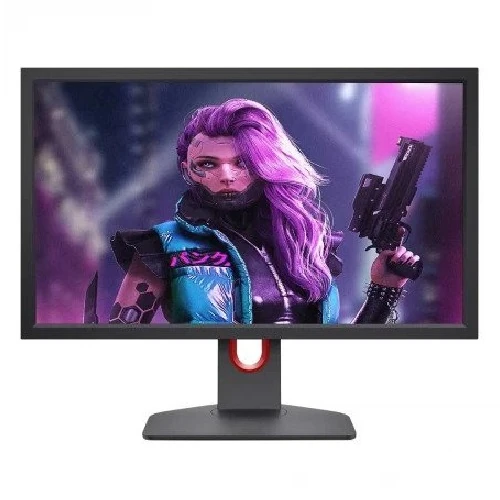
BenQ ZOWIE XL2411K 24-inch 144Hz DyAc Esports Monitor is a 24-inch Full HD esports monitor with a TN panel, 144Hz refresh rate and BenQ ZOWIE DyAc technology.
Product identity and esports purpose
The BenQ ZOWIE XL2411K is a 24-inch Full HD gaming monitor built around a 144Hz TN display and ZOWIE DyAc motion-clarity technology. BenQ’s official ZOWIE APAC product page confirms the model, panel type, refresh rate, 16:9 screen, gaming features and supported connection modes. This exact model code is important because ZOWIE XL monitors share similar names but differ in refresh rates, DyAc versions, ports and included accessories. Match “XL2411K” on the rear label and invoice when buying or arranging warranty service.
The product is designed around competitive games where clear motion, quick display updates and repeatable on-screen settings matter. BenQ describes DyAc as helping make vigorous movements such as spraying appear less blurred. That manufacturer description is about visual presentation; it does not increase the player’s reaction speed or guarantee a game result. The monitor displays the signal sent by the PC or console, so frame rate, game settings and graphics performance remain part of the overall experience.
The official page lists optional accessories such as an S Switch and shielding hood in the product family, and explicitly notes that those accessories are not included in the package. Do not assume that an optional accessory shown in promotional material comes with a local retailer bundle. Confirm the included stand, power cable, video cable, documentation and any separately priced accessories before purchase.
Resolution, panel and image characteristics
The XL2411K uses a native 1920 × 1080 resolution in a 16:9 format. Its 24-inch screen size and Full HD pixel count are widely supported by desktop PCs and consoles. For competitive titles, this resolution can be easier to drive at high frame rates than a higher-resolution screen. For office work and general browsing, it supports common documents, web pages and video. Users who need more desktop workspace or finer detail for design and large spreadsheets may prefer a QHD monitor.
BenQ identifies the panel as TN. TN panels are used in some esports monitors for their fast response characteristics, but their viewing-angle and color behavior differs from IPS. A viewer looking from above, below or far to the side may see more noticeable changes in brightness or color. The adjustable stand can help position the panel directly in front of the user. Retail listings include 1000:1 native contrast and 0.276mm pixel pitch; use these as model specifications, not as a promise about every unit’s perceived image.
The official APAC page lists 320 nits typical brightness. Local Star Tech and Vibe Gaming tables show 350 cd/m², so the sources do not agree on that figure. This profile uses the official 320-nit specification and records the local discrepancy rather than choosing the larger number. Ambient light and reflections influence perceived brightness; direct sunlight can still make any display harder to see. BenQ also notes that brightness is reduced when DyAc is switched on, a practical setting trade-off for users comparing motion clarity and screen luminance.
Retailer listings state 1ms GtG response time, while BenQ’s product page focuses on the 144Hz refresh and DyAc feature. Response time describes pixel transitions; refresh rate describes how frequently a new frame can be displayed. A 144Hz mode does not itself guarantee 1ms transitions in every setting, and neither figure is the same as total input lag. Actual motion appearance varies with selected mode, game frame delivery and individual sensitivity.
Refresh rate, DyAc and game setup
The monitor supports up to 144Hz on a compatible PC. BenQ lists 1920 × 1080 at 144Hz through HDMI 2.0 or DisplayPort 1.2. To activate that mode, the graphics output, cable, selected monitor input and operating-system display settings need to support it. If the system initially runs at 60Hz, check the display settings and graphics driver, then confirm that the cable is connected to the desired input. The monitor cannot create extra game frames when the computer is producing fewer.
BenQ lists console compatibility up to 120Hz for PS5 and Xbox Series X, with the caveat that the title must support 120fps. This is a supported display mode, not a claim that every console game runs at 120 frames per second. Configure the console’s video output, use a compatible HDMI connection, and check the game’s performance mode. The actual game frame rate can vary with its graphics settings and workload.
DyAc targets motion clarity during vigorous movement. The official page explains that it can make spraying less blurry and help the player see crosshair and impact points more clearly. It is a display feature, not a substitute for a stable frame rate or appropriate sensitivity settings. BenQ states that brightness is reduced while DyAc is enabled on this model; compare the available modes in the room where the monitor will be used and select the balance that feels right.
ZOWIE provides Black eQualizer for adjusting visibility in dark scenes, Color Vibrance for changing color tone, and game presets for different titles. XL Setting to Share allows users to save and share display settings. These controls can help tailor the picture to personal preference, but they do not alter the game’s actual rendered image data or guarantee an advantage. Save a comfortable general profile so changes for one title can be reversed easily.
Connections, ergonomics and mounting
The official comparison information lists HDMI 2.0, DisplayPort 1.2, two HDMI 1.4 inputs and a headphone jack. Star Tech and Vibe list the same input set. The HDMI 2.0 and DisplayPort 1.2 connections are the relevant ports to check for 144Hz PC operation at Full HD. Older HDMI 1.4 inputs can be useful for additional devices, but supported resolution and refresh depend on the connected source and selected mode. The 3.5mm headphone output provides a wired audio option; built-in speakers are not listed.
The stand has a height-adjustment range listed by retailers as 155mm, tilt from -5° to 23°, swivel of 45 degrees in either direction and 90-degree pivot. BenQ’s product page highlights height and tilt adjustment. These adjustments can help align the screen with eye level and desk space. Pivot may be useful for vertical content, although the monitor’s 16:9 orientation and software display settings must be considered. Retailer specifications also list a 100 × 100mm VESA mount; verify the pattern and monitor weight with the chosen arm before mounting.
Star Tech lists dimensions of approximately 571mm wide, 200mm deep, and 370–525mm high depending on stand height. Retailers list 5.9kg net weight and 8.5kg gross packaged weight. Allow room for the stand footprint and input cables, particularly if the monitor is placed near a wall. The built-in power supply is listed by local sellers; use the supplied power cable and a properly grounded outlet that matches local electrical requirements.
The smaller stand base is part of BenQ’s design description and can leave more desk surface available for mouse movement. The stand still occupies desk area, so measure the desk and consider where the keyboard, mouse pad and speakers will sit. VESA mounting can reclaim desk space if a compatible arm is used. Confirm that the mounting hardware and any optional S Switch are included or sold separately as expected.
Eye comfort, warranty and buying guidance
Star Tech and Vibe list flicker-free and low-blue-light features. These are display features that may help users adjust a screen for their comfort; they should not be understood as medical claims. Set brightness for the room, reduce reflections and take regular breaks during long sessions. A TN panel’s appearance can vary more when viewed off-axis, which is another reason to set the height and angle carefully.
Bangladesh seller warranty statements are not identical. Vibe Gaming lists a three-year brand warranty. Star Tech lists three years and notes an exclusion for internal dust. Warranty coverage and service are controlled by the seller and the written terms for the delivered unit. Ask which service point handles claims, what proof is required, and whether panel pixel conditions or dust exclusions apply. Keep the invoice and confirm that it names XL2411K.
At the time checked, Vibe Gaming’s live product page showed the XL2411K In Stock for ৳24,500. Star Tech showed the item as Upcoming with a price to be announced, so its current status does not support using the earlier search snippet price as an active offer. This product page records a single verified seller price as market context. It is not a BiponiBD store offer, and stock or price can change before an order is placed.
The primary strengths are the officially verified 144Hz TN esports design, DyAc, flexible stand and multiple video inputs. Trade-offs include Full HD resolution, TN viewing-angle characteristics, no built-in speakers, and reduced brightness when DyAc is active. A buyer should select it when those esports controls and the 24-inch size match the intended setup, then confirm the exact package, current stock and warranty with the retailer. For higher resolution, IPS viewing angles or refresh rates beyond 144Hz, compare another model against those priorities before buying.
Key features
- 24-inch 16:9 Full HD 1920 × 1080 TN display
- 144Hz maximum PC refresh rate; compatible consoles can output up to 120Hz in supported games
- BenQ ZOWIE DyAc motion clarity technology for fast in-game movement
- 1ms GtG response time specified by Bangladesh retail listings
- 320 nits typical brightness on the official APAC specification; some local listings differ
- 1000:1 native contrast and 0.276mm pixel pitch
- Display area 531.36 × 298.89mm with a 16:9 aspect ratio
- Three HDMI inputs: one HDMI 2.0 plus two HDMI 1.4; one DisplayPort 1.2
- 3.5mm headphone output; no built-in speakers
- Height adjustment up to 155mm, tilt -5° to 23°, swivel ±45° and 90° pivot
- 100 × 100mm VESA mounting, black finish and built-in power supply
- Black eQualizer, Color Vibrance, game modes and XL Setting to Share
- Low-blue-light and flicker-free features listed by retailers
- Three-year warranty listed by Vibe Gaming; confirm written local terms
Advantages
- Official ZOWIE documentation confirms the core esports identity: 24-inch Full HD TN, 144Hz and DyAc.
- HDMI 2.0 supports 144Hz at 1920 × 1080 on compatible PCs; official documentation also lists 120Hz console compatibility for PS5 and Xbox Series X.
- Height, tilt, swivel and pivot adjustments support a more flexible desk position than a fixed basic stand.
- Black eQualizer, Color Vibrance, customizable game modes and XL Setting to Share provide display tuning options for different games.
- A DisplayPort input, three HDMI inputs and headphone output give several wired connection choices.
Limitations to consider
- The 1920 × 1080 TN panel has narrower viewing angles and different color characteristics than IPS displays.
- It is limited to 144Hz on PC, below many newer high-refresh esports monitors.
- No built-in speakers are listed; audio needs headphones or external speakers.
- DyAc reduces brightness while enabled according to official documentation, so users may need to adjust room lighting or choose another mode.
- Star Tech marked the listing Upcoming; Vibe showed In Stock at ৳24,500 when checked, so price and availability should be reconfirmed before ordering.
Frequently asked questions
What is the BenQ ZOWIE XL2411K?
It is a 24-inch Full HD esports monitor with a TN panel, 144Hz PC refresh rate and BenQ ZOWIE DyAc technology.
What resolution does it support?
The native resolution is 1920 × 1080 (Full HD), with a 16:9 aspect ratio. Official data lists 144Hz at Full HD over HDMI 2.0 or DisplayPort 1.2 on PC.
Does it work with PS5 or Xbox Series X?
BenQ ZOWIE lists compatibility up to 120Hz on PS5 and Xbox Series X when the game, console mode and HDMI connection support 120fps output. Actual frame rates depend on the game.
What is DyAc?
DyAc is BenQ ZOWIE motion-clarity technology intended to make vigorous in-game movement appear less blurred. The manufacturer notes the display becomes dimmer when DyAc is on.
What is the response time?
BenQ and retailer pages list 1ms response. Local listings identify 1ms GtG; response time is distinct from refresh rate and does not represent total input lag.
Which video ports are included?
The official comparison/specification page lists HDMI 2.0, DisplayPort 1.2 and two HDMI 1.4 inputs. Star Tech and Vibe list those same inputs.
Does it include speakers?
No built-in speakers are listed. The monitor has a headphone output; use headphones or external speakers for sound.
Can the stand be adjusted?
Retailer specifications list 155mm height adjustment, -5° to 23° tilt, ±45° swivel and 90° pivot. BenQ describes height and free-tilt adjustment.
Can it be mounted on a monitor arm?
Star Tech lists a 100 × 100mm VESA pattern. Confirm the mount’s load rating and the exact unit’s rear mounting pattern before installation.
What brightness should I expect?
The official APAC specification lists 320 nits typical. Star Tech and Vibe show 350 cd/m², so local retailer data differs; the 320-nit figure is used here from the official source.
What is the current Bangladesh price?
Vibe Gaming showed ৳24,500 and In Stock on its product page when checked. Star Tech showed Upcoming with price to be announced. Prices and stock can change.
What warranty is listed in Bangladesh?
Vibe Gaming lists a three-year brand warranty. Star Tech states three years with an internal-dust exclusion. Check the written terms and invoice with the chosen seller.
Availability, price and seller warranty terms can change. Confirm the delivered XL2411K unit and invoice details with the retailer.