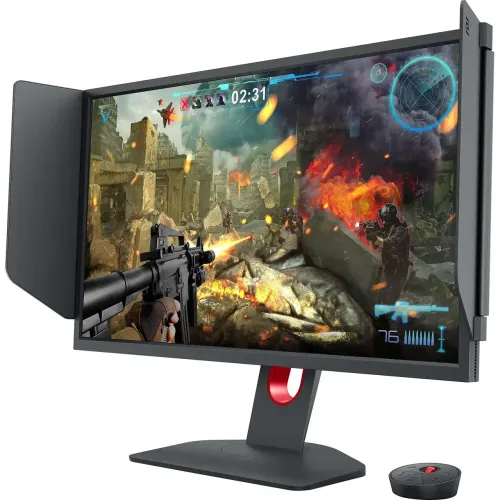
The BenQ ZOWIE XL2546K is a 24.5-inch Full HD 240Hz esports monitor with DyAc+, a TN panel, adjustable stand, three HDMI inputs and DisplayPort 1.2.
Product identity and intended use
The BenQ ZOWIE XL2546K is a competitive-gaming monitor built around a 24.5-inch Full HD display and a 240Hz maximum PC refresh rate. BenQ’s official APAC product page uses the 24.5-inch size, while some Bangladesh retail titles round the screen to 25 inches. The exact model code is XL2546K. It should not be confused with XL2546, XL2546X or other closely named ZOWIE monitors, whose panel, stand or refresh specifications can differ.
Its TN panel and fast refresh target players who value high-frame-rate play and motion handling, especially in first-person shooters. The FHD 1920 × 1080 resolution is a practical match for high frame rates on compatible graphics hardware. The trade-off is lower pixel density and desktop workspace than a QHD or 4K display of similar size. It can also be used for ordinary computing, but its feature set is primarily shaped around esports rather than HDR cinema or color-critical production.
This listing now identifies BenQ as the brand, uses the precise XL2546K model code and distinguishes official manufacturer specifications from retailer claims. The catalog’s old generic description did not explain which refresh modes use which connections, how DyAc+ fits into the product, or what limitations to check. The updated content spells out those practical points without treating a retailer’s unqualified response-time label as a manufacturer guarantee.
Resolution, refresh rate and response behavior
BenQ specifies a 24.5-inch screen with a 16:9 aspect ratio and 1920 × 1080 maximum resolution. At this size, Full HD keeps a competitive-game image straightforward to render at high frame rates. The monitor does not add frames that the PC or console has not rendered: the source performance, graphics settings, game engine, port, cable and selected mode all affect how much of the 240Hz capability is realized.
The official specification lists 1920 × 1080 at 240Hz for PC or laptop through HDMI 2.0 or DisplayPort 1.2. BenQ’s comparison table lists 120Hz support for PS5 and Xbox Series X. These are different use cases: a PC may use the full 240Hz mode, while a compatible console can use its listed 120Hz mode. Check the source device and select the matching mode in its display settings. If 240Hz is missing, verify the cable, graphics output, driver and monitor input before assuming the panel is defective.
BenQ’s XL2546K FAQ specifically cautions that response-time measurement results depend on the test method and that there is no uniform industry measurement standard. BenQ therefore does not publish a single response-time figure for this model. Local retailer tables commonly show 1ms GTG, but the product copy now identifies that as a retailer claim rather than repeating it as an official universal guarantee. Response behavior can depend on the transition measured, overdrive setting and viewing mode.
The 240Hz refresh rate and DyAc+ feature address different aspects of motion. Refresh rate is the number of display updates per second when the source supplies the mode. DyAc+ uses backlight strobing to reduce perceived motion blur under supported settings. Results are content- and setting-dependent; users should test it with their own games and preferences. Avoid assuming that a marketing feature makes every scene sharper or changes the game’s rendered frame rate.
DyAc+, controls and game profiles
BenQ describes DyAc+ as a motion-clarity technology that can make fast in-game actions, including spraying, appear less blurry. It is intended to help players follow the crosshair and impact points during motion. The visible effect can differ by scene, frame rate and selected settings. Players sensitive to flicker or backlight strobing should compare the available modes and choose the setting that feels comfortable.
Black eQualizer adjusts visibility in darker areas without simply raising every bright region. Color Vibrance changes color tone and saturation so users can tune the picture to a game or personal preference. These are image controls, not a guarantee that opponents become easier to see in every map or lighting condition. Game modes allow saved or preset configurations to be selected for different titles, and users can adjust them to suit the room and source.
BenQ’s XL Setting to Share software supports saving and sharing display profiles on compatible computers. The included five-way S Switch gives a physical way to navigate menus and quickly switch settings. These tools can help a player move between profiles without repeatedly rebuilding every setting by hand. Software compatibility and available features may depend on the computer and current BenQ support utility; check the product’s support page for downloads and instructions.
A shielding hood is included in BenQ’s accessory listing. It can help limit side reflections in a bright environment, but it does not replace sensible placement, room lighting or cleaning. The compact base is designed to leave more desk room for mouse movement, which can matter to players using low sensitivity and broad arm movements. Measure the desk and allow enough clearance for the stand, cables and hood before purchase.
Display quality, brightness and eye-care settings
BenQ lists typical brightness at 320 nits (cd/m²), native contrast at 1000:1 and a 0.283mm pixel pitch. These figures describe the manufacturer’s stated display characteristics; they do not establish calibration accuracy, panel uniformity or the appearance of an individual unit. For general gaming, the Full HD TN panel prioritizes fast esports use. Buyers who need wide viewing angles, high-resolution creative workspace or stronger dark-scene contrast may prefer a different category of display.
The XL2546K is not presented as a high-dynamic-range monitor in the official specification reviewed. The listed brightness and contrast should not be interpreted as an HDR certification. If HDR playback or wide color gamut is essential, compare a monitor with explicit manufacturer HDR and color specifications instead of inferring those features from brightness alone.
BenQ lists Flicker-free Technology and Low Blue Light. These settings let users change the display behavior to suit their own comfort preferences; they are not medical treatment and cannot guarantee that a long gaming session will avoid eye strain. Set a comfortable brightness, reduce direct reflections, keep the monitor at a suitable distance and take breaks. The right picture settings are personal and depend on ambient light and game content.
Connections, audio and compatibility
The official connectivity list contains three HDMI 2.0 inputs and one DisplayPort 1.2 input. A headphone jack is listed for audio output. BenQ does not list USB-C video input on the XL2546K, so a USB-C-only laptop may need a compatible video adapter that supports the desired resolution and refresh rate. Check the source device’s output and adapter specifications before relying on an adapter for 240Hz.
There are no built-in speakers. A computer or console can send audio to headphones through the monitor’s headphone connection when the source and selected signal carry audio. For speakers, connect them to the source device or use an external audio interface. This distinction is included because generic monitor listings sometimes omit the absence of speakers, which can affect a desk setup.
For PC play, confirm that the graphics card provides HDMI 2.0 or DisplayPort 1.2 and can render the games at the chosen frame rates. For console play, BenQ lists 1080p at up to 120Hz for PS5 and Xbox Series X over HDMI 2.0. Actual output depends on console generation, game support and display settings. Use a suitable cable and configure the source to the intended refresh mode.
Ergonomics, mounting and dimensions
BenQ lists a 155mm height-adjustment range, tilt from -5° to +23° and swivel of 45° left and right. Its official specification table does not list a pivot rotation. Star Tech’s table includes a 90° pivot value, but because the manufacturer page omits that function, this catalog record treats pivot as unconfirmed rather than promising portrait rotation. The product has a 100 × 100mm VESA mounting pattern and a Kensington lock.
The manufacturer gives a net weight of 6.2kg and a gross weight of 9.5kg. Its dimensions are listed as 521.17mm wide by 571mm high at the upper stand position, or 366.17mm at the lower position, with an additional height-adjustment handle dimension and 200.18mm depth. Retail tables often round these numbers. Check desk width, stand depth, cable clearance and mounting-arm capacity before setting it up.
The height and tilt range can help position the display for a seated gaming posture, while swivel can make small desk adjustments easier. Use a VESA arm rated for the monitor and install it on a surface that can support the full setup. Keep vents clear and route power and video cables so they do not pull on connectors when the display moves.
In-box accessories, care and warranty
BenQ lists an S Switch, shielding hood, 1.8m DisplayPort 1.2 video cable, 1.8m power cable and dust cover. Accessories can vary by country, package batch or retailer. Confirm the box contents with the Bangladesh seller before purchase, particularly if the included cable is needed for a specific desk layout. Retain the invoice, serial number and any warranty paperwork.
BenQ’s product page describes a protective frame intended to help protect the LCD panel during transport, but users should still carry the monitor carefully and avoid pressure on the screen surface. Place it on the stand before removing protective materials, keep liquids away from the panel and use a soft dry cloth for routine cleaning. Do not spray cleaner directly onto the screen or force the stand beyond its specified range.
Star Tech lists a three-year warranty and specifically notes that internal dust is excluded. Warranty wording can depend on seller, invoice and local service policy. Confirm the service provider, covered parts, dead-pixel terms, physical-damage exclusions, internal-dust policy and claim procedure in writing before paying. A warranty period in a product listing does not override the written warranty document.
Bangladesh availability and buyer checklist
At the time checked, Star Tech’s exact-model page showed “Up Coming” and “To be announced.” The same page contains older copy that states a latest price of ৳45,000, but that number is not an active offer while the page status is Upcoming. The search snippet also displayed the old amount and in-stock wording, which conflicts with the direct product page. The catalog therefore records no current market price and does not treat the older copy or search snippet as live stock evidence.
Before buying, confirm exact model XL2546K, current stock, final price, invoice and written warranty. Check whether the unit and package are local-market stock and verify that the display size is 24.5 inches according to BenQ, even if the seller rounds it to 25 inches. Compare the included S Switch, hood, cable and dust cover against the confirmed Bangladesh package.
For a PC, check that the graphics output and cable can carry 1920 × 1080 at 240Hz. For a console, BenQ lists up to 120Hz at Full HD. Decide whether the TN panel and FHD resolution fit the intended use, and plan separate audio because there are no built-in speakers. If the setup needs USB-C video, choose an appropriate adapter or a monitor with a native USB-C video input.
The strongest reasons to choose this model are its 240Hz Full HD PC mode, DyAc+, competitive-game image controls, multiple HDMI inputs, included S Switch and adjustable stand. The key trade-offs are Full HD resolution, TN viewing characteristics, no integrated speakers, no manufacturer-published standardized response-time figure and uncertain current Bangladesh availability. These points make it easier to compare the XL2546K with newer QHD monitors or adjacent ZOWIE models without confusing their specifications.
Key features
- 24.5-inch (BenQ official measurement) 16:9 TN display with Full HD 1920 × 1080 native resolution.
- 240Hz maximum refresh rate at 1920 × 1080 for compatible PCs over HDMI 2.0 or DisplayPort 1.2.
- BenQ ZOWIE DyAc+ strobing technology designed to improve perceived motion clarity in fast FPS play.
- Fast liquid crystal panel; BenQ does not publish one standardized XL2546K response-time number.
- Three HDMI 2.0 inputs and one DisplayPort 1.2 input; BenQ lists console refresh support up to 120Hz.
- Typical brightness 320 cd/m², native contrast 1000:1 and pixel pitch 0.283mm in BenQ specifications.
- Black eQualizer, Color Vibrance and customizable game picture modes for user-selected image tuning.
- XL Setting to Share software for storing and sharing monitor profiles on compatible systems.
- Included five-way S Switch gives quick access to saved display modes and settings.
- Shielding hood and dust cover are listed among the package accessories; regional package contents can vary.
- Height-adjustable stand with 155mm range, tilt from -5° to +23° and swivel 45° left/right.
- 100 × 100mm VESA mounting pattern and Kensington lock for compatible mounting and physical security.
- BenQ lists 6.2kg net weight, 9.5kg gross weight and dimensions around 521.17 × 571 × 200.18mm at high position.
- Flicker-free and Low Blue Light options are listed for display comfort preferences.
- No built-in speakers; a headphone jack is available for audio from a compatible connected source.
Advantages
- Full HD at 240Hz suits competitive FPS setups that prioritize high refresh and motion handling over QHD resolution.
- DyAc+ is a model-specific motion-clarity feature, alongside BenQ’s gaming presets and image controls.
- Three HDMI 2.0 inputs plus DisplayPort 1.2 make it practical to connect multiple PCs and console sources.
- The 155mm height range, tilt, swivel, compact base design and VESA compatibility give flexible placement options.
- The S Switch and XL Setting to Share support fast switching and sharing of saved display profiles.
Limitations to consider
- The native resolution is Full HD; it offers less desktop detail than QHD or 4K screens of similar size.
- The 24.5-inch TN panel prioritizes speed; users who prefer wider viewing angles or richer contrast may prefer another panel type.
- BenQ does not publish a standardized single response-time number for this model, despite retailer 1ms claims.
- There are no built-in speakers, and the USB/HDMI/DisplayPort selection should be checked against the intended devices.
- Star Tech currently labels its page Upcoming / To be announced; the displayed ৳45,000 copy is not a live offer.
Frequently asked questions
What is the BenQ ZOWIE XL2546K?
It is a 24.5-inch Full HD esports monitor with a 240Hz maximum refresh rate, TN panel, DyAc+ motion-clarity technology, adjustable stand, three HDMI 2.0 ports and one DisplayPort 1.2 input. Retailers may round the official 24.5-inch size to 25 inches; confirm the XL2546K model code.
What is its resolution?
BenQ lists 1920 × 1080 Full HD at 16:9. It is not a QHD or 4K model.
Can it run at 240Hz?
BenQ lists a maximum PC mode of 1920 × 1080 at 240Hz over HDMI 2.0 or DisplayPort 1.2. BenQ also lists up to 120Hz at Full HD for PS5 and Xbox Series X. The graphics card or console, cable and selected display mode must support the chosen refresh rate.
What is DyAc+?
DyAc+ is BenQ ZOWIE’s backlight strobing feature intended to improve perceived motion clarity during fast actions such as spraying in FPS games. Its appearance depends on settings and content; compare it in person if motion behavior is a key purchase factor.
What is the response time?
BenQ’s XL2546K FAQ explains that test methods differ and says BenQ does not claim one response-time figure to avoid misunderstanding. Some retailers list 1ms GTG, but that should be treated as a retailer specification rather than a standardized BenQ guarantee.
What ports are provided?
BenQ lists three HDMI 2.0 inputs, one DisplayPort 1.2 input and a headphone jack. It does not list USB-C video input on this model.
Does it have speakers?
No built-in speakers are listed. Use headphones through the monitor’s headphone output or connect audio equipment to the source device.
Can I adjust the stand?
BenQ lists 155mm height adjustment, tilt from -5° to +23° and swivel 45° in either direction. Its official spec table does not list a pivot function.
Can it be wall mounted?
BenQ lists a 100 × 100mm VESA pattern. Check the mount’s rating, screw compatibility and installation instructions before fitting it.
What accessories come with it?
BenQ lists an S Switch, shielding hood, 1.8m DisplayPort 1.2 cable, 1.8m power cable and dust cover. Package contents may differ by region; confirm the Bangladesh seller’s box before purchase.
What is the current Bangladesh price and availability?
Star Tech’s exact-model page says Upcoming and To be announced. The same page also contains older copy mentioning ৳45,000, which is not evidence of a currently available offer. No current price estimate is published in this product record.
What warranty applies in Bangladesh?
Star Tech lists a three-year warranty and an internal-dust exclusion. Confirm the written warranty, service provider, exclusions and invoice terms with the seller before buying.
Confirm current Bangladesh availability, price, included accessories and written warranty with the seller.