BenQ ZOWIE XL2566K: complete esports monitor guide
XL2566K monitor overview
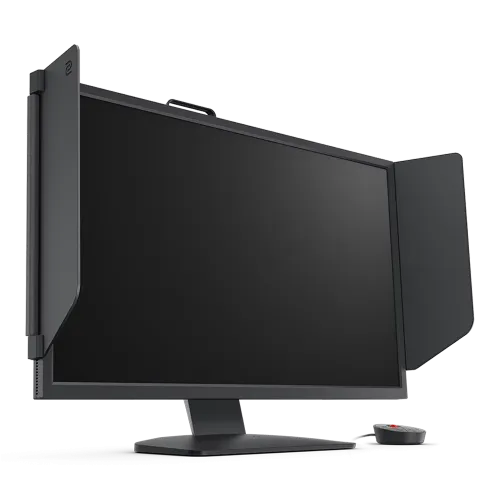
The BenQ ZOWIE XL2566K is a 24.5-inch esports monitor built around a Full HD TN panel, a 360Hz refresh rate and DyAc+ motion clarity technology. It is intended for competitive PC play where a fast and stable frame rate matters more than high resolution or wide-gamut presentation. BenQ lists a typical brightness of 320 cd/m², a 1000:1 native contrast ratio and a 1920 x 1080 maximum PC mode at 360Hz through DisplayPort 1.4. The monitor also includes a height-adjustable stand, side shields, an S Switch controller, two HDMI 2.0 inputs, one DisplayPort 1.4 input and a headphone jack. The catalog's brand association was “Others”; it has been corrected to the existing BenQ brand. Verify local price, warranty, package and exact regional part number before purchasing.
Resolution, panel and pixel pitch
The XL2566K uses a 24.5-inch diagonal TN LCD panel with a native 1920 x 1080 resolution and 16:9 aspect ratio. BenQ lists a 0.283mm pixel pitch and a 543.744 x 302.616mm display area. Full HD keeps the pixel workload comparatively manageable for a gaming PC pursuing very high frame rates, while the smaller 24.5-inch screen keeps the image area compact for a close competitive setup. It provides less detail than QHD or 4K displays, so players choosing it should prioritize frame rate and motion handling over desktop workspace or fine-detail productivity. TN panel behavior and viewing characteristics should be evaluated at the player's normal sitting position. The XL2566K is a specialized gaming display rather than a general-purpose high-resolution monitor.
360Hz refresh and PC requirements
BenQ specifies up to 1920 x 1080 at 360Hz on a PC or laptop through DisplayPort 1.4. A 360Hz display can refresh up to 360 times each second, but the computer and the game must also deliver a sufficiently high and stable frame rate to realize the benefit. ZOWIE's guidance says to confirm that the game supports 360fps, use the supplied DP 1.4 cable, update graphics drivers and ensure the graphics hardware can sustain the target output. CPU-intensive games can fall below the desired frame rate during busy scenes even when average frame rates appear high. If the system cannot consistently reach 360fps, the monitor can still operate at lower standard refresh rates such as 240Hz or 144Hz. Select the refresh rate in the operating system and verify it in the graphics control panel.
DyAc+ motion clarity
DyAc+ is BenQ ZOWIE's strobing-based motion clarity feature, designed to make moving outlines appear clearer during fast gameplay. It is a feature to evaluate in person because perceived blur, brightness and comfort vary between users and settings. BenQ states that DyAc+ and FreeSync Premium or Adaptive-Sync cannot operate at the same time: enabling one disables the other. The choice is therefore between the motion presentation of DyAc+ and variable refresh behavior, based on the game, frame-rate stability and player preference. DyAc+ is not a guarantee of improved aim or match results, and it does not increase the game's rendered frame rate. The XL2566K should be configured around one preferred mode and tested at the player's actual desk, game and graphics settings.
Response and motion settings
The XL2566K's panel and 360Hz operation are aimed at responsive competitive play. BenQ's regional specifications list the fast liquid crystal panel behavior and provide settings such as AMA overdrive. Response measurements can use different test methods and should not be treated as directly interchangeable. The published product information does not justify presenting a single response-time number without specifying its measurement method. Use a compatible cable and choose the refresh rate first, then adjust AMA and DyAc+ to personal preference. Stronger overdrive can create visible artifacts in some scenes, so inspect moving edges rather than assuming the most aggressive setting is best. Motion performance also depends on in-game frame pacing, GPU output and the chosen display mode.
Brightness, contrast and color expectations
BenQ lists a typical brightness of 320 cd/m² and a typical contrast ratio of 1000:1. These specifications describe a standard SDR esports monitor; the product is not advertised as an HDR display. It prioritizes high refresh and motion clarity rather than wide-gamut or high-dynamic-range presentation. The TN panel, competitive presets and adjustable picture settings support gameplay preferences, while brightness, black levels and color appearance should be assessed at normal viewing distance. Avoid assuming color-critical photo or video accuracy based only on an esports marketing description. If the monitor will also be used for office work, adjust brightness to the room and choose a less saturated mode for documents and web pages.
Connectivity and console modes
The XL2566K provides two HDMI 2.0 inputs, one DisplayPort 1.4 input and a headphone jack. BenQ lists PC output up to 1920 x 1080 at 360Hz using DisplayPort 1.4. For consoles, the published compatibility mode is 1920 x 1080 at 120Hz for PS5 and Xbox Series X over HDMI 2.0. A console and game must support the selected mode; 120Hz is not guaranteed in every game. The display has no built-in speakers listed, so plan to use headphones or a separate audio system. Connect the high-refresh PC to DisplayPort and confirm the cable meets the required standard. Two HDMI inputs can be useful when alternating between console devices, but check the input labeling and cable arrangement at setup.
Stand adjustment and esports setup
The included stand supports tilt from -5 to +23 degrees, swivel 45 degrees left and right, pivot through 90 degrees and 155mm of height adjustment. The height and angle range lets a player position the screen for a close desk setup or different seating posture. BenQ's design materials emphasize quick adjustment and a smaller competitive-footprint layout. The stand can be adjusted without assuming a separate arm is required. If using an arm, the monitor supports a 100 x 100mm VESA mount; check that the arm is rated for the display's weight and that mounting screws match the manual. Keep enough clearance for the stand, S Switch cable, shields and video connections when positioning the panel.
Side shields and S Switch controller
BenQ includes side shields that can help reduce visual distractions around the panel, plus an S Switch five-way controller for navigating the monitor menu and switching stored display profiles. The shields are physical accessories and should be attached according to the installation guide. The S Switch is a control aid, not a separate video source or performance upgrade. Regional box contents may vary, so confirm that the seller package contains the shields, controller, cables and power lead before relying on them. Preserve the included accessories and packaging if local return or warranty inspection may be needed.
Color settings and esports tools
The XL2566K includes gaming-focused image controls such as Black eQualizer, Color Vibrance and XL Setting to Share. These settings allow users to tune shadow detail, color presentation and saved profiles for different titles. Their usefulness is personal and can alter the intended look of a game's artwork. They do not reveal information that is absent from the source image and should be adjusted without sacrificing visibility or comfort. The monitor is designed around competitive play, so users may prefer different profiles for FPS games, desktop work and video. Keep a neutral or standard profile available to restore a balanced image when the esports adjustments are not useful.
Flicker-free and low blue light features
BenQ lists Low Blue Light and Flicker-Free functions. Its product material notes that Flicker-Free is available with DyAc+ off. Eye-care settings can change the image and may interact with the chosen motion mode, so review the on-screen menu and manual for exact behavior. These options are user comfort features and do not replace appropriate room lighting, readable text, breaks or an ergonomic setup. Some color or brightness changes from Low Blue Light may be undesirable for color-sensitive work. Choose settings for the current activity and take regular breaks during extended sessions.
Dimensions, power and mounting
BenQ lists dimensions of approximately 571mm wide by 200mm deep, with height ranging from about 366mm at the lower stand position to 521mm at the highest position. The monitor weighs 6.2kg net and 9.7kg gross in the cited regional specification. The built-in power supply supports 100-240V and the listed on-mode consumption is below 40W. VESA wall mounting uses a 100 x 100mm pattern. These values can vary slightly by regional specification or packaging, so consult the manual and box label for the exact unit. Confirm desk depth, arm capacity, cable routing and power access before installation.
Bangladesh price and warranty checks
The captured BiponiBD variant has no listed price, and this audit did not verify a current Bangladesh checkout price for the exact XL2566K model. The variant MSRP remains null rather than borrowing an older listing or a price for another ZOWIE monitor. The current catalog says three years warranty, but a global manufacturer specification does not prove the warranty coverage for this particular local unit. Ask the retailer for the exact regional product code, local warranty card, authorized service location, stock status and return terms. Confirm whether the unit is new and sealed and whether the supplied DP 1.4 cable, HDMI cable, shields and S Switch are included. Keep the invoice and serial number for service.
Who should consider XL2566K
The ZOWIE XL2566K is suited to competitive players who value very high refresh, DyAc+ motion clarity and practical esports setup controls over higher resolution, integrated speakers or HDR. It can make sense for a PC that can sustain high frame rates in the games being played. It is less compelling for users who want QHD/4K detail, wide viewing angles, built-in speakers, USB-C connectivity or HDR playback. Console players can use the listed 1080p/120Hz mode, but do not receive the PC's 360Hz mode from a console. Compare the exact local price and warranty against other 24.5-inch esports monitors, and consider whether DyAc+ or adaptive sync is more important for your setup.
Model identity and source notes
This item is the BenQ ZOWIE XL2566K, a 24.5-inch TN 360Hz DyAc+ display. It should not be confused with XL2566X or other XL-series models, whose panels and refresh technologies may differ. Official ZOWIE product specifications and support pages establish the refresh-rate connection requirements, DyAc+/Adaptive-Sync incompatibility, PC frame-rate recommendations, stand adjustments, console modes and connectivity. Regional specifications can differ in accessory bundle or listed measurements; use the box label and local invoice to identify the actual unit. The catalog's previous “Others” brand link was inaccurate and now points to the active BenQ brand. Bangladesh price, local warranty card and GTIN remain unverified.
Frequently asked questions
1. What is the native resolution?
The XL2566K has a 1920 x 1080 Full HD resolution and a 16:9 aspect ratio.
2. How do I run the monitor at 360Hz?
Use a compatible DisplayPort 1.4 cable, update graphics drivers and select 360Hz in the operating system. The PC and game must support the required frame rate.
3. Does it have a 360Hz refresh rate?
Yes. BenQ specifies up to 1920 x 1080 at 360Hz on PC through DisplayPort 1.4.
4. What is DyAc+?
DyAc+ is BenQ ZOWIE motion clarity technology; the preferred effect depends on game and user settings.
5. Can DyAc+ and FreeSync run together?
No. BenQ says DyAc+ and FreeSync Premium or Adaptive-Sync are mutually exclusive modes.
6. What ports are included?
Two HDMI 2.0 inputs, one DisplayPort 1.4 input and one headphone jack.
7. Can a console use 120Hz?
BenQ lists 1080p/120Hz compatibility for PS5 and Xbox Series X over HDMI 2.0; the game must support that mode.
8. Does it include a height-adjustable stand?
Yes. The listed stand provides 155mm height adjustment, tilt, swivel and pivot; confirm regional box contents.
9. Does it have built-in speakers?
No built-in speakers are listed. Use headphones or an external audio system.
10. Does it support VESA mounting?
Yes. The specification lists a 100 x 100mm VESA mounting pattern.
11. What is the Bangladesh price?
A current exact-model Bangladesh checkout price was not verified, so the catalog variant price remains unset.
12. What is the local warranty?
The catalog says three years, but verify the exact Bangladesh warranty card and authorized service terms with the seller.