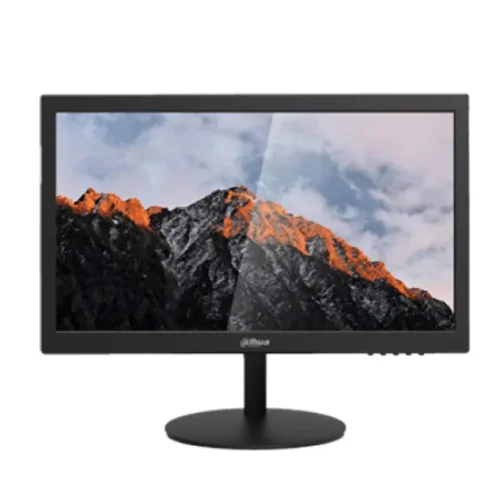
Dahua DHI-LM19-A202Y 18.5-inch HD Monitor: specifications and buying guide
Model identity and source basis
Dahua DHI-LM19-A202Y is an 18.5-inch HD monitor built around a TN panel. The exact-model Dahua Bangladesh product page and downloadable datasheet are the primary sources for technical details. Some local sellers copy values into their own tables, but a few fields—especially VESA spacing—conflict with Dahua. This page prioritizes manufacturer specifications and identifies disagreements. Match the complete DHI-LM19-A202Y code on the carton and rear label before relying on model-specific compatibility or parts. Do not confuse it with other LM19 variants.
Screen size, native resolution and format
The panel measures 18.5 inches diagonally and has native resolution of 1366 × 768 pixels in a 16:9 format. This HD resolution can serve basic desktop tasks such as point-of-sale software, documents, web browsing, monitoring feeds and secondary-screen use when text and workspace requirements fit. It provides fewer pixels than Full HD, so buyers who need more spreadsheet columns, detailed image work or dense interfaces should compare a higher-resolution model. Select the native mode for the clearest image; scaling and source resolution affect the result.
TN panel and viewing position
Dahua identifies the LCD technology as TN and lists asymmetric viewing angles of 45° left/right, 40° up and 20° down. Contrast and colors can shift when viewed from above, below or off-center. Place the monitor directly in front of its primary user and adjust tilt for a comfortable view. This exact specification differs from broad 178° figures sometimes copied from unrelated monitor listings. TN can suit a single-user workstation, while a shared display used by several viewers may benefit from another panel type.
Brightness, contrast and color
Dahua source conflict: the product page lists brightness as 250 nits, while the linked Rev002 datasheet states 200 nits maximum. Dahua lists 600:1 contrast and 16.7 million colors. Confirm the exact revision before publishing a single brightness figure. These figures describe nominal specifications; they are not independent measurements of the physical unit and do not certify color accuracy or gamut coverage. Brightness perception varies with ambient light and viewing position. Avoid direct reflections and choose a comfortable setting rather than assuming maximum brightness is best. No HDR, wide-gamut color or calibrated professional workflow is claimed for this model.
Refresh rate and motion
Dahua specifies refresh rate up to 60Hz and typical response time of 5ms. The 60Hz ceiling suits many basic desktop and video uses, but is not a high-refresh gaming specification. The product page does not identify the 5ms measurement method, so the response figure is kept as stated rather than relabelled GTG or MPRT. Motion clarity, input lag and game performance are not established by these figures alone. Confirm the computer can output the native 1366 × 768 mode at 60Hz.
HDMI and VGA connections
The exact-model manufacturer page lists one HDMI input and one VGA input, with no signal output. HDMI is typically the simplest connection for a compatible modern computer; VGA can support older desktop equipment. Source resolution and adapter compatibility still matter. If using a converter or dock, check that it supports the native resolution and timing. The product has both inputs, but this does not mean it can convert signals between them or provide additional outputs. Dahua lists an HDMI cable among standard accessories; confirm the regional package with the seller.
VESA mount conflict and installation
The manufacturer specification lists a 100 × 100mm VESA pattern and an optional wall bracket. Some Bangladesh retail specification tables show 75 × 75mm instead, creating a direct conflict. This listing follows Dahua and flags the disagreement for physical verification. Before buying an arm, inspect the delivered unit’s rear holes and consult its manual. Confirm bracket spacing, screw requirements and load rating. Do not force an incompatible mount or rely on a seller table that may have been copied from another display.
Tilt, stand and physical dimensions
Dahua lists tilt from approximately −5° ±2° to +15° ±2°. The body without base measures 452.4 × 279.1 × 48.3mm in width, height and depth; package dimensions are 492 × 105 × 377mm. Net weight is 2.5kg and gross weight 3.5kg. The stand footprint and cable bend space add to body dimensions. Plan desk placement with the monitor assembled, keep the surface stable, and use tilt to reduce glare without forcing an uncomfortable viewing angle.
Power and operating conditions
The official page lists a 12V DC, 2A external adapter, standard consumption up to 24W and standby consumption up to 0.5W. Operating temperature is listed as 0°C to 40°C. Actual energy use depends on brightness, signal and use pattern. Retain the supplied adapter and check its label and manual before connection. Do not substitute an adapter based only on connector size. Keep the device dry and avoid blocking ventilation or exposing the panel to heat, impact or liquid.
Controls, audio and accessories
Dahua describes physical button control and lists the speaker as NA. Its standard accessory list names an HDMI cable, adapter and base. These are manufacturer package references, not proof that every retail carton is sealed or includes every item. Check the box contents and condition when receiving the BiponiBD order. Since no integrated speakers are listed, arrange a separate audio path if sound is needed. A wall bracket is optional and should not be assumed to be included.
Strengths and trade-offs
Documented strengths include compact 18.5-inch size, HDMI and VGA inputs, a simple tilt stand and modest stated power consumption. This product may fit basic single-user desktop work when HD resolution, TN viewing behavior and 60Hz are adequate. Trade-offs include less workspace than Full HD, narrow asymmetric viewing angles, one input of each type, no listed built-in speakers and conflicting VESA figures. Response-time methodology is not stated. Buyers needing shared viewing, higher detail, broader color, more inputs or faster refresh should compare those requirements against exact-model specifications.
Bangladesh offer and warranty context
BiponiBD’s captured catalog stores BDT 8,000 for one Active variant and states a three-year warranty. The saved amount and Active status do not confirm current physical stock or final checkout availability. Star Tech and Ryans publish their own prices and three-year terms, but those promises apply to those sellers and can change. Dahua’s specification page confirms technical details but not the provider for this BiponiBD offer. Ask BiponiBD to confirm provider, coverage, exclusions, claim location, invoice/serial requirements, price, delivery and package contents.
Who should consider this monitor
Consider the DHI-LM19-A202Y when an 18.5-inch HD screen, basic HDMI/VGA connectivity and 60Hz refresh meet the task. It may work as a compact office, point-of-sale or secondary display where high pixel density and wide-angle viewing are not priorities. Check the TN viewing angle and Dahua’s 100 × 100mm VESA measurement against your setup. For color-sensitive work, shared viewing or detailed multitasking, compare an IPS Full HD alternative. Confirm the exact model, mount spacing, stock and local warranty for the delivered unit.
This monitor’s native 1366 × 768 resolution represents an entry-level HD desktop format. It can show everyday applications, but the available workspace is smaller than a 1920 × 1080 Full HD display. If several windows must remain visible at once, compare the pixel count and screen size before purchase. If the monitor is used for a cash counter, monitoring station or a dedicated legacy computer, determine whether the software’s interface and the computer’s output match the native mode. This helps avoid clipped controls, scaling issues or a blurry non-native picture.
The listed TN viewing angles make desk setup especially relevant. A small vertical change in eye position can affect the image more than on a broad-angle panel. Place the center of the screen near a comfortable sight line and adjust the stand before changing brightness or contrast. A user seated to one side may see a different image than the person centered in front. For a counter where several customers view the same screen, assess the actual panel behavior in person if possible; the data sheet alone cannot guarantee shared-view comfort.
For the clearest initial setup, connect the monitor to the intended source, select 1366 × 768 and confirm 60Hz in the operating system. If the picture is blank or unstable, check input selection, connector seating and the source output mode. HDMI-to-VGA conversion is not necessarily bidirectional; use an adapter designed for the direction of conversion and check its resolution support. This monitor lists both HDMI and VGA inputs, but that does not mean it can convert signals between them or provide additional outputs.
The VESA measurement deserves a deliberate check because the manufacturer and some retailers disagree. Dahua publishes 100 × 100mm for this exact model, while several seller catalog tables repeat 75 × 75mm. This page uses the manufacturer value and does not silently reconcile the conflict. Before purchasing a wall arm, request a photograph or manual page showing the delivered unit’s mounting pattern, then compare it with the bracket. If actual unit verification is unavailable, use the supplied stand rather than assuming a bracket will fit.
Keep the invoice, serial number, adapter and carton until the monitor has been tested under the seller’s delivery and return conditions. Inspect the panel and casing for transport damage, verify both HDMI and VGA connections if relevant, and check that the computer recognizes the supported 60Hz native mode. Warranty terms are offer-specific: a three-year term printed by another retailer does not establish who will service a BiponiBD purchase. Ask for the warranty provider and written claim process before placing an order.
Frequently asked questions
What are the screen size and resolution?
Dahua specifies an 18.5-inch TN LCD with HD resolution of 1366 × 768 pixels and a 16:9 aspect ratio. That is below Full HD, so compare your preferred text detail and workspace requirements before choosing it. Select 1366 × 768 in the computer display settings for the panel’s native mode.
What is the refresh rate?
Dahua lists a maximum refresh rate of 60Hz. The official datasheet describes this model as a standard 60Hz desktop display. It is not a high-refresh gaming monitor; check the computer output and display settings to confirm 60Hz at 1366 × 768.
What ports does the monitor have?
The exact-model Dahua page lists one HDMI input and one VGA input, with no signal output. HDMI can connect a compatible modern computer, while VGA can support older systems. The official product page lists 1366 × 768 as the display resolution and does not promote a higher refresh timing.
Does it have built-in speakers?
Dahua specifies the speaker as NA, so do not plan on integrated monitor audio. Use the computer’s audio output or an external speaker/headphone device if sound is required.
What is the VESA size?
Dahua’s exact-model specification lists VESA 100 × 100mm. Some Bangladesh retailer tables show 75 × 75mm, which conflicts with the manufacturer page. Verify the rear mounting holes and the official manual on the delivered unit before purchasing or installing a bracket.
What are the viewing angles?
The manufacturer lists asymmetric TN viewing angles: left/right 45°, upper 40° and lower 20°. These are narrower than the wide-angle figures used for many IPS monitors. For consistent appearance, position the screen directly in front of the viewer and adjust tilt carefully.
What are brightness and contrast?
Dahua product-page entry lists 250 nits, while its linked Rev002 datasheet lists 200 nits maximum; the manufacturer sources conflict. Both sources list 600:1 contrast. These are stated specifications, not a measurement of the particular BiponiBD unit. Room lighting, angle and screen settings affect perceived brightness and contrast.
What does 5ms response time mean?
Dahua states a typical 5ms response time. The official page does not specify the measurement method, so this listing does not relabel the figure as GTG or MPRT. Response time and 60Hz refresh rate describe different display properties.
Can it be wall-mounted?
The manufacturer specifies a 100 × 100mm VESA pattern and a separate wall bracket is optional. Check the actual delivered monitor’s hole spacing, screw requirements and mount load rating before installation. This confirmation is especially important because some local retail tables publish a conflicting 75 × 75mm figure.
What power adapter and consumption does it use?
Dahua lists an external 12V DC, 2A supply, standard consumption of at most 24W and standby consumption of at most 0.5W. Use the supplied adapter and confirm its voltage, current and polarity from its label; a connector that fits is not sufficient.
What warranty applies to this BiponiBD offer?
The BiponiBD catalog currently states three years, and some local sellers publish three-year terms for their own offers. The manufacturer specification does not establish the warranty provider or exact coverage for this unit. Confirm the local provider, exclusions, invoice/serial requirements and claim location with BiponiBD.
What are the current price and stock?
The saved BiponiBD variant price is BDT 8,000 and its status is Active. Those catalog fields do not prove physical stock, final checkout price or delivery availability. Confirm the current offer with BiponiBD before ordering; independent retailer prices can change separately.