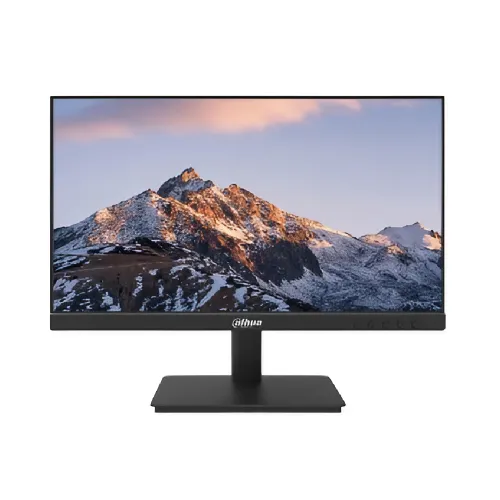
Exact model and Bangladesh identity
Dahua DHI-LM22-A211Y is a black 21.45-inch-class monitor built around an IPS panel. Dahua materials may shorten the commercial name to LM22-A211Y, but the product’s manufacturer part number is DHI-LM22-A211Y. Keeping the full model in the page title, description, structured specifications and catalog fields helps shoppers distinguish it from lookalike monitors and helps search engines associate the page with the precise model query. The A211Y suffix matters: related Dahua A201YF and A201YFW products have different specifications, and A200Y and A220 belong to other panel or refresh configurations. This page describes the A211Y only. The regional distributor and Bangladesh retailer references were used to cross-check the model and locally listed warranty; the existence of a regional listing does not prove the provenance of a specific unit.
Screen size, resolution and panel
The display is marketed in the 21.45-inch class, with a native Full HD resolution of 1920 × 1080 pixels and 16:9 aspect ratio. Dahua lists an IPS panel with an ELED backlight. IPS technology is commonly chosen for its wider viewing angles, and the published horizontal and vertical viewing angles are 178 degrees. At native resolution, text, browser pages and everyday productivity interfaces have a familiar Full HD workspace. The approximate pixel density is 102.7 pixels per inch. That is appropriate for ordinary desktop viewing distances, while image sharpness still depends on the source content, operating-system scaling and viewing distance. The manufacturer specifies the display class and resolution; pixel-density and pixel-pitch figures are derived values rather than separately advertised performance measurements.
Refresh rate: standard 100Hz and overclocked 120Hz
The exact-model specification distinguishes a 100Hz standard refresh rate from a maximum 120Hz overclocked HDMI mode. The distinction should remain visible in product copy: 120Hz is not the default guaranteed mode for every port, graphics card, cable or resolution. A compatible HDMI source and supported display mode are required, and users may need to select the refresh rate in their operating-system settings. VGA is an analog connection and product listings generally show lower modes, commonly 60–75Hz. Higher refresh can make scrolling and cursor motion appear smoother when the full system supports it, but it does not increase the monitor’s pixel resolution or create higher-frame-rate content. The feature should not be read as a guarantee that every game will render at 120 frames per second.
Response-time wording and motion expectations
Dahua markets a 1ms MPRT response figure for this model. MPRT (motion picture response time) describes motion clarity using a different method from gray-to-gray pixel transition time. The source materials do not establish a 1ms GtG value, so this page names MPRT explicitly and does not convert it into a faster panel-transition guarantee. Buyers comparing displays should check whether competing response figures use MPRT, GtG or another method. Motion perception also depends on refresh rate, frame rate, overdrive settings, content and the user’s sensitivity to blur. Retail product copy often compresses these technical differences into a simple “1ms” badge; this detailed page keeps the measurement type attached to the number to make comparison more accurate.
Brightness, contrast and color
Published specifications list 250 cd/m² typical brightness, 1000:1 typical static contrast and 72% NTSC typical color gamut. Color is processed with a 6-bit + FRC arrangement, supporting 16.7 million displayed colors. These are manufacturer specification values, not a report from an independent laboratory and not a factory calibration certificate. For everyday office applications, study, video and general web use, the Full HD IPS combination provides a practical viewing format. The listed gamut is a basic monitor-class figure; it should not be marketed as professional wide-gamut coverage. Color-sensitive work should use an appropriately measured and calibrated display with a gamut suited to the output workflow. Brightness perception changes with room lighting and selected settings, so users can adjust the display for their environment.
Eye-care and surface characteristics
Dahua lists Flicker-Free and Low Blue Light features. The screen surface is described as anti-glare, with haze 25% and surface hardness 3H in the product specification. These labels describe display design features; they do not promise that every user will avoid eye fatigue or that reflections disappear in direct sunlight. Positioning the screen away from windows, setting comfortable brightness and taking regular visual breaks remain useful habits. The anti-glare surface can diffuse some reflected light, but it cannot replace suitable lighting or correct an unsuitable viewing angle. The low-blue-light feature can change the displayed color balance depending on its mode, so users should consider that tradeoff when assessing photos or other color-critical material.
Connections and audio
The listed video inputs are one HDMI port and one VGA port. HDMI provides a digital connection for compatible computers and other sources, while VGA supports older systems that provide analog video. The specification does not list USB-C or DisplayPort, so a device that offers only those outputs would need a compatible adapter and should be checked for resolution and refresh support. There are no built-in speakers. Audio must come from the source device or an external audio product; the monitor should not be described as having integrated sound. Check the computer’s available outputs, cable length and selected mode before ordering. The one-HDMI arrangement may require unplugging and switching cables when a user regularly alternates between multiple HDMI sources.
Stand, ergonomics and VESA mounting
The monitor body is listed at 491.4 × 290.8 × 45.2mm without the stand. Dahua specifies a 100 × 100mm VESA mounting pattern and a tilt range from approximately −5 degrees to +20 degrees. Height adjustment is not listed, so the supplied stand should be treated as tilt-only unless the package or seller confirms otherwise. A separate compatible arm or wall bracket can provide additional positioning, but buyers should check the bracket’s load rating, screw size and installation instructions. The VESA pattern is 100 × 100mm for this exact A211Y model; a conflicting retailer entry for a related A201YF should not be copied into this product. Leave room for the power and video cables and ensure the mount does not obstruct ventilation.
Power use, dimensions and package
The unit uses an external DC 12V, 2A power adapter. Dahua lists 15W basic consumption, 19.2W typical consumption, up to 20W maximum and below 0.5W in standby. Actual energy use can vary with brightness, selected operating mode and usage. Published dimensions without the stand are 491.4 × 290.8 × 45.2mm; the package carton is listed as 540 × 395 × 116mm. Those carton measurements describe shipping space, not the footprint of the monitor on a desk. Listed net weight is 2.3kg and gross package weight is 3.3kg. The manufacturer package contents include the monitor, base, adapter, HDMI cable, quick-start guide, QR manual and regulatory or energy labels. Contents may vary by shipment, so inspect the delivered box.
Bangladesh warranty and buying checks
Bangladesh distributor and retailer listings identify a three-year manufacturing warranty. That period should be presented as listed warranty information, not a promise that every seller or every imported unit uses the same service route. Check the warranty card, invoice, serial label and the named service provider for the specific unit before relying on coverage. Exact-model retailer price observations can change and are not evidence of BiponiBD’s current price or inventory. Use the live BiponiBD offer and seller confirmation for stock, delivery, payment and return terms. This content intentionally keeps marketplace information separate from this catalog’s own sale offer.
Who this monitor may suit
The A211Y may suit a home or office user who wants a Full HD IPS screen, a standard 100Hz mode and the possibility of a supported 120Hz HDMI overclocked mode. HDMI and VGA are useful when a desk setup includes both a newer computer and a legacy source, although there is only one input of each type. The 100 × 100mm VESA pattern gives an alternative to the supplied tilt stand. It is not the right fit for a buyer who requires integrated speakers, USB-C docking, several HDMI inputs, height-adjustable ergonomics or a verified professional color gamut. Matching the monitor to the buyer’s ports, mount and refresh-rate needs is more useful than treating any single headline number as a complete performance summary.
Model clarity and search-friendly product details
Searchers may use queries such as Dahua DHI-LM22-A211Y price in Bangladesh, LM22-A211Y monitor, Dahua 21.45-inch IPS monitor, Full HD 120Hz monitor or 100Hz IPS display. The product name and metadata include the precise manufacturer model with the core screen descriptors, while the existing canonical slug is preserved to avoid breaking its established URL. The long description explains model differences, qualifications and practical limitations; structured attributes keep exact values machine-readable; and FAQs address the questions buyers commonly ask before purchase. These details improve clarity for shoppers and search systems without inventing stock, reviews, delivery claims or an unsupported BiponiBD offer price.